3OM-1343-008_w.pdf - 第212页
5-27 AKFEDT -ID A list of management data (the counted numbers (total counts included) related to "Stage #1" and "Stage #2" for the current program (model)) is displayed for each pattern program. (1) …
5-26
AKFEDT-ID
3.2 Machine Performance Data
0607-003
3.2 Machine Performance Data
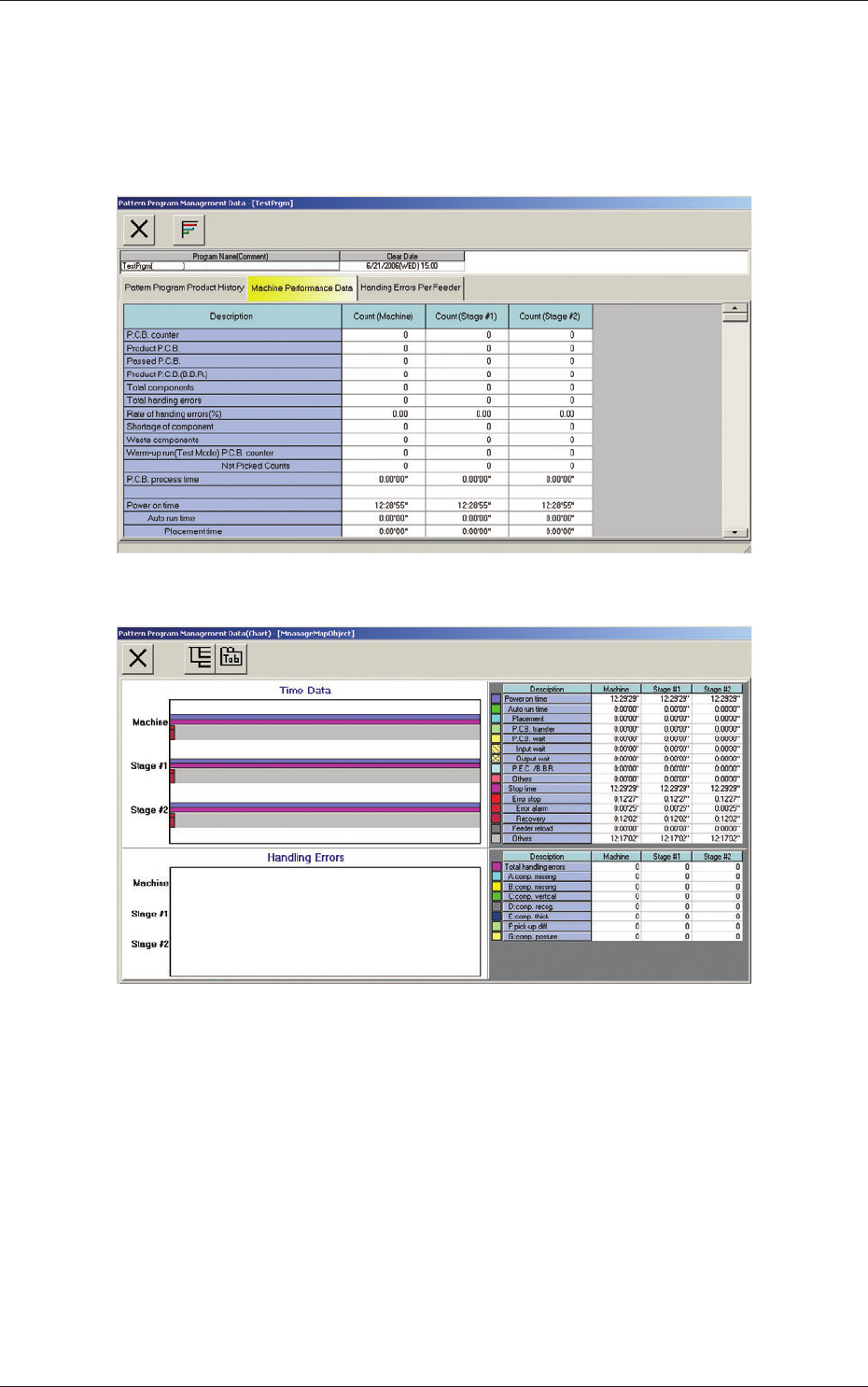
When the "Machine Performance Data" tab is pressed in the "Pattern
Program Management Data" window, the following tab sheet appears inside
the window.
Fig. 3E14 "Machine Performance Data" Tab Sheet
Fig. 3E14-1 "Pattern Program Management Data (Chart)" Window for
"Machine Performance Data"
5-27
AKFEDT-ID
A list of management data (the counted numbers (total counts included)
related to "Stage #1" and "Stage #2" for the current program (model)) is
displayed for each pattern program.
(1) PCB counter
Shown is the number of produced PCBs.
Counting is implemented when the X/Y table is zeroed after component
placement operation (when a PCB is fi nished).
Note
When a particular pattern program is set several times as current one, the
sum total is computed.
(2) Product PCB
The number of produced unit PCBs on multi-unit PCB is summed up.
Counting is implemented when the X/Y beam is zeroed after component
placement operation (when a unit is fi nished).
When the bad board reject (BBR) function (option) is used, defective
unit PCBs are excluded.
(3) Passed PCB
The number of passed PCBs is counted when the machine is set in the
"PASS" mode.
Counting is implemented when the PCB transfer starts (when the PCB
on the PCB positioning section is transferred to the output conveyor).
(4) Product PCB (BBR)
Shown is the number of defective PCBs summed up when the bad
board reject function (option) is used.
(5) Total components
Shown is the number of picked components (the number of pickup
operations).
(6) Total handling errors
Shown is the total number of component handling errors.
(7) Rate of handling errors (%)
Shown is the percentage of handling errors per total number of picked
components.
(8) Shortage of component
Shown is the total number of detected component shortage errors.
0607-003
3.2 Machine Performance Data
5-28
AKFEDT-ID
(9) Waste components
Shown is the total number of components that were picked up but not
placed.
Note
The indicated number of components represents the components that
were not placed due to a vertical component error (sensor), a component
recognition error, a component thickness error, interrupted production, the
detection (Unit PCB BBR Mode: Option) of a defective unit PCB., etc.
(10) Warm-up run (Test Mode)
The data of the warm-up run (dry cycle) is counted.
PCB counter
The number of PCBs is counted when the machine is operated under
the following condition.
•
"Test Mode" is enabled in the "OPERATION MODE" window.
•
"PCB Transfer Dsbl." Check Box Checked
(State in which no PCB is put in and out)
Not Picked Counts
The number of non-handling/non-placed actions is counted when the
machine is operated under the following condition.
•
"Test Mode" is enabled in the "OPERATION MODE" window.
•
The "Handling/Place Disabled" or the "Vacuum/Blower Disabled"
check box is ticked.
(11) PCB process time
Shown is the total of the time required to fi nish a PCB.
(12) Power on time
Shown is the period of time during which the control power of the
machine was working.
Note
Example: 10:03'50" (10 hours, 3 minutes, and 50 seconds)
Auto run time
Shown is the period of time during which the machine was running
automatically.
When a particular pattern program is set several times as current one,
the sum total is computed.
Placement time
Shown is the time required to fi nish a PCB (from the fi rst to the last
component placement on one product PCB).
The essential component placement time is summed up. While
the machine is set in the "STOP" or the "PAUSE" mode or a step
operation is performed, the time is not measured.
This is used to calculate the average placement tact time per
component.
0607-003
3.2 Machine Performance Data