3OM-1343-008_w.pdf - 第97页
3-12 AKFEDT -ID (A01_10) PCB transfer speed des When "Speci fi cation V alue" is set in "(A01_09) PCB transfer speed", it is required to specify the following items. Avoid comp deviation Input, Between…
3-11
AKFEDT-ID
Bottom [mm]
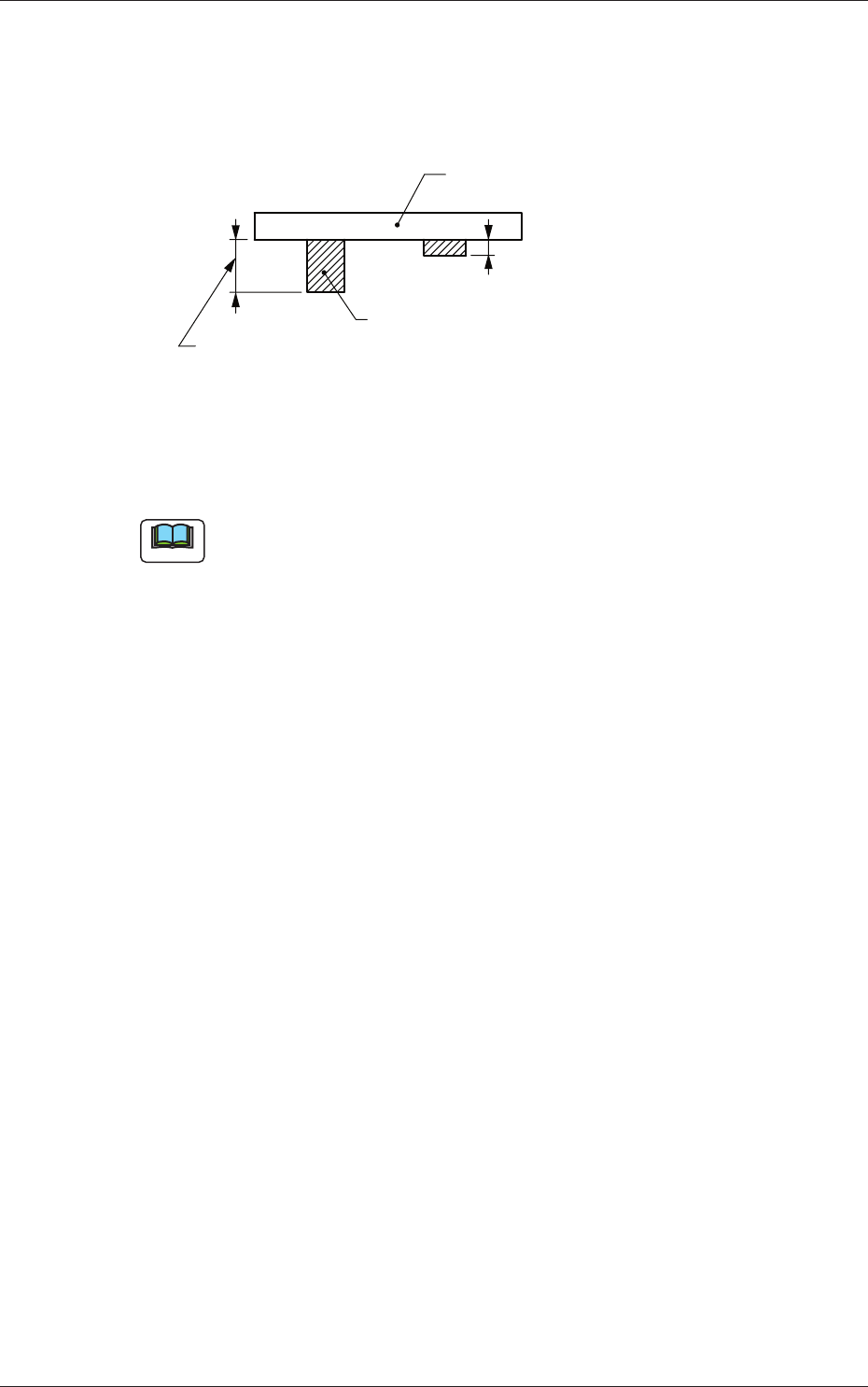
When PCBs with some components already mounted on the lower
surfaces (back) by the input machine are transferred to this machine, be
sure to enter the thickness of the highest component in the text box.
Tallest Previously-Placed Component
PCB
Set this thickness in the text box.
Fig. 3C14
• Data Input Range
0 to 30.000
Note
(a) The set parameter is used to determine the position (elevation) of the
fi rst backup table when the PCB is transferred to the PCB positioning
section.
(b) When components are placed previously and the main machine is
operated with "0.00" (no previously-placed components) in this text
box, the support pins may interfere with some of the previously-
placed components on the back of PCB while the PCB is being
transferred to the PCB positioning section.
(A01_09)
PCB transfer speed
Input, Between Stages, Output
Select one of the following options as PCB transfer speed.
Standard :
PCBs are transferred at normal speed.
Low Speed 1 :
PCBs are transferred at a speed slower than
"
Standard
"
.
Low Speed 2 :
PCBs are transferred at a speed slower than
"
Low Speed 1
"
.
Low Speed 3 :
PCBs are transferred at a speed slower than
"
Low Speed 2
"
.
Specifi cation Value :
Your desired speed can be specifi ed.
0601-002
1.2 Operation Data

3-12
AKFEDT-ID
(A01_10)
PCB transfer speed des
When "Specifi cation Value" is set in "(A01_09) PCB transfer speed", it
is required to specify the following items.
Avoid comp deviation
Input, Between Stages, Output
Set one of the following options in each text box.
Speed 1 [mm/sec]
PCBs are transferred at the specifi ed speed.
Speed 2 [mm/sec]
The PCB being transferred at "Speed 1" is detected by the
deceleration sensor and the transfer speed decreases to the
specifi ed one.
Acceleration [G]
Set the acceleration value to reach the speed specifi ed in "Speed
1 [mm/sec]".
Stop position control
Input, Positioning 1, Center, Positioning 2, Output
Set one of the following options in each text box.
Timer [msec]
Specify the time during which the transfer speed of the PCB
detected by the deceleration sensor is decelerated to "Speed 2
[mm/sec]".
•
Default:
350 [mm/sec]
Position [mm]
Specify the distance of the PCB transfer between the time when
the PCB was detected by the stop sensor and the time when the
PCB was stopped.
0601-002
1.2 Operation Data
3-13
AKFEDT-ID
0 0
00
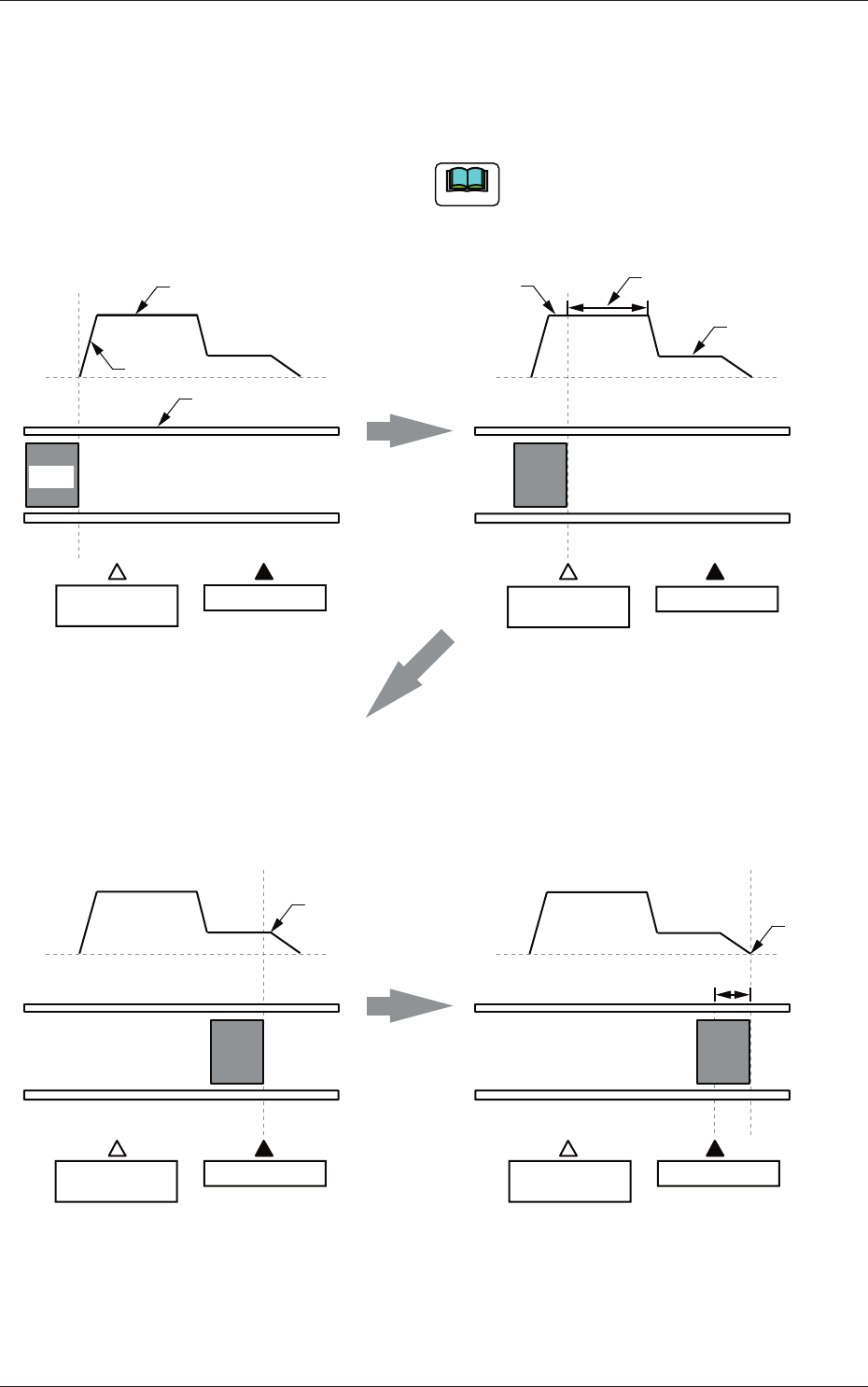
2. When the PCB is detected by the deceleration
sensor, the speed of the transfer conveyor
starts to decelerate to the specified one (Speed
2 [mm/sec]) after the period of time specified as
"Timer [mm/sec]" has elapsed.
1. The speed "Speed 1 [mm/sec]" of the
transfer conveyor is accelerated at the
specified "Acceleration [G]" and PCBs
are transferred at the accelerated speed.
The speed from "Speed 1 [mm/sec]" to
"Speed 2 [mm/sec]" is equivalent to
"Acceleration [G]".
Note
Position
Speed
Speed 1
Acceleration
Time
Conveyor
PCB
Deceleration
Sensor
Stop Sensor
Speed 1
Time
Speed
Speed 2
Timer
Deceleration
Sensor
Stop Sensor
3. When the PCB is detected by the stop
sensor, the transfer speed decreases and
the PCB is transferred to the stop position
specified as "Position [mm]".
4. The PCB stops completely.
Speed
Time
Deceleration
Sensor
Stop Sensor
Starting of
PCB Stop
Speed
Time
Deceleration
Sensor
Stop Sensor
PCB
Stop
Position
Fig. 3C15
0604-003
1.2 Operation Data