3OM-1343-008_w.pdf - 第149页
3-64 AKFEDT -ID 0601-002 3. Example of Pattern Program Creation 3. Example of Pattern Program Creation Described on the following pages are the examples of pattern programs to be created. Notice The examples are based on…
3-63
AKFEDT-ID
2.6 Saving a Pattern Program
This session describes how to save a newly created or an edited pattern
program.
Note
Before saving the pattern program data, select the
(
)
icon. The
"
Pattern program configuration
"
dialog box opens. Select the [Enable]
button in the
"
program check before save
"
group box.
The [Enable] button opens a
"
Confirmation
"
window when an error is
found in the data to be saved.
(1) Press the [Save] or the [Save As] icon on the toolbar.
Saving active file:
Select this to replace the original pattern program with the edited
one.
Saving a file with another name:
Select this to save a newly created pattern program or save the
edited pattern program with another name (as an another file).
(2) When the [Saving active file] icon is pressed, the active pattern
program is saved with the current name (model name), replacing the
original program with the active one.
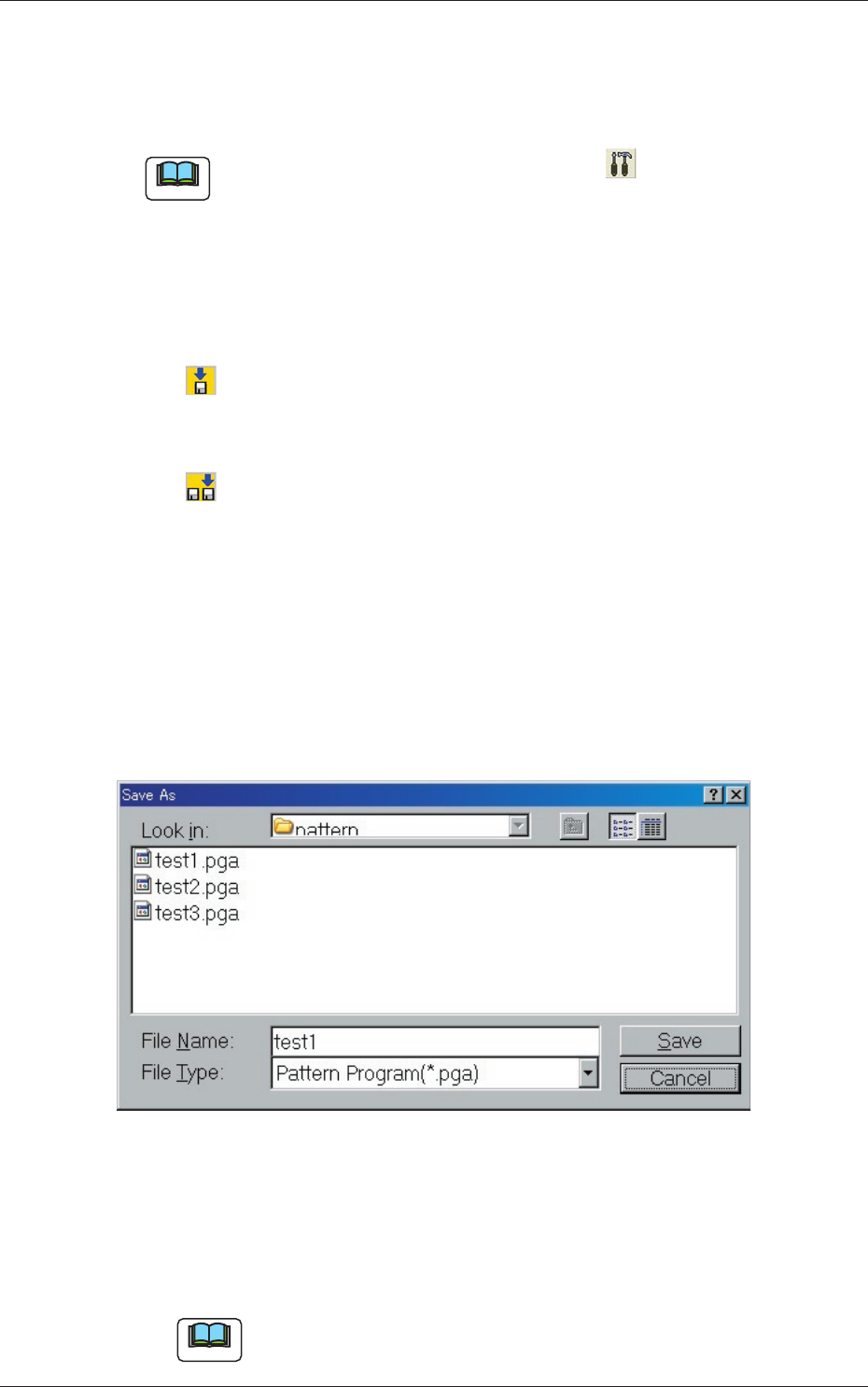
(3) When the [Saving a file with another name] icon is pressed,
the following "Save As" dialog box opens.
Fig. 3C49 "Save As" Dialog Box
(4) Enter the pre-determined pattern program name in the "File Name:"
text box and press the [Save] button in the "Save As" dialog box.
The currently displayed pattern program is saved with the entered
file (model) name.
Note
An extension (.pga) is automatically assigned to the entered file name,
indicating that the file contains a pattern program.
0611-003
2.6 Saving a Pattern Program
3-64
AKFEDT-ID
0601-002
3. Example of Pattern Program Creation
3. Example of Pattern Program Creation
Described on the following pages are the examples of pattern programs to be
created.
Notice
The examples are based on "Front Right" (Placement Coordinate
Reference Point).
Create the pattern programs according to the placement coordinate
reference point of each system.
•
Single Pattern
(Global Recognition Enabled)
•
Repetitive Patterns
(Image Recognition Enabled)
•
Multi-Model Repetitive Patterns
•
Data for Polar Coordinate Conversion Function
•
Placement Data for Priority Sorting Function
Note
Marks in "Required Data"
: This means that you must refer to the description of the pattern
program data and create the data correctly.
×
: This means that you must refer to the description of the pattern
program data and set "Disable" for the pertinent functions.
3-65
AKFEDT-ID
3.1 Single Pattern (Global Recognition Enabled)
(1) Information on Pattern Program Creation
•
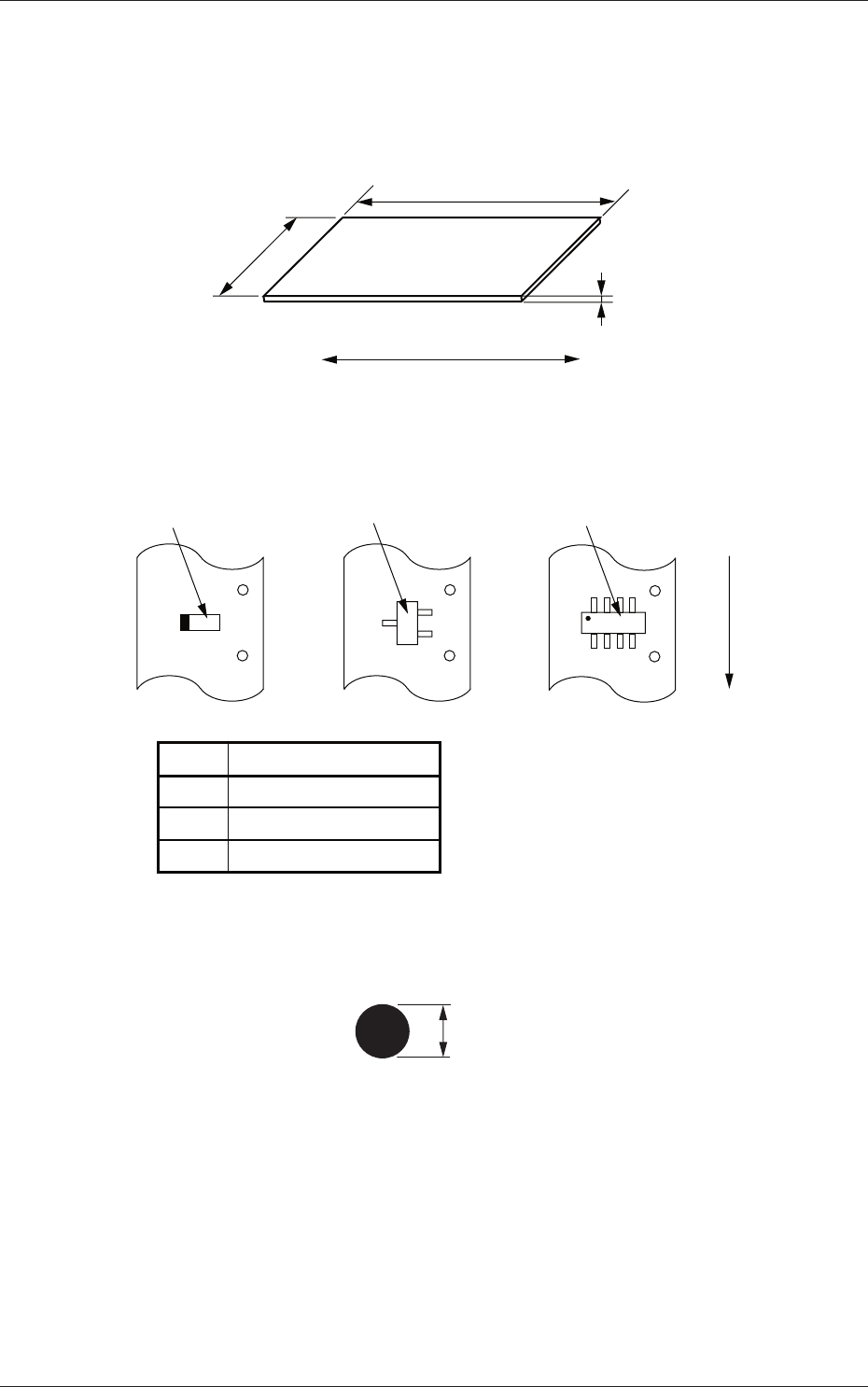
PCB size
250 mm
1.6 mm
330 mm
PCB
PCB Flow Direction
Fig. 3C50
•
Packaged Posture and IDs of Components
[3]
[2]
[1]
User Direction of Feed
No. Component IDs
[1] TANA3216C0HIT
[2] TR2012-3B0HIT-L2
[3] S0P008-B02SAN32E
Fig. 3C51
•
Fiducial Mark
1.0 mm
Fig. 3C52
0601-002
3.1 Single Pattern (Global Recognition Enabled)