00198374-02_UG_OSC-Paket_R18-2_DE_EN.pdf - 第66页
4 Working with the OSC Features 4.1 Placement of Snap-In Components (from R16-2) 66 Bedienungsanleitung OSC Package User Guide OSC-Paket 11/2018 Step 6: Station software ► Check all placement positions at the inspection …
4 Working with the OSC Features
4.1 Placement of Snap-In Components (from R16-2)
Bedienungsanleitung OSC Package User Guide OSC-Paket 11/2018 65
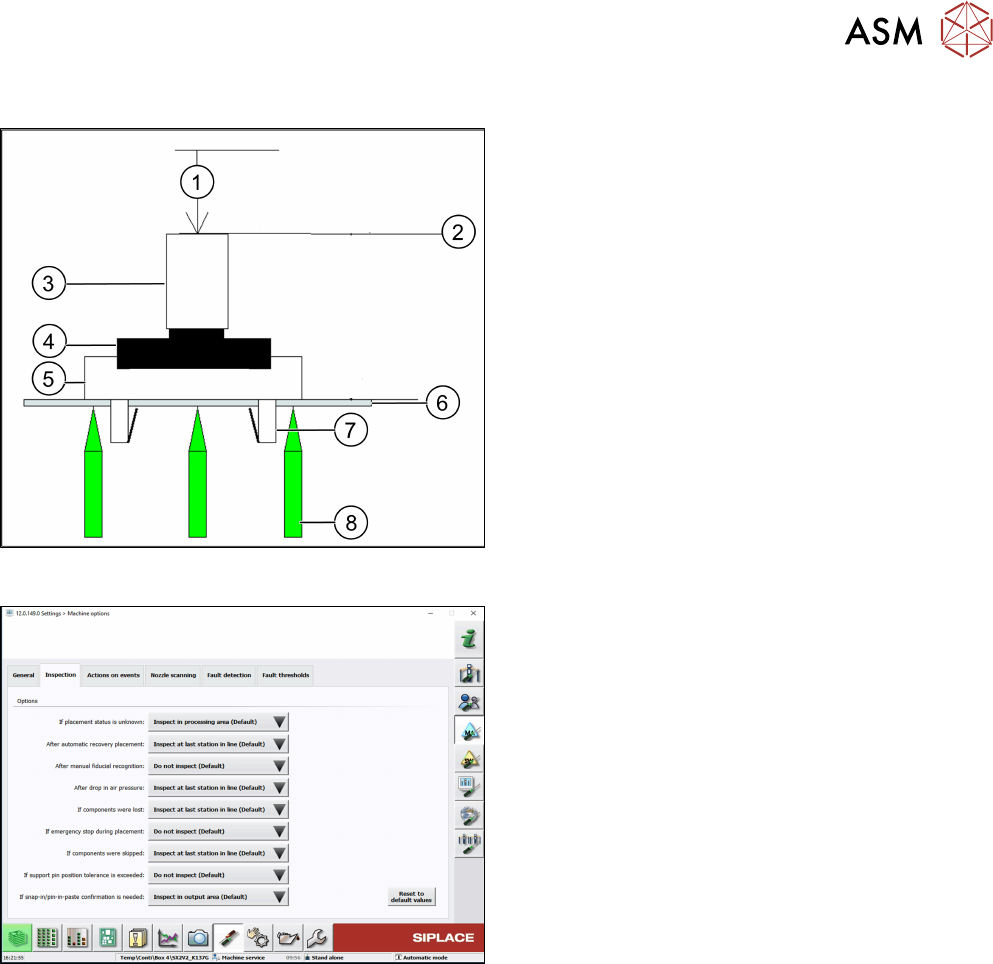
Correct locking after a correct Z-threshold value has been set
1. Z-axis position = 0
2. Z-axis = reference position
3. Segment
4. Gripper
5. Snap-in component
6. Board
7. Locking mechanism
8. Support pin
Step 5: Station software
► If necessary, configure the inspection station
under Machine options – Inspection – If snap-in/
pin-in-paste confirmation is needed
.
(Default: Inspect in output area.
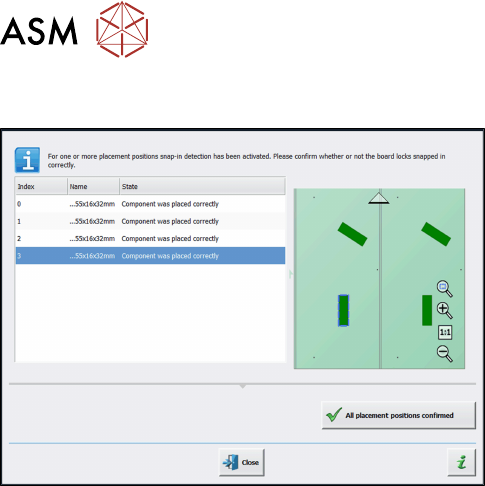
When the board enters the output section, a detailed message is displayed.
The message contains:
●
The position of the board in the machine.
●
A list including all placement positions on the board which have to be confirmed.
●
A graphical board overview in which the selected items in the list are highlighted.
There are two options for each row in the list:
● Component was placed correctly
The Z-height will be set as good for the snap-in detection.
● Repeat measurement
The measured height will be ignored and the user has to confirm the height whenever the next
component is placed. The board keeps marked for inspection.
After setting the results for all placement positions, the settings have to be confirmed.
4 Working with the OSC Features
4.1 Placement of Snap-In Components (from R16-2)
66 Bedienungsanleitung OSC Package User Guide OSC-Paket 11/2018
Step 6: Station software
► Check all placement positions at the inspection
station.
► Confirm all placement positions with the All
placement positions confirmed button.
After that, the placement will continue automatically.
4.1.3 Improved Teaching (from R18-2)
If the next board is already present in the input section, it will be moved in but not placed until the
settings for the first board have been confirmed.
4 Working with the OSC Features
4.2 Stereo Measurement for THT Pins (from R16-2)
Bedienungsanleitung OSC Package User Guide OSC-Paket 11/2018 67
4.2 Stereo Measurement for THT Pins (from R16-2)
For correct placement of components with THT pins (Through Hole Technology) it is important to
detect and measure the position of the tip of each pin to fit the pins into the holes on the board.
Since the pins often have different shapes and lengths, it is very difficult or impossible to accurately
locate the center of each tip with conventional 2D measurements. In addition, reflections and other
structures of the component could interfere with the image of the tip and restrain the camera from
determining the THT pin position exactly during a 2D measurement.
Therefore, the Stereo Measurement for THT pinsprocess has been introduced to measure THT
pins exactly and robustly. The stereo measurement can be used for all components with the THT
round pin and THT square pin pin types.
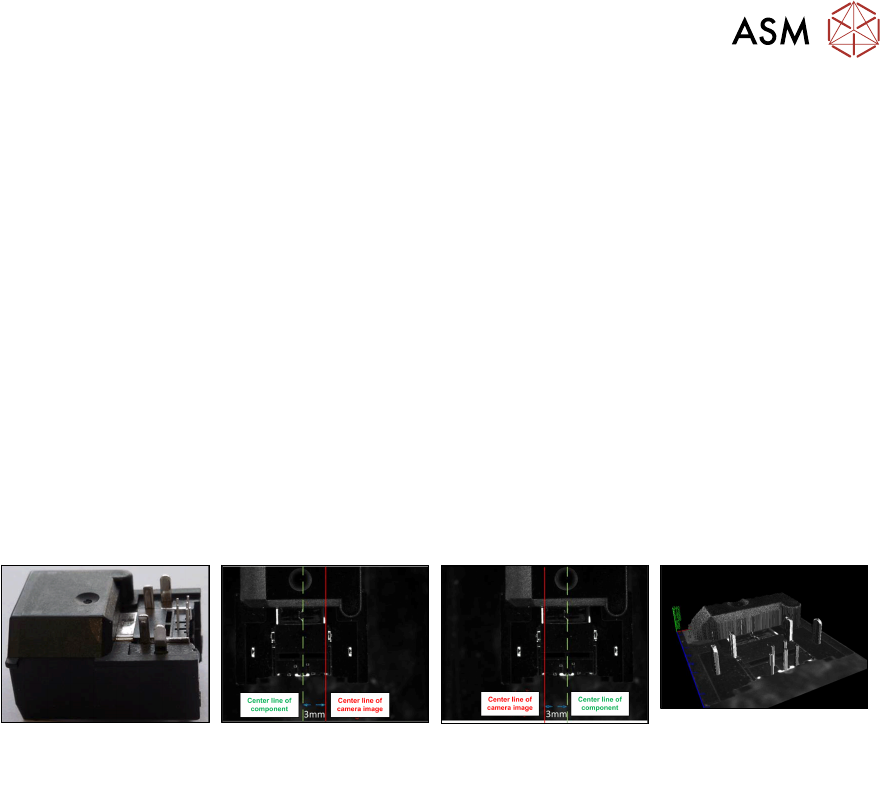
When using the stereo measurement, at least two images are captured per component. Between
capturing the two images the component is moved in x-direction to obtain images of the component
from two different perspectives. Out of the two images a height image is calculated and a 3D image
created showing the component structures very detailed. Depending on the distance to the camera,
an object pixel is displayed at different points on the x-axis in the stereo images. Based on the
position of an object pixel in the respective stereo image, its distance to the camera can then be
calculated. If necessary, the traverse path can be changed.
Example
Original component Left image capture Right image capture 3D image as result of
the two measurements
Prerequisites
●
The measurability of the features depends on feature size, feature appearance and back-
ground interference.
●
THT round pins and THT square pins are allowed for stereo measurement.
●
Stationary camera types 25 or 33 are required.
●
Minimum features size 145 µ = 9 Pixel:
Camera type 25 = 145 µ
Camera type 33 = 360 µ
●
Minimum feature height: minimum distance between pin top and background:
Camera type 25: 1.0 mm
Camera type 33: 2.0 mm
Recommendation: lead height >= (3 * <height resolution>)
The height resolution depends on the traverse path between the left and right images.
For the default traverse path, the following (pixel) height resolutions are valid:
Camera type 25: 0.49 mm
Camera type 33: 0.9 mm