00198374-02_UG_OSC-Paket_R18-2_DE_EN.pdf - 第94页
4 Working with the OSC Features 4.8 Placement of An Exceptionally High Component (fromR18-2) 94 Bedienungsanleitung OSC Package User Guide OSC-Paket 11/2018 4.8.1 Procedure The following overview lists the single work s…
4 Working with the OSC Features
4.8 Placement of An Exceptionally High Component (fromR18-2)
Bedienungsanleitung OSC Package User Guide OSC-Paket 11/2018 93
4.8 Placement of An Exceptionally High Component
(fromR18-2)
In a special use case, an exceptionally high component can be placed with automatic crash avoid-
ance by the software. In this case, the gantry and the placement head are moved around this
component. The component must be feeded by a third party feeder module.
WARNING
Description of the component height
It is essential that the description of the component height in SIPLACE Pro is correct.
Otherwise, the hardware (machine, board camera etc.) could be damaged ).
The described component height is used in the station software to decide whether the
placement head and the board camera are allowed to be moved over an already placed
component. If this is not possible without collision, they are moved around this component.
In SIPLACE Pro, a specially defined comment must be created and confirmed for the component
shape. In this case, no height check will be performed, and the component can be placed by a
Twin VHF in the last placement area of the line. The placement positions of this component are the
last ones to be placed.
Prerequisites
●
Placement machine SIPLACE SX V2
●
Single conveyor
●
Placement head Twin VHF, as the only placement head in the station or in combination with
either another Twin VHF or a CPP mounted in high position
●
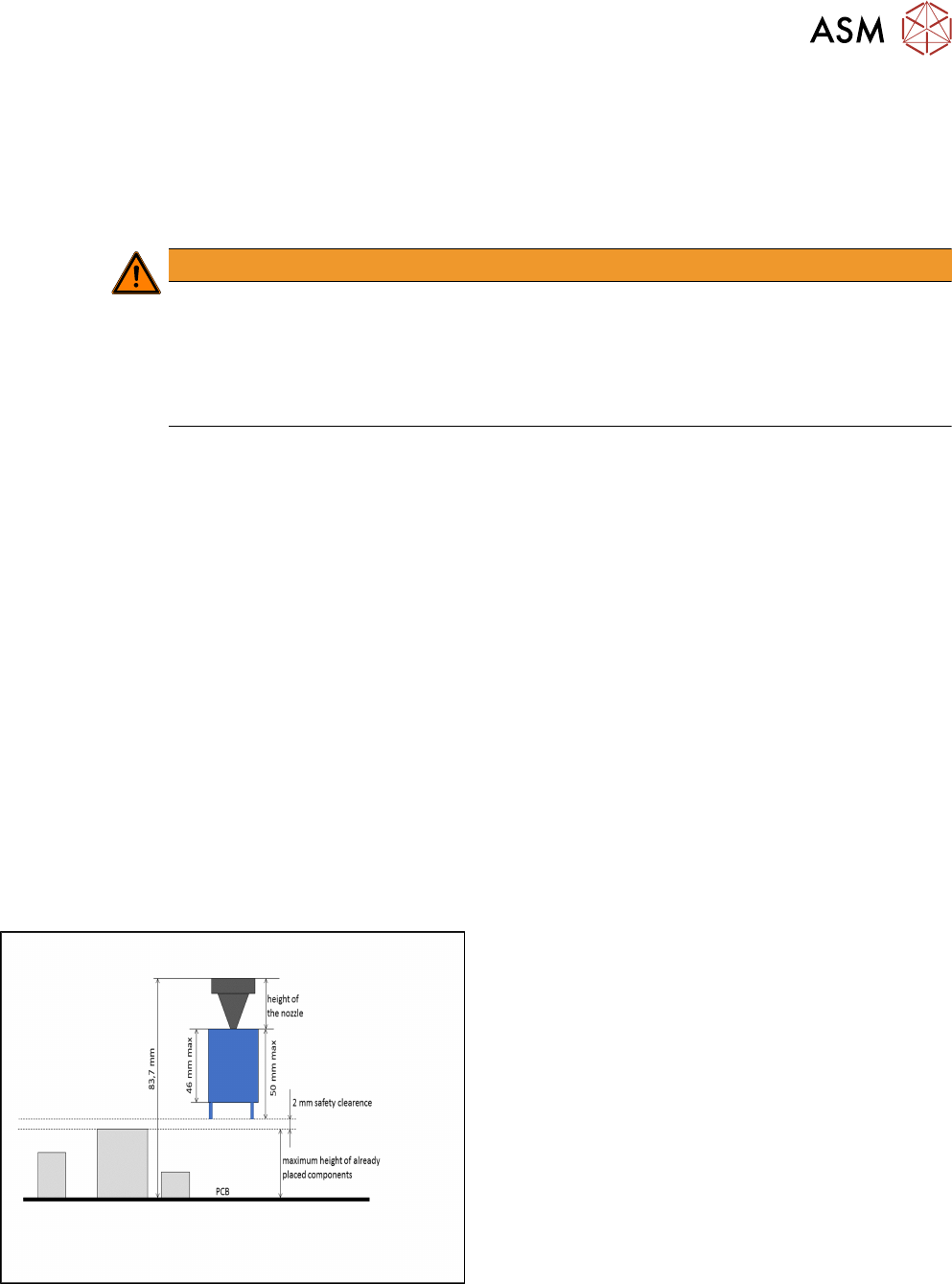
One component of type SMT; height: max. 46 mm
or
One component of type THT (e.g. Connector or Inductance); height: max. 46 mm without pro-
truding elements which disappear into the board after placement (e.g. centering pins), 50 mm
with protruding elements
●
None of the previously placed components may be higher than the bottom of the exceptionally
high component when it is attached to the placement head after pickup. When using a nozzle
of 20 mm length for placing the exceptionally high component, the previous placed
components are allowed to be 22 mm high. When using a nozzle of 10 mm length, the previ-
ous placed components are allowed to be 32 mm high.
Exceptionally high component
4 Working with the OSC Features
4.8 Placement of An Exceptionally High Component (fromR18-2)
94 Bedienungsanleitung OSC Package User Guide OSC-Paket 11/2018
4.8.1 Procedure
The following overview lists the single work steps that have to be performed in the specified order
to place an exceptionally high component.
Placing an exceptionally high component
Step Action SIPLACE program
1) Enabling OSC package SIPLACE Pro
2) Creating the comment for the component shape SIPLACE Pro
3) Confirming the comment SIPLACE Pro
4 Working with the OSC Features
4.8 Placement of An Exceptionally High Component (fromR18-2)
Bedienungsanleitung OSC Package User Guide OSC-Paket 11/2018 95
4.8.2 Application Example
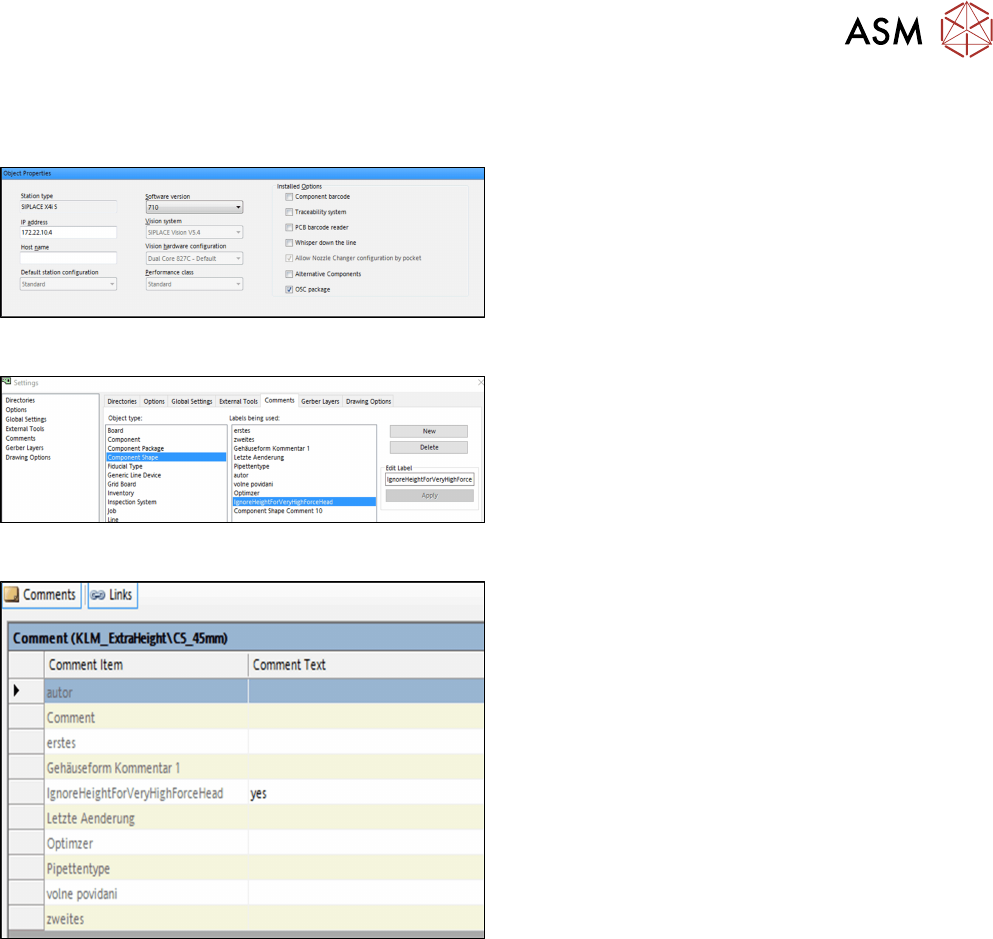
Step 1: SIPLACE Pro
► In the Station Editor under Placement Station,
enable the OSC Package option under Installed
options.
Step 2: SIPLACE Pro
► In the Settings in SIPLACE Pro Desk under
Comments, select the Component Shape object
type and the IgnoreHeightForVeryHighForce-
Head label.
► Click on New to create the comment.
Step 3: SIPLACE Pro
In the Component Shape Editor, you must confirm the
comment for the component shape.
► Under Comments, enter "yes" as comment text
for the IgnoreHeightForVeryHighForceHead com-
ment item.
No height check will be performed for the component. The optimizer ensures that the component is
placed in the last placement area of the line and that the placement positions of this component are
the last ones to be placed.