00198374-02_UG_OSC-Paket_R18-2_DE_EN.pdf - 第96页
4 Working with the OSC Features 4.9 Placement Head TH – Increased Placement Force (fromR18-2) 96 Bedienungsanleitung OSC Package User Guide OSC-Paket 11/2018 4.9 Placement Head TH – Increased Placement Force (fromR18-2…
4 Working with the OSC Features
4.8 Placement of An Exceptionally High Component (fromR18-2)
Bedienungsanleitung OSC Package User Guide OSC-Paket 11/2018 95
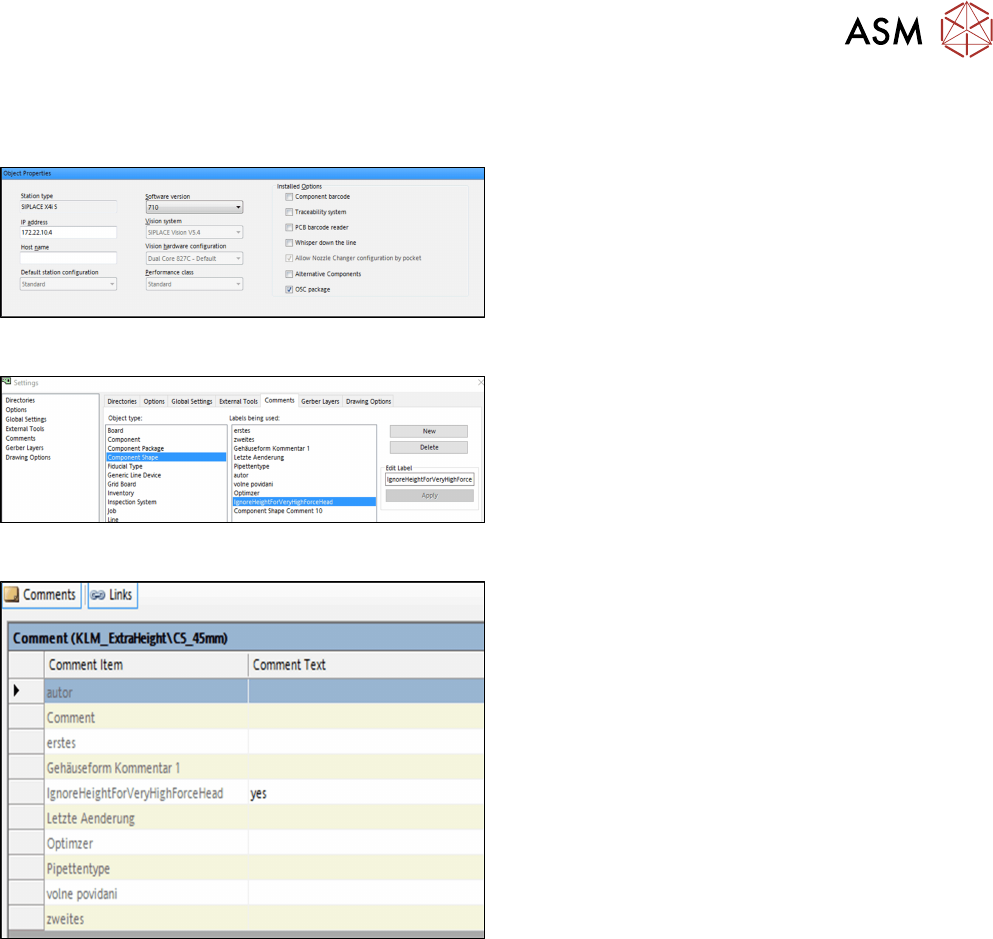
4.8.2 Application Example
Step 1: SIPLACE Pro
► In the Station Editor under Placement Station,
enable the OSC Package option under Installed
options.
Step 2: SIPLACE Pro
► In the Settings in SIPLACE Pro Desk under
Comments, select the Component Shape object
type and the IgnoreHeightForVeryHighForce-
Head label.
► Click on New to create the comment.
Step 3: SIPLACE Pro
In the Component Shape Editor, you must confirm the
comment for the component shape.
► Under Comments, enter "yes" as comment text
for the IgnoreHeightForVeryHighForceHead com-
ment item.
No height check will be performed for the component. The optimizer ensures that the component is
placed in the last placement area of the line and that the placement positions of this component are
the last ones to be placed.

4 Working with the OSC Features
4.9 Placement Head TH – Increased Placement Force (fromR18-2)
96 Bedienungsanleitung OSC Package User Guide OSC-Paket 11/2018
4.9 Placement Head TH – Increased Placement Force
(fromR18-2)
From R18-2, an increased placement force up to 30 N is supported for the TH placement head.
Prerequisites
●
At least one station in the line is equipped with a TH placement head.
●
On this station/these stations, station software version 712.0 must have been installed.
●
This station/these stations must have been configured for the OSC package (OSC license
assigned, OSC package enabled in the Station Editor in SIPLACE Pro).
●
At least one component is assigned to a component shape for which the placement process
requires a placement force from >15 N to 30 N. Placement process and placement force must
have been set in the Component Shape Editor in the Handling tab.
When a job containing such a component is optimized, the component will be assigned to a station
that meets the prerequisites mentioned.
Restrictions
●
The increased placement force is not supported on SIPLACE X-Series placement machines.

5 Restrictions
Bedienungsanleitung OSC Package User Guide OSC-Paket 11/2018 97
5 Restrictions
●
The increased placement force to 100 N is only possible for the Twin VHF placement head,
item no. [03096701-03]. Placements with a force greater than 70 N are not supported on
stations with software versions < 710 and Twin VHF placement heads with a functional status
< [-03]. Such placements will be forced onto stations with station software version >= 710 by
SIPLACE Pro.
●
The increased placement force to 30 N from R18-2 for the TH placement head is not suppor-
ted on the SIPLACE X-Series placement machines.
●
The improved teaching procedure for placement of snap-in components from R18-2 is not
supported on the SIPLACE CA4 / CA4 V2 placement machines.
●
Placement of components with centering pins (Pin in Paste height check) is not supported on
the SIPLACE CA4 / CA4 V2 placement machines.
●
Station software version 712.0 is required for the 4x image capture option in the stereo
measurement. This option is not supported in the compatible 711.2© mode.