CP6的IO代码.pdf - 第231页
Part 5 Chapter 5 Servo Adjustments Edition 1.0 5-5-8 CP-6 Series Mechanical Reference < D-Axis> Use the LOOP volume pot to adjust the GAIN on the D-axes (see diagram below). Note: No feeders should be loaded on the…
Part 5 Chapter 5 Servo Adjustments
Edition 1.0 5-5-7 CP-6 Series Mechanical Reference
<X-, Y-, Z-Axis>
Connect the Digital Operator to the amp.
[V_TEST] (F3) → [ZERO] (F3) → START
The current servo count appears on the screen. The value will fluctuate. When adjusting
the amp, perform automatic zero adjustment first and then manual adjustment.
Automatic Zero Adjustment
[DSPL SET]
→ [C] [n] [-] [0] [0] will be displayed
→ [DATA ENTER]
→ [0] [0] [-] [0] [0] will be displayed → [▲]
→ [0] [0] [-] [0] [1] will be displayed → [DSPL SET]
Manual Zero Adjustment
→ [▲]
→ [0] [0] [-] [0] [3] will be displayed
→ Press [DSPL SET] once
→ [A] [_] [*] [*] [*] will be displayed
→ Press [▲] or [▼] on the Digital Operator to eliminate any fluctuation
Press [DSPL SET] twice to register the data when the counter becomes stable
→ Press CYCLE STOP to stop the axis
→ [DATA ENTER]
→ [C] [n] [-] [0] [0] will be displayed
Gain Adjustment
The Gain adjustment is peformed in order to ensure that the axis travel time and
maximum overshoot fall within permissible levels (see chart for tolerance values for each
axis).
In order to perform Gain adjustments, it is necessary to change from “zero test mode” to
“test move mode” :
[MOVE MODE] (Changes to test move mode) [MODE] → [GAIN_TEST] → START
[▲]: Count value plus-side offset
[▼]: Count value minus-side offset
Part 5 Chapter 5 Servo Adjustments
Edition 1.0 5-5-8 CP-6 Series Mechanical Reference
< D-Axis>
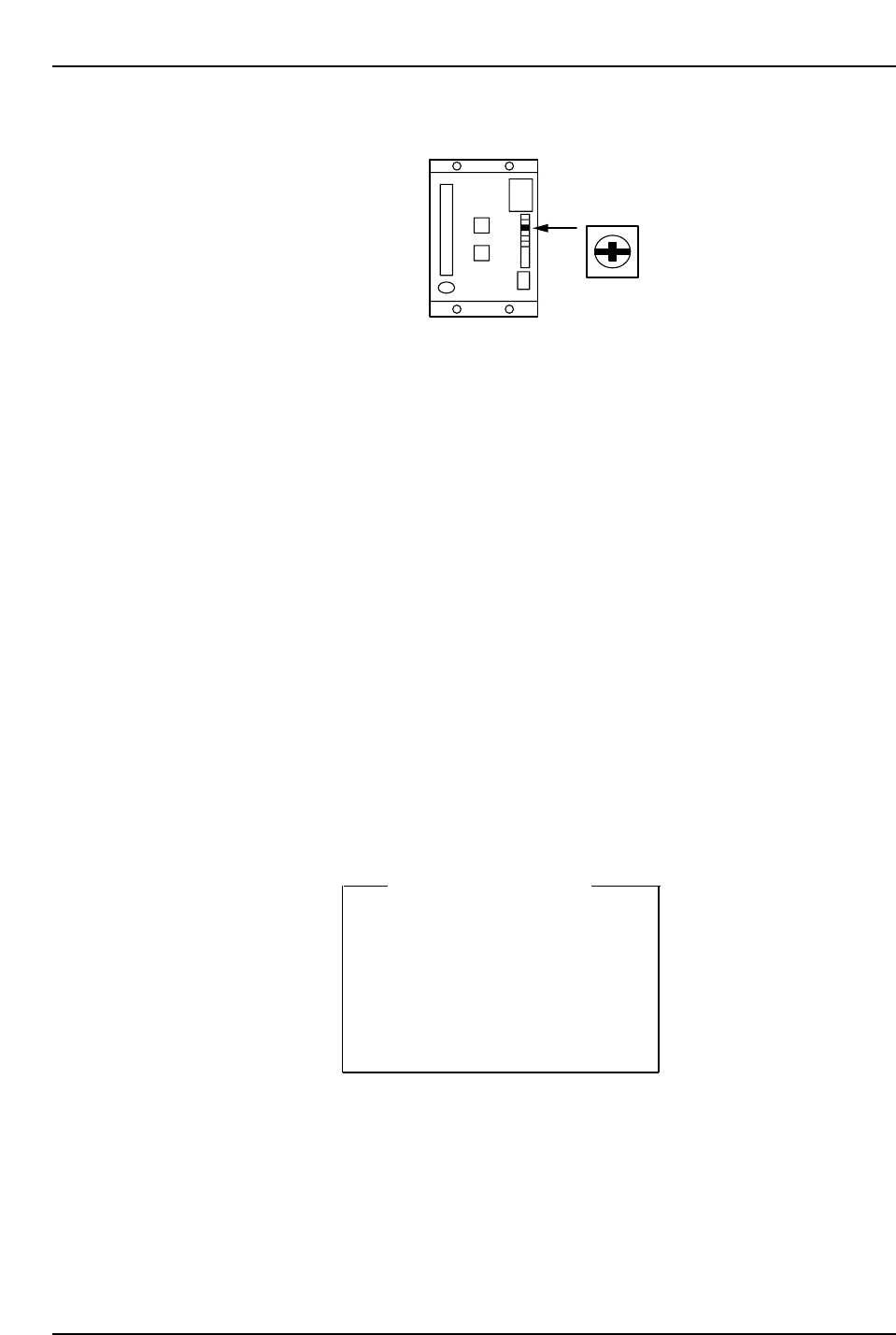
Use the LOOP volume pot to adjust the GAIN on the D-axes (see diagram below).
Note: No feeders should be loaded on the D-table during adjustment.<C-Axis>
[MODE] (sw 4) [C] [n] [-] [0] [0] will be displayed
→ [▲] (sw 2)
→ [C] [n] [-] [0] [4] will be displayed
→ [DATA] (sw 1 + sw 4)
→ [ ] [ ] [4] [0] [0] (loop gain)
→ [DATA] (sw 1 + sw 4)
→ [C] [n] [-] [0] [4]
<X-, Y-, Z-, FQ-, FRQ-, NC -axis>
Connect the Digital Operator to the amp.
[DISP SET]
→ [C] [n] [-] [0] [0] will be displayed
→ [▲]
→ [C] [n] [-] [0] [4] will be displayed
→ [*] [*] [*] [*] [*] (loop gain)
→ [DATA ENTER]
→ [C] [n] [-] [0] [4] will be displayed
Loop Gain Value
X → 80
Y → 95
Z → 120
Fθ → 240
FRθ → 240
NC → 350
CP6M5080
LOOP
CP6M5079
Part 5 Chapter 5 Servo Adjustments
Edition 1.0 5-5-9 CP-6 Series Mechanical Reference
Note: 1. For the X- and Y-axes, adjust using the UHi parameter values first. After adjustment,
enter the mid parameter values to ensure that the travel time and overshoot are as
specified in Table 1 “Max, Travel Time and Overshoot”.
2. For the FQ, FRQ and NC-axes, adjust by using the ROT parameter values. After
adjustment, enter the REV parameter values to ensure that the travel time and overshoot
are as specified in Table 1.
3. For digital input servo amplifiers, use a loop gain value specified in the table above. No
servo adjustment is required.
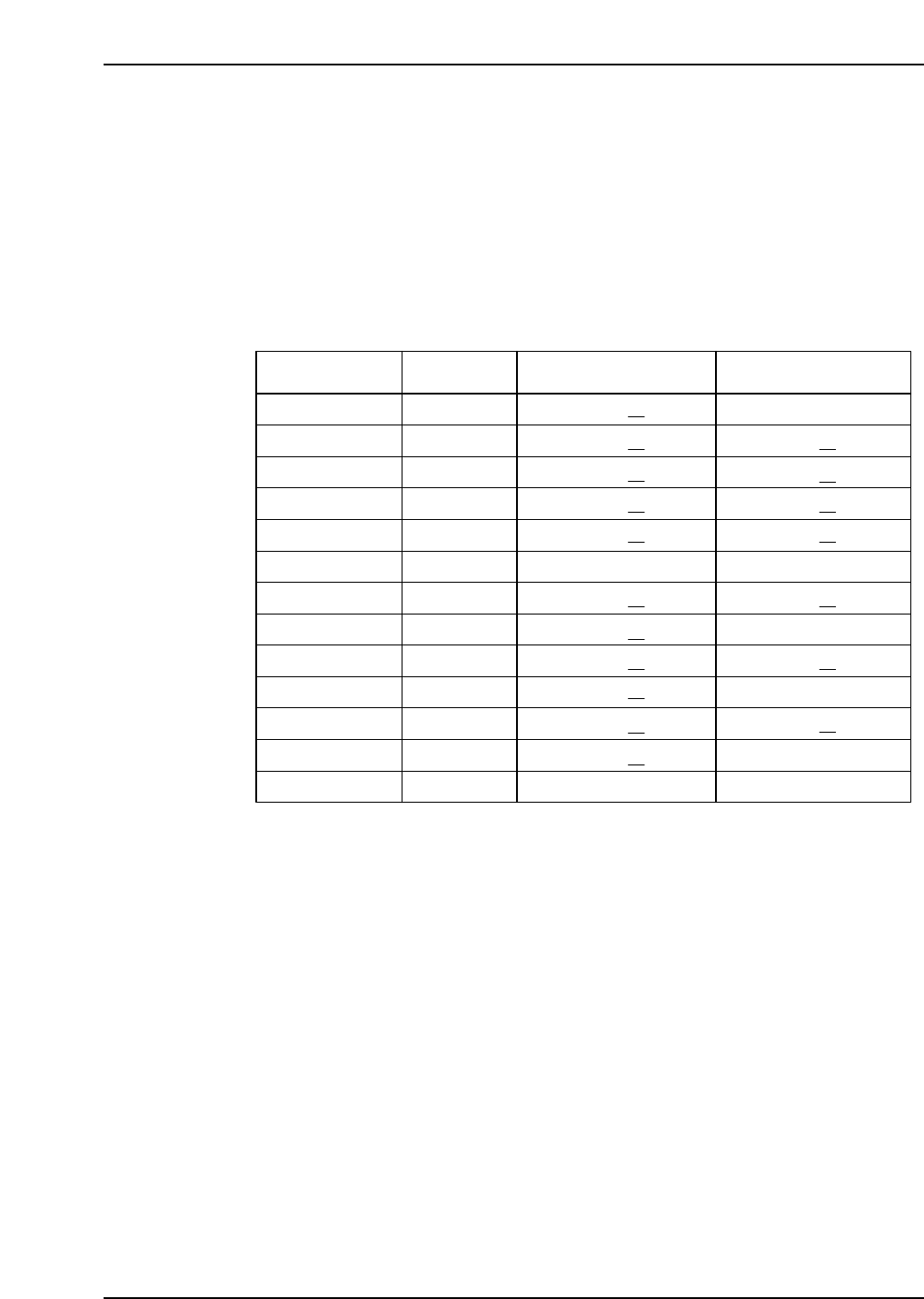
If an axis does not satisfy the specs in table 1, check it again after idling the relevant axis.
Axis Condition Travel time (ms) Max, overshoot (pulse)
X UHi
X Mid
Y UHi
Y Mid
Z
C
D
Fθ ROT
No load
56 ~ 59
✻1
Fθ REV
FRθ ROT
FRθ REV
NC ROT
NC REV
200 degrees
200 degrees
200 degrees
0 degrees
0 degrees
0 degrees
0 ~ 4
0 ~ 4 ✻1
0 ~ 4 ✻1
0 ~ 4 ✻1
0 ~ 5 ✻1
0 ~ 4
2 ~ 4 ✻1
0 ~ 4
0 ~ 4 ✻1
0 ~ 4
0 ~ 4 ✻1
4 ~ 8
0 ~ 4
56 ~ 59
✻1
56 ~ 59 ✻1
56 ~ 59 ✻1
50 ~ 54 ✻1
166 ~ 171
72 ~ 73 ✻1
29 ~ 35 ✻1
29 ~ 35 ✻1
29 ~ 35 ✻ 1
29 ~ 35 ✻1
19 ~ 22 ✻1
31 ~ 33
Table 1 : Max, Travel Time and Overshoot
CP6M5081