OM-1271-003_w.pdf - 第17页
14 Tg1097-ID-OP 6. Nozzle Change in the Manual Operation 041 1-002 6. Nozzle Change in the Manual Operation This window enables you to manually perform a cycle of the vacuum nozzle attachment and storage operation. When …
13
Tg1097-ID-OP
(6) Attach the nozzle stocker to the machine while pushing down the lever.
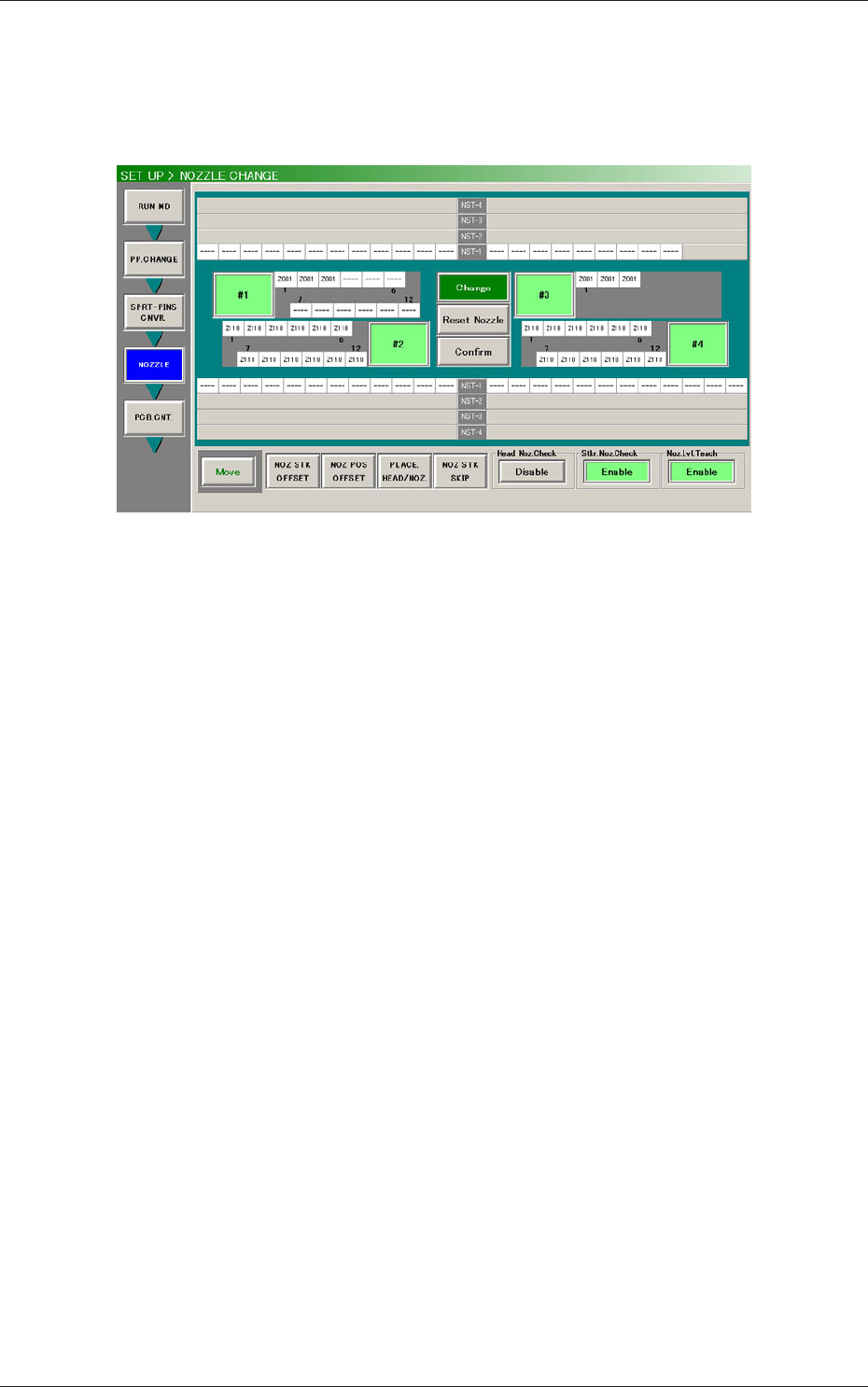
(7) Press the [Change] button in the "NOZZLE CHANGE" window. In 10
seconds, press the [START] button on the operation panel to change the
nozzle.
Fig. 5 "NOZZLE CHANGE" Window
(When the multi-functional head is mounted on the Head No. 3 position)
(8) Press the [Confirm] button in the "NOZZLE CHANGE" window
and then the [START] button to confirm that the correct nozzles are
attached.
(9) Press the [NOZ POS OFFSET] button in the "NOZZLE CHANGE"
window, "NOZ POS OFFSET" window appears.
(10) Perform the nozzle position offset teaching for each head.
5. Nozzle Change in the "Set-up" Operation
0411-002
14
Tg1097-ID-OP
6. Nozzle Change in the Manual Operation
0411-002
6. Nozzle Change in the Manual Operation
This window enables you to manually perform a cycle of the vacuum nozzle
attachment and storage operation.
When the [NOZ CHNG] button on the "MAINT."
→
"UNIT ADJ." submenu
bar is pressed, the "NOZZLE CHANGE" window opens.
Press the Head No.3 with multi-functional head in "Head Select".
VF01
VF01 VF01
[1]
[2]
[3]
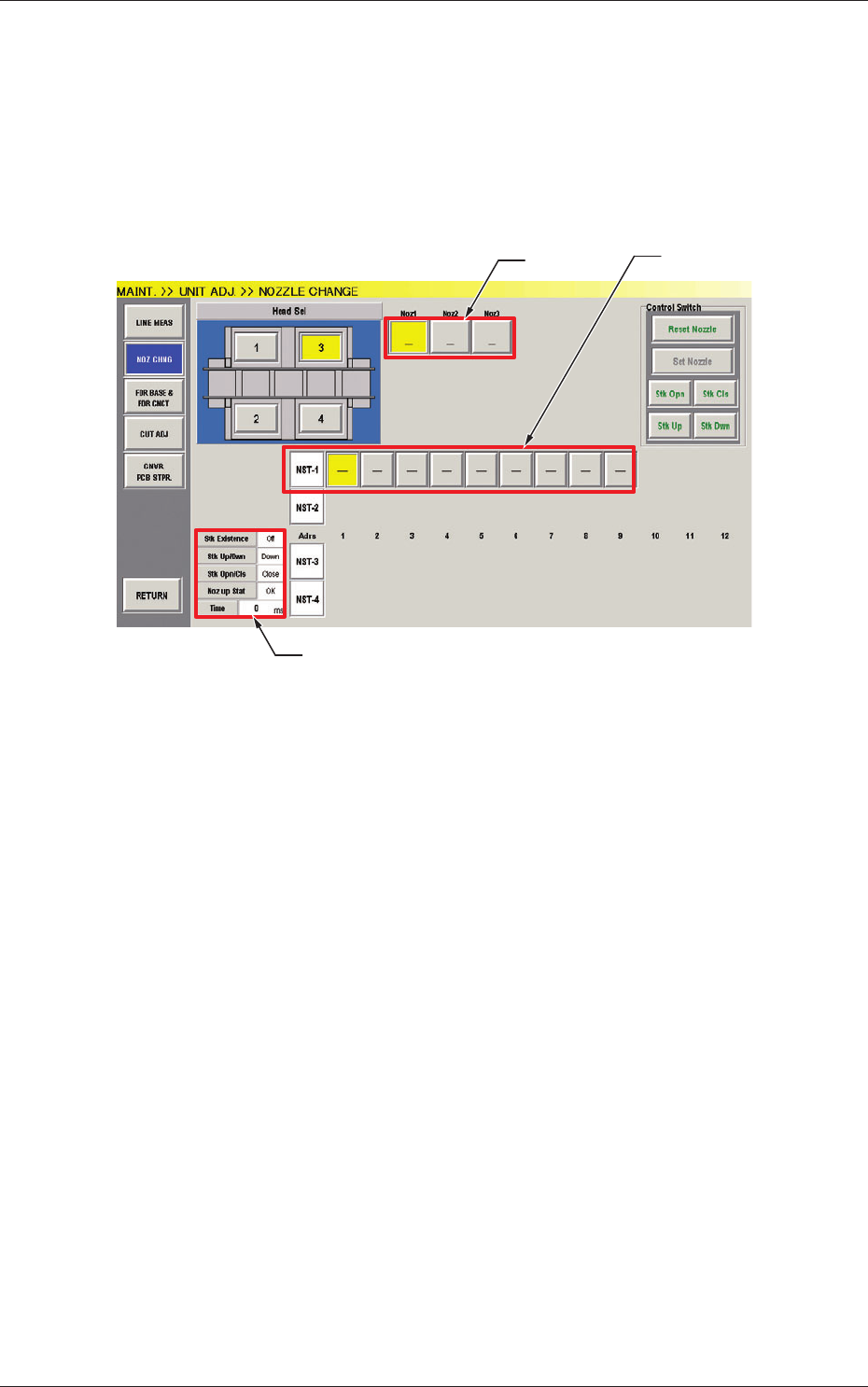
Fig.6 "NOZZLE CHANGE" Window
(When the multi-functional head is mounted on the Head No. 3 position)
[1] Nozzle Allocation No. Selection Buttons
When a button is pressed, the corresponding nozzle to be changed is
selected.
The background color of the button turns yellow.
[2] Nozzle Stocker/Nozzle Selection Buttons
These buttons can be used to specify the nozzle stocker to be opened or
closed and the nozzle stored in the nozzle stocker.
NST-1
: Nozzle Stocker #1
NST-2
, 3, 4
: Nozzle Stocker #2,#3,#4
(When a multi-functional head is used, this can not be
selected.)
When a nozzle button is pressed, the background color turns yellow.
The nozzles accented in red represent that they are attached to the head.
[3] Status Display
This displays the status of the head currently selected.
15
Tg1097-ID-OP
• Procedure for Nozzle Storage
Notice
Do not perform any nozzle storage operation while a component
is picked up by the head. Otherwise, the vacuum will be turned off,
releasing the component from the head.
(1) Press the head (one of the head selection buttons) holding the nozzle
desired to be stored.
The background color of the selected button turns yellow.
(2) Select the nozzle (one of the nozzle allocation No. selection buttons)
holding the nozzle desired to be stored.
The background color of the selected button turns yellow.
(3) Select the address button of the nozzle stocker in which the nozzle
should be stored.
The background color of the selected button turns yellow.
(4) Press the [Reset Nozzle] button.
The background color of the button turns green and the selected
head selection button, nozzle allocation No. button, and nozzle
stocker address buttons are set active.
(5) When the [START] button of the operation panel is pressed, the
selected nozzle is stored in the selected nozzle stocker (located at
the specified address).
• Procedure for Nozzle Attachment
Notice
Be sure not to perform any nozzle attachment operation while the
head is holding a component.Otherwise, the vacuum will be turned
off, releasing the component from the head.
(1) Select the head (one of the head selection buttons) where the desired
nozzle should be attached.
The background color of the selected button turns yellow.
(2) Select the nozzle allocation No. button to specify the position where
the nozzle should be attached.
The background color of the selected button turns yellow.
(3) Select the address button of the nozzle stocker where the nozzle to
be attached is stored.
The background color of the selected button turns yellow.
(4) Press the [Set Nozzle] button.
The background color of the button turns green and the selected
head selection button, nozzle allocation No. button, and nozzle
stocker address buttons are set active.
(5) When the [START] button on the operation panel is pressed, the
specified nozzle is attached.
Note
No nozzle can be attached to any nozzle No. position where a nozzle is
already attached.
0411-002
6. Nozzle Change in the Manual Operation
Procedure
Procedure