YS12P_YS12F_YG12F_Mainte_E.pdf - 第45页
2-1 2 Daily maintenance items Before beginning work In most cases, maintenance should be perfor med with the main power turned off. However , some maintenance tasks are perfor med under emergency stop conditions with the…

2-1
2
Daily maintenance items
Before beginning work
In most cases, maintenance should be performed with the main power turned off.
However, some maintenance tasks are performed under emergency stop conditions with the power turned on.
In such cases, ensure adequate safety and press the emergency stop before beginning the maintenance.
The power is turned on during maintenance where any servo-axis must be operated or machine operation
checked. In this case, also ensure adequate safety before beginning the maintenance.
When operating the machine, make sure the following conditions are met.
n
Operating conditions
1.Supplyairpressureiskeptatcorrectpressure.
2.Allsafetycoversareclosed.
3.Nozzlesandotherunitsareattachedinplace.
2-2
2
Daily maintenance items
1. Checking the nozzle
Solder sticking to the nozzle tip or a clogged nozzle hole can cause component pickup errors and
recognition errors. Poor nozzle spring action can also cause pickup and mounting errors. To prevent such
problems periodically inspect and clean each nozzle.
1.1 Check with software
n
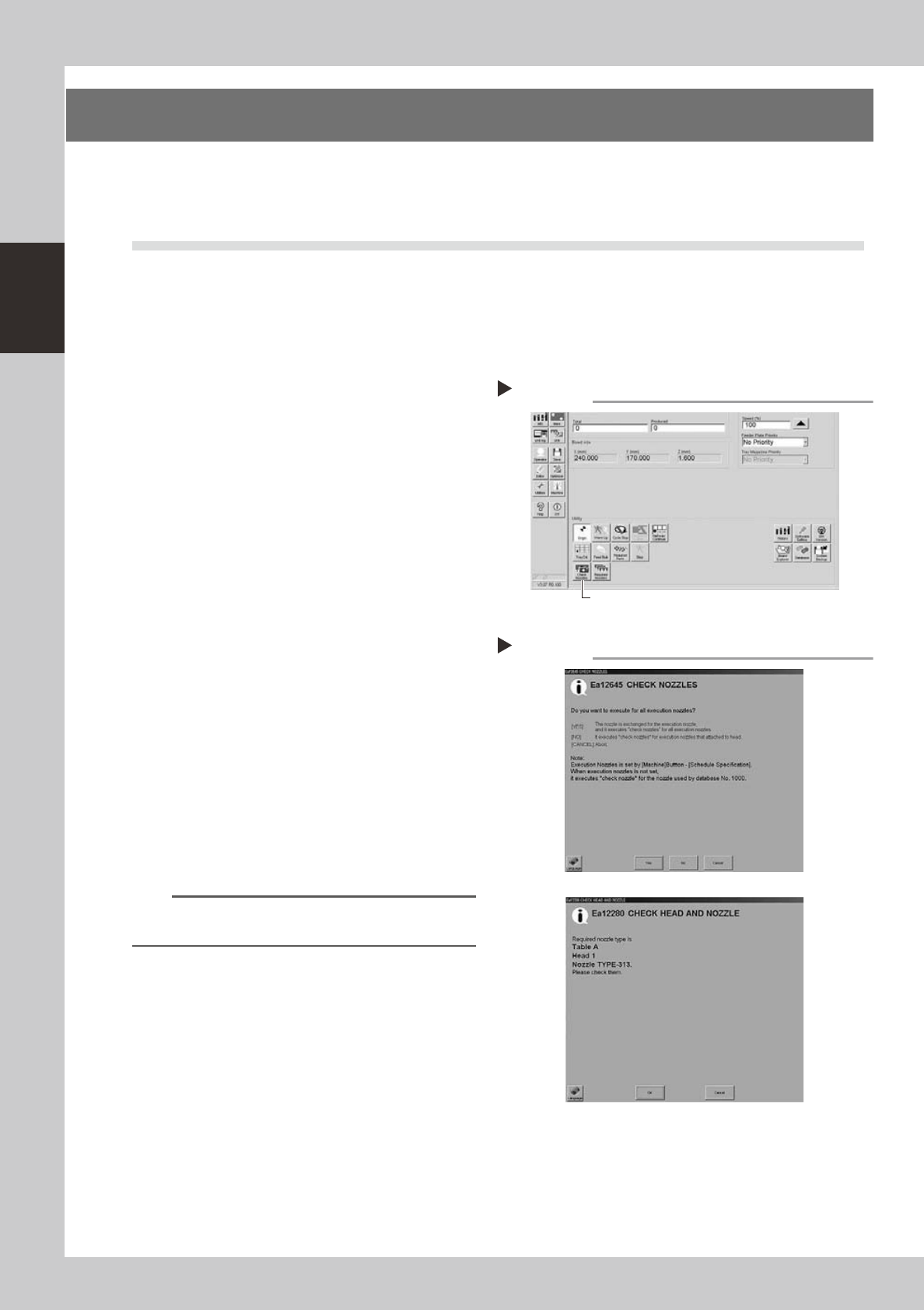
How to check for a dirty nozzle (with the [Check Nozzle] button)
Theterm"dirtynozzle"asusedhereindicatesshinymaterialsuchassolderadheringtothenozzletip.This
shinyportionmightbemistakenforacomponentandcauserecognitionerrors.Tocheckforthisproblem,
pressthe[CheckNozzles]buttononthe[Setup]screenwhilethenozzletippicksupnocomponents.The
camerafindstheextentofgrimeordirtonthenozzletip.
e
1
Move the head.
Press the emergency stop button and move
the head so the nozzle is at a position where
it can be easily replaced.
2
Press the [Check Nozzles] button as
follows.
1. Cancel emergency stop.
2. Open the [Setup] screen and press the
[Check Nozzles] button in "Utilities".
54201-L6-00
3
Select the item to be executed.
After checking the displayed message,
select the desired button.
n
When [Yes] was selected
Performsautonozzlechangeandchecksallnozzles
thatcanbechanged.
n
When [No] was selected
e
Checkthetargetnozzleinthenozzlescurrently
installedtotheheadassembly.
54202-L2-00
4
Check the message.
Clean the nozzle if the check shows it is dirty.
n
NOTE
The "Check Nozzles" function is usually set for "Type 302A
nozzles" before shipment.
Selecting the item to be executed
Step 3
When [No] was selected
Pressing the [Check Nozzles] button
Step 2
[Check Nozzles] button