YS12P_YS12F_YG12F_Mainte_E.pdf - 第67页
3-15 3 Periodic maintenance items 2.5 Inspecting and cleaning the board conveyor belt (bimonthly) Asthebeltwearsaway,slippagesmayoccurthatpreventsecurelyconveyingtheboards.Itistherefore necessarytomake…
3-14
3
Periodic maintenance items
5
Apply the new grease by hand.
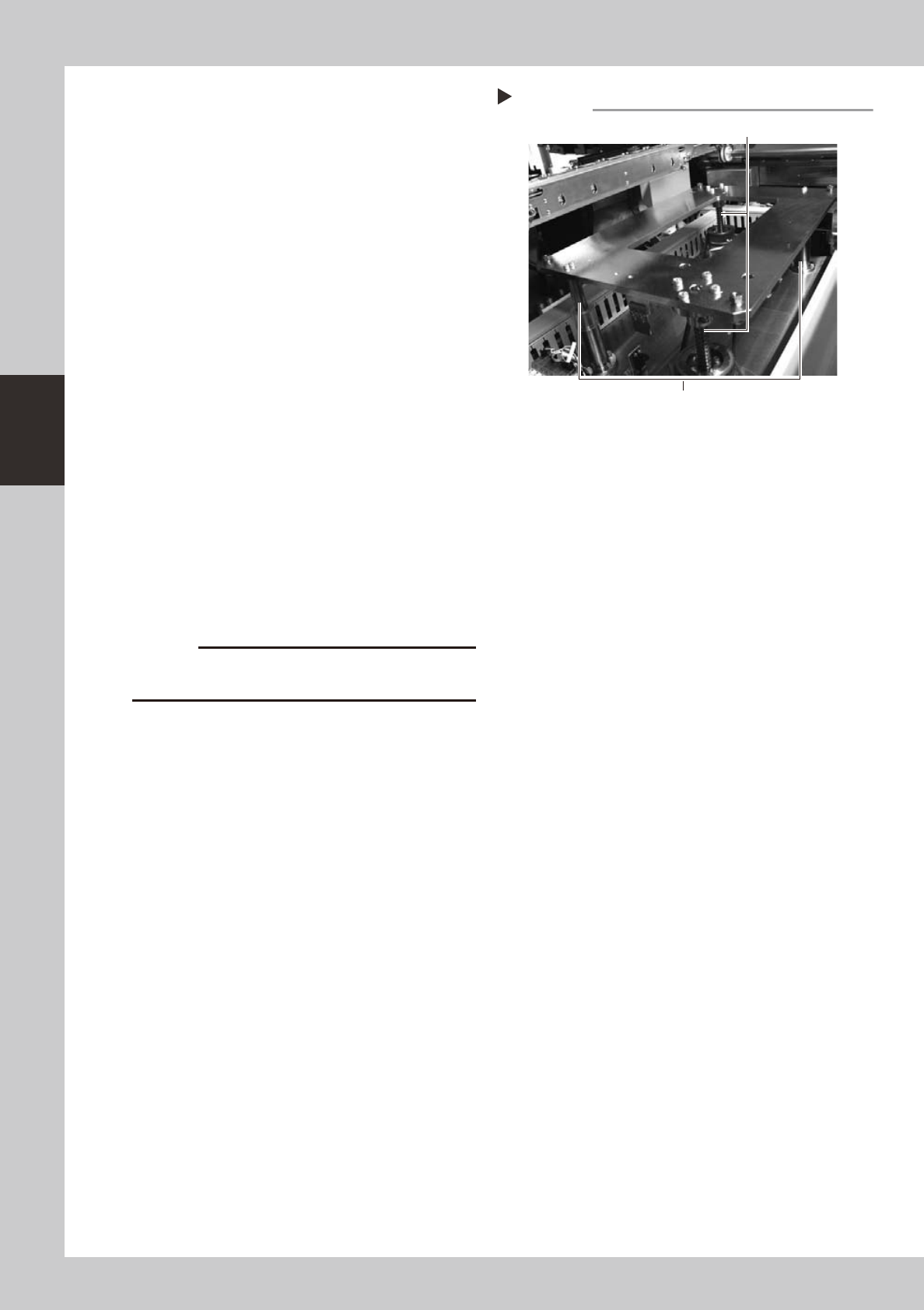
Ball screw
Apply as much as 2 cm of new grease to
your finger, and rub it evenly into the ball
screw grooves.
Ball guide
Apply as much as 2 cm of new grease to
your finger, and coat it evenly on the ball
guides.
53331-L6-00
6
Raise and lower the push-up unit
manually.
After cancel emergency stop, raise and
lower the push-up unit several times
manually to spread the grease evenly. After
the grease is well spread, raise the push-up
unit and leave it in that state.
e
7
Wipe away excess grease by hand.
After pressing the emergency stop button,
wipe away excess grease by hand.
Again raise and lower the push-up unit
several times manually and if there is no
problem then lower the push-up unit.
8
Reinstall the pushup plate to its
original position.
Reinstall in the reverse procedure of step 2.
c
The push-up plate is heavy so use plenty of caution
during handling.
Applying the grease
Step 5
Ball guides (2 places)
Ball screws (2 places)
3-15
3
Periodic maintenance items
2.5 Inspecting and cleaning the board conveyor belt (bimonthly)
Asthebeltwearsaway,slippagesmayoccurthatpreventsecurelyconveyingtheboards.Itistherefore
necessarytomakeperiodicchecksforwearoftheconveyorbelt.
Beltwearmayalsocausetroublesuchaserroneousdetectionoftheconveyorsensorduetodustfrombelt
wearaccumulatingonthesensorsurface,ordustfrombeltwearaccumulatinginthebeltguidegroovesmay
causethebelttostick,etc.
1
Change the conveyor width to a
convenient width for maintenance
work.
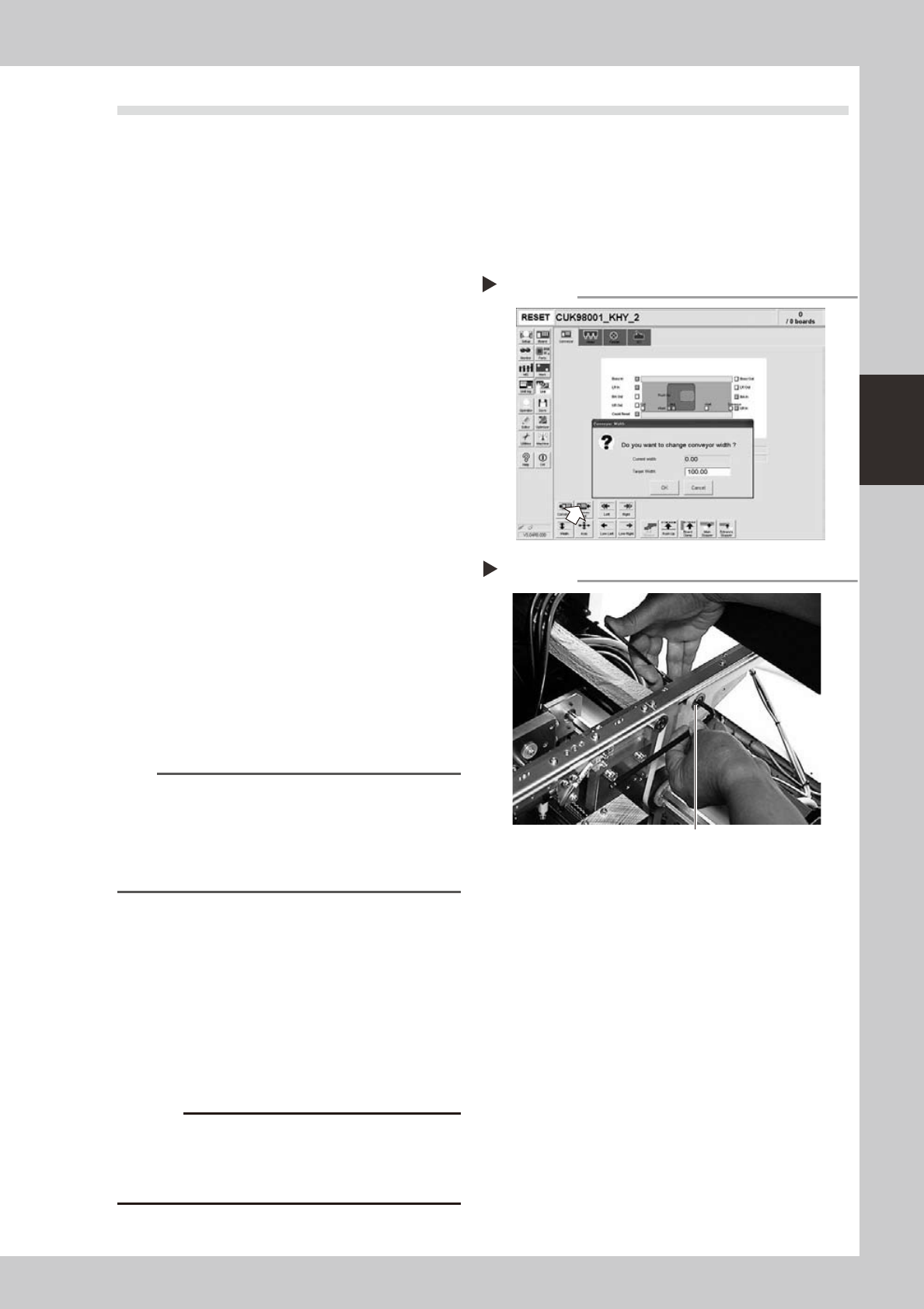
1. Press the [Width] button to display the
"Conveyor Width" dialog.
2. In the "Target Width" box, enter a width
large enough for maintenance work
(about 200mm) and press [OK].
The conveyor is changed to the width
that was just entered.
54304-L6-00
e
2
Loosen the tension on the conveyor
belt.
Press the emergency stop button and then
use a 4mm and 5mm hex wrenches to
loosen the belt tension.
53332-L6-00
3
Remove the conveyor belt.
Remove the conveyor belt from the pulley
and the belt groove of the board guide.
4
Check for wear on the board
conveying side of the conveyor belt.
After removing the belt in step 3, check for
wear on the board conveying side of that
conveyor belt.
TIP
About half (3 to 4 mm) the belt width is used for board
conveying. If the board conveying side of the conveyor
belt is worn, then you can still reuse the belt by switching
the used side with the opposite side. However, this will
cause errors after long-term use, so early belt
replacement is recommended.
5
Clean the pulley and the belt
groove on the board guide.
Using a vacuum cleaner or similar device,
suction up the belt wear dust deposited in
the belt groove or on the sensor surface. Also
use a vacuum cleaner while brushing debris
away with the brush supplied with the
machine.
Also clean the pulley and other parts for the
conveyor belt.
c
sometimes adhere to and darken the outer
Changing the conveyor width
Step 1
Step 2
Tensioner bolt
Loosening the tension on the belt
3-16
3
Periodic maintenance items
3. Three-month inspection
3.1 Cleaning and replacing the ejector filter
Althoughdependingontheairsupplyconditionsandoperatingtime,ejectorsshouldbeinspectedonceevery
3months.Useanairblowguntoremovedustbuildupswhensmall.Werecommendreplacingtheairfilterif
heavydustdepositsarefound.
1
Move the head all the way to the
front end of the Y axis.
On the [Unit]-[Head] tab (or [conveyor] tab)
screen, press the [Axis] button to open the
"Move Axis" screen. Then move the head
assembly all the way to the front of the Y
axis (front of machine).
TIP
The ejector unit is located at the front of the head
assembly. It is easier to inspect the ejector filters when
the head assembly is positioned to the front side of the
Y axis. (Inspect the ejector filters from the front of the
machine.)
e
2
Press the emergency stop button.
The machine should be in emergency stop
to ensure safety during work.
3
Remove the filter cap.
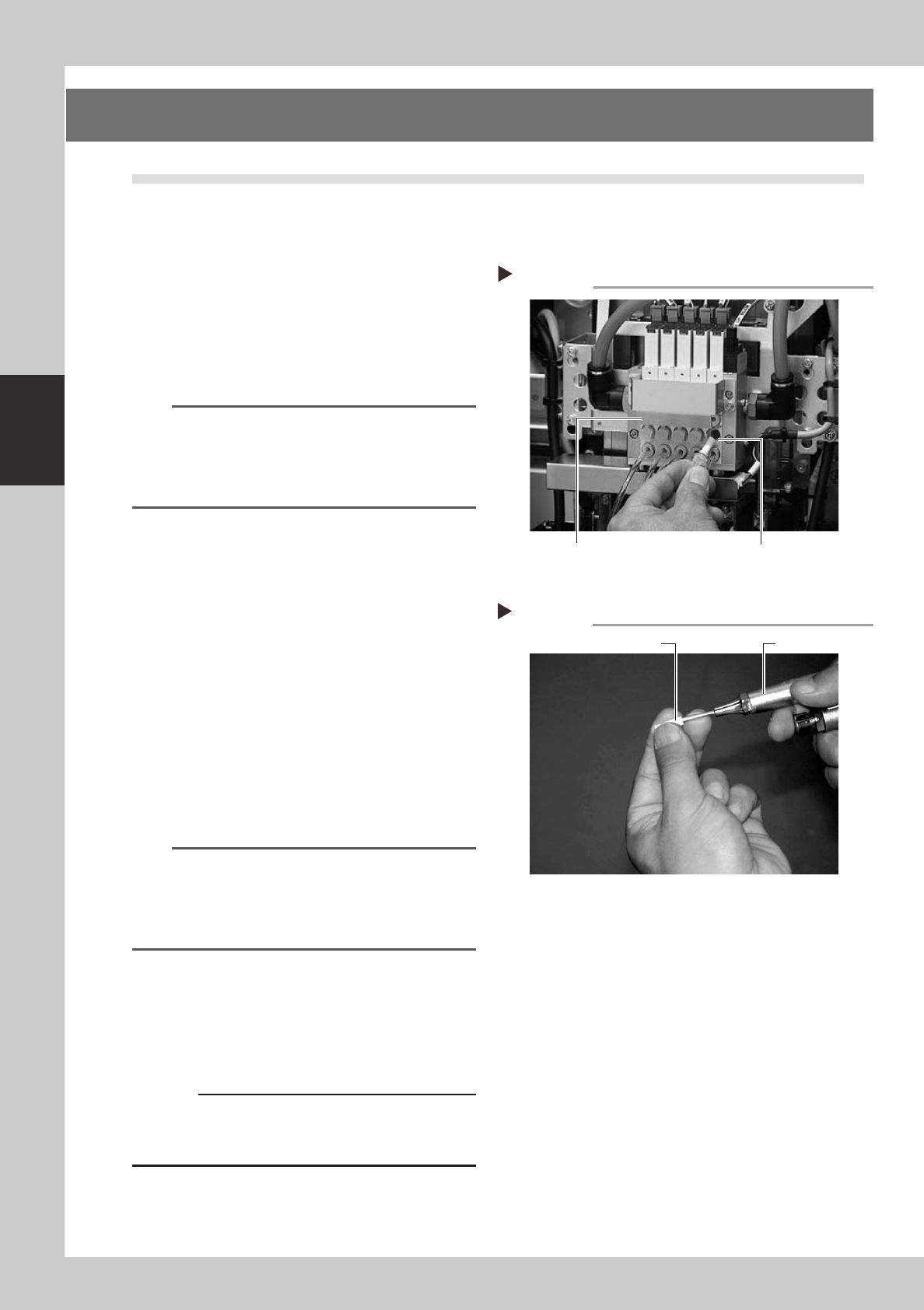
Loosen and remove the filter cap with a
slotted screwdriver.
53340-L6-00
4
Clean the filter.
Use tweezers to take the filter out of the
ejector. When there is only a little dust in the
filter, use an air blow gun to blow it away
and return the filter back to the original
position.
53316-L6-00
n
NOTE
If there are heavy dust deposits in the filter or the filter
has discolored, replace it with a new filter (K46-M8527-
C0X). As a general guide, filters should be replaced
once every 3 months, although this depends on the
actual operating time.
5
Reattach the filter cap.
1. Fit the filter into the filter cap and insert it
into the ejector.
2. Turn the filter cap to the right until it locks
and clicks.
c
Cleaning the filter
Step 4
Air blow gunFilter
Removing the filter cap
Step 3
Ejector unit Ejector filter
O-ring
Filter cap