YS12P_YS12F_YG12F_Mainte_E.pdf - 第51页
Chapter 3 Periodic maintenance items Contents 1. W eekly inspection 3- 1 1.1 Checking and c leaning the nozzles 3- 1 1.1.1 Checking and cleaning the spring-action parts 3- 1 1.1.2 Checking the nozzle leaf springs 3- 3 1.…
2-6
2
Daily maintenance items
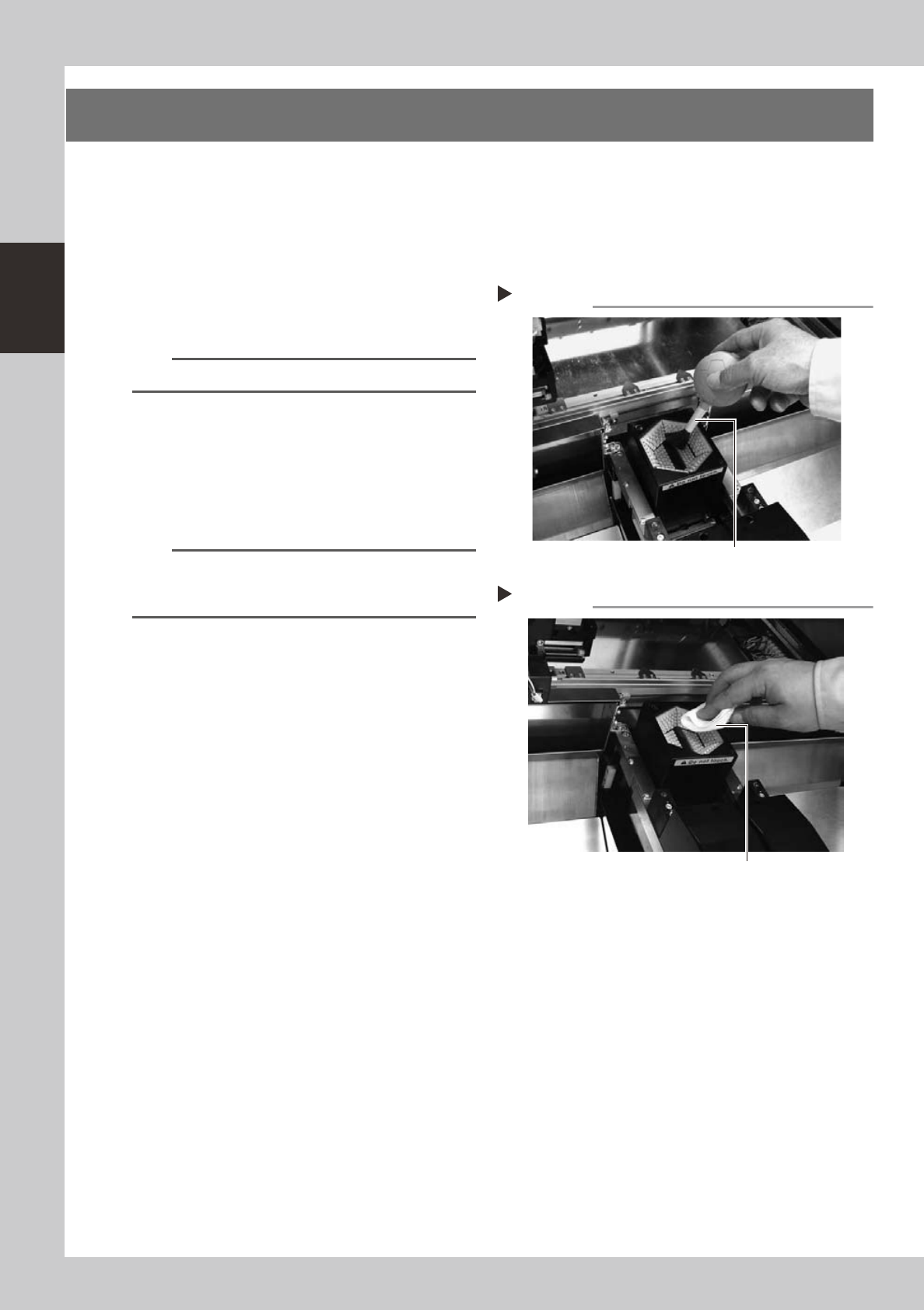
3. Cleaning the camera transparent cover
Dirt or dust particles sticking to the transparent cover of the multi-view camera can cause recognition errors.
Periodic inspection and cleaning are recommended to prevent this problem.
e
To ensure safety, make sure that the machine power switch is off or the emergency stop button is pressed
before starting work.
1
Remove dust on the transparent
cover with the lens blower brush.
53207-L6-00
TIP
A lens blower brush is available as an option.
2
Wipe the transparent cover with a
lint-free cloth.
Apply a few drops of lens cleaner to a
lint-free cleaning cloth or paper towel and
wipe the transparent cover.
53209-L6-00
n
NOTE
Use a lint-free cleaning cloth or paper wiper.
A lens cleaner is supplied with the machine. Do not use
other type of cleaner.
Blowing off dust with blower brush
Step 1
Lens blower brush
Wiping the transparent cover
Step 2
Lent-free cleaning cloth or paper wiper

Chapter 3 Periodic maintenance items
Contents
1. Weekly inspection 3-1
1.1 Checking and cleaning the nozzles 3-1
1.1.1 Checking and cleaning the spring-action parts 3-1
1.1.2 Checking the nozzle leaf springs 3-3
1.1.3 Cleaning the nozzle top end 3-3
1.2 Checking the conveyor sensor condition and operation 3-4
1.3 Checking the board clamp condition and operation 3-5
1.3.1 Checking the board clamp condition 3-5
1.3.2 Checking the board clamp operation 3-5
6
2.1 Cleaning the nozzle air path (monthly) 3-6
2.2 Inspecting each axis (monthly) 3-7
8
2.3.1 Cleaning and greasing the X, Y and W axis ball screws 3-8
2.3.2 Cleaning and greasing the X, Y and W axes linear guides 3-11
2.4
3-13
2.5
Inspecting and cleaning the board conveyor belt (bimonthly)
3-15
3. Three-month inspection 3-16
6
3.1.1 Checking the ejector vacuum pressure 3-17
3.1.2 Checking the blow valve operation (each head) 3-18
3.1.3 Checking the cleaning blow valve operation (for all heads) 3-18
3.2 Cleaning and lubricating the inside of the spline shaft 3-19
3.2.1 Cleaning the inside of the spline shaft 3-19
3.2.2 Checking the negative pressure 3-22
3.3
Checking the spline shaft movement and lubricating the slide section
3-23
3.4 Checking the SC-axis flex cable (YS12P) 3-24
5
3.6 Cleaning and greasing the hexagon spline 3-27

4. Six-month or one-year inspection 3-28
4.1
Cleaning the fiducial camera lighting unit (6-month inspection)
3-28
4.2 Checking the R-axis spline belt (1 year) 3-29
4.3
Cleaning and replacing the blow station filter (1 year) … option
3-30
4.4
Checking the nozzle station sensor condition (1 year) … option
3-31
4.5 Inspecting and cleaning the controller filter (1 year) 3-32
4.6
Cleaning the multi-view camera lens and lighting unit (1 year) …. option
3-33
4.7
Cleaning the scan camera lighting unit (6-month inspection) …. YS12P
3-34