KY8030 Programmers Manual.pdf - 第55页
Program mers Manual | 5 3 Clearance The clearance range requ ired for the "Create All Patt erns" and "Scan Reference" tasks. All positions wit hin the clearance range are r ecognized as the same posit…
52 | KY-8030 Series(KYOS-2007001_rev0)
3DIn‐lineSolderPasteInspectionSystems
14) Option
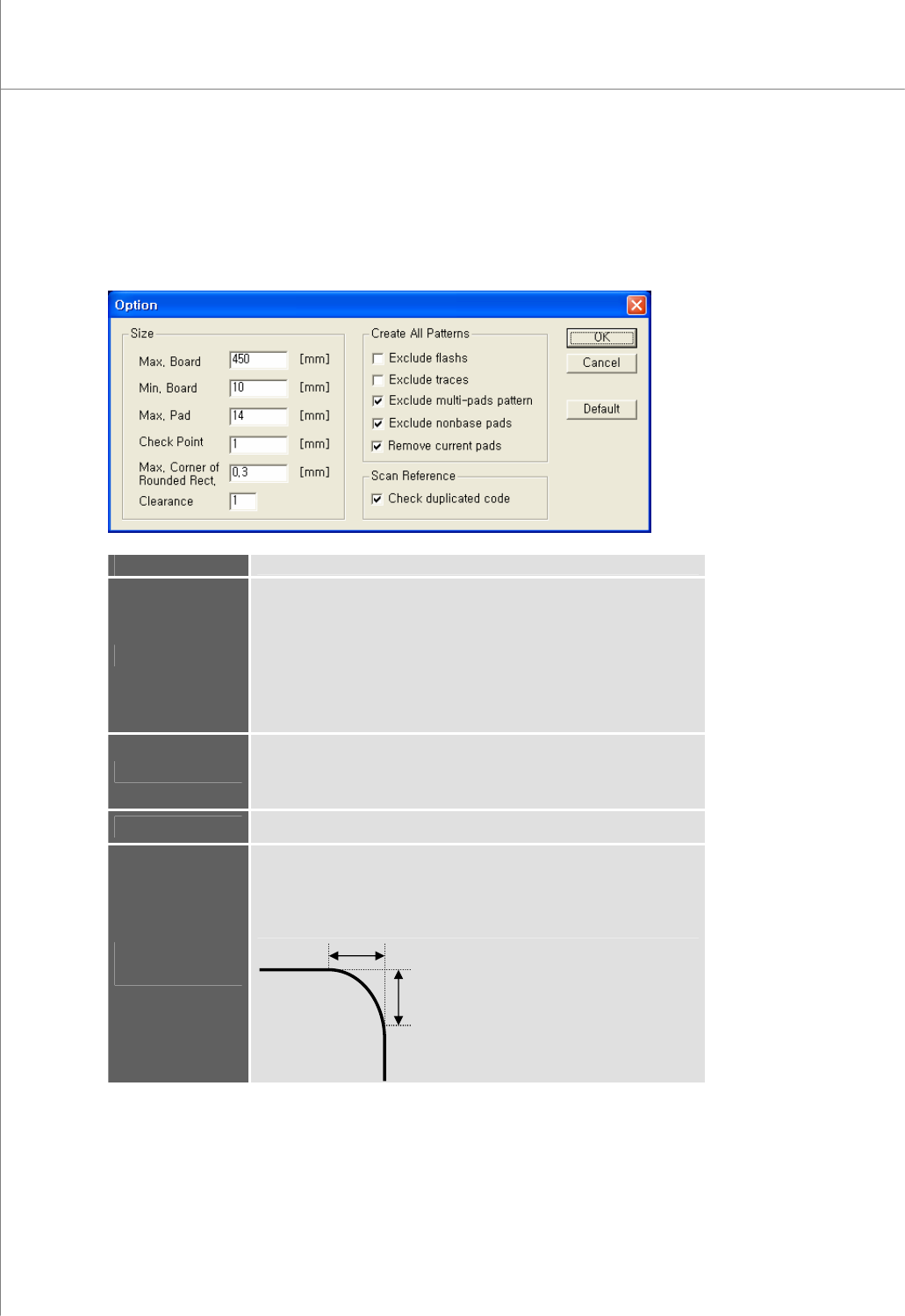
Open the "Option" dialog box to specify option settings.
The "Option" Dialog Box["flashs" in box below should read "flashes"]
Max. Board
The maximum length of a PCB
Min. Board
The minimum length of a PCB.
When loading a Gerber file that contains a board with a
maximum/minimum size, make sure that the Gerber parameters are
valid.
※ Caution: If Gerber parameters are not set correctly, it may lead to
incorrect board size or position data, inhibiting normal PCB operation.
When opening a Gerber file in the RS274D format, make sure that the
Gerber parameters entered match the actual size of the PCB.
Max. Pad
The maximum length of a pad.
When performing "Create All Patterns", patterns are retrieved only
when the size of patterns is equal to or less than the Max Pad value.
Check Point
The size of a check point displayed on the screen
Max. Corner of
Rounded Rect.
The maximum offset value for a rounded rectangle.
This value differentiates rectangles and rounded rectangles from other
pattern shapes.
Offset
Offset
Programmers Manual
| 53
Clearance
The clearance range required for the "Create All Patterns" and "Scan
Reference" tasks.
All positions within the clearance range are recognized as the same
position.
※ Note: If the PCB unit is mm, clearance 1 ==> 0.0001 mm.
If the PCB unit is inches, clearance 1 ==> 0.0001 inch.
Exclude flash
Indicates whether a flash will be excluded during create all pattern
process.
Exclude trace
Indicates whether a trace will be excluded during create all pattern
process.
Exclude multi-
pads pattern
Indicates whether adjacent pads will be differentiated during create all
pattern process.
You can prevent adjacent pads from being automatically registered as
a single pattern while performing "Create All Patterns".
Exclude nonbase
pads
Indicates whether flashes and traces in a layer will be excluded during create all
pattern process.
Remove current
pads
Indicates whether all patterns and pads registered will be removed
during create all pattern process.
Check duplicated
codes
Indicates whether duplication of part reference codes will be checked
and whether a warning message will be displayed.
Default
Initialize all settings back to the default settings set at the time of
shipment.
Ú Caution: If an option setting is changed, "Create All Patterns" may not be performed properly.
Ú Note: You can select from the following options for "Create All Patterns":
y Exclude flash
y Exclude trace
y Exclude multi-pads pattern
y Create All Patterns
y Exclude Nonbase pads
y Remove current pads
Ú Note: You can select the following option for "Scan Reference":
y Check duplicated codes
54 | KY-8030 Series(KYOS-2007001_rev0)
3DIn‐lineSolderPasteInspectionSystems
1.3.5. View
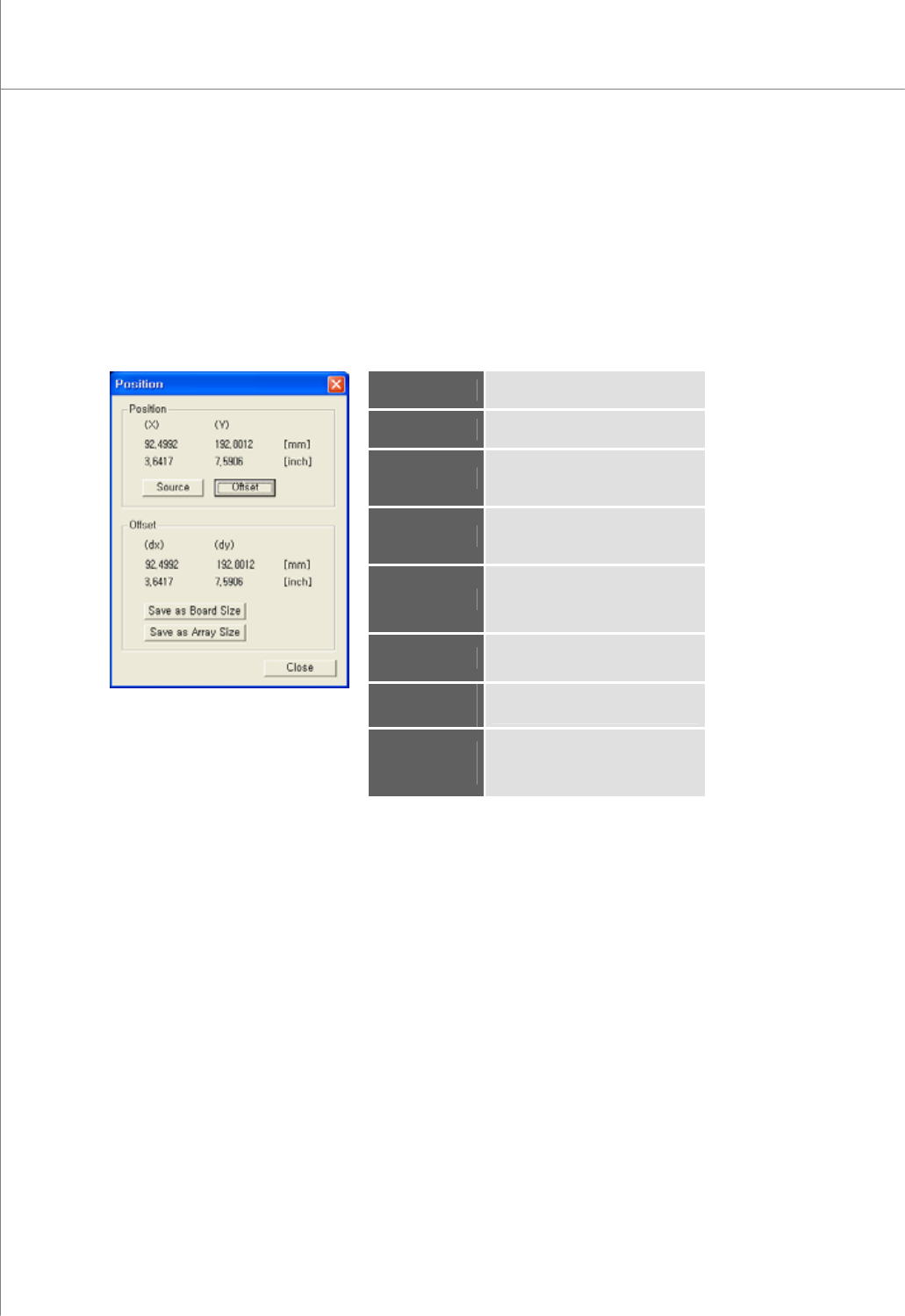
1) Position
Display the position of the selected flash, trace or pad as an offset distance from the
specified reference point.
You can specify PCB and array sizes directly.
The "Position" Dialog Box
Position (X)
The center for the selected point
in the X-axis
Position (Y)
The center for the selected point
in the Y-axis
Offset (dx)
The offset distance between the
selected point and the reference
point (source) in the X-axis
Offset (dy)
The offset distance between the
selected point and the reference
point (source) in the Y-axis
Source
Specify the current point as a
reference point.
Initial Value = (0,0)
Offset
Calculate and display offset (dx)
and offset (dy).
Save as Board
Size
Save offset (dx) and offset (dy)
values as a PCB size.
Save as Array
Size
Save offset (dx) and offset (dy)
values as the row and column
sizes for an array board.