4OM-1322-006_w.pdf - 第152页
2-15 AKOEMT -ID 0609-002 2.2 T roubleshooting after Error Display 2.2.3 Error IDs and Remedial Procedures (01 T able-X Axis) T able 4B6 Error ID Error Name, Description, Cause, and Remedy 0101000 T able-X Origin Zeroing …
2-14 AKOEMT-ID
2.2.2 Error IDs and Controlled Areas
Basic System of Error IDs
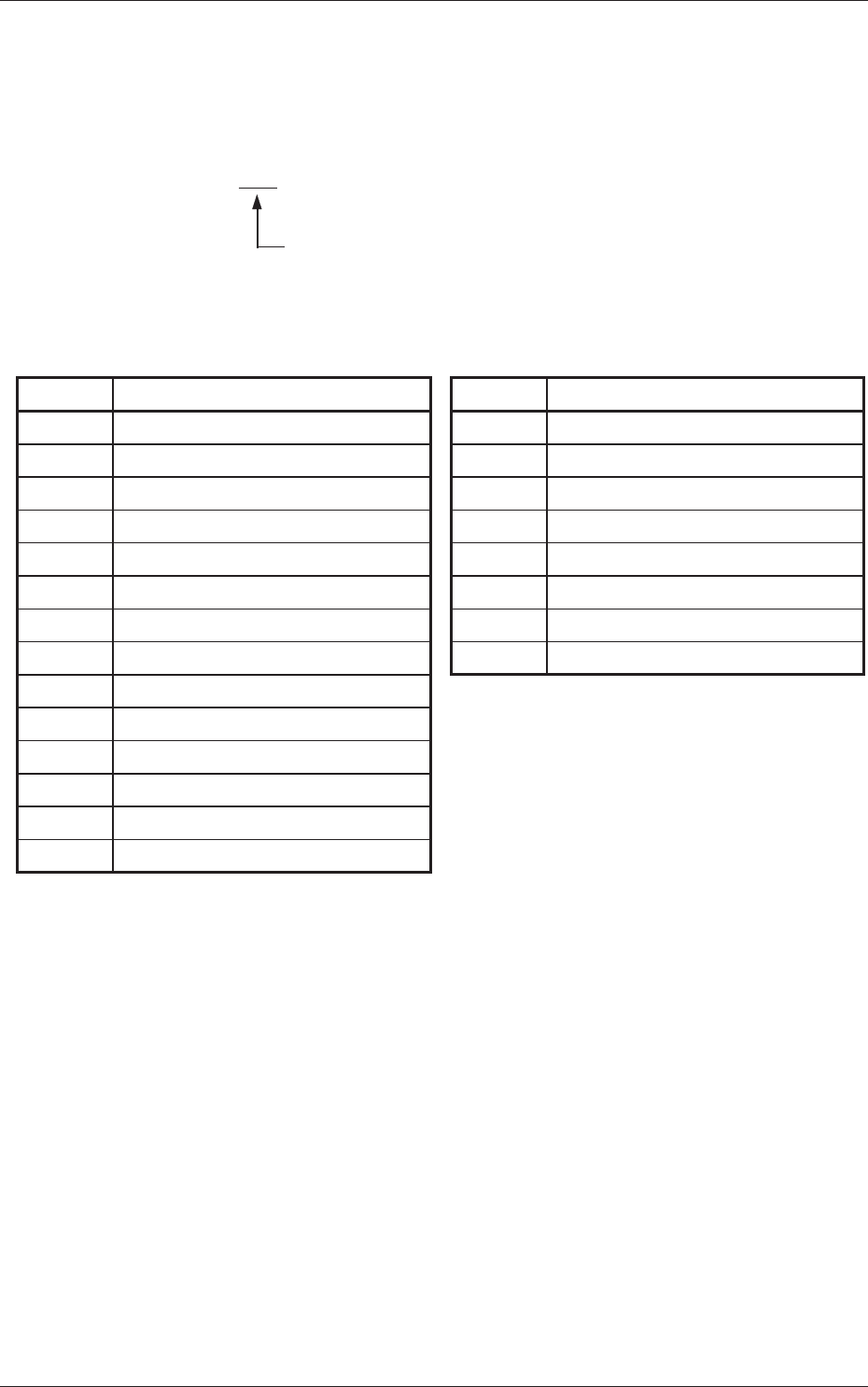
An error ID is expressed by 7 digits (decimal number) as follows.
Major Classification of "Operating Axis", "Process Error",
and "Teaching Operation"
Error IDs and Controlled Areas
Table 4B5
Error ID Operation Axis
01
Table X Axis
02
Table Z Axis
03
Placement Z Correction Table θ Axis
04
Screen Y Axis
05
Squeegee Driving Axis
06
PEC Recognition Camera X Axis
07
PEC Recognition Camera Y Axis
08
Screen Recognition Camera X Axis
09
PCB Backup Axis
10
Table Chute Width
11
Input Conveyor
12
Output Conveyor
13
PCB Transfer
14
Squeegee Head
Error ID Process Error
15 Safety Device
16 Self-Diagnostics
17 Material Shortage
18 PEC Recognition
19 Screen Recognition
20 Cleaning
21
Operator’s Error
22 Others
0603-001
2.2 Troubleshooting after Error Display

2-15 AKOEMT-ID
0609-002
2.2 Troubleshooting after Error Display
2.2.3 Error IDs and Remedial Procedures
(01 Table-X Axis) Table 4B6
Error ID Error Name, Description, Cause, and Remedy
0101000 Table-X Origin
Zeroing opn. was incompleted, within specified time.
(Cause 1)
Dirt adheres to the sensor and the optical beam is shielded.
(Cause 2) The sensor is defective.
(Cause 3) The driver is malfunctioning or an error has occurred during communication with
the host CPU.
(Remedy 1) Wipe off dirt on the sensor and zero
Table X again.
(Remedy 2) It is required to replace the sensor with a new one. Contact our service
personnel for details.
(Remedy 3) Shut down the power of the machine once and power up the machine again.
After that, zero Table X. If this operation does not reset the machine to its
normal condition, the driver may be defective. Contact our service personnel
for details.
0102000 Table-X Origin
Detect lost pulse error.
(Cause 1)
The motor is overloaded and has a loss of synchronism.
(Remedy 1) Check for any obstacle around the table X axis and then perform the zeroing
operation. If this operation does not reset the machine to its normal condition,
contact our service personnel for details.
0103000 Table-X Overrun
(+) Limit error has been detected.
(Cause 1) Dirt adheres to the sensor and the optical beam is shielded.
(Cause 2) The sensor is defective.
(Cause 3)
The driver is malfunctioning or an error has occurred during communication with
the host CPU.
(Remedy 1) Wipe off dirt on the sensor and zero
Table X again.
(Remedy 2) It is required to replace the sensor with a new one. Contact our service
personnel for details.
(Remedy 3) Shut down the power of the machine once and power up the machine again.
After that, zero Table X. If this operation does not reset the machine to its
normal condition, the driver may be defective. Contact our service personnel
for details.
0105000 Table-X Driver
Driver alarm signal was detected.
0108000 Table-X Driver
Driver Over-Heat
(Cause 1)
Self-Diagnostics Error Message
(Remedy 1) Zero all axes and restart the operation. If this operation does not reset the
machine to its normal condition, contact our service personnel for details.

2-16 AKOEMT-ID
Table 4B7
Error ID Error Name, Description, Cause, and Remedy
0109000 Table-X Driver
Operation was incompleted, within specified time.
(Cause 1)
The driver is malfunctioning or an error has occurred during communication with
the host CPU.
(Remedy 1) Shut down the power of the machine once and power up the machine again.
After that, perform the zeroing operation. If this operation does not reset the
machine to its normal condition, the driver may be defective. Contact our
service personnel for details.
0110000 T
able-X Interlock
Table-Z Axis is not at safety area.
(Cause 1) The table Z axis interlock sensor (B4D) is defective.
(Cause 2) The operation timing is shifted from the normal one.
(Remedy 1) Check how the sensor is working in “DEVICE CHECK” window (submenu).
When the sensor is not working, it is required to replace the sensor with a new
one. Contact our service personnel for details.
(Remedy 2) Shut down the power of the machine once and power up the machine again.
After that, restart the operation. When the same error still occurs, contact our
service personnel for details.
0111000
Table-X Interlock
Table-Z Axis is not at origin.
(Cause 1) The table Z axis origin sensor (B171) is defective.
(Cause 2) The operation timing is shifted from the normal one.
(Remedy 1) Check how the sensor is working in “DEVICE CHECK” window (submenu).
When the sensor is not working, it is required to replace the sensor with a new
one. Contact our service personnel for details.
(Remedy 2) Shut down the power of the machine once and power up the machine again.
After that, restart the operation. When the same error still occurs, contact our
service personnel for details.
0112000 T
able-X Interlock
PCB stopper was down.
(Cause 1) The table X axis was activated after the PCB stopper had moved down.
(Cause 2) The PCB stopper upper limit (B68) is defective.
(Remedy 1)
Move up the PCB stopper and restart the operation.
(Remedy 2) Adjust the sensor position. If this operation does not reset the machine to its
normal condition, it is required to replace the sensor with a new one. Contact
our service personnel for details.
0113000 T
able-X Interlock
PCB warpage protection was down.
(Cause 1) The table X axis was activated after the PCB warpage protection had moved
down.
(Remedy 1) Move up the PCB warpage protection and restart the operation.
0114000
Table-X Interlock
Table-Theta Axis is not at origin.
(Cause 1) The operating timing may be shifted from the normal one.
(Remedy 1) Power up the machine again and then perform the zeroing operation.
0609-002
2.2 Troubleshooting after Error Display