00198706-01_AI_Stationaere_Kamera_25_33_GigE_SXV3_DE_EN.pdf - 第68页
3 Installation 3.2 Installation position 68 Assembly Instructions / Montageanleitung SIPLACE SX1/SX2 V3 Stationäre Kamera Typ 25/33 (GigE) Stationary Camera Type 25/33 (GigE) 03/2021 3.2 Installation position Fig.8: Ins…
3 Installation
3.1 General information
Assembly Instructions / Montageanleitung SIPLACE SX1/SX2 V3 Stationäre Kamera Typ 25/33 (GigE) Stationary
Camera Type 25/33 (GigE) 03/2021
67
3 Installation
3.1 General information
General information
●
IC cameras (SST33), FC cameras (SST25) or a coplan module can be installed at locations 1
and 2.
●
The SIPLACE CPP supports the IC camera.
●
The SIPLACE CPP must always be fitted in the top position (for CPP_H see service manual).
●
The SIPLACE TwinHead (TH) and the SIPLACE Very high force TwinHead (VHFTH) both
support the IC, FC camera and the 3D coplan module.
●
The IC camera is a prerequisite for installation of the FC camera or a 3D coplan module.
●
When fitting the IC camera, you need to fit adapter plates to the machine frame. These are
available for location 1 and location 2.
●
These adapter plates/mounting plates can accommodate both cameras (IC, FC), the 3D co-
plan module and the reject bin.
●
The installation height of the cameras is prescribed by the holes drilled in the adapter plate
and must be sight-checked after completion of the work, to prevent a head crash!
NOTICE
FC camera, 3D coplan module and SIPLACE TwinHead (TH) / SIPLACE Very high
force TwinHead (VHFTH)
An FC camera and a 3D coplan module are only possible together with a TwinHead. Only
one of these options can be fitted at the same location, meaning that either the FC camera
or the 3D coplan module can be used.
3 Installation
3.2 Installation position
68 Assembly Instructions / Montageanleitung SIPLACE SX1/SX2 V3 Stationäre Kamera Typ 25/33 (GigE) Stationary
Camera Type 25/33 (GigE) 03/2021
3.2 Installation position
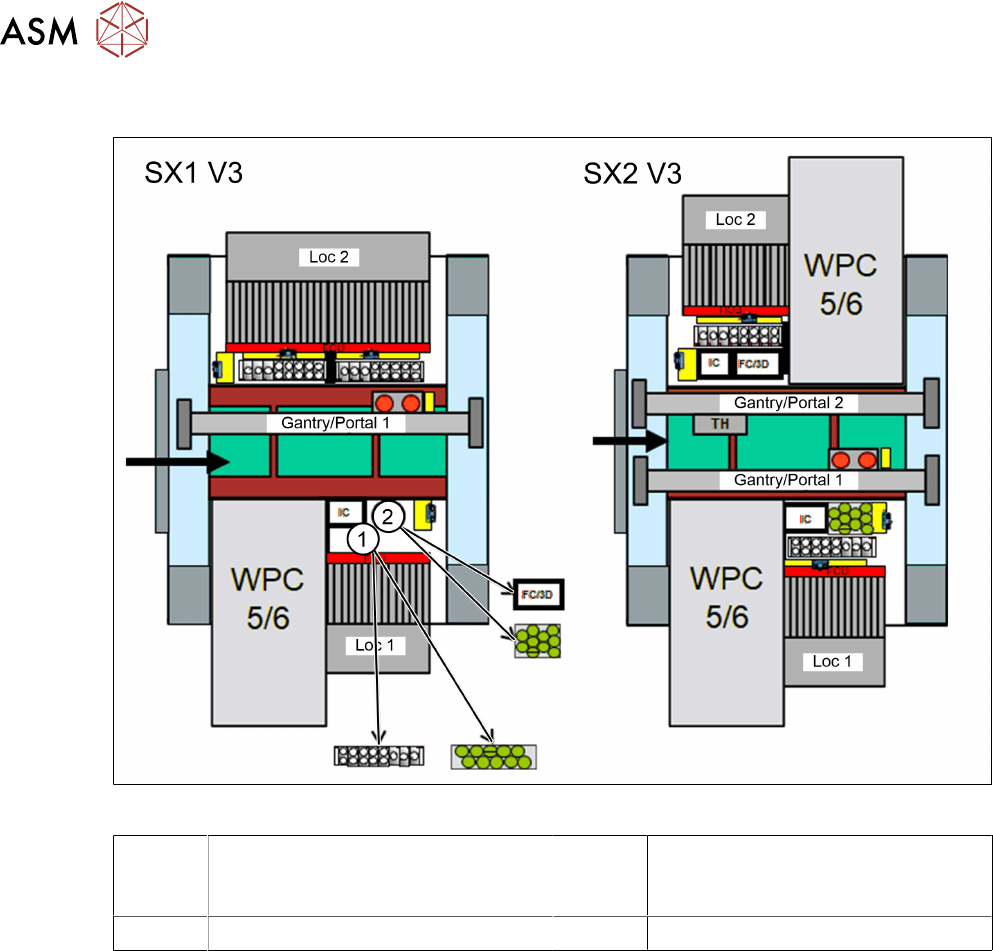
Fig.8: Installation position of stationary cameras
1 NC / pin magazine Q10 (Smart Pin
Support option)
2 FC camera / 3D coplan module / pin
magazine L10 (Smart Pin Support
option)
Loc 1 Location 1 Loc 2 Location 2
3.3 Preparatory work on the machine
► Remove the component trolley/WPC from the camera installation position.
► Switch off the machine, disconnect it from the power supply and secure it to prevent
unauthorized reactivation.
1.2 "Preparatory work..." [}55]
► Dismantle the waste tape chute.
4.1.1 "Replacing the Waste Tape Chute" [}81]
► Dismantle the reject bin holder.
► You may have to move out the COTi out a little to improve the accessibility.
4.1.2 "Replacing the SX1/SX2 COT insert assembly" [}82]
3 Installation
3.4 Preparatory work on the cameras
Assembly Instructions / Montageanleitung SIPLACE SX1/SX2 V3 Stationäre Kamera Typ 25/33 (GigE) Stationary
Camera Type 25/33 (GigE) 03/2021
69
3.4 Preparatory work on the cameras
NOTICE
The following tasks are principally the same for both camera types. Any relevant differ-
ences will be mentioned explicitly.
Removing the upper section and cover
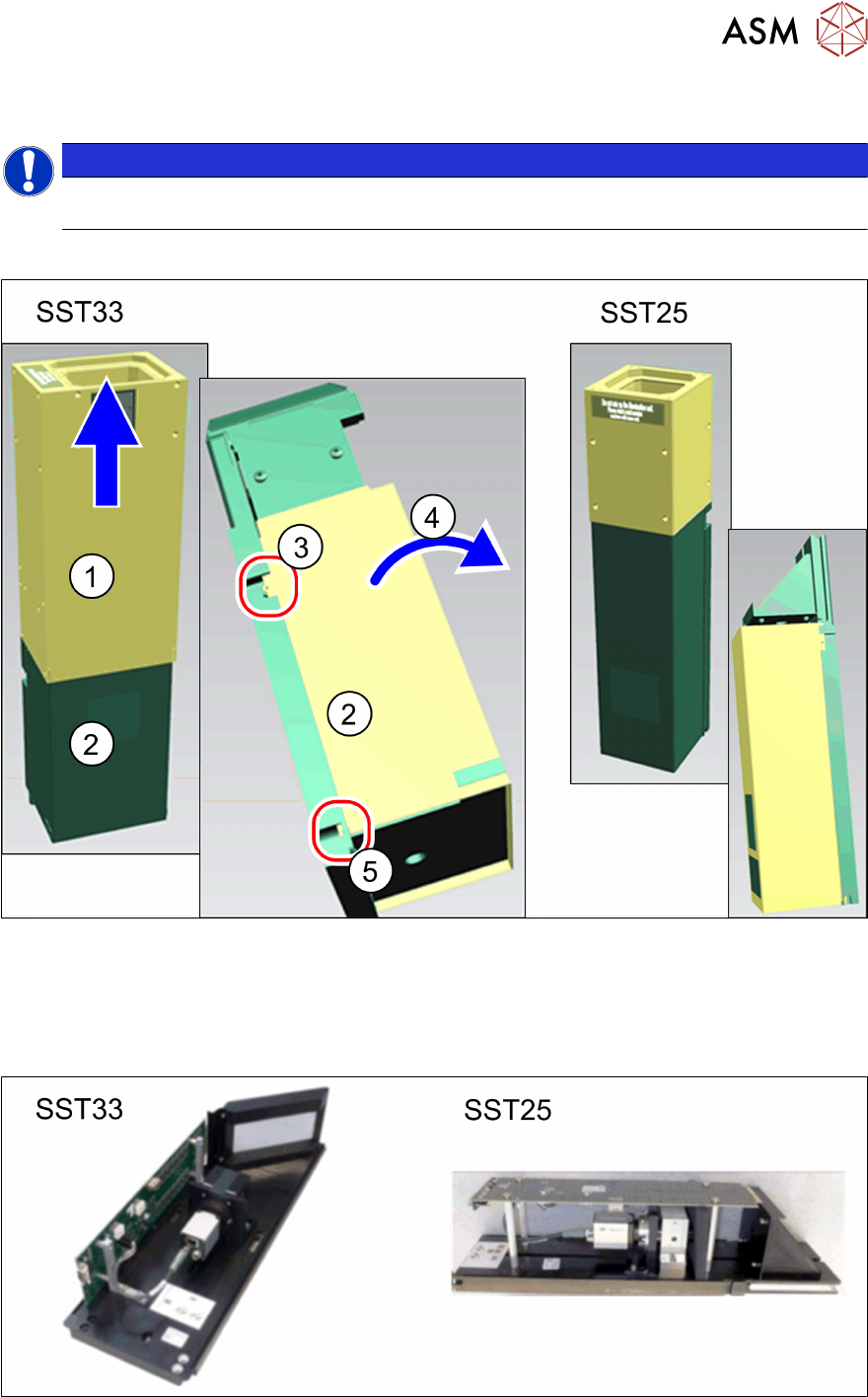
Fig.9: Removing the upper section and bottom cover
► Pull the top section(1) straight up and off the bottom section.
► Press the bottom cover(2) out of the pins on the left and right(3) and swing the cover for-
wards(4)
.
► Lift the cover slightly(5) and take off.
Fig.10: Camera lower parts for IC camera (SST33) and FC camera (SST25)