00198706-01_AI_Stationaere_Kamera_25_33_GigE_SXV3_DE_EN.pdf - 第71页
3 Installation 3.5 Fitting the cameras Assembly Instructions / Montageanleitung SIPLACE SX1/SX2 V3 Stationäre Kamera Typ 25/33 (GigE) Stationary Camera Type 25/33 (GigE) 03/2021 71 3.5 Fitting the cameras 3.5.1 Fitting t…
3 Installation
3.4 Preparatory work on the cameras
70 Assembly Instructions / Montageanleitung SIPLACE SX1/SX2 V3 Stationäre Kamera Typ 25/33 (GigE) Stationary
Camera Type 25/33 (GigE) 03/2021
Setting the camera
► Set the DIP switch S1 as follows:
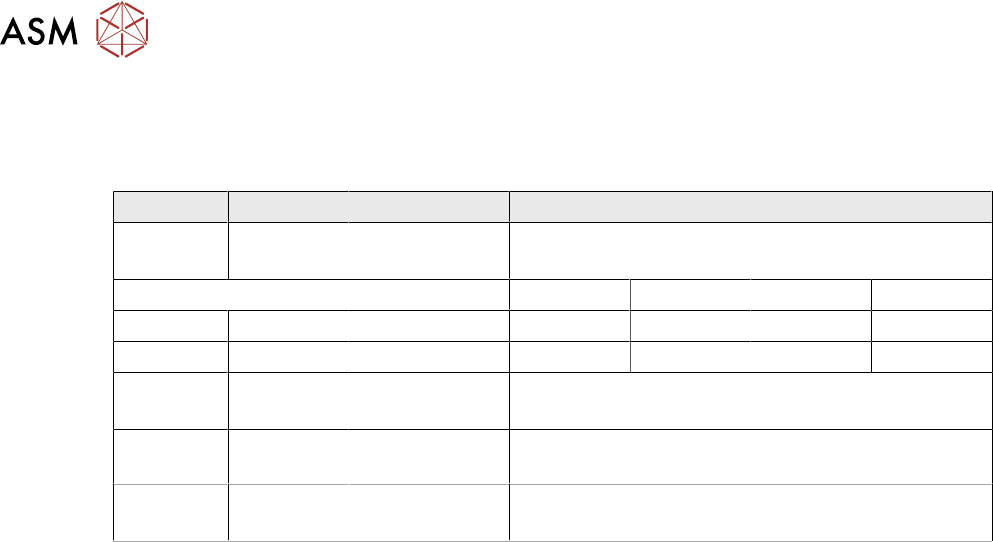
DIP switch S1 for SST25 and SST33:
Switch Status Signal name Description
S1.1 OFF VCU_CODE OFF: normal operation
ON: Reset
Location 1 Location 2 Location 3 Location 4
S1.2 ON/OFF *) PORTAL_ID_0 OFF ON OFF ON
S1.3 ON/OFF *) GANTRY_ID_1 OFF OFF ON ON
S1.4 OFF SMD_LED OFF: standard LED
ON: SMD LED
S1.5 OFF CAN_H OFF: with CAN terminator
ON: without CAN terminator
S1.6 ON/OFF CAN_GROUP OFF: FC camera
ON: IC camera
*) Set the location at which the stationary camera is fitted. There are no locations 3 or 4 on the
SIPLACE SX1/SX2.
See also
2 4.2.1 "PCBs Stationary Cameras" [}90]
3 Installation
3.5 Fitting the cameras
Assembly Instructions / Montageanleitung SIPLACE SX1/SX2 V3 Stationäre Kamera Typ 25/33 (GigE) Stationary
Camera Type 25/33 (GigE) 03/2021
71
3.5 Fitting the cameras
3.5.1 Fitting the support plate assembly
The IC camera is necessary for fitting the FC camera or a 3D coplan module. Both mounting plates
(for location 1 and 2) are therefore provided in the IC retrofit kit.
If it has not already been fitted, fit the support plate assembly next. The cameras and reject bin are
then installed on the support plate assembly.
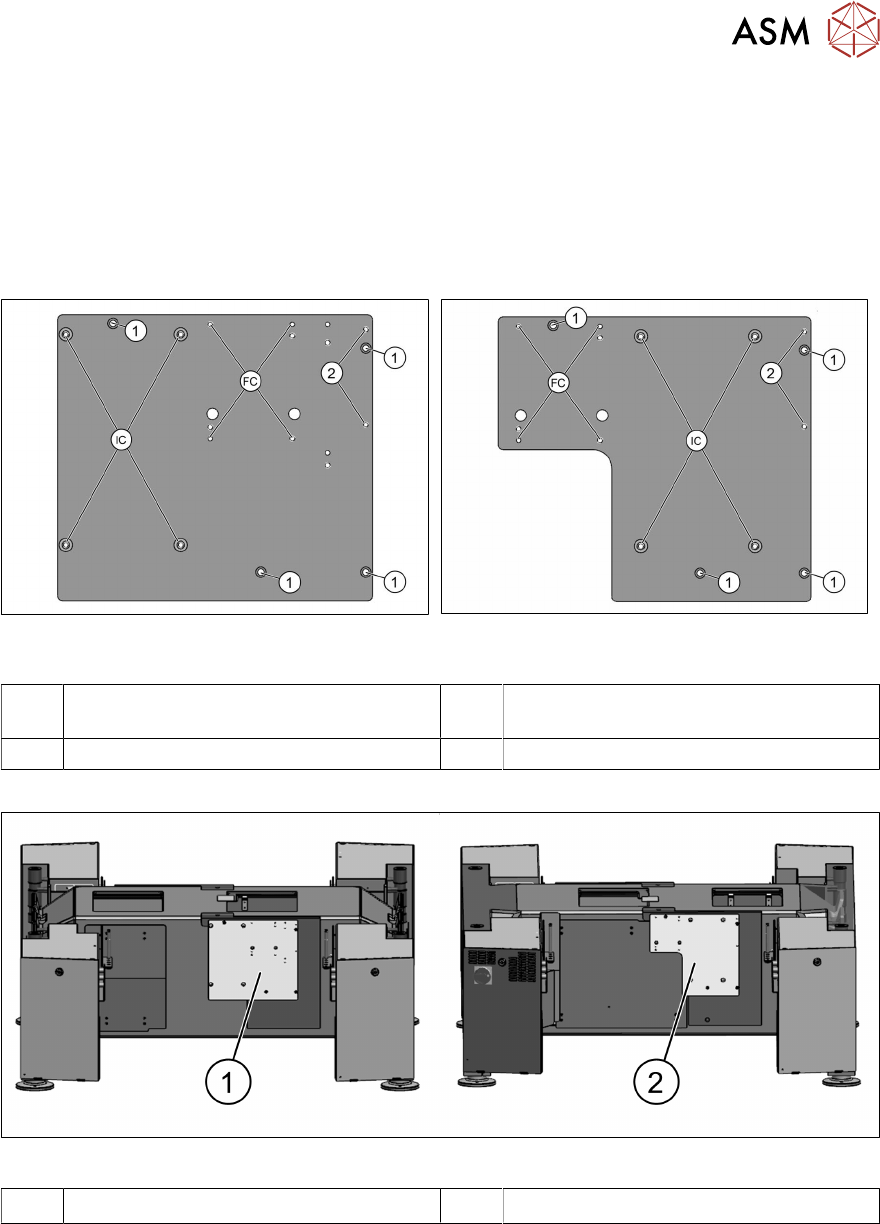
Fig.11: Support plate assembly location 1
[03070836‑xx]
Fig.12: Support plate assembly location 2
[03070862‑xx]
1 Fixture points for support plate assembly
on the machine frame
2 Fixture points for reject bin
FC Fixture points for FC camera (type 25) IC Fixture points for IC camera (type 33)
Fig.13: Support plate assemblies on machine bottom section
1 Support plate assembly on location 1 2 Support plate assembly on location 2
► Fit and fix the support plate assembly with four screws (ISO4762-M6x22-A2-70).
3 Installation
3.5 Fitting the cameras
72 Assembly Instructions / Montageanleitung SIPLACE SX1/SX2 V3 Stationäre Kamera Typ 25/33 (GigE) Stationary
Camera Type 25/33 (GigE) 03/2021
3.5.2 Fitting the IC camera
CAUTION
Observe the installation height
When fitting the camera, observe the correct installation height. Otherwise there is a risk of
head crash!
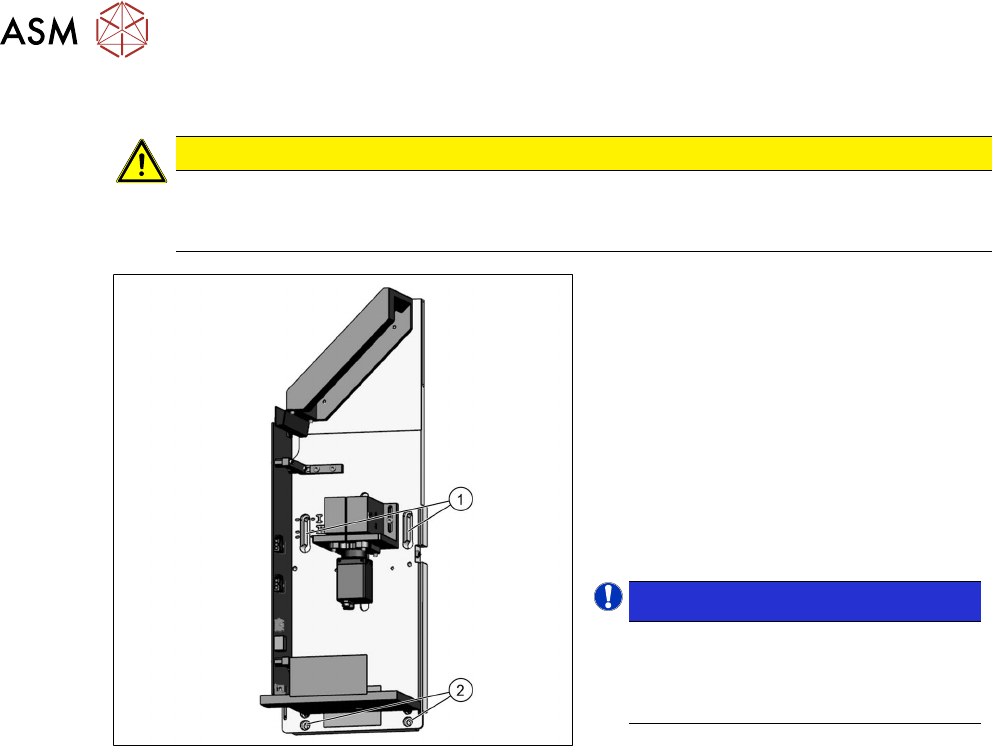
Fig.14: Lower section of camera
► Screw the two top fastening screws
loosely into the support plate assembly
onto which the camera will be fitted
later on. The screws should be
tightened enough to still allow the cam-
era to be easily hooked in.
► Carefully hook the top screw holes on
the lower section of the camera(1)
onto the fastening screws.
► Fix the lower section of the camera with
two screws to the lower screw open-
ings (2)
.
NOTICE!
Installation height
The correct installation height is de-
termined by the thread in the support
plate assembly.
.
► Tighten all four fastening screws.
The lower section of the camera has now
been fixed into place.