00198706-01_AI_Stationaere_Kamera_25_33_GigE_SXV3_DE_EN.pdf - 第74页
3 Installation 3.6 Electrical connections 74 Assembly Instructions / Montageanleitung SIPLACE SX1/SX2 V3 Stationäre Kamera Typ 25/33 (GigE) Stationary Camera Type 25/33 (GigE) 03/2021 Fig.17: Overview of trailing cable …
3 Installation
3.6 Electrical connections
Assembly Instructions / Montageanleitung SIPLACE SX1/SX2 V3 Stationäre Kamera Typ 25/33 (GigE) Stationary
Camera Type 25/33 (GigE) 03/2021
73
3.5.3 Fitting the FC camera and support plate
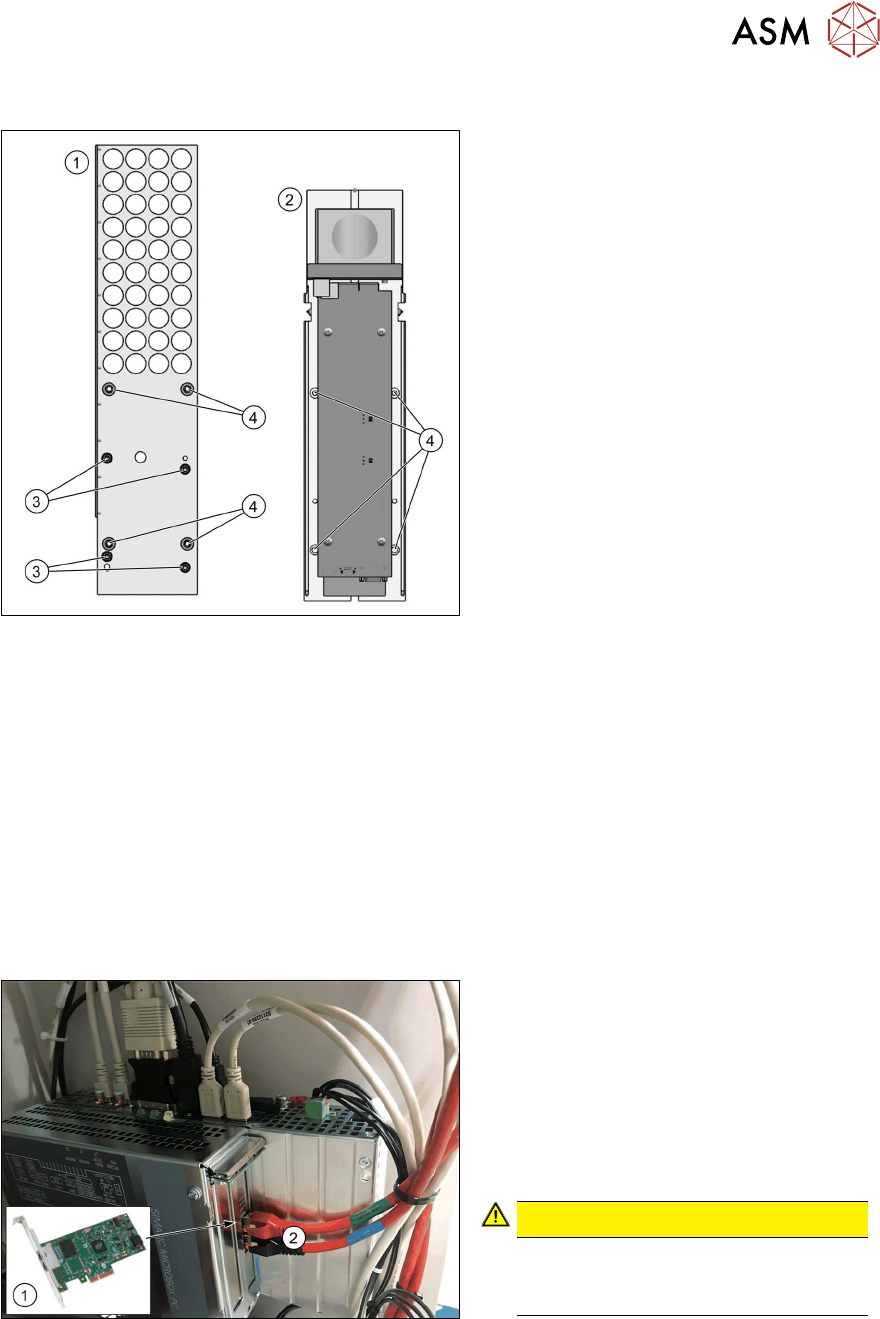
Fig.15: Support plate FC [03077911‑xx]
1. Support plate FC [03077911‑xx]
2. Lower part of FC camera
3. Four screws [03045087‑xx]
(DIN912-M6x12-A2-70)
4. Four screws [03042574‑xx]
(ISO4762-M6x20-A2-70)
●
Two threaded pins [03106014‑xx]
(DIN‑EN‑ISO4026-M6x50‑45H)
► Fit the support plate(1) to the support
plate with four screws(3)
.
The FC camera(2) is fixed into place with
four screws(4)
. For easier installation, pro-
ceed as follows:
► Rotate the two threaded pins into the top two positions.
► Fit the bottom section of the FC camera onto the two threaded pins.
► Fasten the camera at the bottom with two screws.
► Remove the two threaded pins.
► Fasten the camera at the top with two screws.
3.6 Electrical connections
Also observe the detailed circuit diagrams for your machine:
●
Detailed circuit diagrams folder for SIPLACE SX1/SX2V3 (fromRxxxx)
[DEEN:00198680‑xx]
Fig.16: GigE ethernet adapter in the BoxPC
1. GigE ethernet adapter PCI-E I350 T2
V2 BLK [03115569‑xx]
2. GigE cable:
Gantry/location 1: X1
Gantry/location 2: X2
► Check the cabling on the BoxPC.
CAUTION!
Never insert a LAN cable into the
GigE card.
This could damage the GigE card.
.
3 Installation
3.6 Electrical connections
74 Assembly Instructions / Montageanleitung SIPLACE SX1/SX2 V3 Stationäre Kamera Typ 25/33 (GigE) Stationary
Camera Type 25/33 (GigE) 03/2021
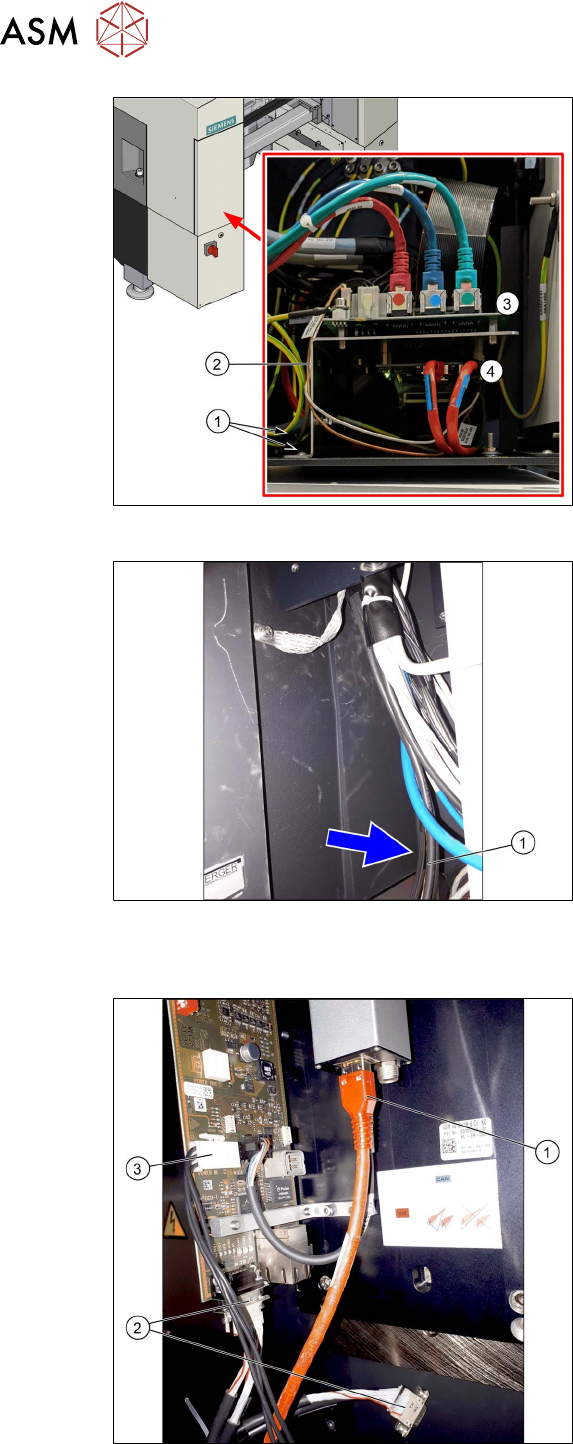
Fig.17: Overview of trailing cable interface
1. Screws fastening the mount (front and
back)
2. Mount
3. Trailing unit interface
4. Vision Base Interface (VBI) (on the un-
derside of the mount)
The trailing cable interface for gantry 1 is
located in sector 1.
The trailing cable interface for gantry 2 (only
SIPLACE SX 1 prepared" and SX2) is loc-
ated in sector 3.
Fig.18: Connecting cable
► Find the connection cable(1). This is
either on the left or right of the cable
tree, depending on the location.
Electrical connections for IC camera
Fig.19: IC camera
1. Camera cable
Location 1: CAT6 [03221649‑xx]
Location 2: CAT6 [03221651‑xx]
2. CAN bus cable
MCAN cable [03099372‑xx] for IC and
FC camera
MCAN2 one each for location 1 and 2
3. Power supply cable [03200832‑xx]
one each for location 1 and 2
When only one stationary camera is used,
the camera cable, the CAN bus cable and
the power supply cable are connected dir-
ectly.
3 Installation
3.6 Electrical connections
Assembly Instructions / Montageanleitung SIPLACE SX1/SX2 V3 Stationäre Kamera Typ 25/33 (GigE) Stationary
Camera Type 25/33 (GigE) 03/2021
75
Electrical connections for IC and FC camera
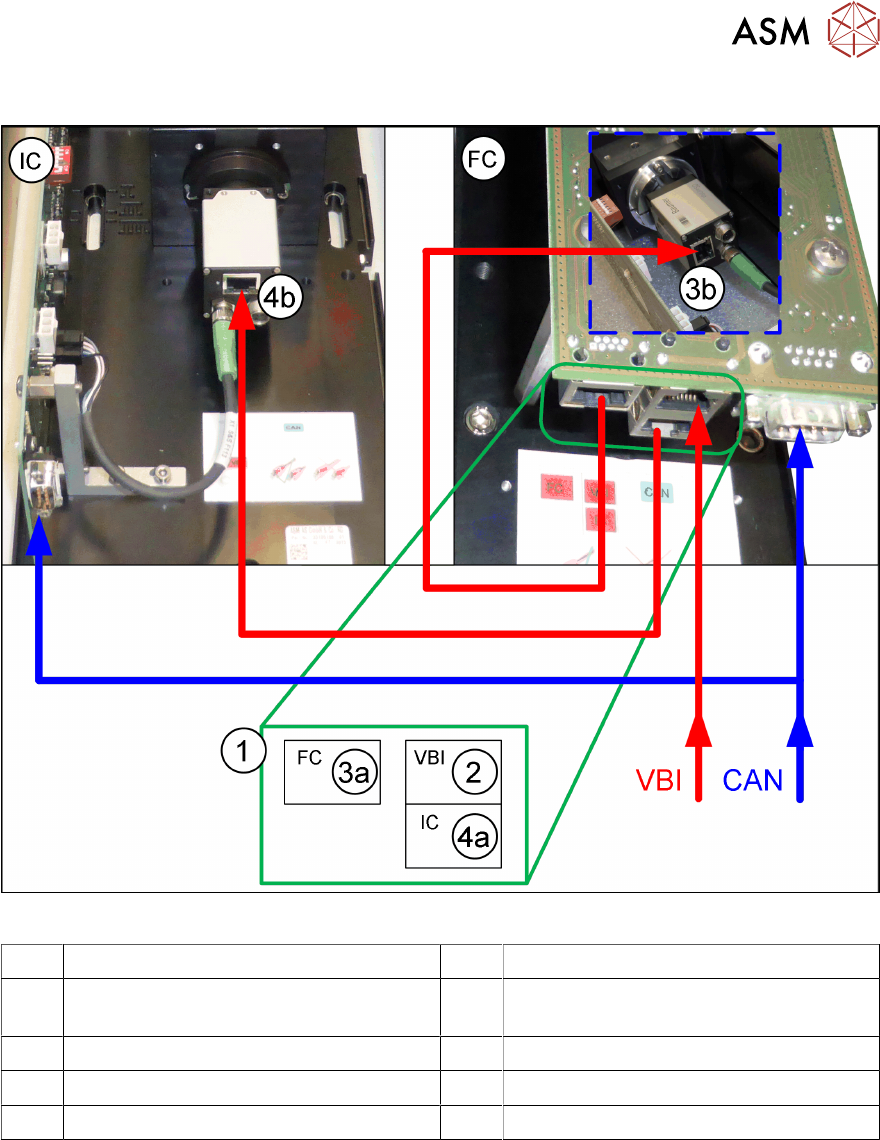
Fig.20: Connecting the IC camera to the FC camera
IC IC camera, type SST33 FC FC camera, type SST25
VBI GigE cable run from the machine (from
the Vision Base Interface)
CAN CAN cable
1 Multiplexer on the FC camera 2 Input on the multiplexer (from BoxPC)
3a Output on multiplexer to FC camera 4a Output on multiplexer to IC camera
3b Input on FC camera 4b Input on IC camera
► Disconnect the GigE cable, leading away from the machine, from the IC camera connec-
tion(4b)
and connect it to the FC camera multiplexer connection(2).
► Check whether the cable "cable: extension camera bus IC/FC camera" [03106367‑xx] is
present between the connections(3a)
und(3b). If not, connect the two connections.
► Use the GigE cable supplied "cable: extension camera bus IC/FC camera" [03106367‑xx] with
the retrofit kit to connect the connections(4a)
and(4b).