00198706-01_AI_Stationaere_Kamera_25_33_GigE_SXV3_DE_EN.pdf - 第72页
3 Installation 3.5 Fitting the cameras 72 Assembly Instructions / Montageanleitung SIPLACE SX1/SX2 V3 Stationäre Kamera Typ 25/33 (GigE) Stationary Camera Type 25/33 (GigE) 03/2021 3.5.2 Fitting the IC camera CAUTION Obs…
3 Installation
3.5 Fitting the cameras
Assembly Instructions / Montageanleitung SIPLACE SX1/SX2 V3 Stationäre Kamera Typ 25/33 (GigE) Stationary
Camera Type 25/33 (GigE) 03/2021
71
3.5 Fitting the cameras
3.5.1 Fitting the support plate assembly
The IC camera is necessary for fitting the FC camera or a 3D coplan module. Both mounting plates
(for location 1 and 2) are therefore provided in the IC retrofit kit.
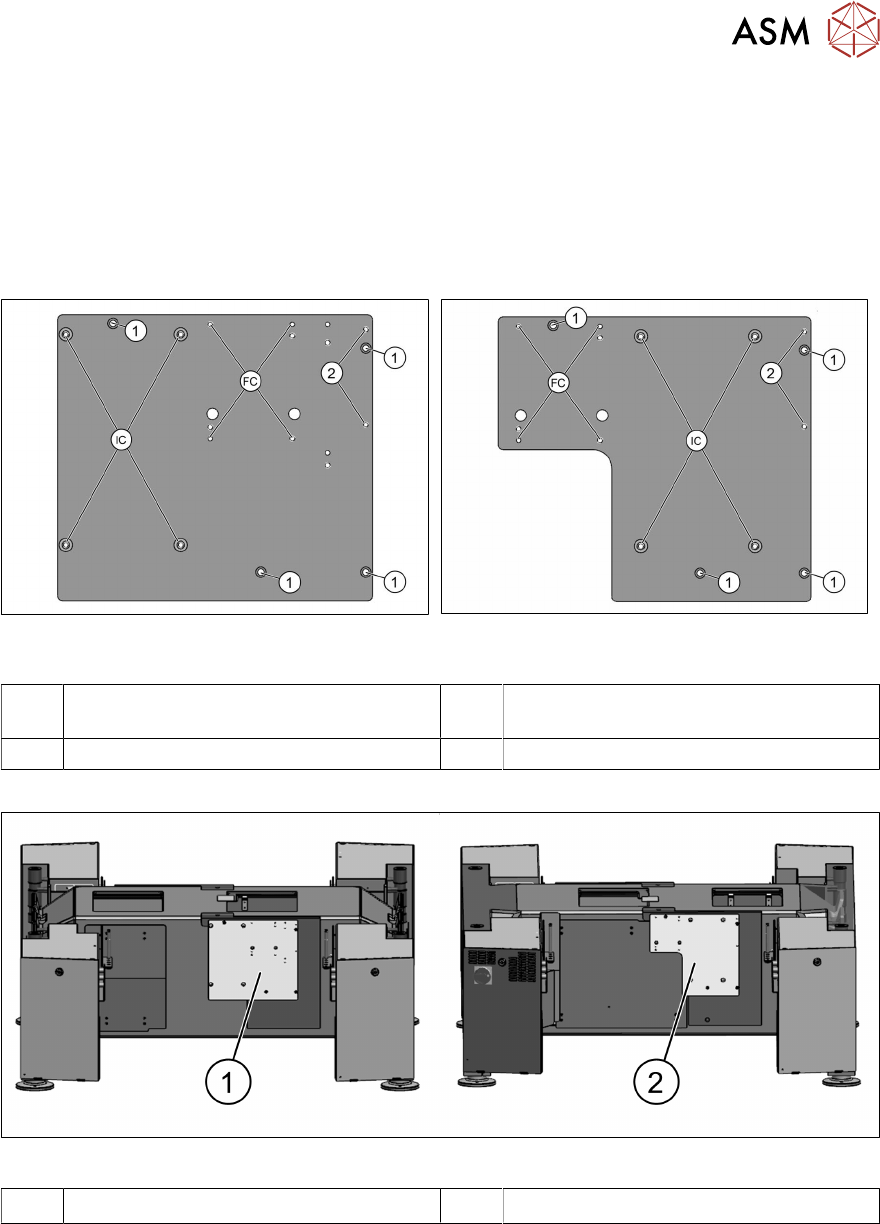
If it has not already been fitted, fit the support plate assembly next. The cameras and reject bin are
then installed on the support plate assembly.
Fig.11: Support plate assembly location 1
[03070836‑xx]
Fig.12: Support plate assembly location 2
[03070862‑xx]
1 Fixture points for support plate assembly
on the machine frame
2 Fixture points for reject bin
FC Fixture points for FC camera (type 25) IC Fixture points for IC camera (type 33)
Fig.13: Support plate assemblies on machine bottom section
1 Support plate assembly on location 1 2 Support plate assembly on location 2
► Fit and fix the support plate assembly with four screws (ISO4762-M6x22-A2-70).
3 Installation
3.5 Fitting the cameras
72 Assembly Instructions / Montageanleitung SIPLACE SX1/SX2 V3 Stationäre Kamera Typ 25/33 (GigE) Stationary
Camera Type 25/33 (GigE) 03/2021
3.5.2 Fitting the IC camera
CAUTION
Observe the installation height
When fitting the camera, observe the correct installation height. Otherwise there is a risk of
head crash!
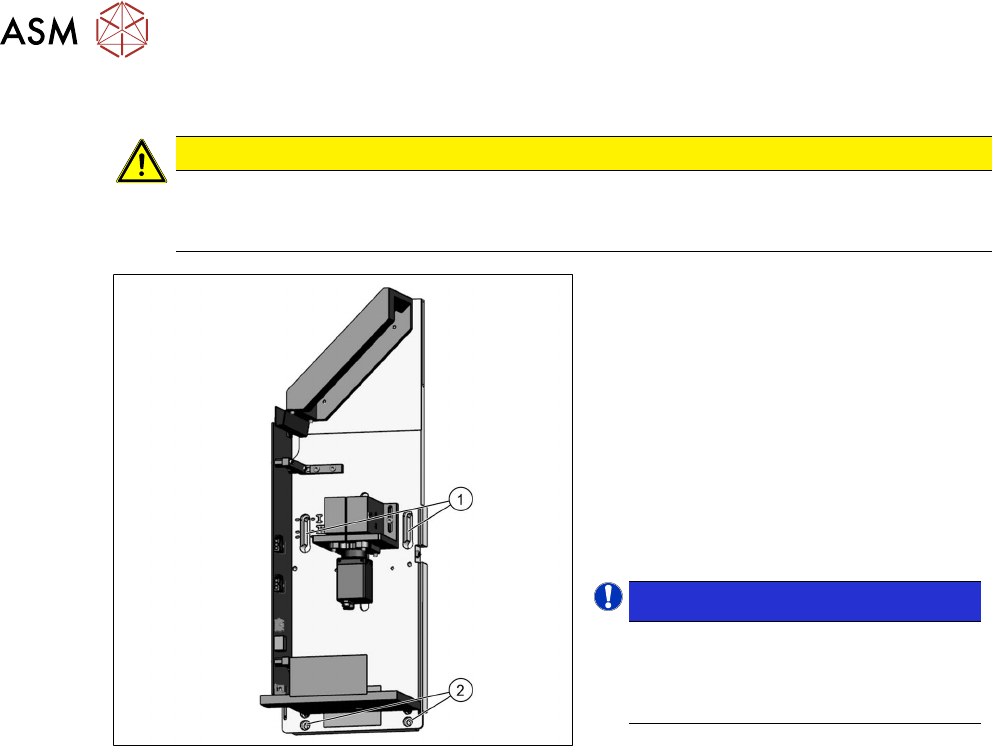
Fig.14: Lower section of camera
► Screw the two top fastening screws
loosely into the support plate assembly
onto which the camera will be fitted
later on. The screws should be
tightened enough to still allow the cam-
era to be easily hooked in.
► Carefully hook the top screw holes on
the lower section of the camera(1)
onto the fastening screws.
► Fix the lower section of the camera with
two screws to the lower screw open-
ings (2)
.
NOTICE!
Installation height
The correct installation height is de-
termined by the thread in the support
plate assembly.
.
► Tighten all four fastening screws.
The lower section of the camera has now
been fixed into place.
3 Installation
3.6 Electrical connections
Assembly Instructions / Montageanleitung SIPLACE SX1/SX2 V3 Stationäre Kamera Typ 25/33 (GigE) Stationary
Camera Type 25/33 (GigE) 03/2021
73
3.5.3 Fitting the FC camera and support plate
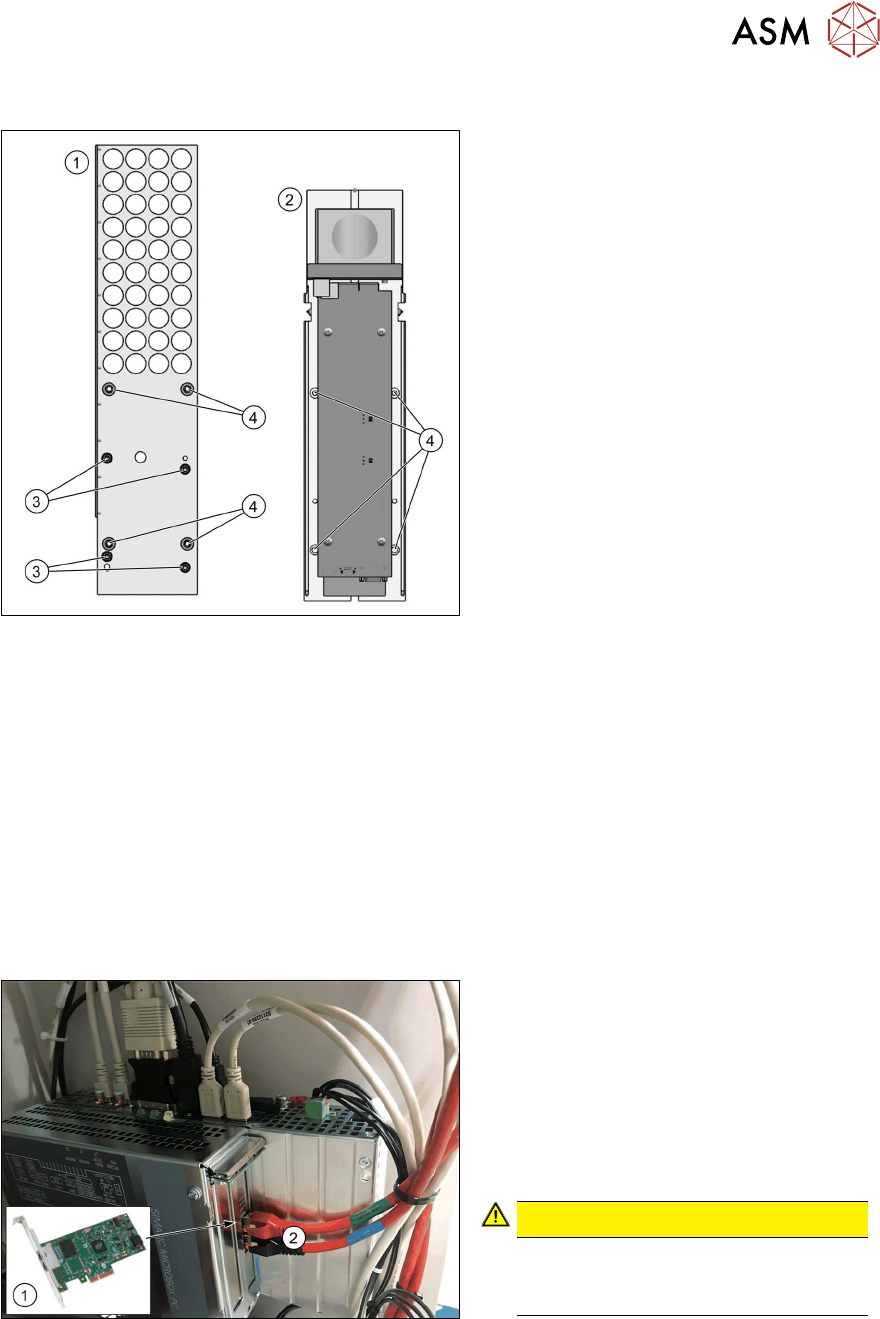
Fig.15: Support plate FC [03077911‑xx]
1. Support plate FC [03077911‑xx]
2. Lower part of FC camera
3. Four screws [03045087‑xx]
(DIN912-M6x12-A2-70)
4. Four screws [03042574‑xx]
(ISO4762-M6x20-A2-70)
●
Two threaded pins [03106014‑xx]
(DIN‑EN‑ISO4026-M6x50‑45H)
► Fit the support plate(1) to the support
plate with four screws(3)
.
The FC camera(2) is fixed into place with
four screws(4)
. For easier installation, pro-
ceed as follows:
► Rotate the two threaded pins into the top two positions.
► Fit the bottom section of the FC camera onto the two threaded pins.
► Fasten the camera at the bottom with two screws.
► Remove the two threaded pins.
► Fasten the camera at the top with two screws.
3.6 Electrical connections
Also observe the detailed circuit diagrams for your machine:
●
Detailed circuit diagrams folder for SIPLACE SX1/SX2V3 (fromRxxxx)
[DEEN:00198680‑xx]
Fig.16: GigE ethernet adapter in the BoxPC
1. GigE ethernet adapter PCI-E I350 T2
V2 BLK [03115569‑xx]
2. GigE cable:
Gantry/location 1: X1
Gantry/location 2: X2
► Check the cabling on the BoxPC.
CAUTION!
Never insert a LAN cable into the
GigE card.
This could damage the GigE card.
.