00198519-03_UM_LDU_2_X_DE_EN_CHS-ZH.pdf - 第191页
4 Operation 4.16 Monitoring production User Manual / Bedienungsanleitung / 用户手册 SIPLACE Linear Dipping Unit 2 X 05/2020 191 4.16 Monitoring production NOTICE Target group: standard operator The procedure described is a r…
4 Operation
4.15 Starting a warm-up cycle
190 User Manual / Bedienungsanleitung / 用户手册 SIPLACE Linear Dipping Unit 2 X 05/2020
4.15 Starting a warm-up cycle
NOTICE
Target group: standard operator
The procedure described is a regular task that can be carried out by any trained operator.
The LDU provides a warming function. This helps to influence the viscosity of the flux before it is
used. During this warm-up cycle the LDU performs a number of squeegee processes which can be
set. This moves the flux and "warms" it up.
The number of squeegee processes is set in the line software: 4.1.12 "Setting the warm-up cycles
and the squeegee speed" [}162].
For information on the viscosity of a flux, see chapter 3.3.4 "Viscosity and thixotropy" [}142].
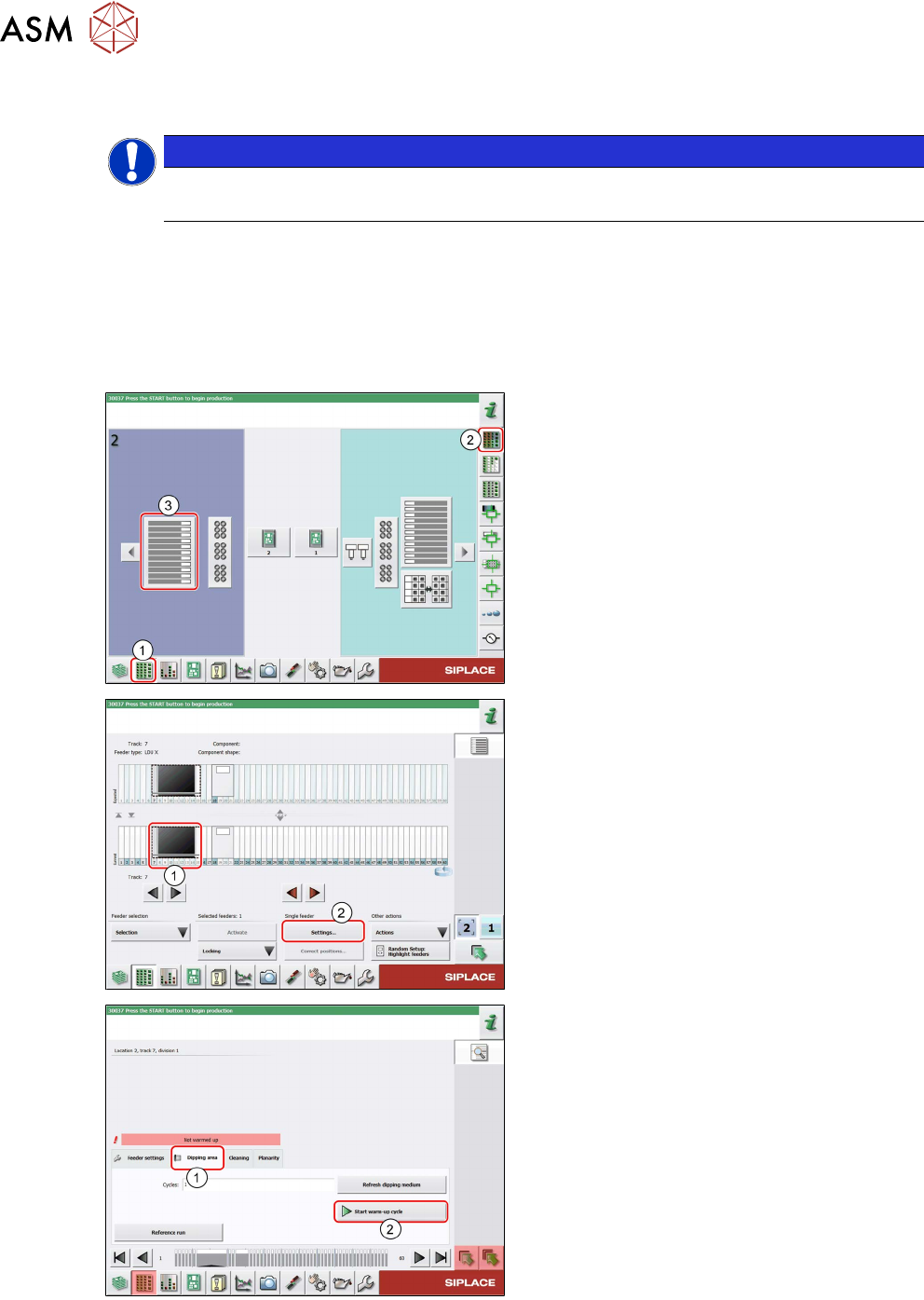
► In the station software, select the Setup
view(1) and then the Locations area(2).
► Select the Table(3) on which the LDU is
set up.
► Select the icon of the LDU(1).
► Click on the Settings... button (2).
► Select the Dipping area tab (1).
► Click on the Start warm-up cycle but-
ton(2)
.
The LDU performs the set number of squeegee
processes.
► Click on the Start warm-up cycle but-
ton(2)
again to stop the process.
After finishing the warm-up cycle, the production can be started.
4 Operation
4.16 Monitoring production
User Manual / Bedienungsanleitung / 用户手册 SIPLACE Linear Dipping Unit 2 X 05/2020 191
4.16 Monitoring production
NOTICE
Target group: standard operator
The procedure described is a regular task that can be carried out by any trained operator.
During production, the correct functioning of the LDU should be checked regularly. For this pur-
pose, perform the following steps:
► Check the level of flux in the flux tank and fill in more flux if necessary.
► Check the required flux layer height in the cavity of the dipping plate and prepare the flux
again if necessary (see chapter 4.17
"Refreshing the dipping medium" [}192]).
► Check the downholder for contaminants and clean it if necessary.
► Check the application unit for any leakage and remove any flux which leaks out.
► Check whether there are components or other contaminants on the application unit, in the
cavity or in the flux or flux tank. Stop the production process if necessary and remove these
contaminants with a pair of tweezers or clean the complete LDU application unit (see chapter
5
"Cleaning" [}195]).
CAUTION
Components or other contaminants on or in the application unit
can cause considerable damage to the LDU!
► Remove any components or contaminants immediately from the LDU.
► Use a suitable measuring device to check occasionally the required flux layer height in the
cavity in the dipping plate (see chapter 4.5
"Checking the layer thickness" [}174]).
Cleaning of the LDU after use
Do not leave the LDU standing for longer periods with the flux inside. The flux could dry out and
clog up the LDU mechanics. There is then a risk that the mechanics are damaged when you restart
the machine.
► Clean the LDU after each shift.
► Clean the LDU at least once a day.
► Clean the LDU when it is taken out of the production process.
4 Operation
4.17 Refreshing the dipping medium
192 User Manual / Bedienungsanleitung / 用户手册 SIPLACE Linear Dipping Unit 2 X 05/2020
4.17 Refreshing the dipping medium
NOTICE
Target group: standard operator
The procedure described is a regular task that can be carried out by any trained operator.
With the Refresh dipping medium function you can perform a set number of squeegee move-
ments to refresh the flux in the cavity.
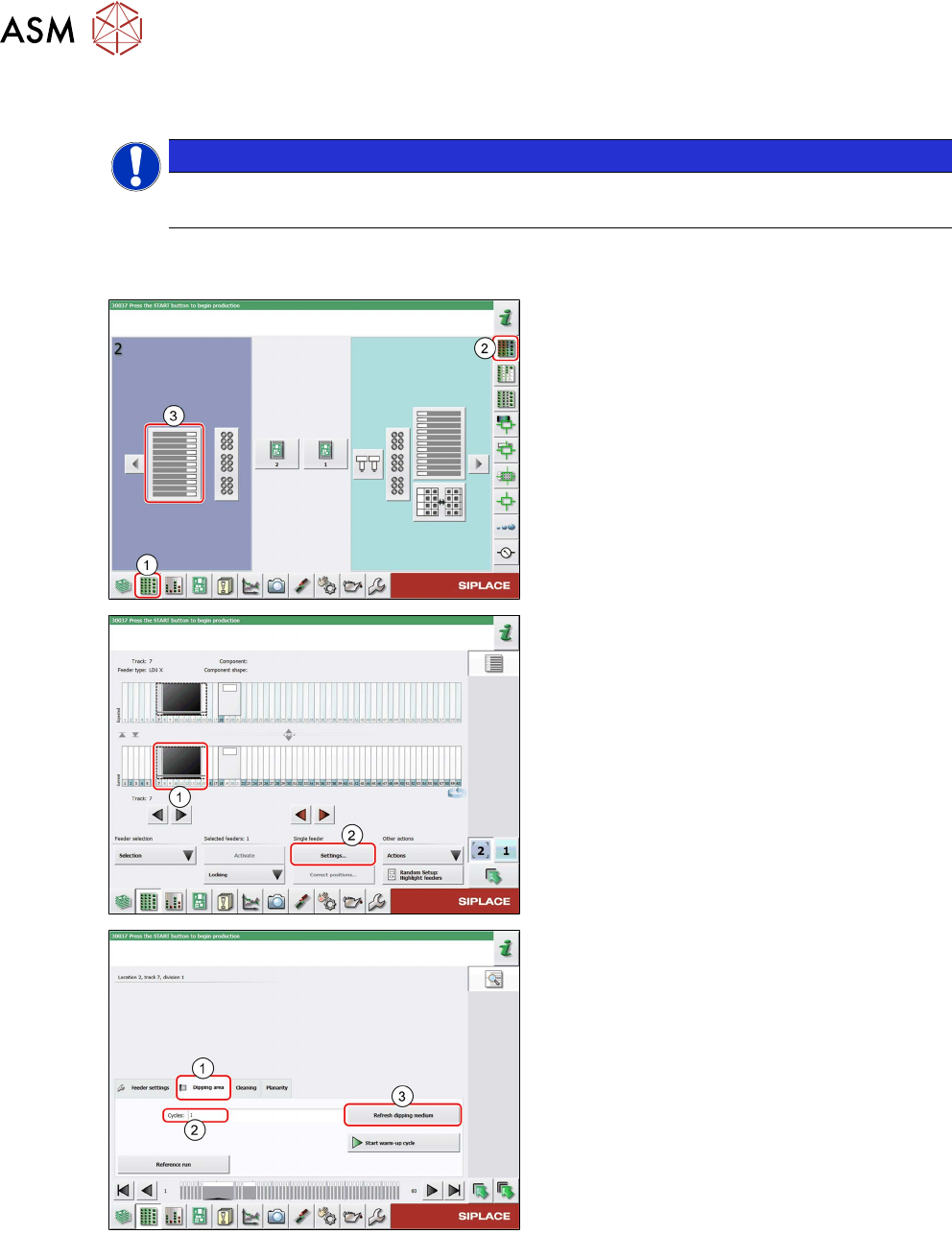
► In the station software, select the Setup
view(1) and then the Locations area (2).
► Select the Table (3) on which the LDU is
set up.
► Select the icon of the LDU(1).
► Click on the Settings... button (2).
► Select the Dipping area tab (1).
► If required, enter the desired number of
squeegee movements to be performed in
the Cycles
field.
► Click on the Refresh dipping medium
button (3).
The LDU performs the set number of squeegee
movements.