TP3447.Production Lot Operations_standard.pdf - 第18页
SMT Softw are En gineering Group IM Operations Y AMAHA M OTOR CO., L TD MDOC-SOFT50283 18/62 If there is any d ata that is not sui tabl e for the production lot operation, the “Ea25889: Production lot operation check err…
SMT Software Engineering Group
IM Operations YAMAHA MOTOR CO., LTD
MDOC-SOFT50283
17/62
3.1.6 Checking the program list
You can check if the data that has been added to the program list is applicable to the
production lot operation.
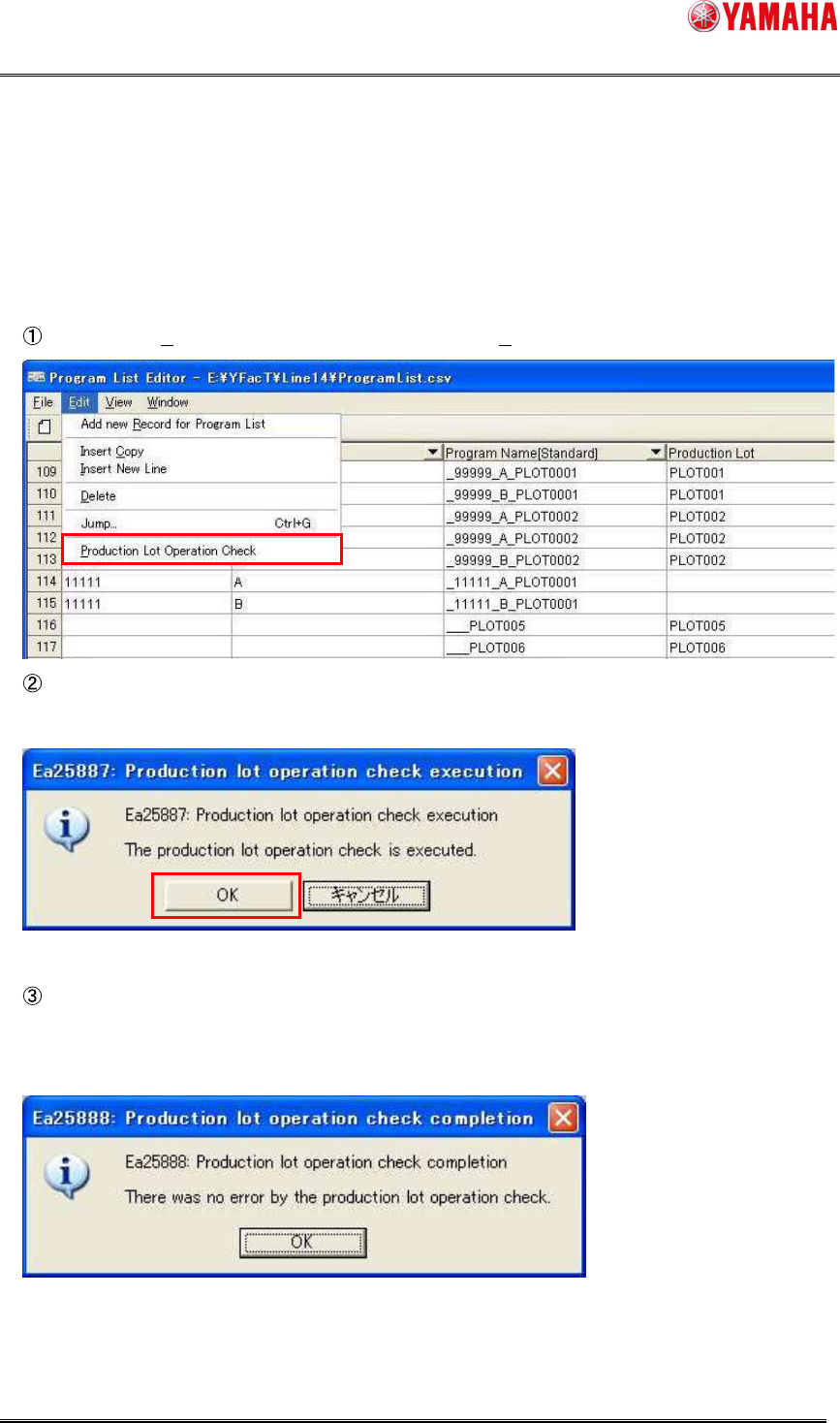
Select [Edit (E)] – [Production Lot Operation Check (P)].
In the “Ea25887: Production lot operation check execution” message window, click the
[OK] button.
The production lot operation check is executed, and then the check result is displayed.
When all of the data are correct, the “Ea25888: Production lot operation check completion”
message window will appear.
SMT Software Engineering Group
IM Operations YAMAHA MOTOR CO., LTD
MDOC-SOFT50283
18/62
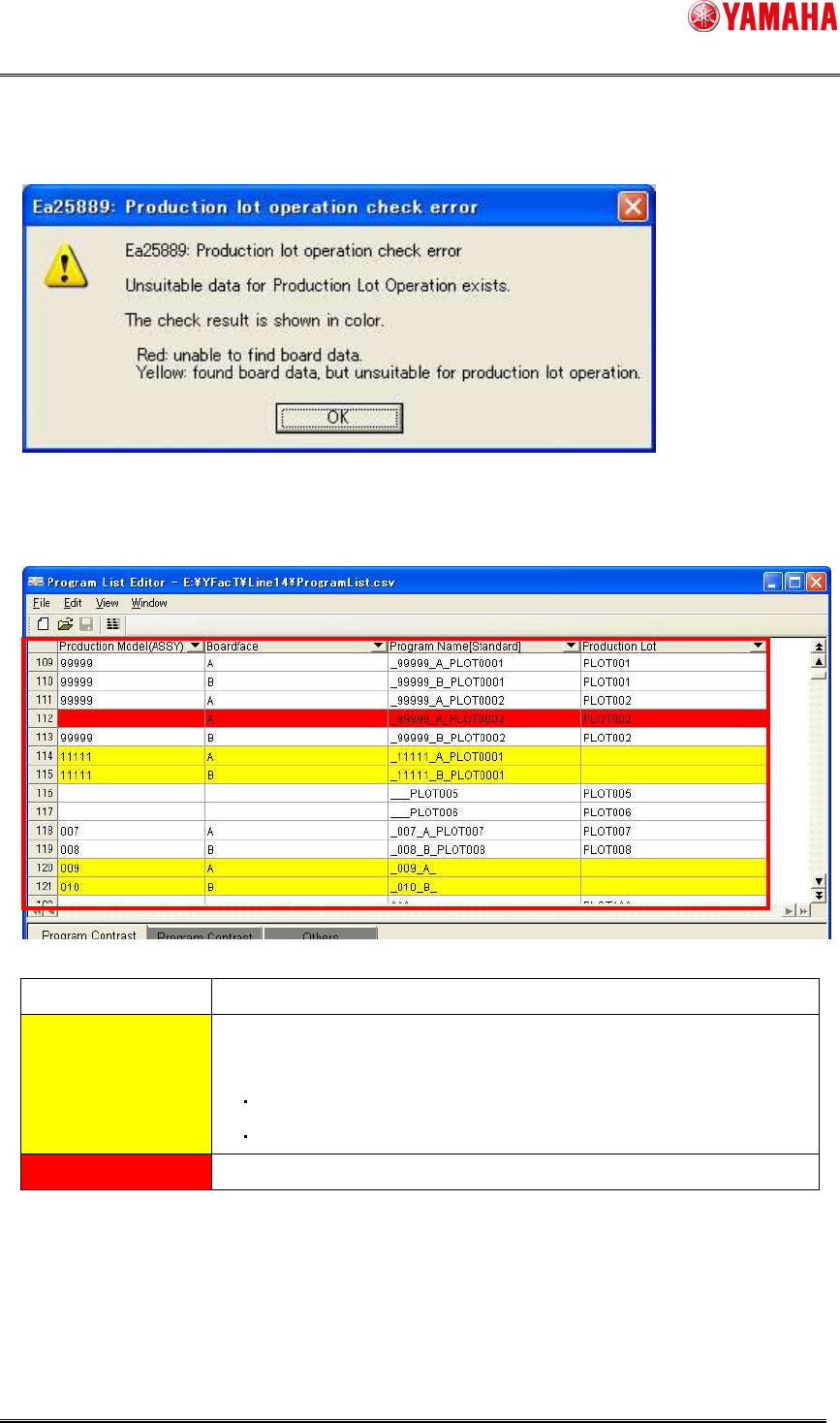
If there is any data that is not suitable for the production lot operation, the “Ea25889:
Production lot operation check error” message window will appear.
The background of the data that is not suitable for the production lot operation is displayed in
yellow or red.
Background color Contents
Yellow Data that can allocate the board program, but is not suitable for the
production lot operation.
Data without entering the production lot
Data with duplicate board program allocation conditions
Red Data that cannot allocate the board program.
* Even when the data is edited to its correct state after checking, the background color does
not change at real-time. When the check is needed, run [Production Lot Operation Check]
again.
* The background color is reset at the program list save or load timing.
SMT Software Engineering Group
IM Operations YAMAHA MOTOR CO., LTD
MDOC-SOFT50283
19/62
3.1.7 Cautions
To avoid any trouble, associate the production lot with the board program as follows.
When “OP003: Auto Pgm Change Over” is not used;
Be sure to register the production lot.
A unique value is set for the production lot.
“Production Model (ASSY)” and “Board face” can be omitted.
When “OP003: Auto Pgm Change Over” is used;
For the same model and same surface, set a unique value for the production lot.
“Production Model (ASSY)” and “Board face” can be omitted.
* When there is YG/Xg series model in the line, register “Production Model (ASSY)”
and “Board face”. If they are omitted, the auto setup is not performed.
No board data type can be specified in the program list. When selecting the production
lot with the machine or “S-Tool: Setup Navi”, specify the board data type.
* When using “OP003: Auto Pgm Change Over”, the board data type when the previous
board data is loaded is then loaded into the machine.
Be sure to exit Program List Editor when copying or renaming the program list
The production lot assumes the lot in each manufacturing process. In addition, please
correspond by devising the registration method to the program list for the distinction and
the record by another lot (lot of parents) as follows.
Example)
Register in the “Production Lot” by the name including the lot of parents.
When “Production Model (ASSY)” is not used, the lot of parents is registered in this
item.