TP3447.Production Lot Operations_standard.pdf - 第30页
SMT Softw are En gineering Group IM Operations Y AMAHA M OTOR CO., L TD MDOC-SOFT50283 30/62 4.3 Setup correspo nding to the production lot The setup work after lo ading the program is not changed. * For det ails about t…
SMT Software Engineering Group
IM Operations YAMAHA MOTOR CO., LTD
MDOC-SOFT50283
29/62
4.2.4 Troubleshooting
Error
number
Contents Cause and corrective action
Ea6314
[Export Required Parts
List] was failed.
Cause
The folder/file may be write-protected.
The disk capacity at the save destination may be
insufficient.
Corrective action
Run [Export Required Parts List] again.
Check that the folder/file is not write-protected.
Check that the free disk space at the save
destination is sufficient.
4.2.5 Restrictions
There are no particular restrictions.
SMT Software Engineering Group
IM Operations YAMAHA MOTOR CO., LTD
MDOC-SOFT50283
30/62
4.3 Setup corresponding to the production lot
The setup work after loading the program is not changed.
* For details about the setup work, see the “Factory Tools S-Tool User’s Manual”.
SMT Software Engineering Group
IM Operations YAMAHA MOTOR CO., LTD
MDOC-SOFT50283
31/62
5. Production: Mounter
5.1 Program selection corresponding to the production lot
As the Production lot selection screen is added to the Board selection screen, the operation,
such as YAMAHA’s equipment program selection can be instructed using the production lot. This
makes a series of program selections from Setup Navi with the production lot to the production
possible.
5.1.1 Introduction
5.1.1.1 Preparations
To perform the production lot operation, it is necessary to create a program list.
* For details about how to create a program list, see “3. P-Tool: Program List Editor”.
5.1.1.2 Settings
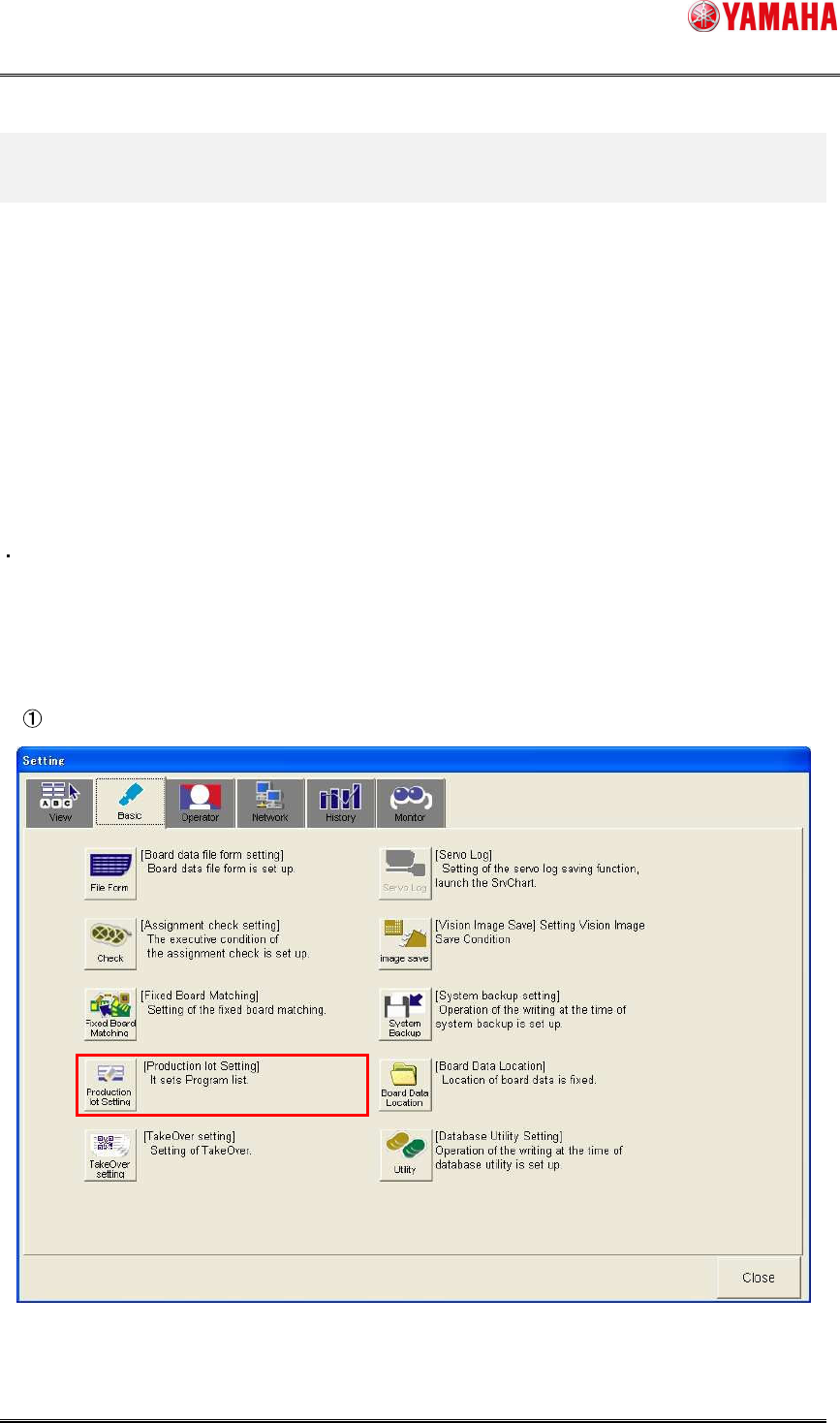
Make the settings for the production lot operation.
Click [Setup]-[Software Setting] button - [Basic] tab - [Production lot Setting] button.