TP3447.Production Lot Operations_standard.pdf - 第20页
SMT Softw are En gineering Group IM Operations Y AMAHA M OTOR CO., L TD MDOC-SOFT50283 20/62 4. S-T o ol: Setup Navi 4.1 Program selection corre sponding to the production lot When selecting the production lot from the p…
SMT Software Engineering Group
IM Operations YAMAHA MOTOR CO., LTD
MDOC-SOFT50283
19/62
3.1.7 Cautions
To avoid any trouble, associate the production lot with the board program as follows.
When “OP003: Auto Pgm Change Over” is not used;
Be sure to register the production lot.
A unique value is set for the production lot.
“Production Model (ASSY)” and “Board face” can be omitted.
When “OP003: Auto Pgm Change Over” is used;
For the same model and same surface, set a unique value for the production lot.
“Production Model (ASSY)” and “Board face” can be omitted.
* When there is YG/Xg series model in the line, register “Production Model (ASSY)”
and “Board face”. If they are omitted, the auto setup is not performed.
No board data type can be specified in the program list. When selecting the production
lot with the machine or “S-Tool: Setup Navi”, specify the board data type.
* When using “OP003: Auto Pgm Change Over”, the board data type when the previous
board data is loaded is then loaded into the machine.
Be sure to exit Program List Editor when copying or renaming the program list
The production lot assumes the lot in each manufacturing process. In addition, please
correspond by devising the registration method to the program list for the distinction and
the record by another lot (lot of parents) as follows.
Example)
Register in the “Production Lot” by the name including the lot of parents.
When “Production Model (ASSY)” is not used, the lot of parents is registered in this
item.
SMT Software Engineering Group
IM Operations YAMAHA MOTOR CO., LTD
MDOC-SOFT50283
20/62
4. S-Tool: Setup Navi
4.1 Program selection corresponding to the production lot
When selecting the production lot from the program list, the setup of the target board program
can be performed.
4.1.1 Introduction
4.1.1.1 Preparations
When performing the production lot operation, it is necessary to add the production lot to
the program list.
* For details about how to add the production lot to the program list, see “3. P-Tool: Program
List Editor”.
4.1.1.2 Settings
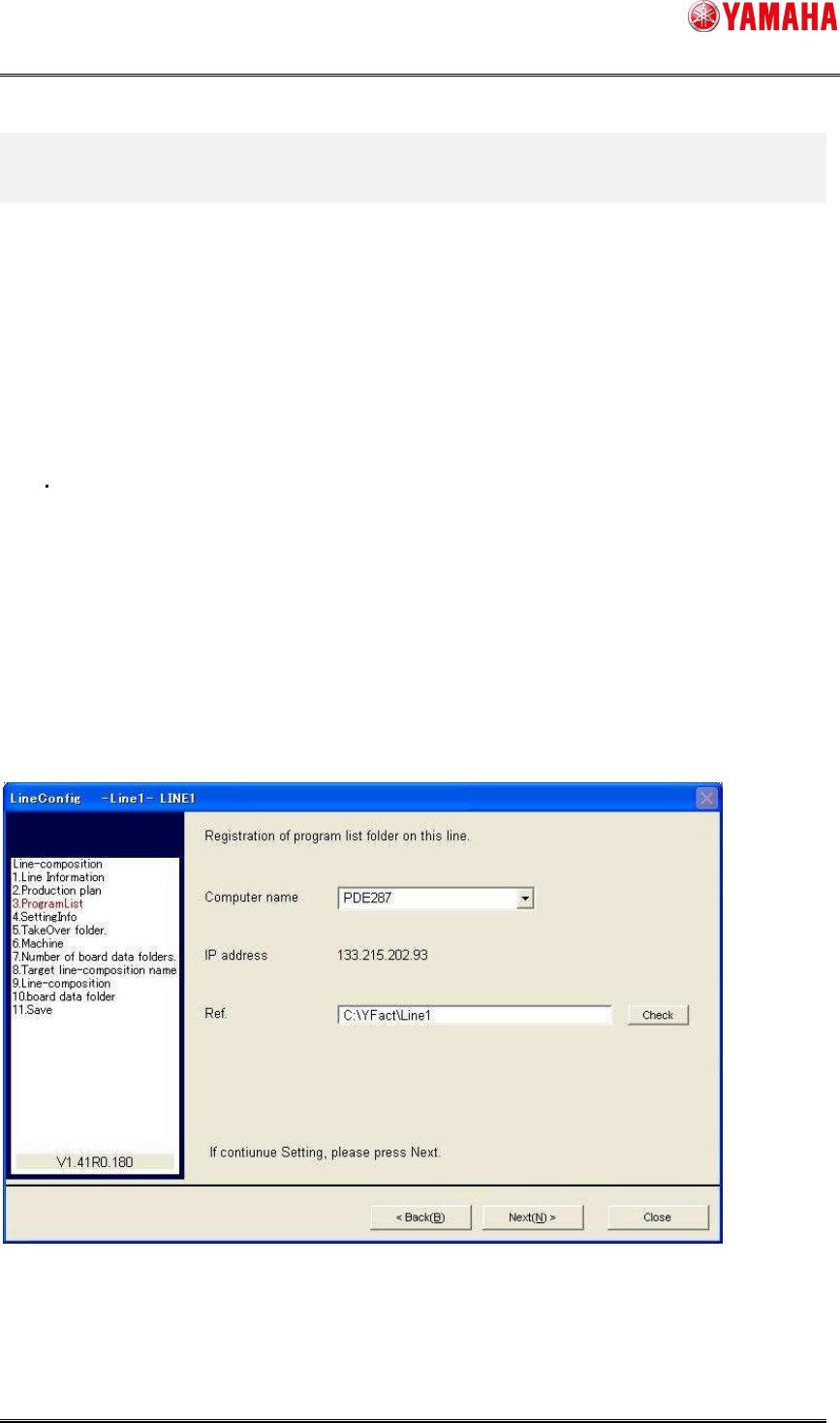
To allow the program list to be referred to through Setup Navi that is created using “3. P-Tool:
Program List Editor”, set the program line reference destination of each line using Line Config.
* For details about Line Config, see the “Server Utility Software User’s Manual”.
SMT Software Engineering Group
IM Operations YAMAHA MOTOR CO., LTD
MDOC-SOFT50283
21/62
Item name Contents
Computer name Computer name of the PC that stores the program list.
Ref. Local path of the folder, into which the program list is saved.
To make the selection with the computer name, this PC needs to be registered in Line Config.
To register the PC into Line Config, “IT-System Client” needs to be installed into the PC.
* For details, see the “IT-System Configuration Manual”.
Recommended setting
Item name Contents
Computer name Computer name of the PC, into which P-Tool has been installed.
Ref. Line folder of relevant line in the installation folder
Example) C:¥YFacT¥Line1
Program List Editor of P-Tool creates the program list in the line folder. As the line folder of
P-Tool is specified as reference destination, it can be interlock-used.
4.1.2 Operation procedure
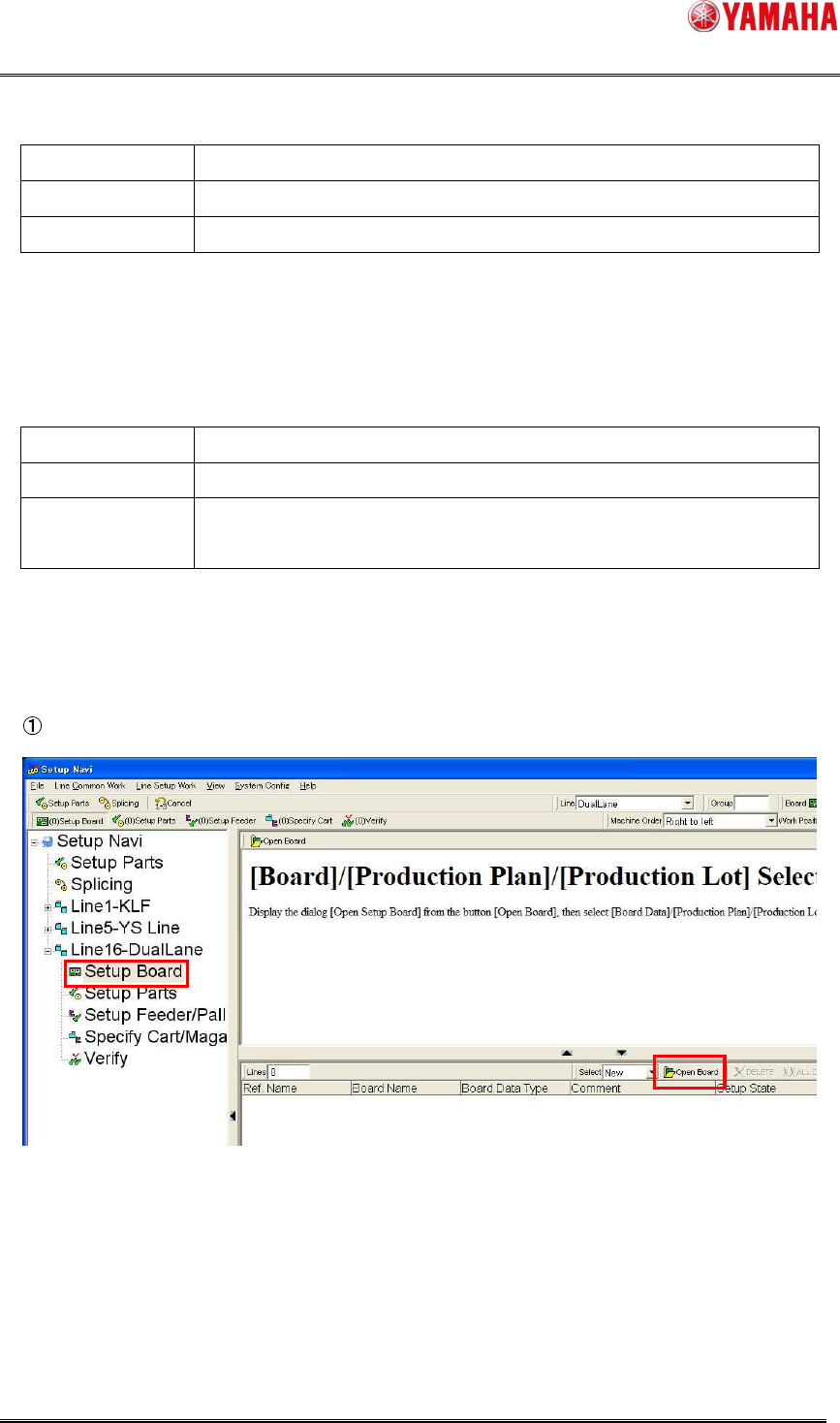
Click [Setup Board]-[Open Board] button for a line you want to perform the setup.