TP3447.Production Lot Operations_standard.pdf - 第56页
SMT Softw are En gineering Group IM Operations Y AMAHA M OTOR CO., L TD MDOC-SOFT50283 56/62 5.3.2.3 BOARD ID As the fixed type reader (barcode reader or 2 D code re ader) installed at the exit of the up stream process r…
SMT Software Engineering Group
IM Operations YAMAHA MOTOR CO., LTD
MDOC-SOFT50283
55/62
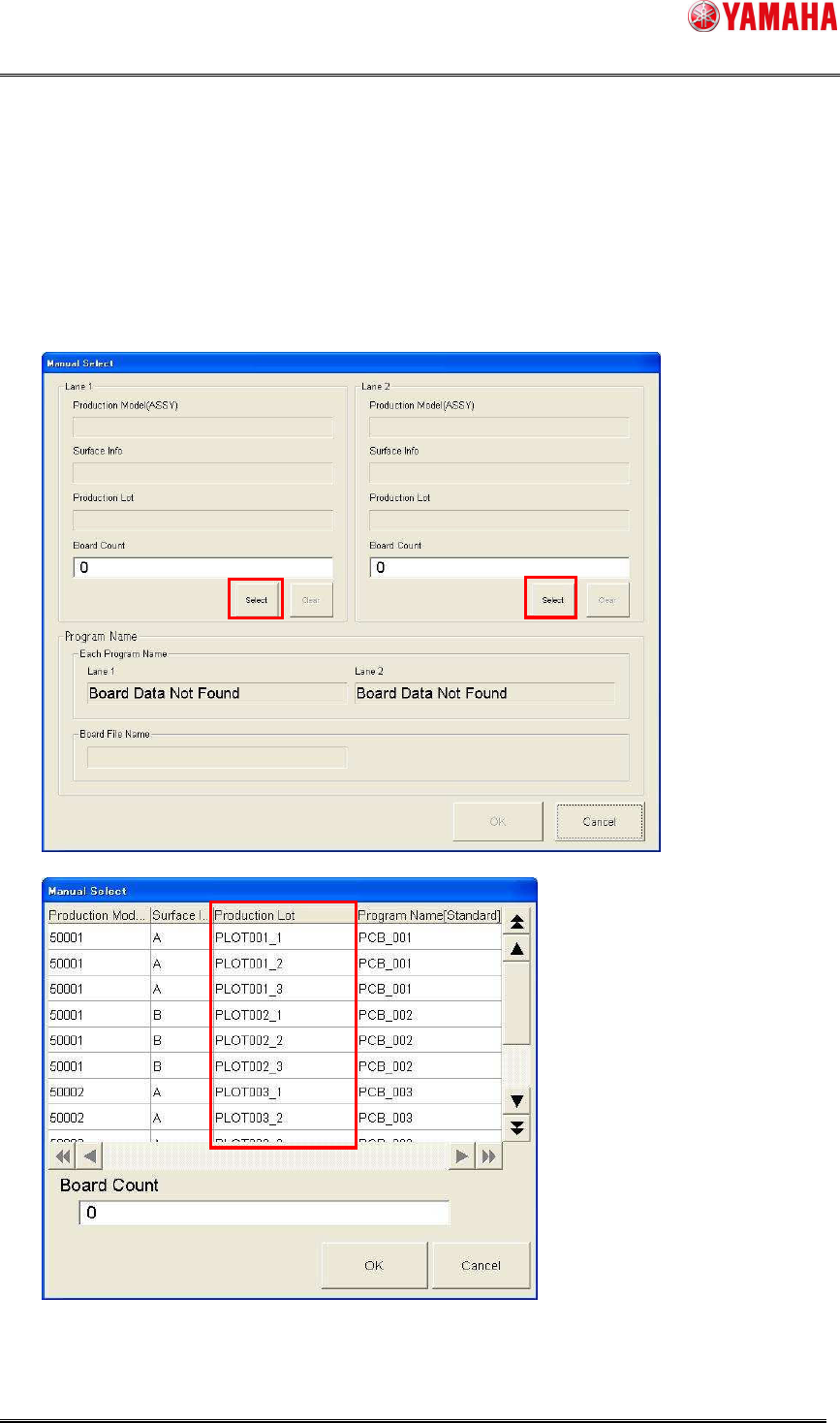
5.3.2.2 MANUAL SELECT
As the protection lot is selected manually in the top machine of the line, the board program can
be changed. Furthermore, when the downstream machine operates in the “take over” mode, the
board program of the overall line can be changed as the downstream machine takes over the
production lot.
The production lot is displayed in the “Manual Select” dialog box.
SMT Software Engineering Group
IM Operations YAMAHA MOTOR CO., LTD
MDOC-SOFT50283
56/62
5.3.2.3 BOARD ID
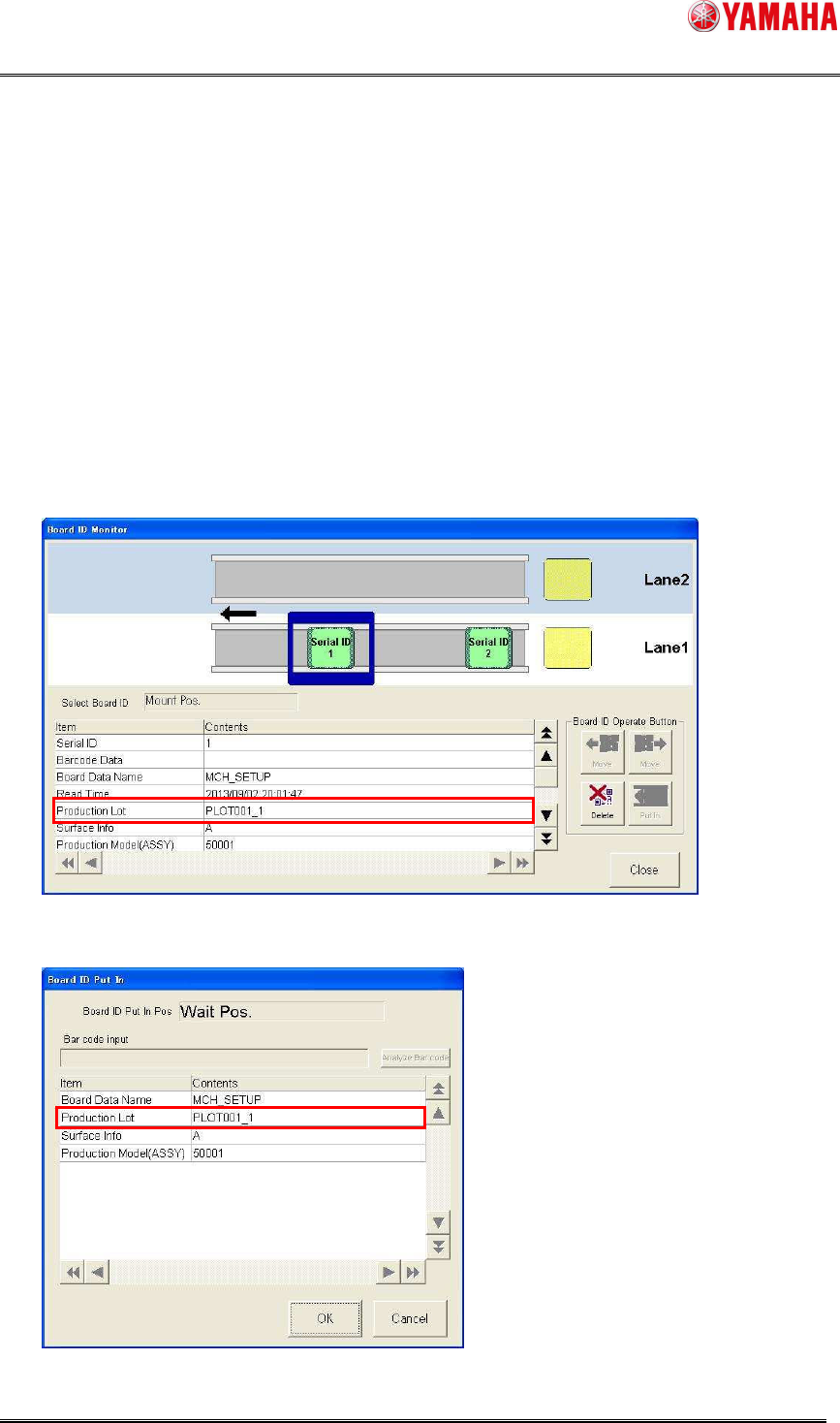
As the fixed type reader (barcode reader or 2D code reader) installed at the exit of the
upstream process reads the production lot of the board ID attached to the board that arrives, the
board program is changed automatically. Furthermore, when the downstream machine operates
in the “take over” mode, the board program of the overall line can be changed as the
downstream machine takes over the production lot.
The contents of the production lot of the board ID that has been read are displayed in the
dialog box.
* The item name was changed from “Lot ID” to “Production Lot”.
Board ID Monitor
Board ID Put In
SMT Software Engineering Group
IM Operations YAMAHA MOTOR CO., LTD
MDOC-SOFT50283
57/62
5.3.2.4 TAKE OVER
As the production lot, the auto setup of which has been changed in the upstream machine is
taken over, the board program is changed automatically. Furthermore, when the downstream
machine operates in the “take over” mode, the board program of the overall line is changed as
the downstream machine takes over the production lot.
5.3.2.5 Log
The contents of the production lot are output to the logs shown below.
Additionally, “Production Model (ASSY)” and “Surface Info” are also output.
[MIS]-[Error log] screen
[MIS]-[Board log] screen
[MIS]-[Program log] screen
* Regardless of the production lot operation setting, the screen is displayed when the “OP003:
Auto Pgm Change Over” function is enabled.
Item name Contents
Production Model “Production Model (ASSY)” of the allocated program list
Surface Info “Surface Info” of the allocated program list
Production Lot When the production lot operation is set at “ON”;
Production lot of the allocated program list
When the production lot of the program list is not specified or the
production lot operation is set at “OFF”;
KANBAN
Scanned production lot + Year-month-day-hour-minute-second
when loading the board
MANUAL SELECT
Year-month-day-hour-minute-second when loading the board
BOARD ID
Production lot of the scanned board ID
TAKE OVER
Production lot taken over from the upstream machine