SOM-1735-001.pdf - 第48页
9.1 "Comp. Recog. Light" T ab The corresponding tab sheet enables the operator to perform the teach- ing operation on the sensitivity of the camera and the lighting intensity . 9.1.1 Camera Sensitivity Check • …
9. "TEACHING" Window (Submenu)
••
••
• Window Layout
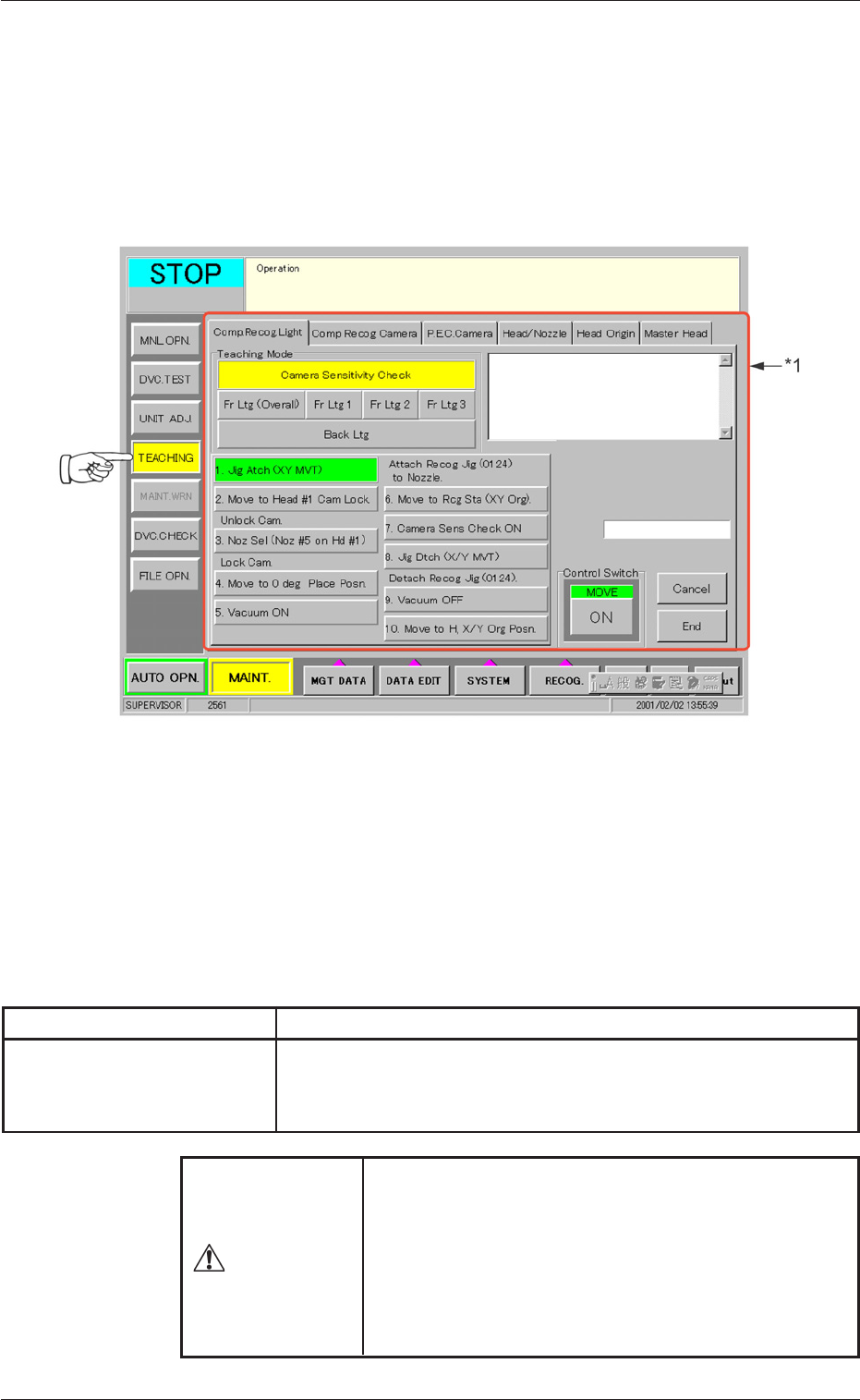
When the [TEACHING] button on the submenu bar is pressed, the fol-
lowing window (submenu) opens. (Operation Sequence: [MAINT.] But-
ton Æ [TEACHING] Button on Submenu Bar Æ "TEACHING" Window)
Fig. 100 "TEACHING" Window (Submenu)
••
••
• Window Composition
*1 Tab
The "TEACHING" window (submenu) is provided with 6 tab
sheets. When each tab is pressed, the corresponding tab sheet
appears inside the window.
Table 15
Tab Description
Comp. Recog. Light The corresponding tab sheet enables the operator to perform
the teaching operation on the sensitivity of the camera and the
lighting intensity.
9. "TEACHING" Window (Submenu)
Various teaching operations must be performed with
the [OPERATION] switch set to the "SETUP" side.
Only the person in charge of maintenance work should
perform teaching operations.
No teaching operation can be implemented with the
[OPERATION] switch set to the "RUN" side.
WARNING
0307-001 46 Tg0930-PM-SO
9.1 "Comp. Recog. Light" Tab
The corresponding tab sheet enables the operator to perform the teach-
ing operation on the sensitivity of the camera and the lighting intensity.
9.1.1 Camera Sensitivity Check
••
••
• Sheet Layout
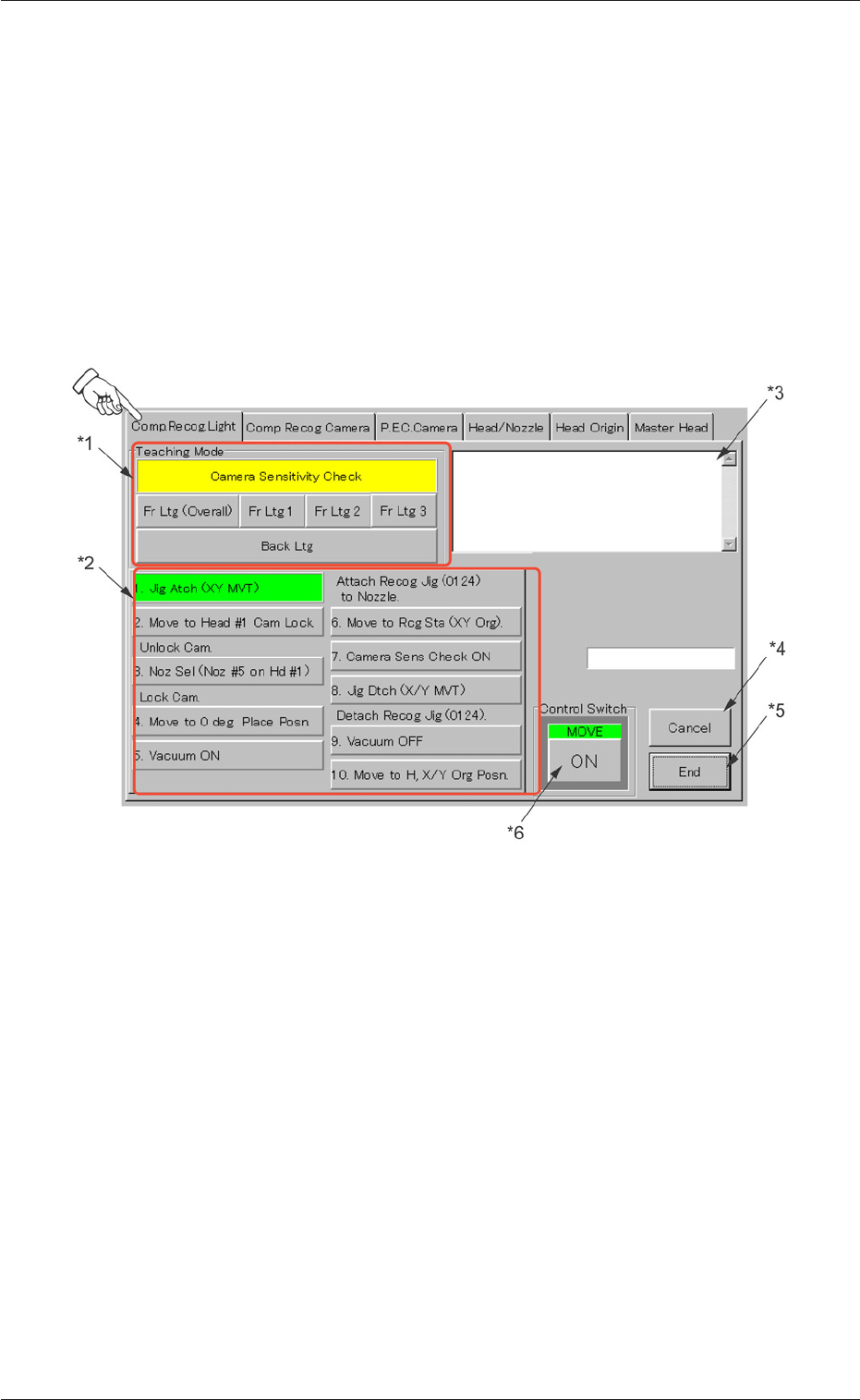
When the "Comp. Recog. Light" tab is pressed in the "TEACHING" win-
dow (submenu), the following tab sheet appears inside the window.
Fig. 101 "Comp. Recog. Light" Tab Sheet
••
••
• Sheet Composition
*1 Teaching Selection Buttons
The following buttons are arranged.
[Camera Sensitivity Check] Button :
[Fr Ltg (Overall)] Button :
[Fr Ltg 1] Button :
[Fr Ltg 2] Button :
[Fr Ltg 3] Button (Option) :
[Back Ltg] Button :
9.1 "Comp. Recog. Light" Tab
0307-001 47 Tg0930-PM-SO

When the [Camera Sensitivity Check] button is pressed to check
the sensitivity of the camera, the background color of the button
turns yellow and the steps to be followed appear in "*2".
*2 Teaching Selection Buttons
Displayed are the steps to be followed for the teaching operation
on the item selected in "*1".
[1. Jig Atch (XY MVT)]
[2. Move to Head #1 Cam Lock]
Unlock Cam.
[3. Noz Sel (Noz #5 on Hd #1)]
Lock Cam.
[4. Move to 0 deg Place Posn.]
[5. Vacuum ON]
Attach Recog Jig (0124) to Nozzle.
[6. Move to Rcg Sta (XY Org).]
[7. Camera Sens Check ON]
[8. Jig Dtch (X/Y MVT)]
Detach Recog Jig (0124).
[9. Vacuum OFF]
[10. Move to H, X/Y Org Posn.]
9.1 "Comp. Recog. Light" Tab
0307-001 48 Tg0930-PM-SO