SOM-1735-001.pdf - 第60页
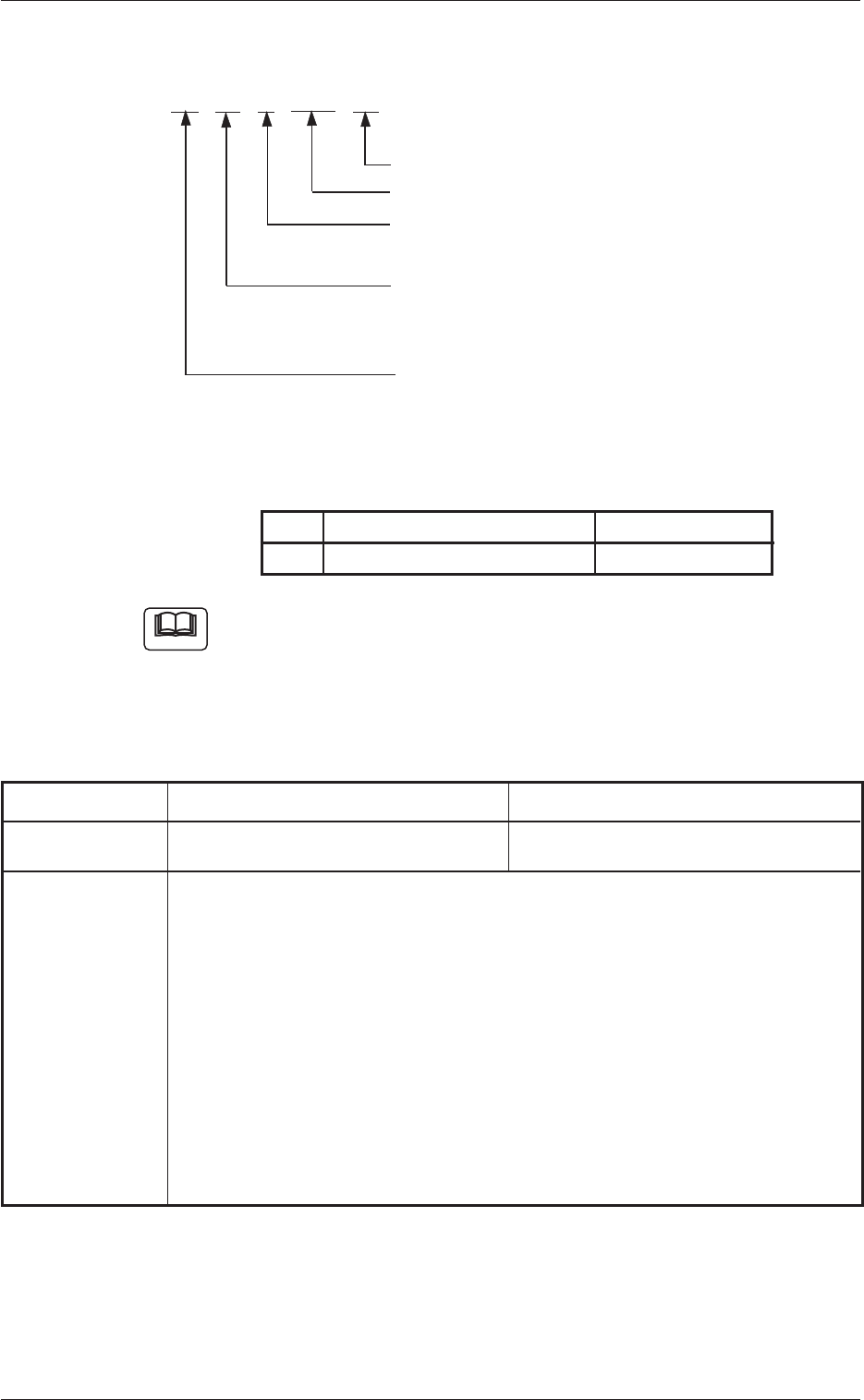
(2) Component Recognition Errors AA BB C DDD EE Detail Code: Kinds of Errors (00 to 99) Detail Code: Kinds of Errors (000 to 999) Secondary Error Classification: Error Classification (1 to 9) Primary Error Classification…
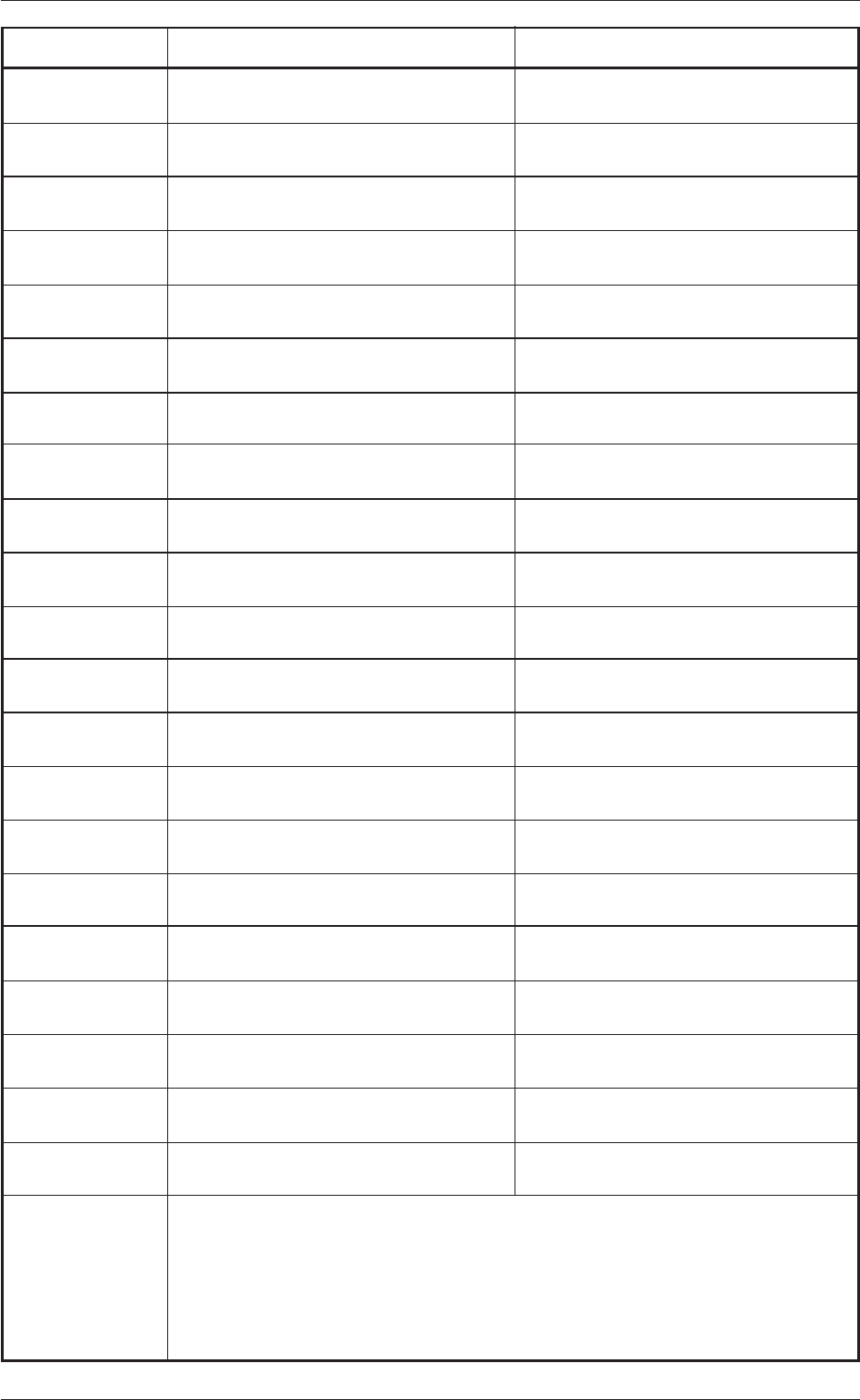
Recognition Error ID Item Description
01 39 3 14111 "Component Library Elctd Shape" Not
Supported!
01 39 3 14112 Error in "Component Library Elctd Dim1"
Data.
01 39 3 14113 Error in "Component Library Elctd Dim2"
Data.
01 39 3 14213 Error in "Component Library Elctd Gp
Posn X or Y" Data.
01 39 3 14214 Error in "Component Library Elctd Col
Pitch" Data.
01 39 3 14215 Error in "Component Library Row Pitch"
Data.
01 39 3 14216 Error in "Component Library Elctd # of
Cols" Data.
01 39 3 14217 Error in "Component Library Elctd # of
Rows" Data.
01 39 3 14221 Error in "Component Library Elctd Missing
Elctd No" Data.
01 39 3 14231 Error in "Component Library Elctd Missing
Std Col" Data.
01 39 3 14232 Error in "Component Library Elctd Missing
Std Row" Data.
01 39 3 14233 Error in "Component Library Elctd # of
Missing Cols" Data.
01 39 3 14234 Error in "Component Library Elctd # of
Missing Rows" Data.
01 39 3 22001 "Component Library Polarity detn" Not
Supported!
01 39 3 22002 "Component Library Polarity Inspection
method" Not Supported!
01 39 3 22003 "Component Library Polarity Detn
Inspection Pos X or Y" Not Supported!
01 39 3 22004 "Component Library Polarity Detn
Inspection range" Not Supported!
01 39 3 26101 "Component Library Electd Pos detn"
Not Supported!
01 39 3 26102 Error in “Component Library Electd Pos
tol” Data.
01 39 3 26201 "Component Library Electd Size detn"
Not Supported!
01 39 3 26202 Error in "Component Library Electd Size
tol" Data.
(Cause) Each data of the component library is wrong.
(Remedy 1) Refer to "5.2 Parameters" and set correct ones.
0307-001 58 Tg0930-PM-SO
10.4 Recognition Error IDs and Remedial Procedures
(2) Component Recognition Errors
AA BB C DDD EE
Detail Code: Kinds of Errors (00 to 99)
Detail Code: Kinds of Errors (000 to 999)
Secondary Error Classification:
Error Classification (1 to 9)
Primary Error Classification:
Recognition Algorithms (00 to 99)
Refer to Table 19.
Classification of Recognition Functions
(02)
Error Classification: Recognition Algorithms
Table 19
BB Recognition Algorithms Remarks
91 BGA Front Lighting
(a) Error IDs "*" will be filled with primary error classification and detail
codes.
(b) When an error ID other than the described ones is issued, contact
our service personnel for some advice.
Table 20
Recognition Error ID Item Description
02 ** 1000 ** Component Missing Component was not found.
(Cause 1) The feeder carriage is loaded with a feeder that contains components
different from the specified ones.
(Cause 2) The vacuum suction force is too weak.
(Cause 3) An improper nozzle is selected for the components or vice versa.
Mismatching parameters are set in the nozzle type data and the compo-
nent library data.
(Remedy 1) Check if proper components are used.
(Remedy 2) Check the vacuum pressure.
(Remedy 3) Check the parameters in the nozzle type data and the component li-
brary data.
Note
0307-001 59 Tg0930-PM-SO
10.4 Recognition Error IDs and Remedial Procedures
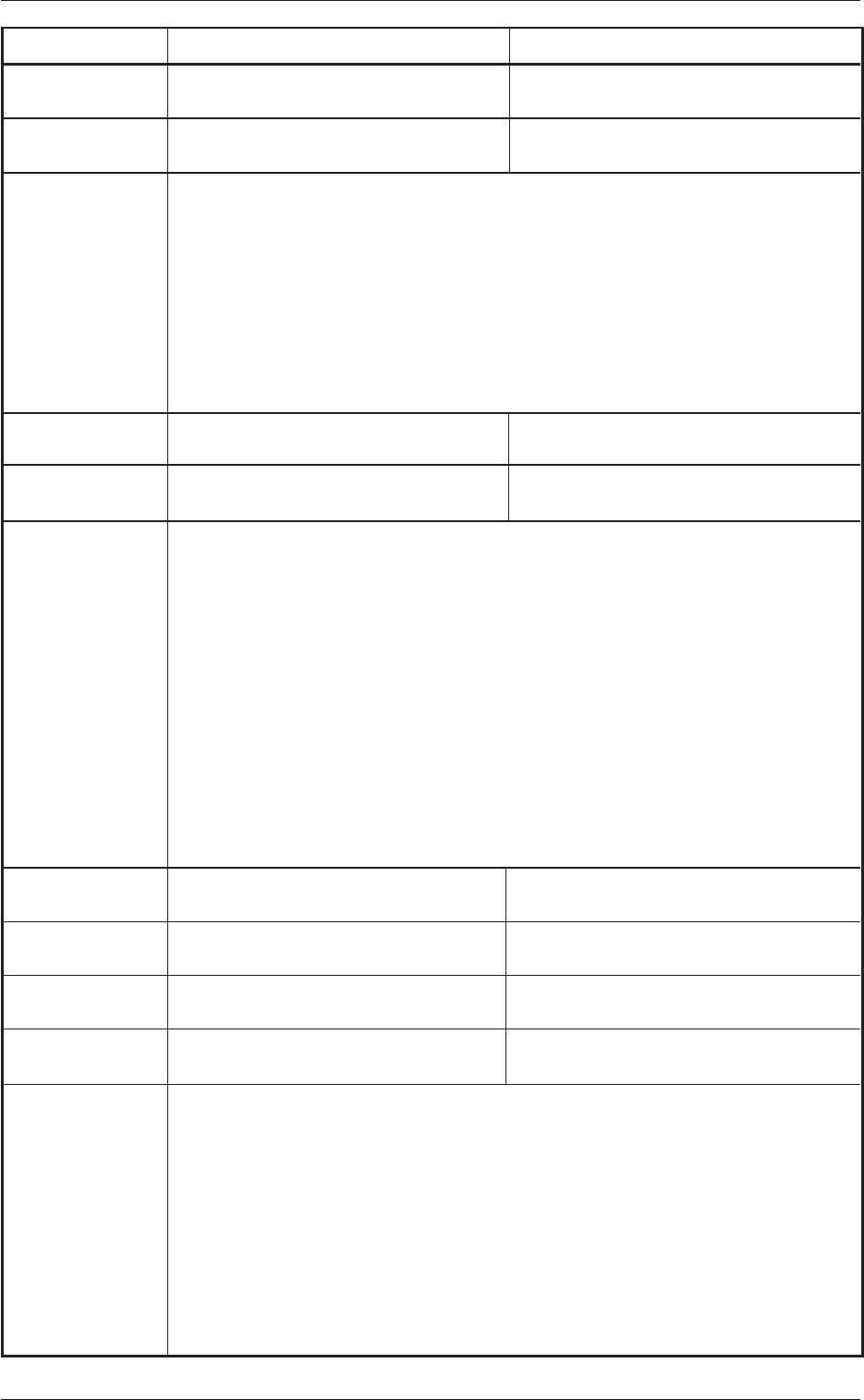
Recognition Error ID Item Description
02 ** 2301 ** Error in Electrode(Ball) Inspection The Electrode(ball) position is incorrect.
02 ** 2302 ** Error in Electrode(Ball) Inspection There is Electrode (ball) of the size out-
side permissible value.
(Cause 1) The component is different from the specified one.
(Cause 2) A component is defective.
(Cause 3) Wrong Data
(Remedy 1) Check the component.
(Remedy 2) Check the component.
(Remedy 3) Refer to "5.2 Parameters" and set correct ones.
02 ** 2401 ** Error in Polarity Detection. Failed in Polarity Detection.
02 ** 2402 ** Error in Polarity Detection. The detected polarity differs from specifi-
cation.
(Cause 1) The polarity data is wrong.
(Cause 2) A good image of the polarity mark is not captured.
(Cause 3) The direction of the component is wrong.
(Remedy 1) Refer to "5.2 Parameters" and set correct ones.
(Remedy 2) Check how the image of the component is captured.
When good images of the polarity marks on several components are
not captured, stable inspections cannot be made. In this case, set "Dis-
able" in the "Polarity detn" text box.
(Remedy 3) Check the component.
02 ** 2901 ** Picked Posture Error The pick angular skew is big.
02 ** 2902 ** Picked Posture Error The pick-up position has deviated greatly
in X direction.
02 ** 2903 ** Picked Posture Error The pick-up position has deviated greatly
in Y direction.
02 ** 2904 ** Picked Posture Error The pick-up position has deviated greatly
in X or Y direction.
(Cause 1) When a component is picked up, the pick-up positions (X and Y) and
angle have shifted greatly from the correct ones.
(Cause 2) When the tape is fed, a component is turned vertically.
(Remedy 1) Check the selected component and the tape feeder.
Check if the feeder (B) offset data is correct.
Check if the component library data is correct.
(Remedy 2) Check the selected component and the tape feeder.
0307-001 60 Tg0930-PM-SO
10.4 Recognition Error IDs and Remedial Procedures