DECAN_S2_Trouble(Eng_Ver4.2).pdf - 第108页
1-86 Advanced Chip Shooter DECAN S2 T roubleshooting Guide [Solution] Check the st ate o f the flux in t he flux feed unit. Then c lean th e fl ux feed un it and refill the flux. Execute t he flux dialog box in the pro…

1-85
System Messages of the MMI and Solutions
$4754 An error occurred to the pneumatic system after the part $P of the head $H was
dipped in the flux unit.
(There is no part on the head.) [FREEZE LEVEL]
[Problem]
It is thought that the part is not on the nozzle from the result of checking if the part
remains on the head after dipping it in the flux feed unit by using pneumatic pressure.
[Solution]
Check if the part is on the nozzle. When the part is on the nozzle, verify if the set
values for checking the pneumatic pressure of the nozzle to which a problem occurred
are correct in the ‘Device’ submenu of the ‘System Setup’ menu.
When there is no part on the nozzle, check if the nozzle is contaminated or the
pneumatic pressure level of the head is normal.
Check if a nozzle whose size fits appropriately for the part size is used.
If the problem occurs continuously, contact our designated C/S or local agent.
$4755 Flux feed unit is not installed on the feeder base. [FREEZE LEVEL]
[Problem]
The system data has no information on the slot of the feeder base for which the flux
feed unit is set.
[Solution]
Select the ‘Flux’ tab dialog box from the ‘Periph.’ submenu of the ‘System Setup’ and
register the information on the feeder base slot in which the flux feed unit is installed.
$4760 Flux is exhausted. Refill in the flux. [WARNING LEVEL]
[Problem]
The period of time taken for flux work in the equipment exceeded the time set in the
Refill Warning Period in the setup dialog box of the flux feed unit.
[Solution]
Check the state of the flux in the flux feed unit. If the flux is exhausted, refill in the
flux. Then execute the flux dialog box in the production screen to reset the ‘Refill
Warning Alarm’.
If the flux is sufficient, execute the flux dialog box in the production screen to reset the
‘Refill Warning Alarm’.
$4761 Clean the flux feed unit. [WARNING LEVEL]
[Problem]
The number of times of flux work in the equipment exceeded the count set in the
Squeeze Warn Count in the setup dialog box of the flux feed unit.

1-86
Advanced Chip Shooter DECAN S2 Troubleshooting Guide
[Solution]
Check the state of the flux in the flux feed unit. Then clean the flux feed unit and refill
the flux. Execute the flux dialog box in the production screen to reset the ‘Squeeze
Warning Alarm’.
When it is not necessary to clean the flux feed unit, execute the flux dialog box in the
production screen to reset the ‘Squeeze Warning Alarm’.
$4801 Cannot move the head to the Pickup Z value since the height of the picked up part is
too high [EMER LEVEL]
[Problem]
It is impossible to perform the next movement since the height of the picked up part is
too high.
[Solution]
The height of the part is higher than the reference height set for the machine. After
selecting the corresponding part in the Step dialog box, select the check box in the
<Skip> column to skip the corresponding part.
If the problem occurs continuously despite that the part is less than the reference,
contact our designated C/S company or local agent.
$4802 An error occurred during movement for part pickup. [EMER LEVEL]
[Problem]
It failed to pick up the part.
[Solution]
Recheck the XY, Z, and R values for the pickup position of the corresponding part to
see if it is possible to pick up the part.
Perform test pickup in the Feeder dialog box to check if the part is picked up normally.
If the problem occurs continuously despite that the part can be picked up manually
without problem, contact our designated C/S company or local agent.
$4803 Tape feeder shutter was not opened. [WARNING LEVEL]
$4804 Tape feeder shutter was not closed. [WARNING LEVEL]
$4805 Feeder operation timeout error occurred while picking up a part from the feeder.
[WARNING LEVEL]
[Problem]
Failed to open the shutter of the corresponding feeder.
[Solution]
Failed to open the shutter of the corresponding feeder.
1-87
System Messages of the MMI and Solutions
Check the state of the clamp of the corresponding feeder. If the clamp is opened, close
it.
If there is a problem with feeder operation, check for mechanical interference,
malfunction of sensors, etc.
When there is no problem with the feeder, click the <Feederbase IO> button in the IO
dialog box and check if the index signal of the corresponding feeder blinks while
turning the shutter on by hand.
When the IO operates abnormally, check the cleanliness of the feeder contact point in
the feeder base.
When there is no mechanical interference and the IO dialog box check finds no IO
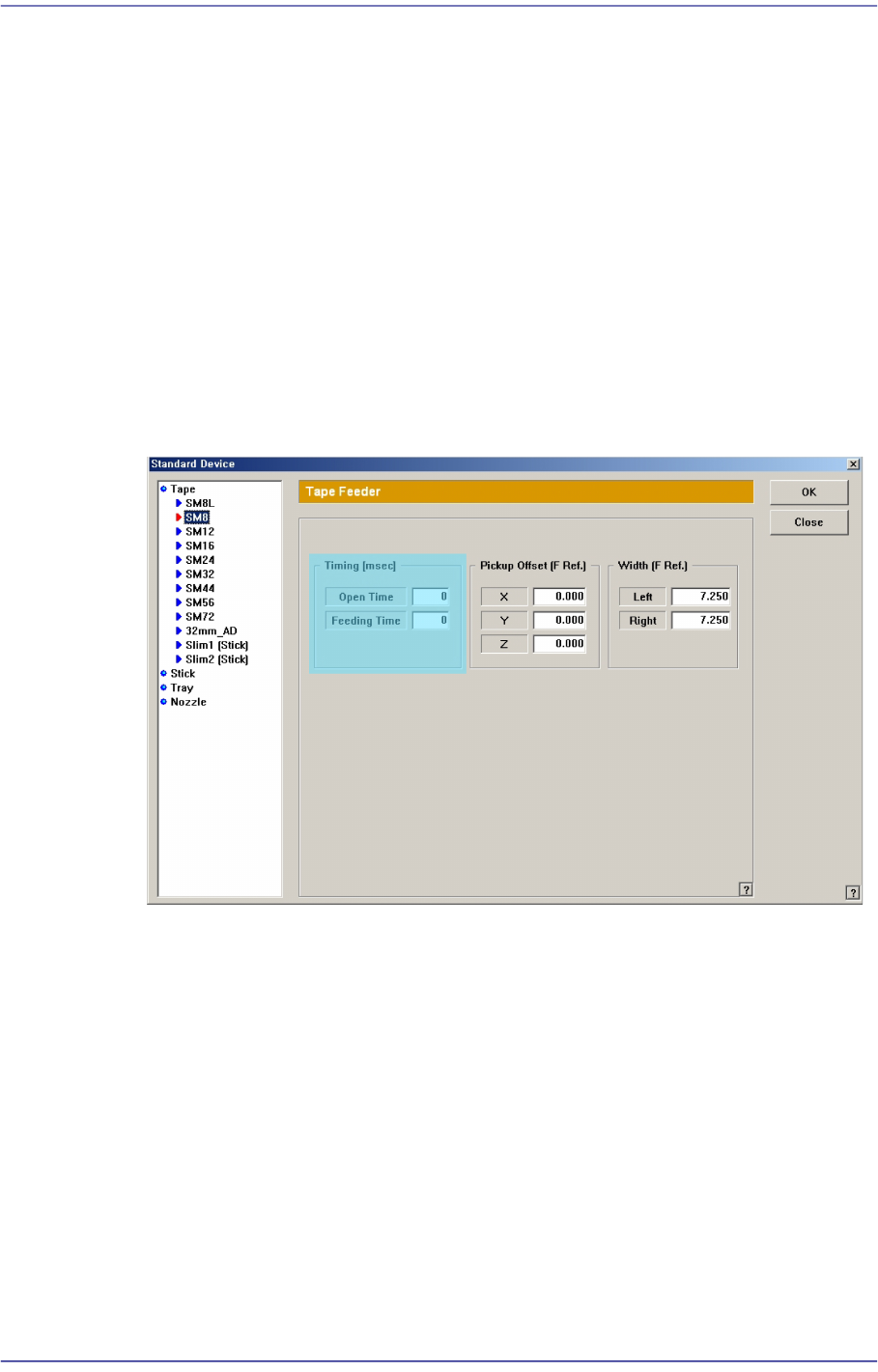
operation problem, execute the Device submenu of the System Setup Menu and select
the Tape Feeder Item. Then check the “Timing” value of the corresponding feeder and
adjust it to be greater than the current value.
If the problem occurs again, contact our designated C/S and local agent.
$4806 The head failed to pick up a part from the feeder. [WARNING LEVEL]
[Problem]
An exceptional situation occurred while picking a part.
[Solution]
Perform part dumping at the current state before production.
After turning off the machine normally, boot it to perform production again.
Despite such checks and measures, if the problem occurs again, contact our designated
C/S and local agent.