DECAN_S2_Trouble(Eng_Ver4.2).pdf - 第142页
1-120 Advanced Chip Shooter DECAN S2 T roubleshooting Guide Click t he <Fiducial Mark … > button i n t he “Board” d i alog bo x of th e PCB edit menu. Then check and correct the data related to the corresponding …

1-119
System Messages of the MMI and Solutions
$a300 Previous vision command is not completed.
[Problem]
Occurs while trying to execute the command of other vision prior to the completion of
the current vision due to fault in the hardware or software.
[Solution]
Turn off power to the machine in the usual way. Wait 5 seconds, turn back on and
reboot the system.
$a401 Incorrect camera ID.
[Problem]
Incorrect camera ID was received due to H/W problem or S/W problem.
[Solution]
Turn off power to the machine in the usual way. Wait 5 seconds, turn back on and
reboot the system.
$a402 An internal error occurred during vision processing.
[Problem]
An error occurred while performing the internal function of vision due to H/W
problem or S/W problem.
[Solution]
Turn off power to the machine in the usual way. Wait 5 seconds, turn back on and
reboot the system.
$a403 Can not generate fiducial data due to wrong fiducial type.
[Problem]
An undefined fiducial type is used.
[Solution]
Click the <Fiducial Mark …> button in the “Board” dialog box of the PCB edit menu.
Then check and correct the data related to the corresponding fiducial mark setup.
Please refer to section “6.3 Fiducial Mark Setup” of the Administrator’s Guide.
$a404 Fiducial is not registered.
[Problem]
The system attempted to use the fiducial while it was unregistered due to H/W
problem or S/W problem.
[Solution]

1-120
Advanced Chip Shooter DECAN S2 Troubleshooting Guide
Click the <Fiducial Mark …> button in the “Board” dialog box of the PCB edit menu.
Then check and correct the data related to the corresponding fiducial mark setup.
Please refer to section “6.3 Fiducial Mark Setup” of the Administrator’s Guide.
$a405 Fiducial size is too large.
[Problem]
The size of fiducial intended to register and use is larger than the maximum value that
the vision can recognize.
[Solution]
Register the smaller mark in the PCB as the fiducial mark.
$a406 Fiducial size is too small.
[Problem]
The size of fiducial intended to register and use is smaller than the minimum value that
the vision can recognize.
[Solution]
Register the larger mark in the PCB as the fiducial mark.
$a407 Too many number of fiducials to register.
[Problem]
More fiducial marks than can be registered in the equipment were registered.
[Solution]
Delete the excess fiducials.
If same fiducial is registered repeatedly, register it as one fiducial.
$a610 Can not find the first lead (left side) of upper lead group.
[Problem]
Failed to recognize the left lead of upper lead group on the SMVision window while
recognizing components.
[Solution]
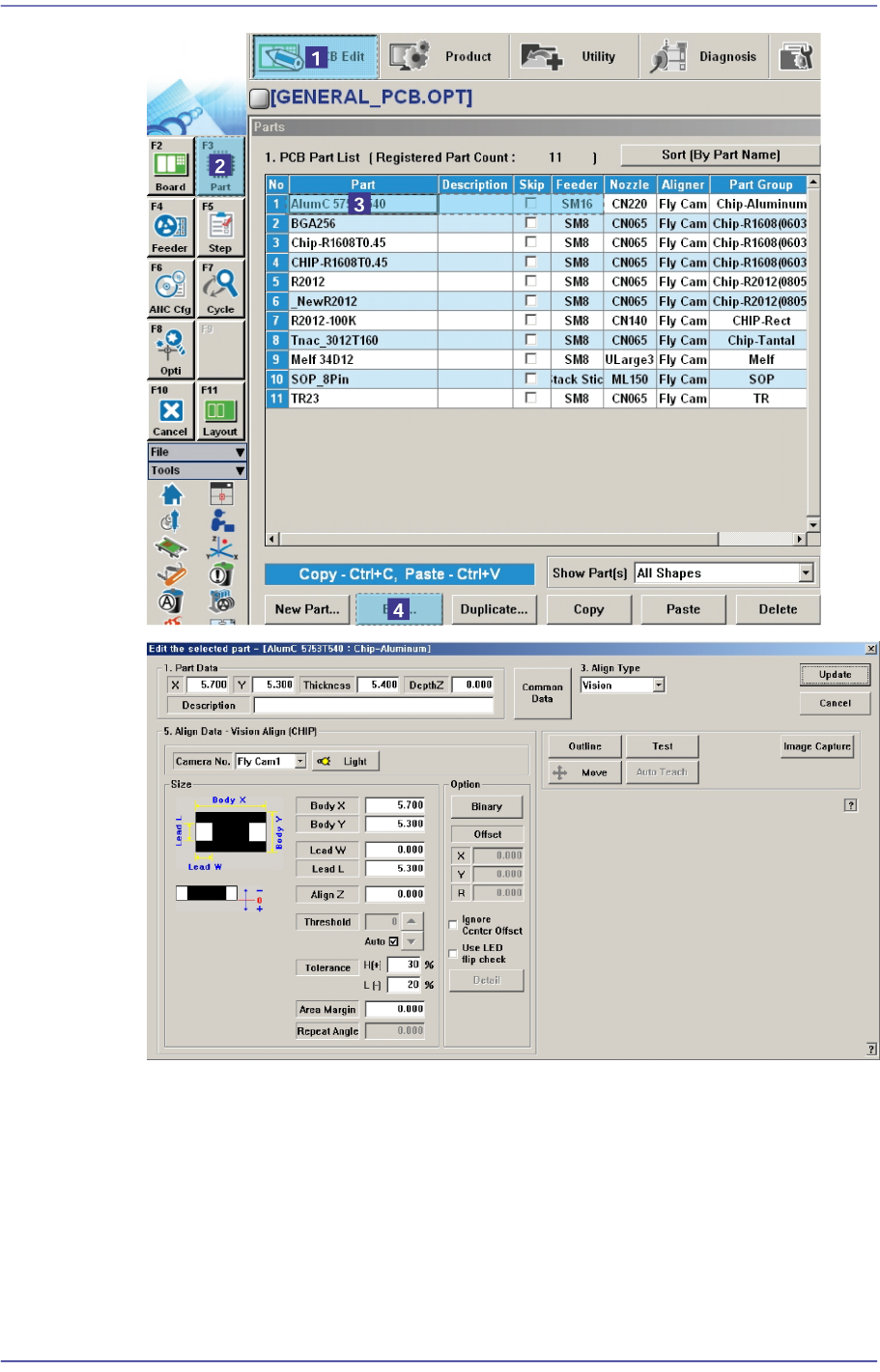
In order to verify if the component data is normal, select the error occurred component
in “Part” of the “PCB Edit” menu and check if the information of the <Align Data>
group is set up in the Profile Editor correctly.
1-121
System Messages of the MMI and Solutions
In addition, if the <Light Control> button is clicked to check and reset the illumination
level for the corresponding component, a dialog box for adjusting the illumination
level is displayed. Here, change the illumination level to make the shape and image of
the SMVision appear clear. For more details, please refer to “7.1 New Components
Registration” in the “Administrator’s Guide”
$a611 Can not find the final (right side) lead of upper lead group.
[Problem]