88192278-01-19 Installation Master.pdf - 第173页
PRINTER PREPARATION PRE POWER UP CHECKS Chapter Issue 15, May 20 Installation Manual 4.71 Ensure that the voltage selector switch, on the front panel of the onboard vacuum filtration unit, is set to match the supply volt…

PRINTER PREPARATION
PRE POWER UP CHECKS
4.70 Installation Manual Chapter Issue 15, May 20
a. Earth tag and the live output.
b. Earth tag and the neutral output.
c. Isolator mount and the neutral output.
d. Isolator mount and the live output.
8. Measure the resistance between the earth tag and all three isolator mount
securing nuts ensuring that all measurements are less than 0.5Ω.
9. Remove the rear cover of the printer (front cover on type 4 printers).
10. Measure the resistance between the following points ensuring that all
measurements are less than 0.5Ω:
a. PC earth stud and a securing screw that secures the PC to the printer
frame.
b. M36 earth stud and a securing screw that secures the M36 to the printer
frame.
c. M37 earth stud and a securing screw that secures the M37 to the printer
frame.
11. Refit the mains isolator cover.
12. Refit the front cover.
13. Before refitting the rear cover, check the three circuit breakers on the M37
Power Supply Enclosure are in the ON position.
14. Refit the cover removed in Step 9.
Vacuum Filtration
Unit
There are four types of onboard vacuum filtration unit, for use with the under
screen cleaner, the VF25, the VF10 and the VF35i. The VF25 is a fixed voltage
unit at either 115V or 230V, ensure that the unit fitted matches the supply
voltage.
The onboard VF35i vacuum filtration unit is dual voltage 115V/230V (50Hz/
60Hz) switchable from the front panel of the unit.
PRINTER PREPARATION
PRE POWER UP CHECKS
Chapter Issue 15, May 20 Installation Manual 4.71
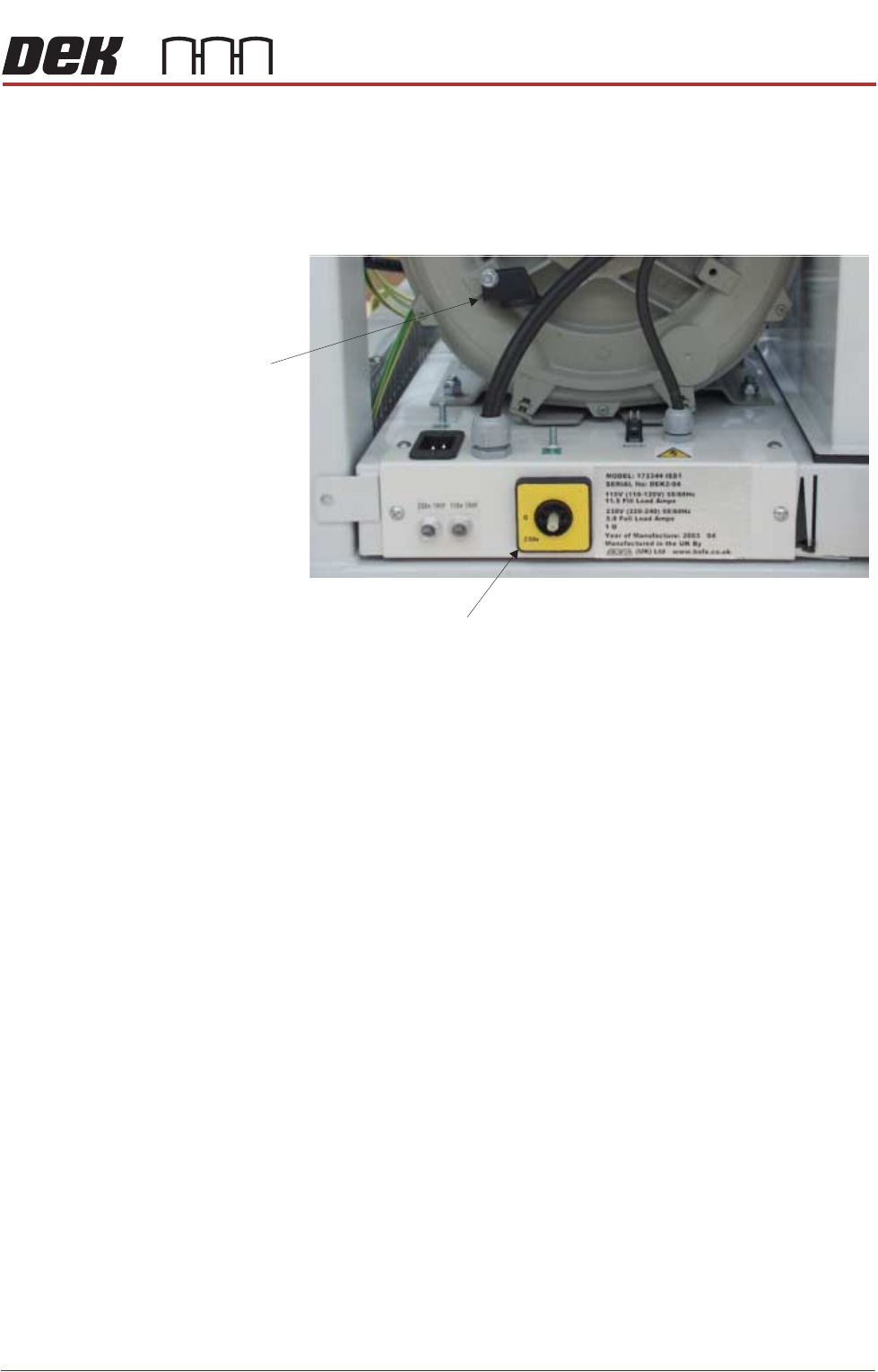
Ensure that the voltage selector switch, on the front panel of the onboard
vacuum filtration unit, is set to match the supply voltage. To check or switch the
voltage selector, carry out the following:
1. Using a 10mm spanner, remove the voltage selector control knob from the
fan housing.
2. Fit the voltage selector control knob to the voltage selector switch.
NOTE
The spindle has three keyways allowing the knob to be fitted in one position
only.
3. Ensure that the pointer of the knob is indicating the voltage that closely
matches the mains supply voltage.
NOTE
a. 1. This unit is liable to damage if the voltage selector does not match the
supply voltage.
b. 2. The ‘0’ position on the voltage selector is OFF disabling the vacuum
filtration unit.
4. Return the voltage selector control knob to the fan housing to prevent further
adjustment.
Voltage Selector Switch
Voltage
Selector
Control Knob
115v
PRINTER PREPARATION
PRE POWER UP CHECKS
4.72 Installation Manual Chapter Issue 15, May 20
External Services
Type 1, 2, 3 and 5 printers
In order for the printer to function correctly the following services must be
available:
• Pneumatic Supply
• Electrical Supply
Other services that may be required are:
• Host Communications
• Upline/Downline Machine Interface (FMI/MIU)
• Temperature Control Module (TCM)
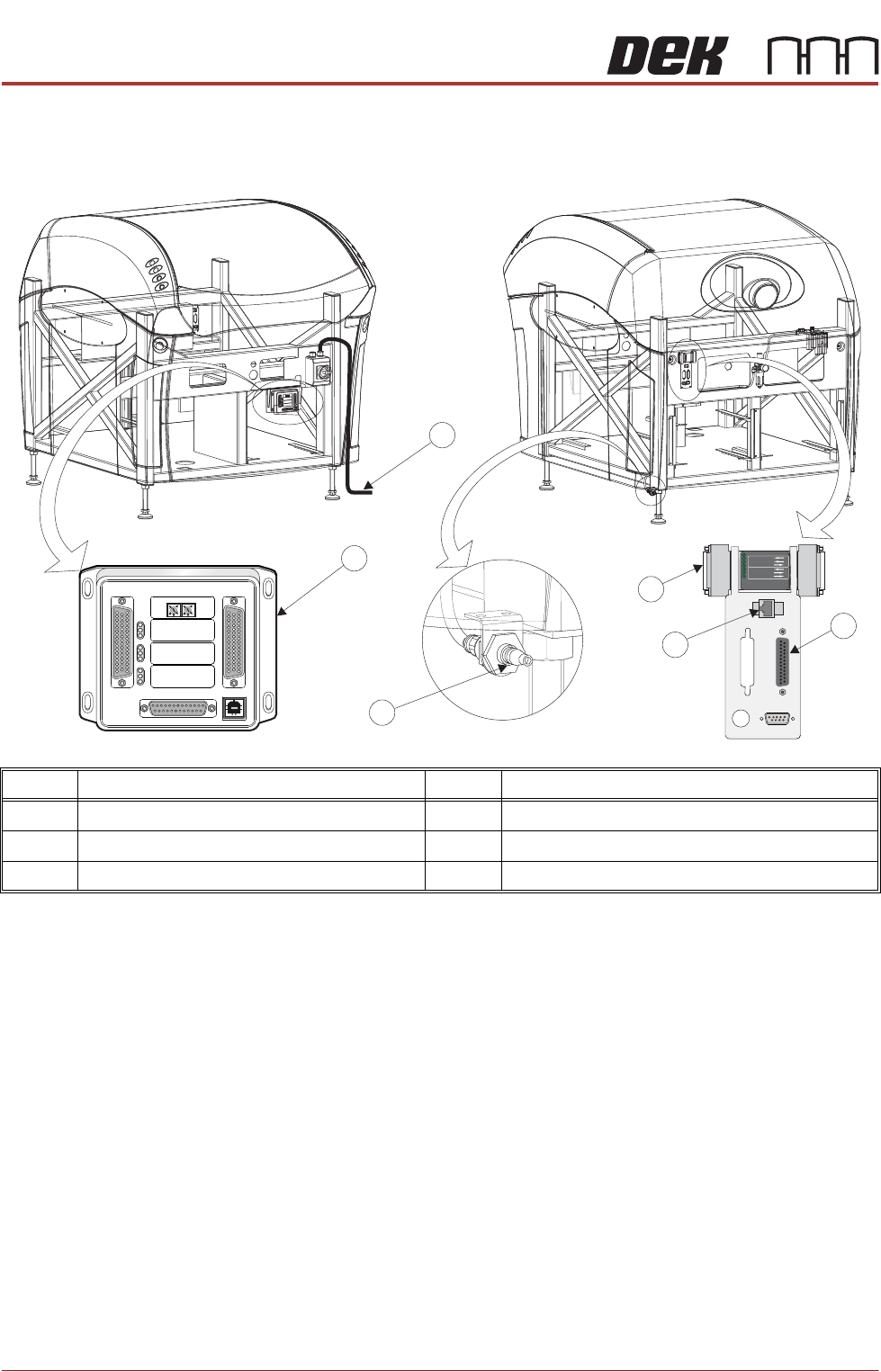
Item Description Item Description
1 Printer Mains Supply Cable 4 Foreign Machine Interface (FMI) Pod
2 Temperature Control Module (TCM) 5 Air Connection
3 Host Comms LAN RJ45 6 Multi Interface Unit (MIU)
M
1
S
K
1
M
1
S
K
1
U
PL
I
N
E
UP
LI
NE
M1
SK
2
M1
SK
2
D
O
W
N
LI
NE
D
O
W
NLI
N
E
M
1P
L3
M1PL3
D
E
K
M
/
C
DEK
M
/C
M
1
S
K
4
M
1S
K
4
D
E
K
U
SB
DEK
U
S
B
+1
2
V+
1
2
V
+2
4
V
+24
V
+2
4V SW
+24
V
SW
S
E
N
D
U
P
L
I
NE
S
END UP
LI
N
E
S
E
N
D
DOW
N
LINE
S
E
N
D
DO
WN
L
IN
E
CO
NTRO
L
I
N
CO
N
T
R
OLI
N
UP
L
I
N
E
R
E
AD
YUP
L
I
NE REA
D
Y
DO
W
N
LI
N
E
R
EAD
Y
DO
W
N
L
INE R
E
A
D
Y
C
ONTRO
L
OUT
C
O
NTR
OL
OU
T
P
O
WE
R
P
OWER
I
/P'
SI
/P'
S
O
/P
'SO
/
P'
S
P
RO
T
OC
O
L
S
EL
EC
T
IO
N
P
R
O
TOC
OL
SE
L
E
CTIO
N
U
P
U
P
L
I
N
E
L
I
N
E
DO
WN
DOWN
LIN
E
LINE
M
IU
1
9
1
11
4
MI
U
191114
4
8
0
4
8
0
POWER ON
PART No. 160740
M/C AVAILABLE
BOARD AVAILABLE
BOARD PASS
D
O
W
N
LIN
E
BOARD AVAILABLE
BOARD PASS
M/C AVAILABLE
U
P
LIN
E
FMI POD
View on RearView on Front
1
2
3
4
5
6
M1SK1
UPLINE
M1SK2
DOWNLINE
M1PL3
DEK M/C
M1SK4
DEK USB
+12V
+24V
+24V SW
SEND UPLINE
SEND DOWNLINE
CONTROL IN
UPLINE READY
DOWNLINE READY
CONTROL OUT
POWER
I/P'S
O/P'S
PROTOCOL SELECTION
UP
LINE
DOWN
LINE
MIU 191114
4
80
4
80