1OM-1003-007.pdf - 第107页
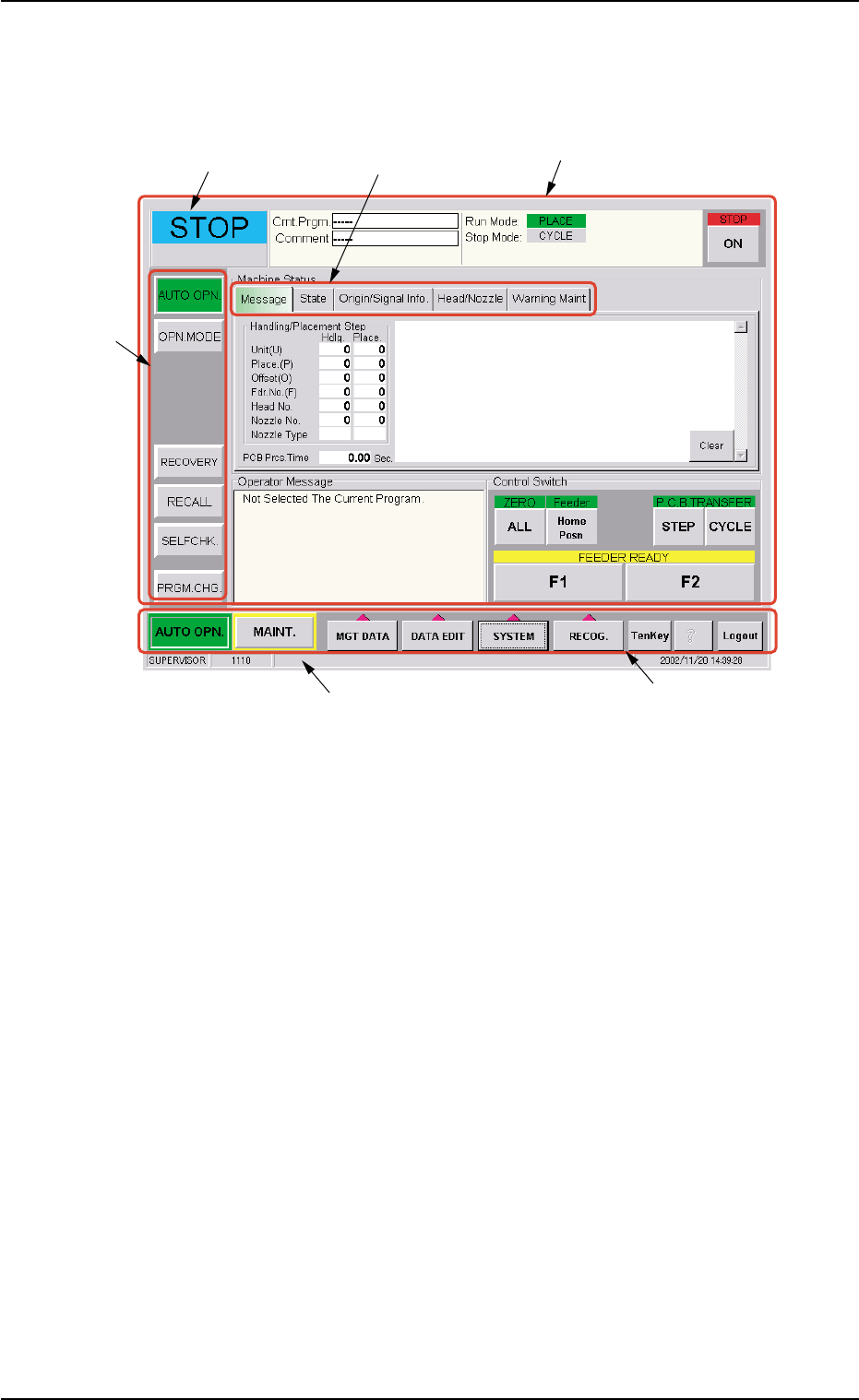
2.2 Structure of Operation Windows Fig. 1B4 Main Menu Bar and "AUT O OPN." Window • • • • • Window Composition *1 Main Menu Bar The main menu bar has five buttons ([AUTO OPN.], [MAINT .], [MGT DA T A], [DA T A …
This machine is provided with a password function which pre-
vents various types of data groups from being deleted by mis-
take and keeps unauthorized user (third party) from operating
the machine.
The following three kinds of passwords are available and each
gives individually approved user’s access to the computer sys-
tem of the machine.
Refer to "Section 5 System Setting" in "Volume 3: Program-
ming and Machine Data" for details.
[SUPERVISOR] : Access can be gained by only the person
identified as "Supervisor".
[OPERATOR #1] : Access can be gained by only the person
identified as "Operator #1". For example, the
person identified as "Operator #1" is given
a permission to all machine operations in-
cluding data editing.
[OPERATOR #2] : Access can be gained by only the person
identified as "Operator #2". For example, the
person identified as "Operator #2" is limited
to only the operations related to the auto-
matic operation.
(3) Enter the password.
"*****" appears in the "Password Entry" dialog box.
(4) Press the [OK] button.
The "AUTO OPN." window opens on the touch screen. It is pro-
vided with a main menu bar.
See Fig. 1B4 in "2.2 Structure of Operation Windows" for the dis-
played main menu bar and the "AUTO OPN." window.
When no password is set, press the [SUPERVISOR], the [OP-
ERATOR #1], or the [OPERATOR #2] button according to the
given authority. The "AUTO OPN." window opens.
Language Selection
Press either the [ ]
or the [ ]
button in the "Login
Type Selection" window to select the language to be used on the
screen.
The selected button turns green, indicating that it is selected.
2.1 Getting Started
0511-002 2-5 AIL01EOPP
Note
Note
2.2 Structure of Operation Windows
Fig. 1B4 Main Menu Bar and "AUTO OPN." Window
••
••
• Window Composition
*1 Main Menu Bar
The main menu bar has five buttons ([AUTO OPN.], [MAINT.], [MGT
DATA], [DATA EDIT], and [SYSTEM] buttons) as main menus, one
button ([RECOG.] button) for selection of a recognized image pat-
tern to be displayed, and three operation buttons ([TenKey], [?],
and [Logout] buttons).
Refer to "Section 4" in "Volume 2: Operation (Supervisor)" for the
main menu bar.
*2 Submenu Bar
The submenu bar has the buttons to select the submenus. When
each button on the submenu bar is selected, the corresponding
operation window opens.
When a button on the main menu bar is pressed, the correspond-
ing submenu bar appears.
Refer to "Section 4" in "Volume 2: Operation (Supervisor)" for the
submenu bar.
2.2 Structure of Operation Windows
0305-001 2-6 AIL01EOPP
*5 Current Mode
*4 Operation Window
(Menus for Automatic Operation)
*6 Supplementary Explanation
*1 Main Menu Bar
*3 Tab
*2 Sub Menu Bar

*3 Tabs
When a window is composed of several sheets, all sheets are pro-
vided with extensions called "Tab" and laid on top of each other so
that the tab of each is visible.
Refer to "Section 4" in "Volume 2: Operation (Supervisor)" for the
tabs.
*4 Operation Window
This window is provided with main menus related to the automatic
operation of the machine.
All operations required for automatic operation are included in this
window.
When the [MAINT.] button on the main menu bar is pressed, the
"MAINT." window opens.
Refer to "Section 5" in "Volume 2: Operation (Supervisor)" for the
composition of the "AUTO OPN." window and "Section 6" in "Vol-
ume 2: Operation (Supervisor)" for the composition of the "MAINT."
window.
*5 Current Mode
The current machine status is indicated at real time.
"RUN" : This indicates that the machine is running.
"PAUSE" : This indicates that the machine is stopped temporarily.
"WAIT" : This indicates that the machine is in the standby mode.
"STOP" : This indicates that the machine is stopped.
"TEACH": The machine is performing a teaching operation.
"MOVE" : The machine is being activated (zeroing and manual op-
erations, etc.).
"TEST" : The machine is performing a device test in the "DVC.
TEST" window (submenu).
*6 Supplementary Explanation
Indicated are the "LOGIN" type, the window No., and the current
date & time.
2.2 Structure of Operation Windows
0305-001 2-7 AIL01EOPP