1OM-1003-007.pdf - 第86页
2.3.5 Front Service Panel Fig. 1A18 *1 Working Lamp Switch This switch is used to turn on or off the working spot lamp. *2 Ground T erminal for Wrist Band This terminal is used to clear a ground through the wrist band. *…

*4 [ENABLE] Button
• When the [ON] button (entitled "MOVE") is pressed in the active operation
sheet, the lamp of the [ENABLE] button illuminates for two seconds. When
the [ENABLE] button is pressed with its lamp "ON", the machine performs
various operations selected in the operation sheets.
*5 [PNL CHANGE] Button
• This button is used to select either the front or the rear operation panel.
(a) The other operation panel can be selected by pressing the
[PNL CHANGE] button on the unavailable (invalid) side only
when the currently selected panel is not set in the "Operation
Locked" mode.
(b) While the LED of this button is ON, the followings become
available.
Rear Touch Screen
[START] Button
[STOP] Button
[ENABLE] Button
(c) The [STOP] button can be activated anytime regardless of the
[PNL CHANGE] button.
(d) When the panel operation is not locked and the [STOP] button
on the unselected operation panel is pressed, the operation
panel on the pressed button side becomes activated automati-
cally.
• When this button is pressed with the LED being "ON", only the rear opera-
tion panel becomes available in operations (Operation Locked) and the
[LOCK] lamps on both front and rear operation panels illuminate.
To cancel the "LOCK" mode, press this button again.
*6 [LOCK] Lamp
• While the lamp is ON, it indicates that the selected operation is locked.
• When the operation panel is operated from the unavailable side, the [LOCK]
lamp flickers.
To cancel the flickering of the lamp, press the [PNL CHANGE] button and
follow the steps to set the operation-lock mode again.
*7 Rear Touch Screen
• The operation windows will be displayed on the rear touch screen as well
as the front one.
Various types of operations become available by touching the buttons and
tabs on the screen.
2.3 Operational Measures
0305-001 1-22 AIL01EOPP
Note
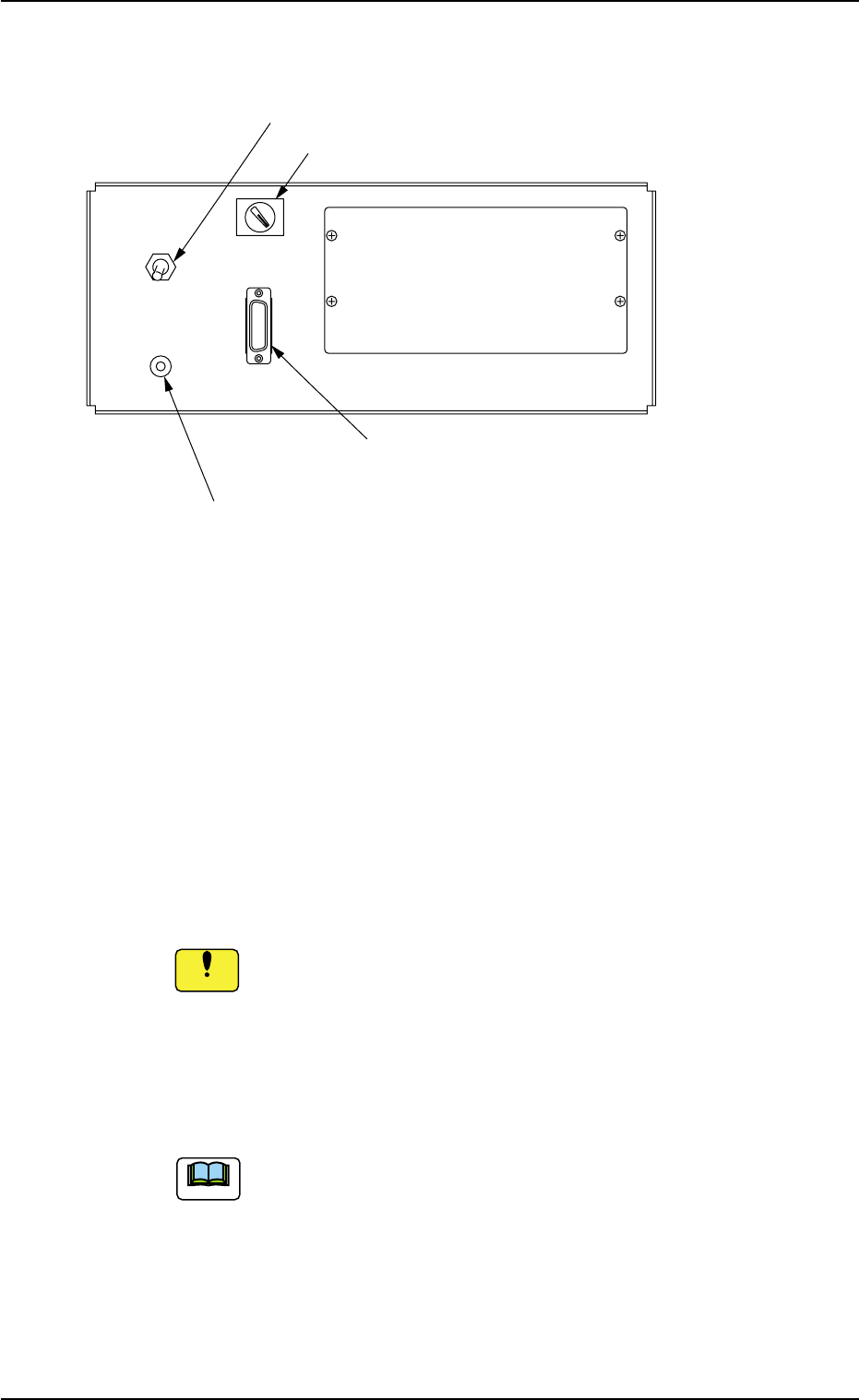
2.3.5 Front Service Panel
Fig. 1A18
*1 Working Lamp Switch
This switch is used to turn on or off the working spot lamp.
*2 Ground Terminal for Wrist Band
This terminal is used to clear a ground through the wrist band.
*3 Selector Switch
This switch is used to select either the operation panel "OFF" of the
main machine or the secondary operation panel "ON" for mainte-
nance.
Keep the selector switch "OFF" during automatic operation.
When the switch is turned "ON", the power will be cut off.
*4 Connector for Secondary Operation Panel
This connector is used to connect the secondary operation panel
for maintenance.
This connector is provided only for a service personnel.
2.3 Operational Measures
ON OFF
LIGHT
OPE-TAB
*3 Selector Switch
*1 Working Lamp Switch
*2 Ground Terminal
for Wrist Band
*4 Connector for Secondary
Operation Panel
0412-002 1-23 AIL01EOPP
Note
Notice
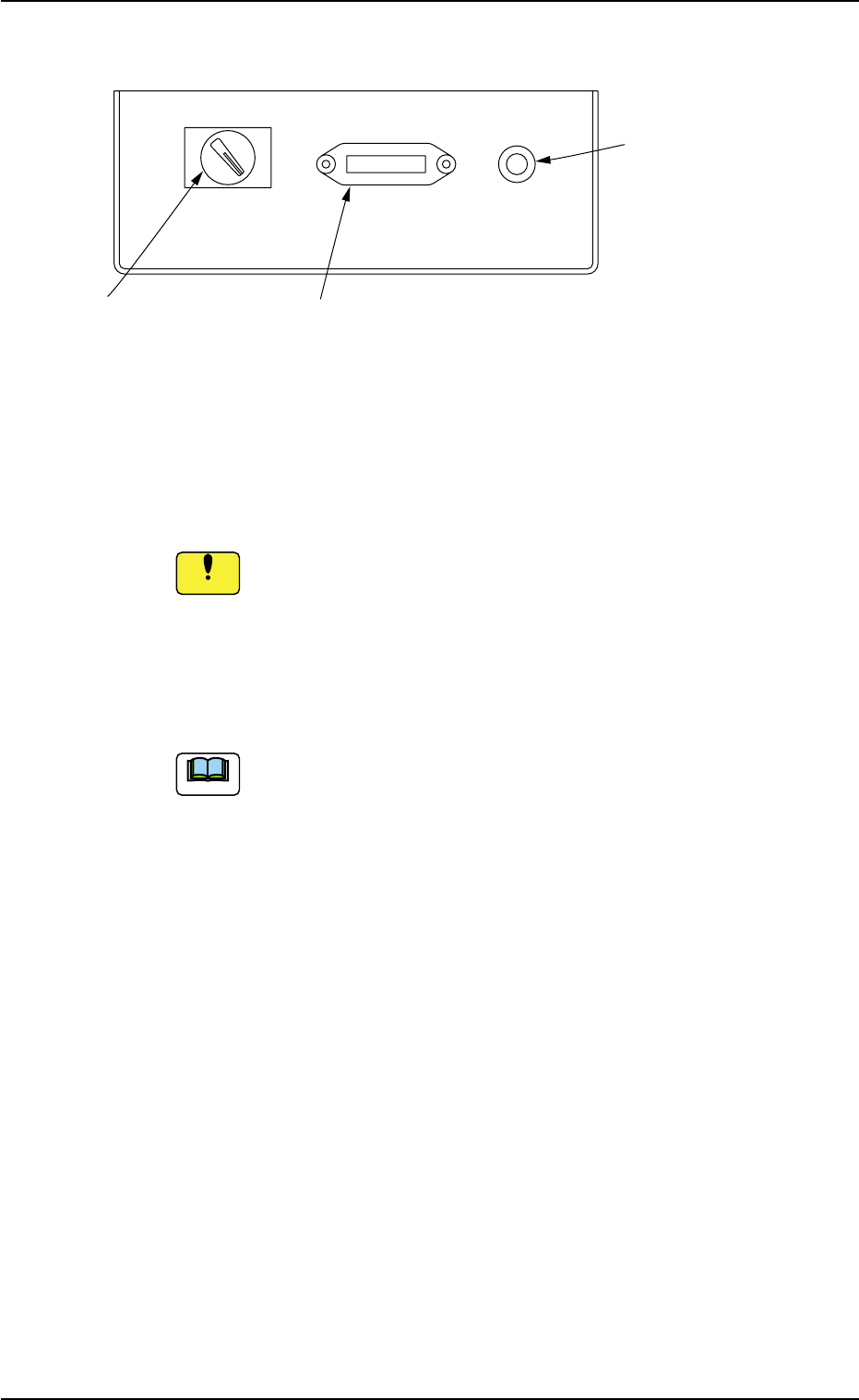
2.3.6 Rear Service Panel
Fig. 1A19
*1 Selector Switch
This switch is used to select either the operation panel of the main
machine or the secondary operation panel for maintenance.
Keep the selector switch "OFF" during automatic operation.
When the switch is turned "ON", the power will be cut off.
*2 Connector for Secondary Operation Panel
This connector is used to connect the secondary operation panel
for maintenance.
This connector is provided only for a service personnel.
*3 Ground Terminal for Wrist Band
The wrist band must be connected to this terminal for grounding.
2.3 Operational Measures
ON OFF OPE-TAB
*1 Selector Switch
*2 Connector for Secondary
Operation Panel
*3 Ground Terminal
*3 for Wrist Band
0412-002 1-24 AIL01EOPP
Note
Notice