1OM-1003-007.pdf - 第123页
(5) Press the [Origin/Signal Info.] tab in the "AUTO OPN." submenu window . The "Origin/Signal Info." tab sheet opens. Check the origin marks. Fig. 1C20 (6) When the [ST ART] button on the front opera…
1.3 Start of Automatic Operation
Operation Procedure
(1) Confirm that the front safety door is closed.
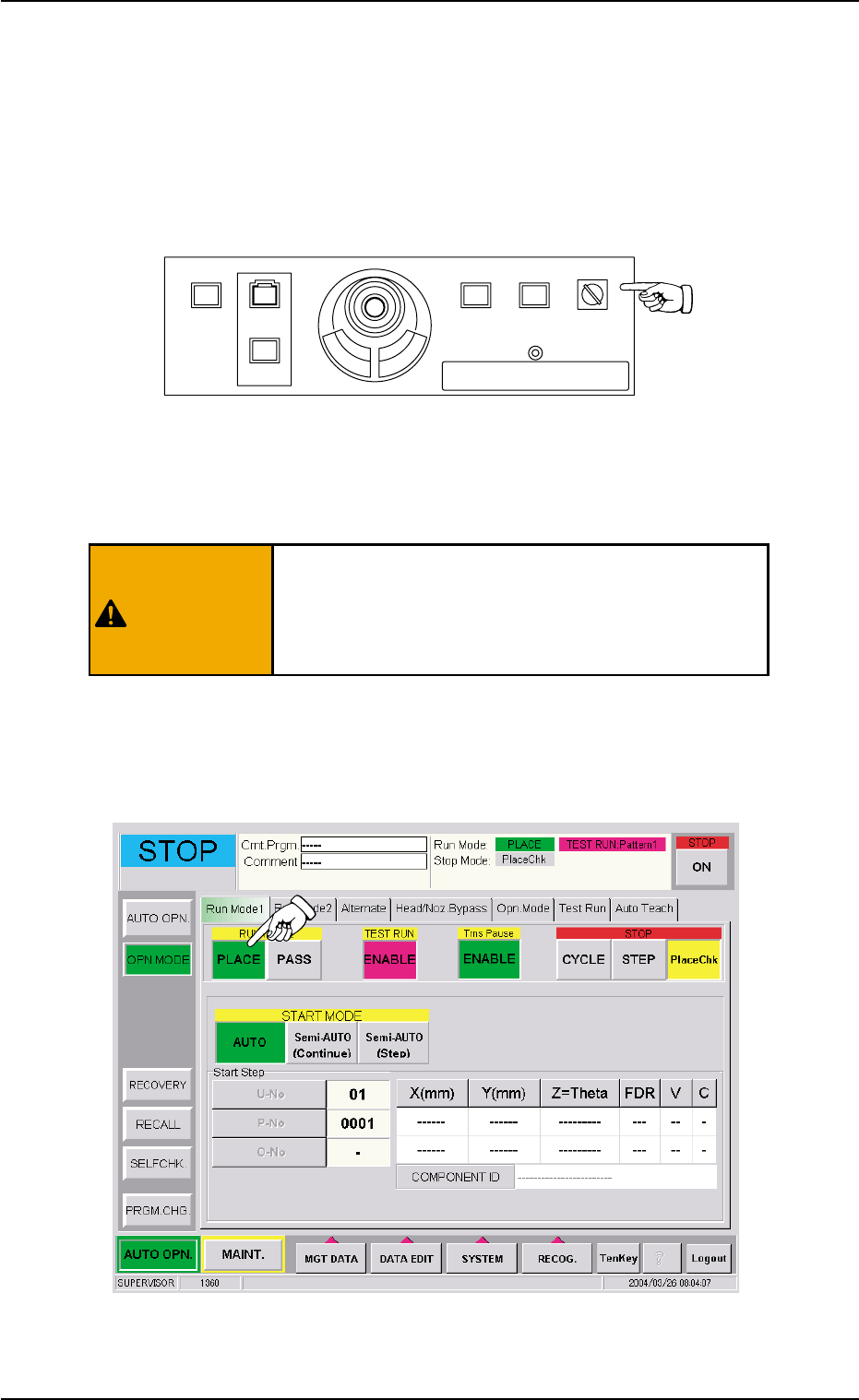
(2) Set the [OPERATION] switch on the front operation panel to the
"RUN" side and be sure to remove the selection key from the ma-
chine.
Fig. 1C18
(3) Check the surroundings of the machine and confirm safety before
starting the automatic operation.
Before starting the automatic operation, check care-
fully that there is no person or objects (tools, parts,
etc.) around the moving mechanisms of the machine
(especially, the other side of machine operation).
(4) Open the "OPN. MODE" window (submenus) on the touch screen
and press the [PLACE] button entitled "RUN MODE" in the "Run
Mode 1" tab sheet.
Fig. 1C19
1.3 Start of Automatic Operation
POWER ON
STOP
START
ENABLE
RUN SETUP
OPERATION
LOCK
PNL CHANGE
0412-004 3-11 AIL01EOPP
WARNING
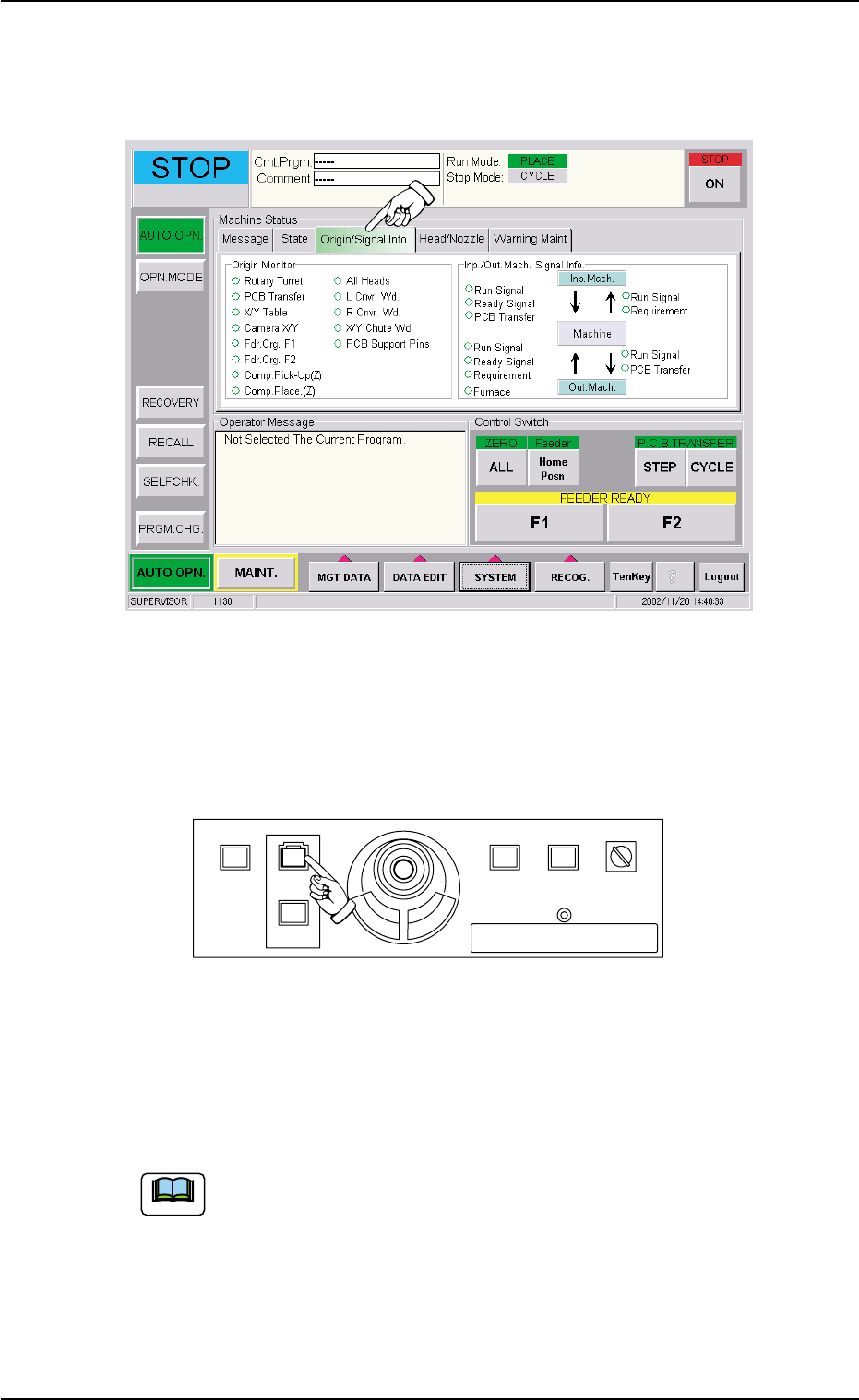
(5) Press the [Origin/Signal Info.] tab in the "AUTO OPN." submenu
window. The "Origin/Signal Info." tab sheet opens. Check the origin
marks.
Fig. 1C20
(6) When the [START] button on the front operation panel is pressed
while the lamp is flickering, the automatic operation (placement)
starts.
Fig. 1C21
When the automatic operation (component placement) starts, all origin
marks disappear and the LED (green) of the [START] button on the
front operation panel and the green lamp of the light tower illuminate.
(a) The automatic operation cannot be started unless the
"AUTO OPN." window is active.
(b) When a P.C.B. already exists in the P.C.B. positioning sec-
tion, the machine discharges the P.C.B. without placing
any component on the P.C.B.
POWER ON
STOP
START
ENABLE
RUN SETUP
OPERATION
LOCK
PNL CHANGE
1.3 Start of Automatic Operation
0305-001 3-12 AIL01EOPP
Note
1.4 Temporary Stop and Restart of Automatic
Operation
1.4.1 Replenishment of Components and P.C.B.’s
There will be two cases of component supply replenishment during au-
tomatic operation - Component Replenishment with Machine in Short
of Components and Intentional Component Replenishment.
Correct countermeasures are also required when the machine is short
of P.C.B.’s.
••
••
• Component Shortage Mode
When a component shortage error occurs during automatic opera-
tion, an error alarm is issued and the machine stops.
In this case, follow the steps below to replenish components and re-
start the automatic operation.
(1) Press the [RESET] button to cancel the error alarm.
(2) Open the feeder work area safety door and detach the tape feeder.
(3) Install the tape feeder loaded with components.
Refer to the instruction manual of the tape feeders for attach-
ment and detachment of the tape feeders.
The tape feeders should be seated securely.
Otherwise, they may collide with the feeder installa-
tion error detection sensors or pick-up errors will oc-
cur.
(4) After the replacement of the tape feeder, close the feeder work
area safety door and press the [FEEDER READY] button on the
pertinent side. Confirm that the "AUTO OPN." window is active on
the touch screen and press the [START] button. The automatic op-
eration re-starts.
1.4 Temporary Stop and Restart of Automatic Operation
CAUTION
0412-002 3-13 AIL01EOPP
Note