00198615-04_UM_IPC-HERMES-9852-V1.2_DE_EN_ZH.pdf - 第12页
2 What is IPC-HERMES-9852 2.4 The most important advantages at a glance 12 Administrator Guide / Administrator Handbuch / 管理员指南 IPC-HERMES-9852 - V1.2 05/2020

2 What is IPC-HERMES-9852
2.4 The most important advantages at a glance
Administrator Guide / Administrator Handbuch / 管理员指南 IPC-HERMES-9852 - V1.2 05/2020 11
2.4 The most important advantages at a glance
●
Protocol-based instead of “signal-based”
– Based on TCP/IP and XML, IPC-HERMES-9852 reduces the complexity. An extension to
integrate new functions is easily feasible.
●
Standard components instead of “special requirements”
– Cables, connectors and interfaces (Ethernet for example) are not expensive and easily
available.
●
Integrated data management instead of separate data holding
– Consistent board and data assignment allows for a new level of transparency.
– Specific advantages for the line production
●
Reduces investment and even line length
– Board tracking over the whole line is possible with only one board ID scanner.
●
Improves flexibility of the line layout
– Simple reconnection of all units even after complex modifications to the line layout.
●
Allows for seamless communication
– The generic communication backbone functions reliably in production lines with equipment
of different manufacturers and supports the gradual extension of existing lines.
●
Minimizes data and process complexity
– The product-oriented approach minimizes the effort of data handling.

2 What is IPC-HERMES-9852
2.4 The most important advantages at a glance
12 Administrator Guide / Administrator Handbuch / 管理员指南 IPC-HERMES-9852 - V1.2 05/2020
3 Configuration
3.1 Connection configuration in the LAN
Administrator Guide / Administrator Handbuch / 管理员指南 IPC-HERMES-9852 - V1.2 05/2020 13
3 Configuration
3.1 Connection configuration in the LAN
Current situation:
To establish a Hermes connection between machines in the SIPLACE LAN and outside, the follow-
ing options are possible:
●
3.1.1 "Using the Line Computer as a router" [}14]
●
3.1.2 "Using the symmedia Plug & Work Box Industrial as a router" [}14]
●
3.1.3 "Using the symmedia Plug & Work Box as a router" [}16]
●
3.1.4 "Using the Linux computer as a router" [}17]
●
3.1.5 "Using the HPE Office Connect 1920S 8G (JL380A) as a router" [}19]
●
3.1.6 "Using another router" [}26]
The following instructions describe how to establish a Hermes connection via the different options.
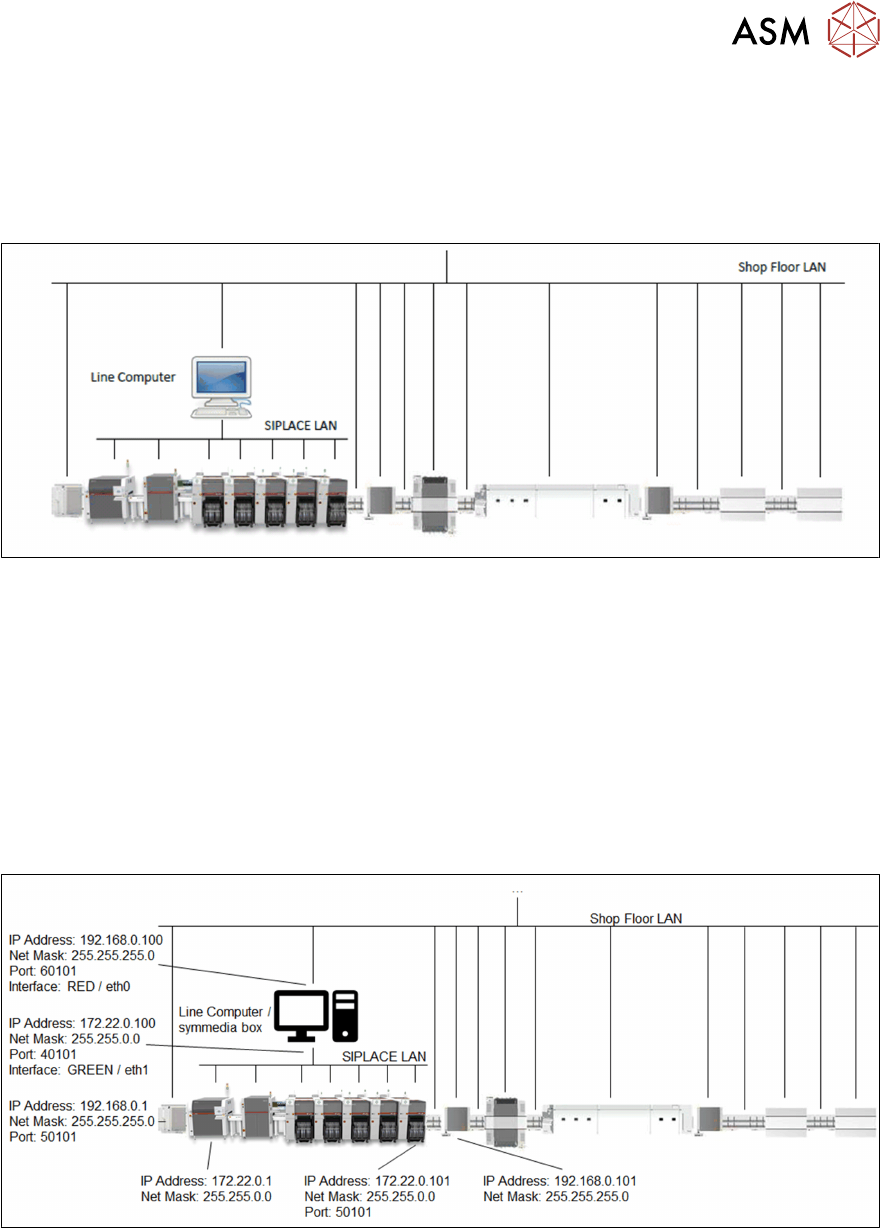
The following line configuration is considered as an example.