00198615-04_UM_IPC-HERMES-9852-V1.2_DE_EN_ZH.pdf - 第32页
3 Configuration 3.4 Connection configuration for DEK printers 32 Administrator Guide / Administrator Handbuch / 管理员指南 IPC-HERMES-9852 - V1.2 05/2020 ► Choose Hermes Upline Address and enter the IP address of the previous…
3 Configuration
3.4 Connection configuration for DEK printers
Administrator Guide / Administrator Handbuch / 管理员指南 IPC-HERMES-9852 - V1.2 05/2020 31
3.4 Connection configuration for DEK printers
NOTICE
DEK printer - Technical Reference Manual
This chapter describes the basic configuration for a DEK printer. For more information and
important details on the IPC-HERMES-9852 connection, refer to the "Technical Reference
Manual" of the DEK printer.
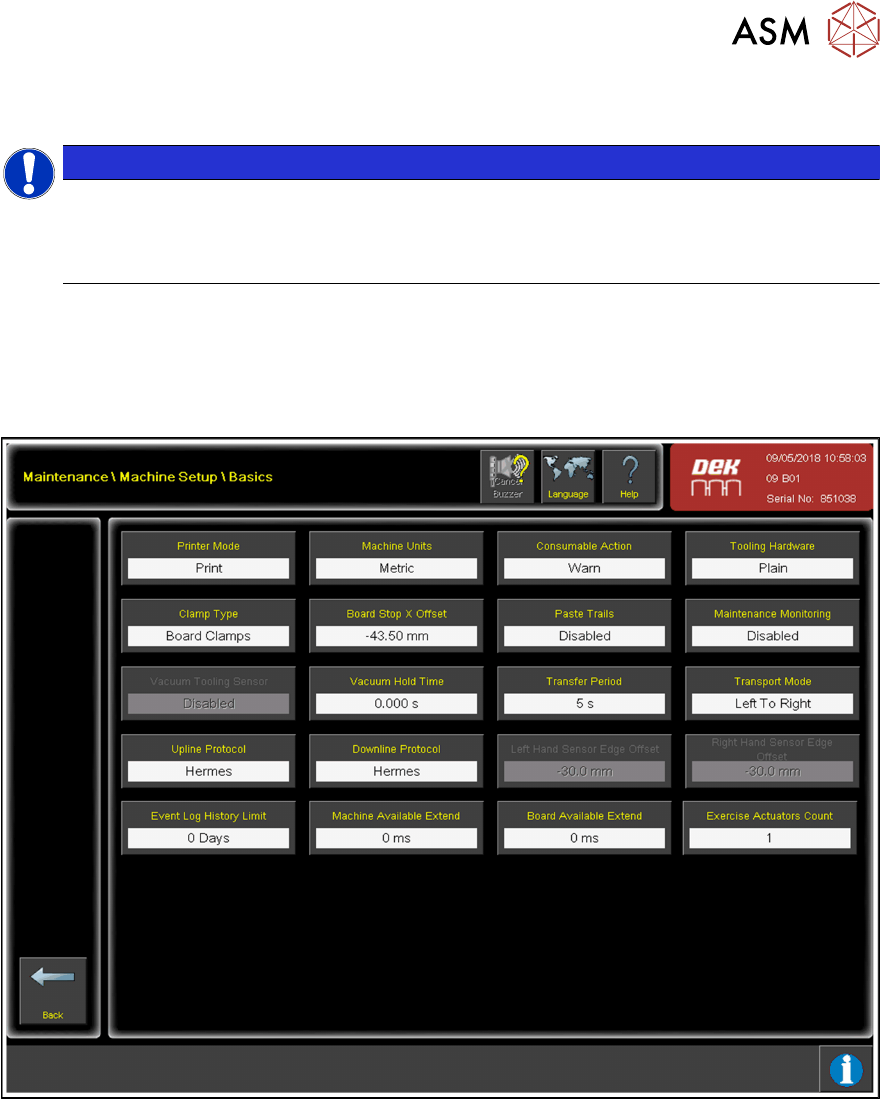
3.4.1 Basic configuration
► Choose Maintenance.
► Choose Machine Setup.
► Choose Basics.
► Choose Upline Protocol.
► From the list of available protocols, choose Hermes.
► Confirm with Accept.
► Choose Downline Protocol.
► From the list of available protocols, choose Hermes.
► Confirm with Accept.
► Choose Back.
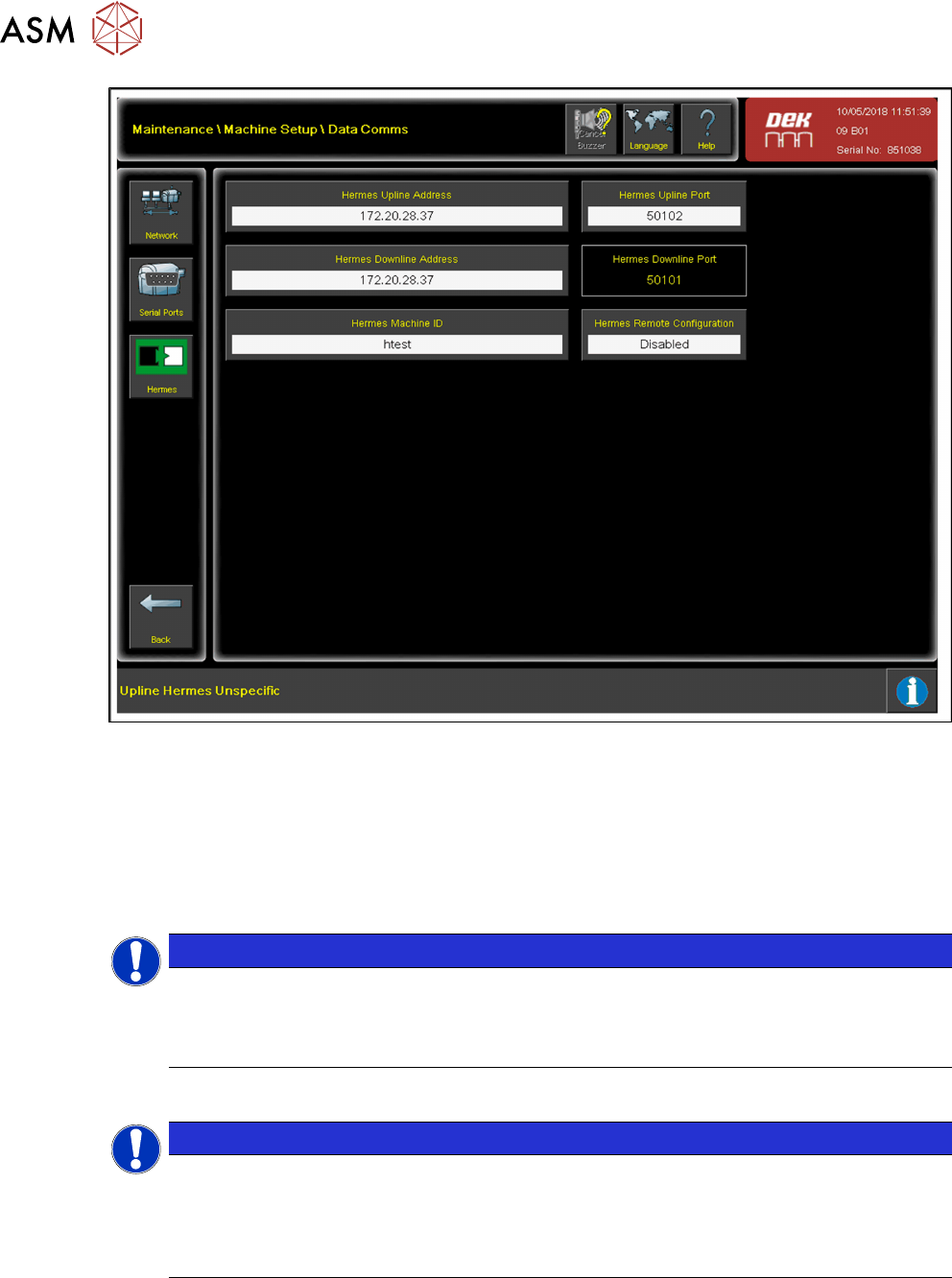
► Choose Data Comms.
► Choose Hermes.
3 Configuration
3.4 Connection configuration for DEK printers
32 Administrator Guide / Administrator Handbuch / 管理员指南 IPC-HERMES-9852 - V1.2 05/2020
► Choose Hermes Upline Address and enter the IP address of the previous machine.
► Confirm with Accept.
► Choose Hermes Upline Port and enter the port number for the previous machine. The default
Hermes port number is 50101.
► Confirm with Accept.
► Choose Hermes Downline Address and enter the IP address of the permissible successor
machine.
NOTICE
Hermes Downline Address
The Hermes Downline Address can be left empty. In this case, any Hermes-compatible
station can connect to the printer. To allow a specific station to connect, enter the IP ad-
dress of this station.
► Confirm with Accept.
NOTICE
The port number of the successor cannot be configured by the printer. It is set to the default
port number for lane 1 (50101). A value must be entered for the Hermes Machine ID. This
value should be the serial number of the printer by default. The parameter is preset so that
no other value is accepted.
► Choose Back.
► Choose Back.
► Choose Back.
► Set the IP address and the port number for the printer at the upstream and downstream sta-
tions.
3 Configuration
3.5 Connection configuration for ASM ProcessLens
Administrator Guide / Administrator Handbuch / 管理员指南 IPC-HERMES-9852 - V1.2 05/2020 33
3.5 Connection configuration for ASM ProcessLens
This section describes the basic configuration of IPC-HERMES-9852 in the ASM ProcessLens soft-
ware version 4.0.1.0 or higher.
Currently IPC-HERMES-9852 is supported only on a dual lane platform; therefore, this document
describes the procedure to configure an IPC-HERMES-9852 on a dual lane system. Differences in
configuration for a single lane platform will be described where necessary.
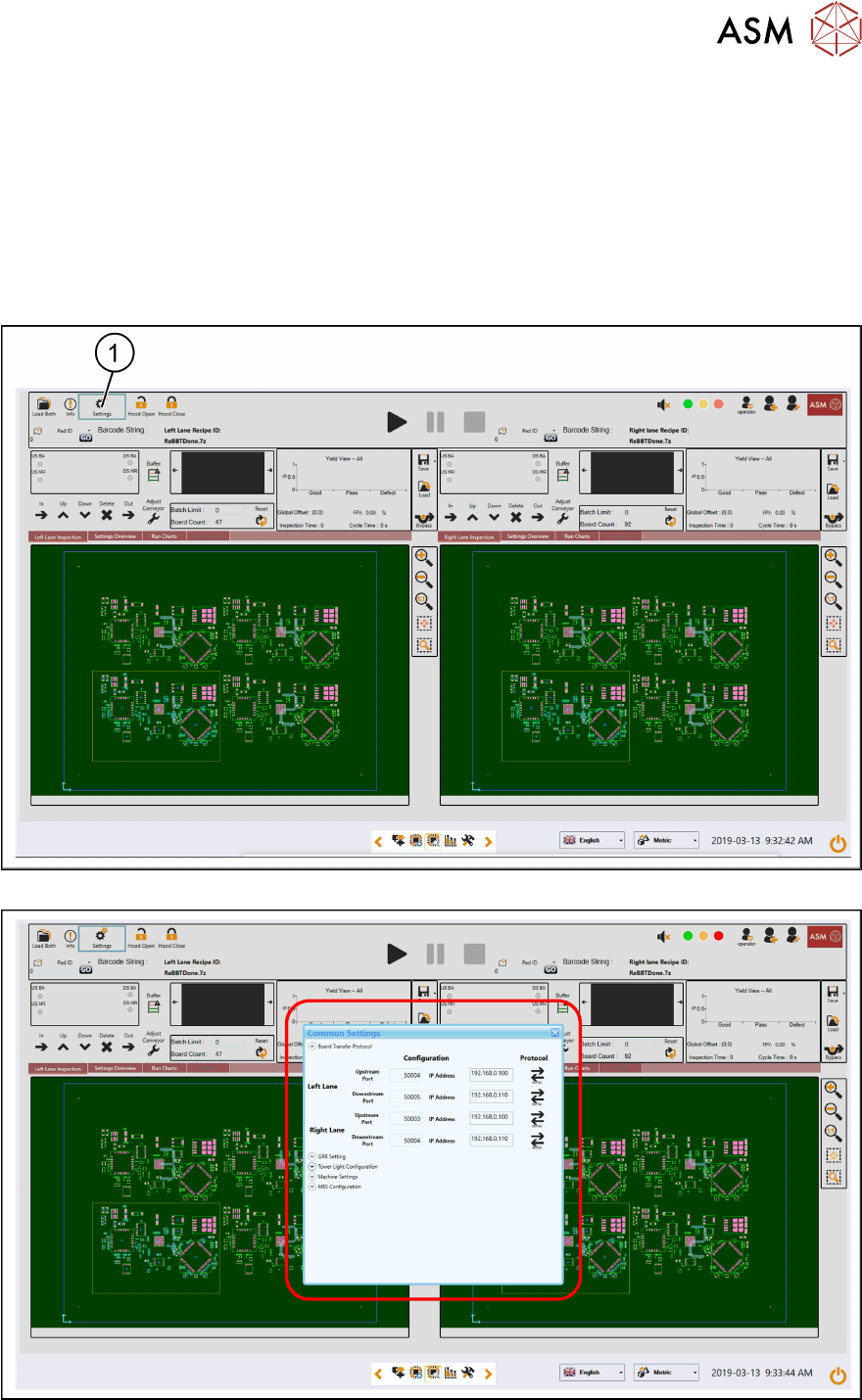
► Start the ASM ProcessLens software.
► Click on the Settings (1) icon.
► Navigate to the Board Transfer Protocol sub-section.