00198615-04_UM_IPC-HERMES-9852-V1.2_DE_EN_ZH.pdf - 第42页
5 Operating the station software 5.1 Working with messages 42 Administrator Guide / Administrator Handbuch / 管理员指南 IPC-HERMES-9852 - V1.2 05/2020 Field Value/Meaning → From the upstream machine to this machine. ← From th…
5 Operating the station software
5.1 Working with messages
Administrator Guide / Administrator Handbuch / 管理员指南 IPC-HERMES-9852 - V1.2 05/2020 41
5 Operating the station software
5.1 Working with messages
Display of the messages that were issued by IPC-HERMES-9852 protocol (the last 100 messages
are displayed at least).
NOTICE
Definition and description of the messages
For the definition and descriptions of the messages, refer to the documentation of IPC-
HERMES-9852. See also 2.2 "IPC-HERMES-9852 documentation" [}9].
See also
2 5.1.3 "Selection of message types" [}44]
5.1.1 Input and Output Lanes
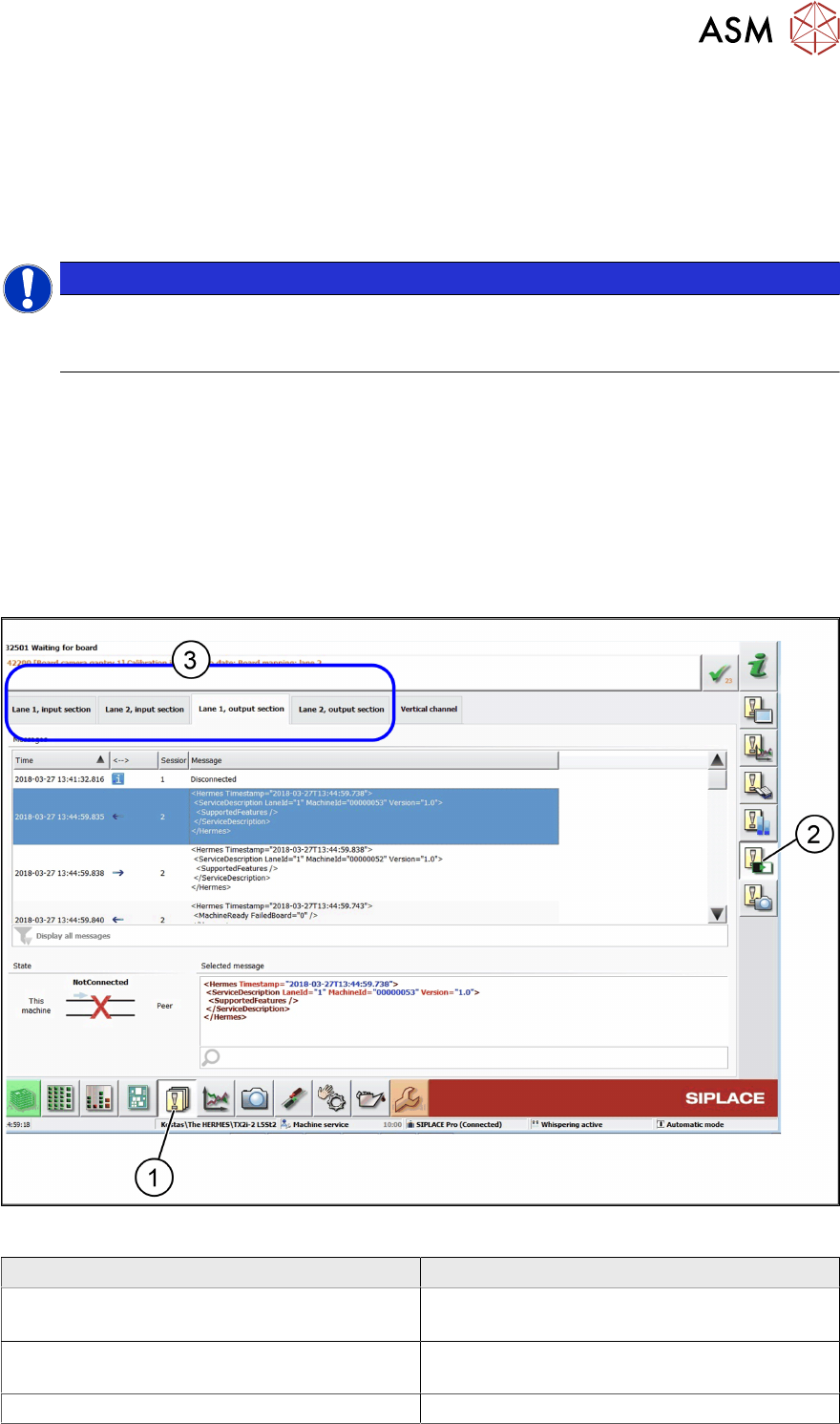
► In the toolbar, click Events (1) and select Hermes: Status and messages (2).
ð The IPC-HERMES-9852 – Events view is displayed.
► Select the Lane 1 input section or Lane 2 input section or Lane 1 output section or Lane
2 output section tab (3).
Editing field - Messages
Field Value/Meaning
Time Time at which the message was issued.
Date and time: YYYY-MM-DD h:min:sec.msec
←→ Specifies the direction in which each message
was sent.
Input section
5 Operating the station software
5.1 Working with messages
42 Administrator Guide / Administrator Handbuch / 管理员指南 IPC-HERMES-9852 - V1.2 05/2020
Field Value/Meaning
→ From the upstream machine to this machine.
← From this machine to the upstream machine.
Output section
→ From this machine to the upstream machine
← From the downstream machine to this
machine.
Session# The number of the connection, in order to allow
the messages to be assigned.
Message The information transmitted.
Display all messages All the sent messages are shown in the list, irre-
spective of the message type.
Display only selected message types Opens a dialog box in which you can select
which messages are shown in the list. See also
5.1.3 "Selection of message types" [}44]
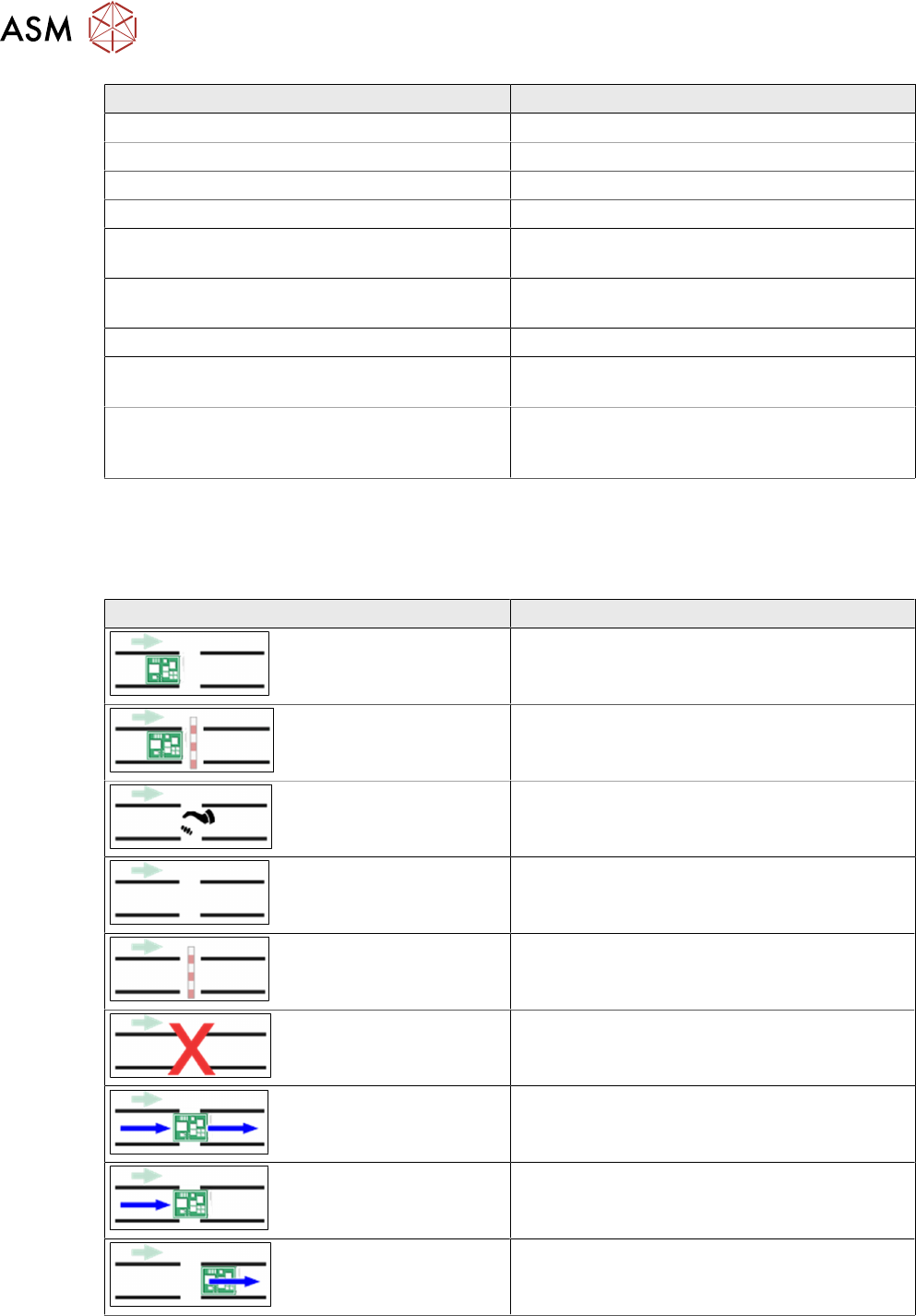
Display area - Status
Describes the current communication status between the communication end point for the current
machine selected on the tab (this machine) and the corresponding communication end point (Peer)
of the upstream or downstream machine.
Icon Value/Meaning
A board is available, the receiving machine is
ready.
A board is available, the receiving machine is
not ready.
Handshake: Establishment of connection
No board is available, the receiving machine is
ready.
No board is available, the receiving machine is
not ready.
There is currently no connection between the
two communication partners.
The conveyors of both machines are running.
The conveyor of the passing machine is run-
ning.
The conveyor of the receiving machine is run-
ning.
5 Operating the station software
5.1 Working with messages
Administrator Guide / Administrator Handbuch / 管理员指南 IPC-HERMES-9852 - V1.2 05/2020 43
Display area - Selected message
The text of the selected message is displayed.
Icon Value/Meaning
Allows you to search for a text string in the dis-
played message.
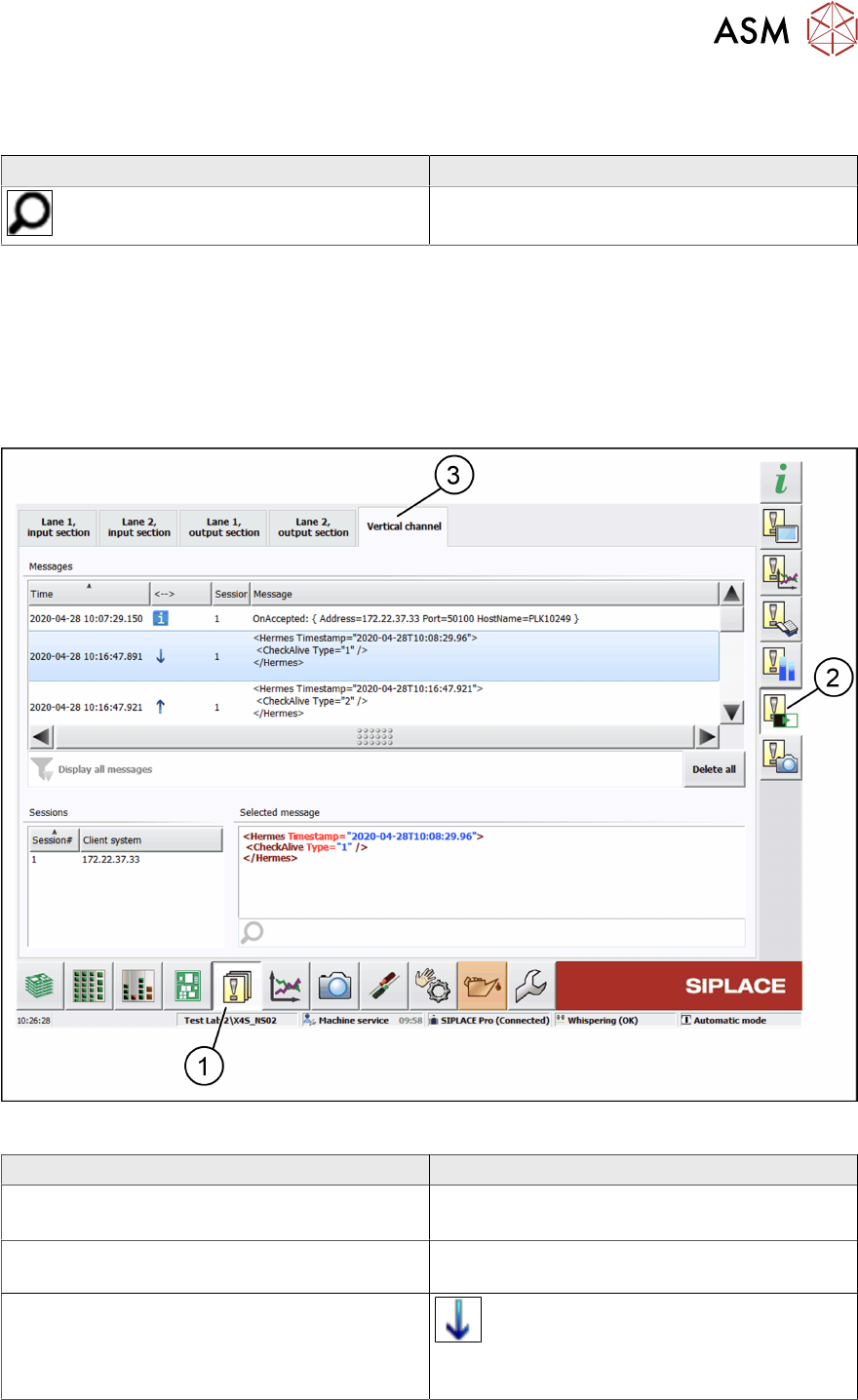
5.1.2 Vertical Channel
Display showing the messages sent between this machine and a higher-level system (client sys-
tem) using the IPC-HERMES-9852 protocol.
► In the toolbar, click Events (1) and select Hermes: Status and messages (2).
ð The IPC-HERMES-9852 – Events view is displayed.
► Select the Vertical channel tab (3).
Editing field - Messages
Field Value/Meaning
Time Time at which the message was issued.
Date and time: YYYY-MM-DD h:min:sec.msec
←→ Specifies the direction in which each message
was sent.
From a higher-level system (client system) to
this machine.