00198615-04_UM_IPC-HERMES-9852-V1.2_DE_EN_ZH.pdf - 第30页
3 Configuration 3.3 Configuring the connections at the SIPLACE station 30 Administrator Guide / Administrator Handbuch / 管理员指南 IPC-HERMES-9852 - V1.2 05/2020 Tabs - Lane 1 / 2, input section ● Peer configuration Here, yo…
3 Configuration
3.3 Configuring the connections at the SIPLACE station
Administrator Guide / Administrator Handbuch / 管理员指南 IPC-HERMES-9852 - V1.2 05/2020 29
3.3 Configuring the connections at the SIPLACE station
The upstream system from which the board data is received must be defined for each SIPLACE
station in the line. In other words, the upstream system must be defined in terms of the IP address
or the host name and port number. This connection configuration is made in SIPLACE Pro and can
be viewed here or modified for the individual station.
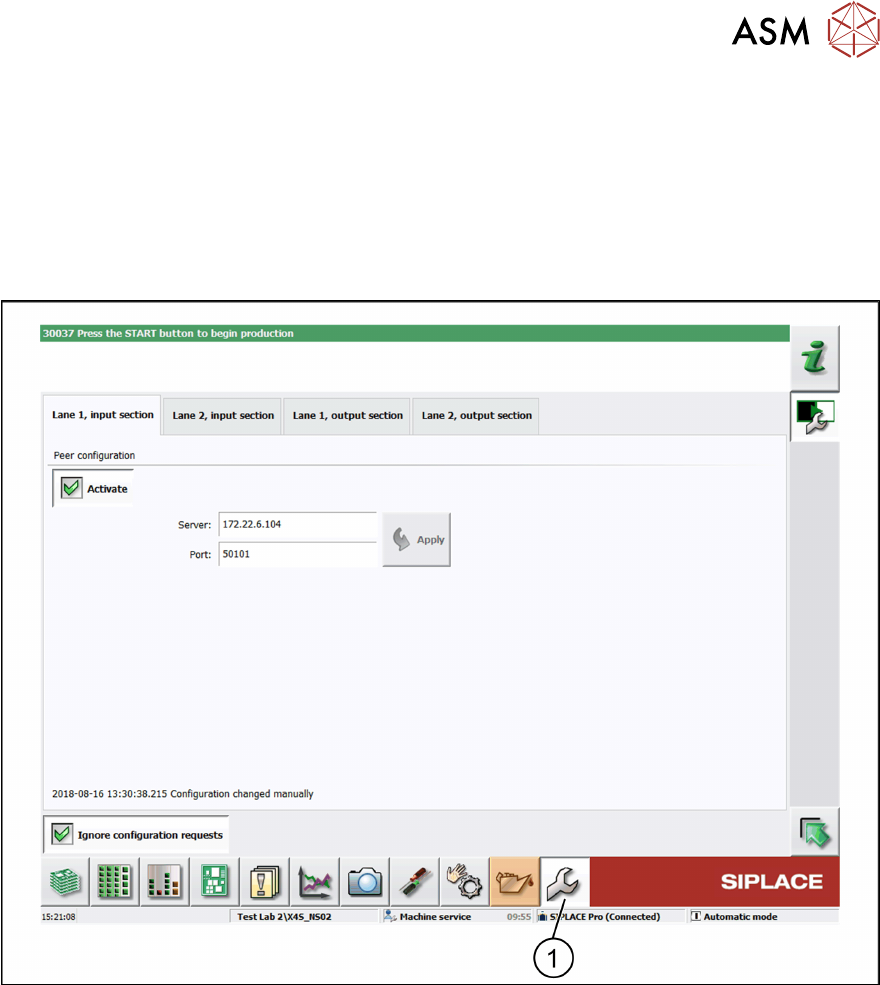
► In the toolbar, click Service (1) and select IPC-HERMES-9852.
ð The IPC-HERMES-9852 – Configuration view is displayed.
Default setting
The Ignore configuration requests option is disabled. Irrespective of the settings that are made
here, the configuration predefined in SIPLACE Pro is applied.
Modifying predefined connection settings (optional)
► Activate the Ignore configuration requests option.
ð The configuration that is predefined in SIPLACE Pro is overwritten by the settings for host
and port that are made here.
A peer on the upstream machine must be defined for each conveyor belt of the input section to al-
low information to be exchanged using IPC-HERMES-9852.
3 Configuration
3.3 Configuring the connections at the SIPLACE station
30 Administrator Guide / Administrator Handbuch / 管理员指南 IPC-HERMES-9852 - V1.2 05/2020
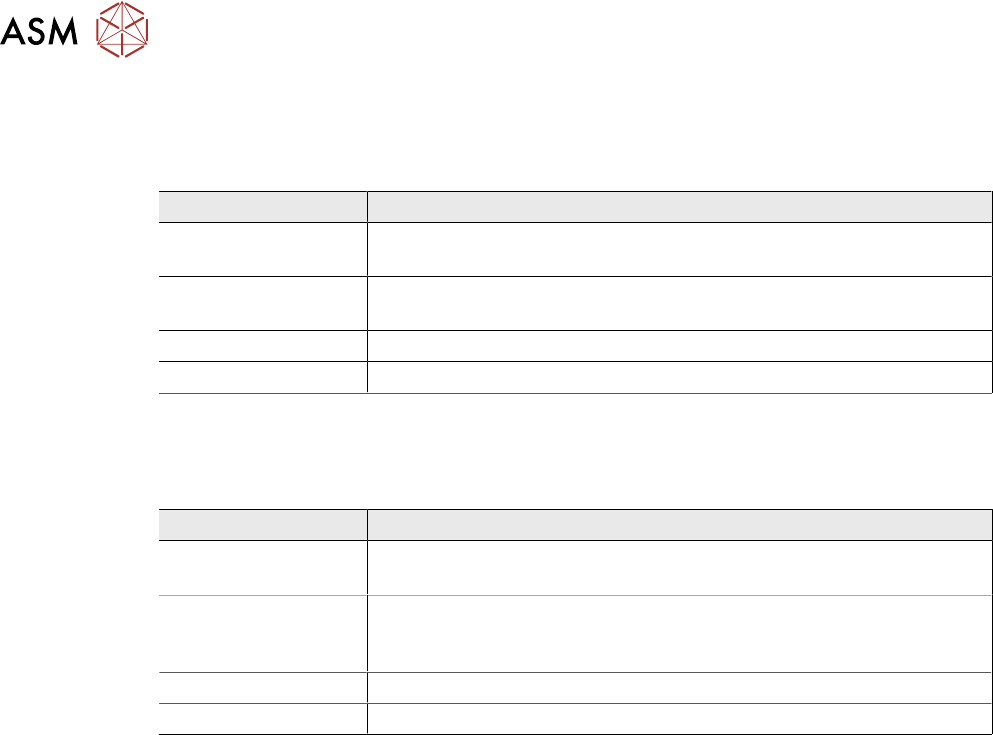
Tabs - Lane 1 / 2, input section
●
Peer configuration
Here, you specify the end point for the communication from the upstream machine.
Field Value/Meaning
Activate Permits the communication with the communication partner on the
downstream machine using IPC-HERMES-9852.
Server IP address or host name of the communication partner on the up-
stream machine.
Port Port number of the communication partner on the upstream machine.
Apply Applies the currently entered settings for the server or port.
Tabs - Lane 1 / 2, output section
●
Peer configuration
Here, you specify the end point for the communication with the downstream machine.
Field Value/Meaning
Activate Permits the communication with the communication partner on the
downstream machine using IPC-HERMES-9852.
Allowed client ad-
dress
IP address or host name of the communication partner on the down-
stream machine. Optional and only recommended if this exact IP ad-
dress is permitted for the downstream machine.
Port Note: This value cannot be configured.
Apply Applies the currently entered settings for the permitted client or port.
3 Configuration
3.4 Connection configuration for DEK printers
Administrator Guide / Administrator Handbuch / 管理员指南 IPC-HERMES-9852 - V1.2 05/2020 31
3.4 Connection configuration for DEK printers
NOTICE
DEK printer - Technical Reference Manual
This chapter describes the basic configuration for a DEK printer. For more information and
important details on the IPC-HERMES-9852 connection, refer to the "Technical Reference
Manual" of the DEK printer.
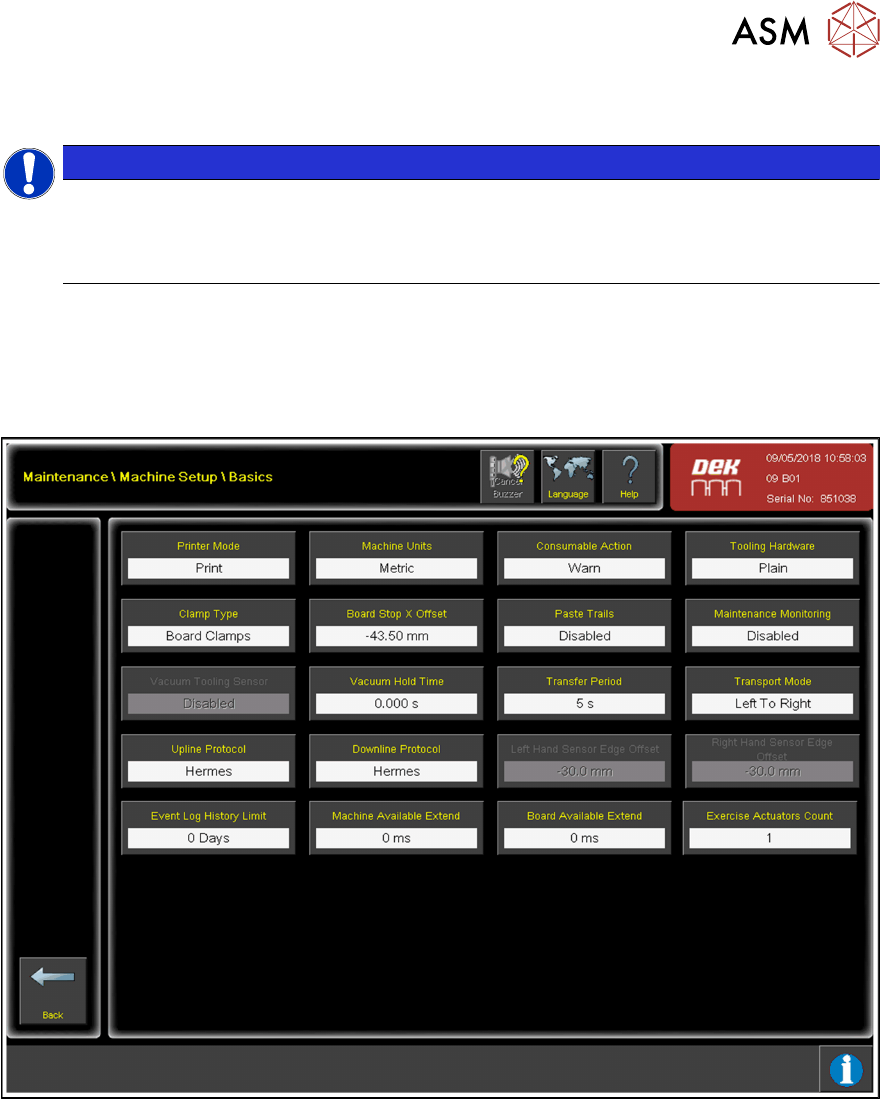
3.4.1 Basic configuration
► Choose Maintenance.
► Choose Machine Setup.
► Choose Basics.
► Choose Upline Protocol.
► From the list of available protocols, choose Hermes.
► Confirm with Accept.
► Choose Downline Protocol.
► From the list of available protocols, choose Hermes.
► Confirm with Accept.
► Choose Back.
► Choose Data Comms.
► Choose Hermes.