00198615-04_UM_IPC-HERMES-9852-V1.2_DE_EN_ZH.pdf - 第48页
6 Restrictions 48 Administrator Guide / Administrator Handbuch / 管理员指南 IPC-HERMES-9852 - V1.2 05/2020 WARNING It is absolutely necessary to unplug the hardware connections! On stations with Shuttle Extension and/or adv…
6 Restrictions
Administrator Guide / Administrator Handbuch / 管理员指南 IPC-HERMES-9852 - V1.2 05/2020 47
6 Restrictions
The following station configurations are not supported by IPC-HERMES-9852:
●
IPC-HERMES-9852 with shuttle extension
●
IPC-HERMES-9852 with advanced conveyor interface (Advanced PCB)
If a Shuttle Extension or the advanced conveyor interface (Advanced PCB) is present at the
SIPLACE station, the IPC-HERMES-9852 interface must be deactivated accordingly. You cannot
use the affected conveyor lane in the input or output section for IPC-HERMES-9852 then.
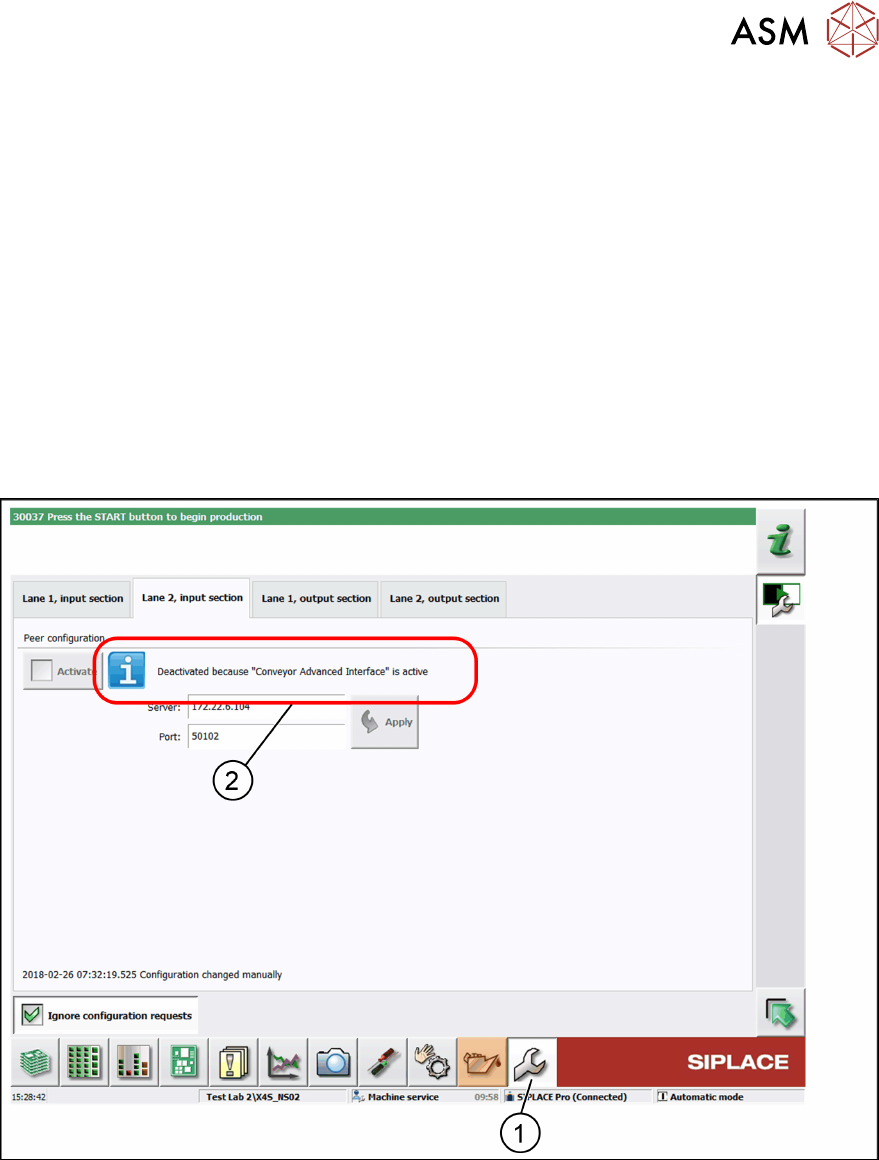
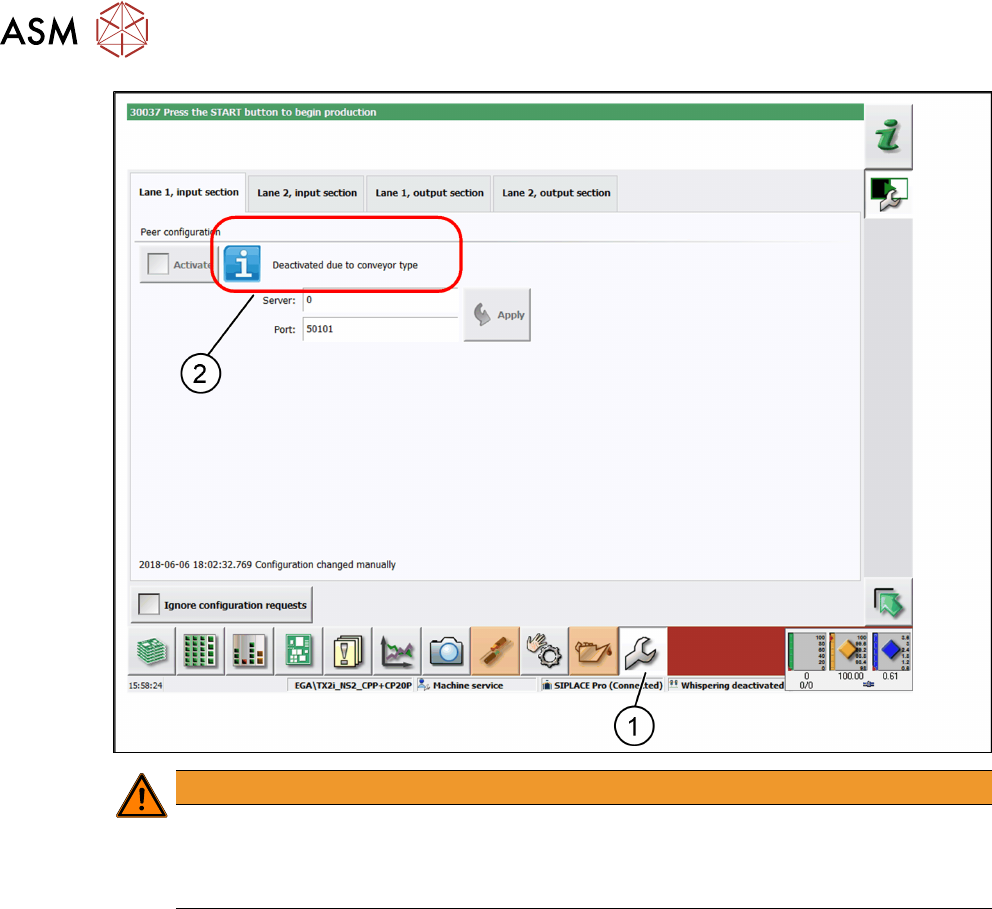
► In the toolbar, click Service (1) and select IPC-HERMES-9852.
ð The IPC-HERMES-9852 – Configuration view is displayed.
► Deactivate the corresponding conveyor lane.
ð A corresponding information is displayed (2).
In the following example, the Advanced PCB conveyor interface is present at conveyor lane 2 (2)
and for this reason it is deactivated for IPC-HERMES-9852.
In the following example, the shuttle extension is present in the input section (2) and for this reason
it is deactivated for IPC-HERMES-9852.
6 Restrictions
48 Administrator Guide / Administrator Handbuch / 管理员指南 IPC-HERMES-9852 - V1.2 05/2020
WARNING
It is absolutely necessary to unplug the hardware connections!
On stations with Shuttle Extension and/or advanced conveyor interface (Advanced PCB),
the corresponding IPC SMEMA interface must be unplugged and the corresponding con-
nection at the conveyor control must be disconnected.
7 Appendix
7.1 Error messages and error correction
Administrator Guide / Administrator Handbuch / 管理员指南 IPC-HERMES-9852 - V1.2 05/2020 49
7 Appendix
7.1 Error messages and error correction
NOTICE
Online help of the station software
In this section, you find a summary of error messages and correction measures that con-
cern IPC-HERMES-9852. You find the description of the current error messages and cor-
rection measures in the Online Help of the station software.
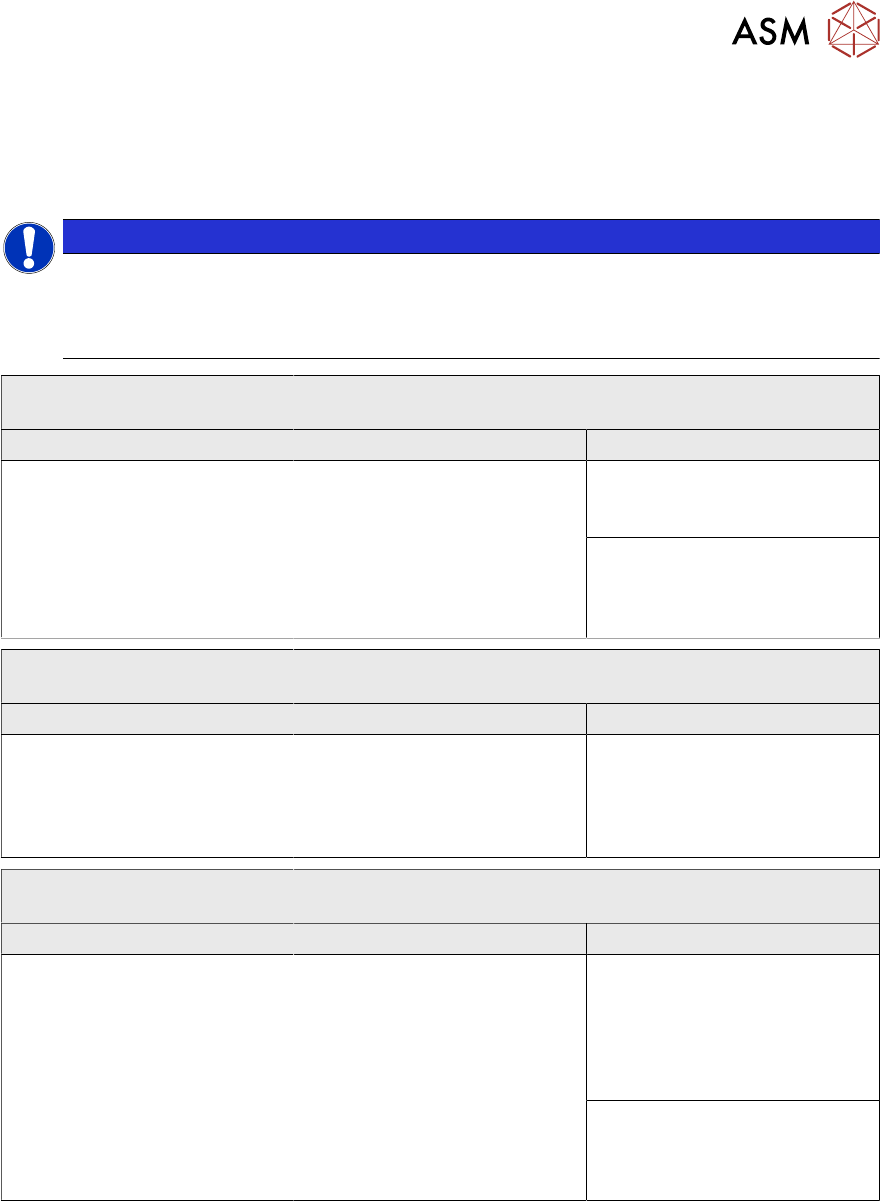
40065 IPC-HERMES-9852: Handover of board from previous
machine failed, message is missing
Cause Correction Action
IPC-HERMES-9852: The mes-
sage from the upstream
machine that transport of the
board has been completed was
not received.
Visually check that the board is
fully located in the input section
and confirm that you have done
so by pressing the relevant but-
ton.
Board is completely in the in-
put section: Starts production
of the board.
Board is not completely in
the input section: Moves the
board into the input section and
starts production.
40066 IPC-HERMES-9852: Handover of board to the next machine
failed, message is missing
Cause Correction Action
IPC-HERMES-9852: The mes-
sage from the downstream
machine that transport of the
board has been completed was
not received.
Visually check that the board is
fully located in the next
machine and confirm that you
have done so by pressing the
relevant button.
Board is completely in the in
the next machine: Starts pro-
duction of the board.
40067 A board without a signal from the previous machine has
been detected
Cause of hazard Correction Action
IPC-HERMES-9852: Confirma-
tion from the upstream machine
that a board has been passed
has not been received. How-
ever, there is a board in the in-
put section for which no data is
available.
Choose whether the board is to
be assembled despite the miss-
ing data or remove the board
and confirm that you have done
so.
Start processing of board:
Starts production of the board
even though the board data
was not sent. This data must
be entered by hand if neces-
sary.
Board removed by hand:
Confirms that you have
removed the board from the
machine.