DECAN_S1_Troubleshooting_Guide(Eng_Ver1.3)_Print_Web.pdf - 第125页
1-101 System Messages of the MMI and Solutions

1-100
Next Generation, Multi-Functional Placer DECAN S1 Troubleshooting Guide
Turn off the Buzzer by pressing the “STOP” button.
Switch the machine to “IDLE” mode by pressing the “RESET” button.
Check the XY-Axis board.
Check the wiring related to XY. Please refer to the servo interface (x, y1, y2) drawings
of the “Technical Reference”.
$6009 Can't find the Z axis PORT. [FREEZE LEVEL]
[Problem]
Can not find the port of Z-axis motor due to fault in equipment setup or software
problem.
[Solution]
Check motor setup value from the ‘Confg.DB’ file in the mark3/system/ directory.
Check motor setup value in the ‘Factory Setup’. (Factory setup value)
If any problem occurs, contact the C/S company designated by Hanwha Precision
Machinery Co., Ltd. or the local agent.
$600a Couldn't move to the position of nozzle pick. [FREEZE LEVEL]
[Problem]
An error occurred when the head moved to the corresponding position to change the
nozzle automatically.
[Solution]
Perform [Solution] in $6004.
$600c No nozzle ID in the component Data. [FREEZE LEVEL]
[Problem]
In the component data, there is no nozzle related setting.
[Solution]
Turn off the Buzzer by pressing the “STOP” button.
Switch the machine to “IDLE” mode by pressing the “RESET” button.
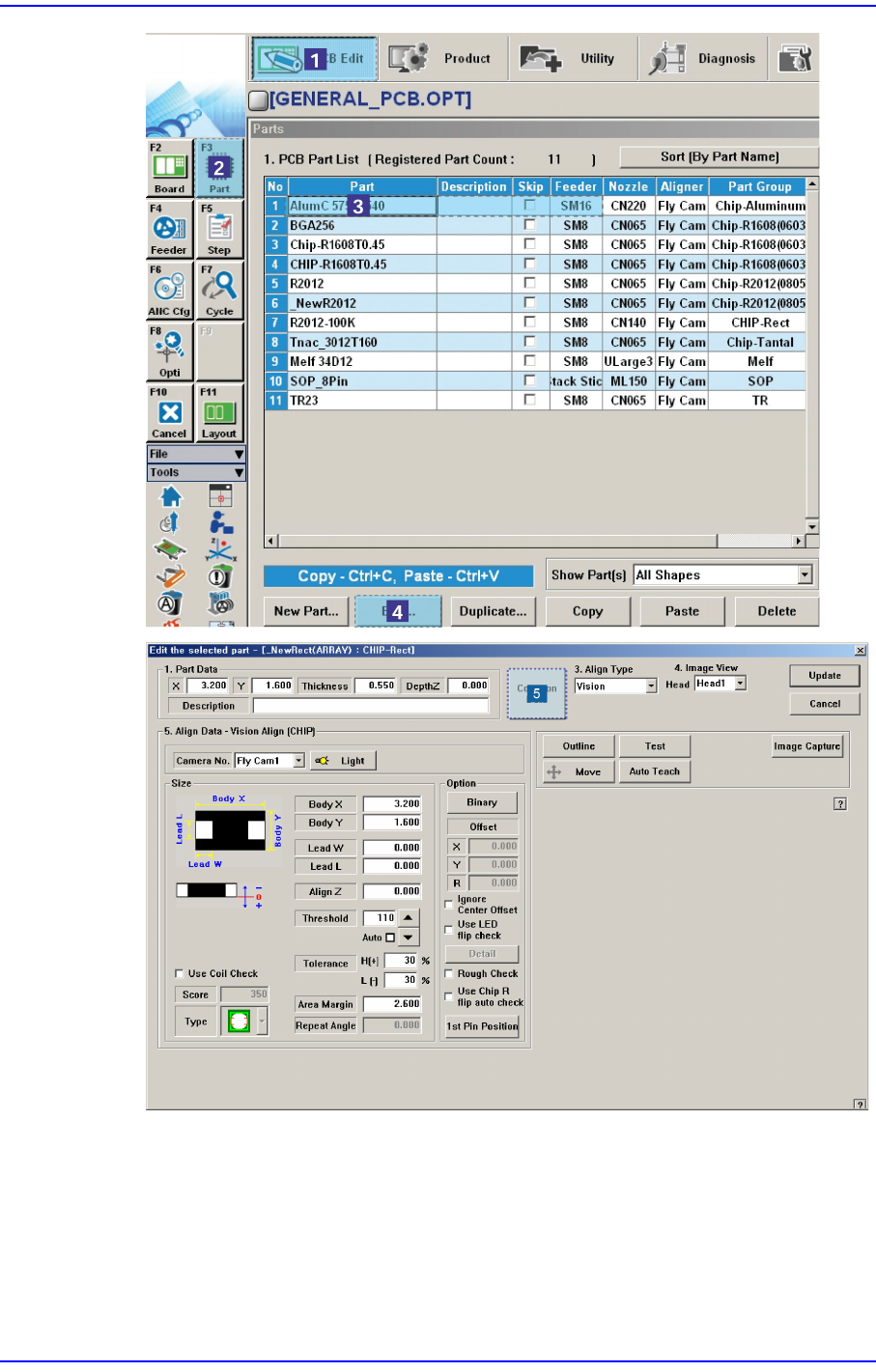
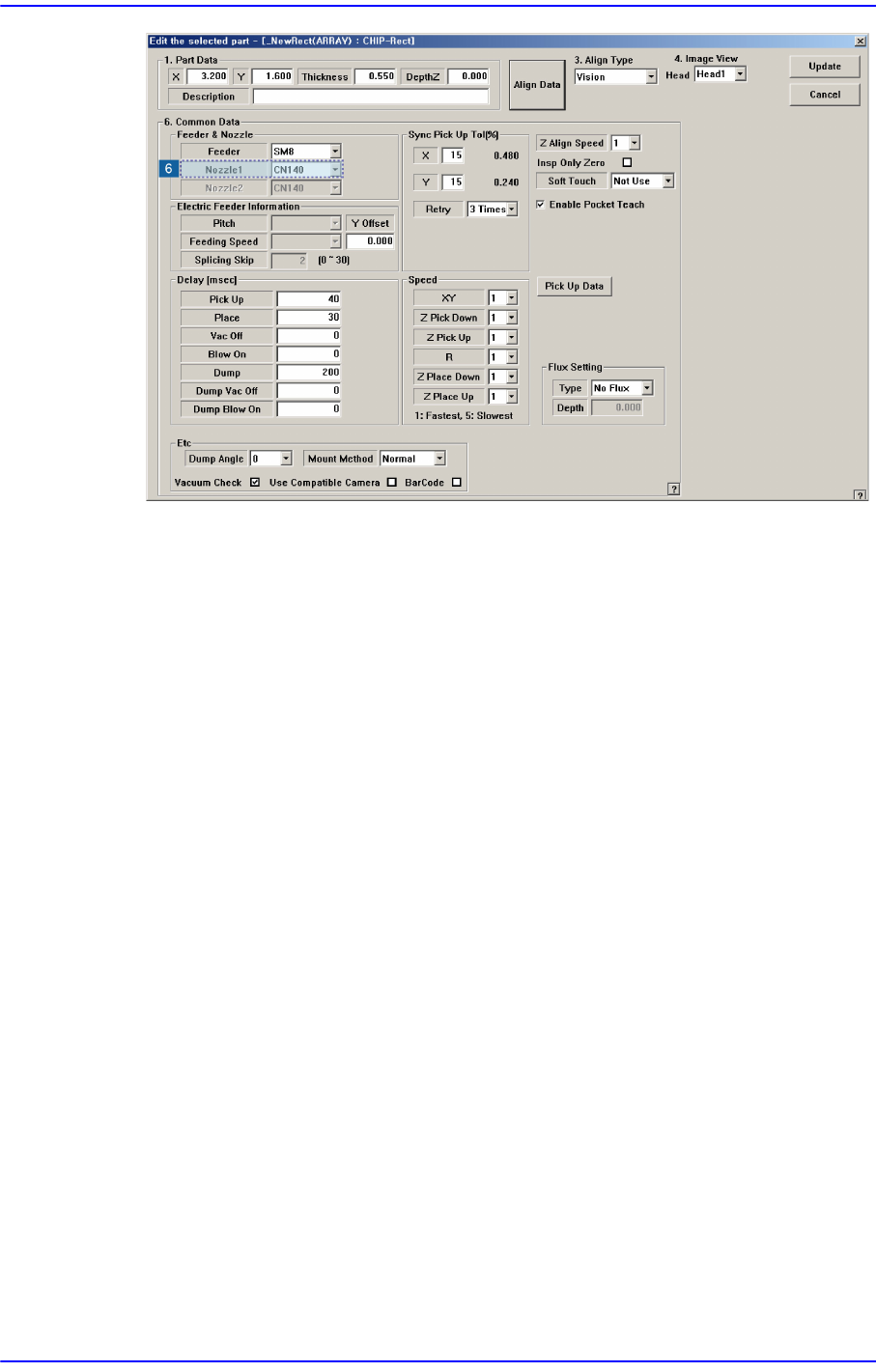
Click ‘Common Data’ of corresponding component on the ‘Part’ of the PCB Edit
menu, and register the nozzle to work on in the nozzle 1.
1-101
System Messages of the MMI and Solutions
1-102
Next Generation, Multi-Functional Placer DECAN S1 Troubleshooting Guide
$6015 The head does not have sufficient nozzles for performing cycle work. [EMER LEVEL]
[Problem]
The number of nozzles registered in the ANC is smaller than that of the nozzles
registered in the ‘Step’ dialog box.
[Solution]
Turn off the buzzer by pressing the “STOP” button.
Press the “RESET” button to change the operation mode to “IDLE”.
Register nozzles to fill the nozzle shortage in the ‘ANC Manager’ dialog box and
arrange them to the ANC.
$6020 Can't put, no nozzle in the head.
[Problem]
Nozzles actually do not exist at head when trying to put nozzles.
[Solution]
Turn off the Buzzer by pressing the “STOP” button.
Nozzles actually do not exist at head when trying to put nozzles.
Nozzles actually do not exist at head when trying to put nozzles.
Although there is no nozzle actually mounted on the head, if it is set up to have been
mounted on the head in the dialog box of the ANC menu, check the ‘No real motion
(Manual)’ and perform ANC setup again by clicking the <Put all nozzle> button.