DECAN_S1_Troubleshooting_Guide(Eng_Ver1.3)_Print_Web.pdf - 第145页
1-121 System Messages of the MMI and Solutions In addition, if the <Light Co ntrol> button is clicked to check and reset the illumination level for the corresponding component, a di alog box for adjusting the illum…
1-120
Next Generation, Multi-Functional Placer DECAN S1 Troubleshooting Guide
$a610 Can not find the first lead (left side) of upper lead group.
[Problem]
Failed to recognize the left lead of upper lead group on the SMVision window while
recognizing components.
[Solution]
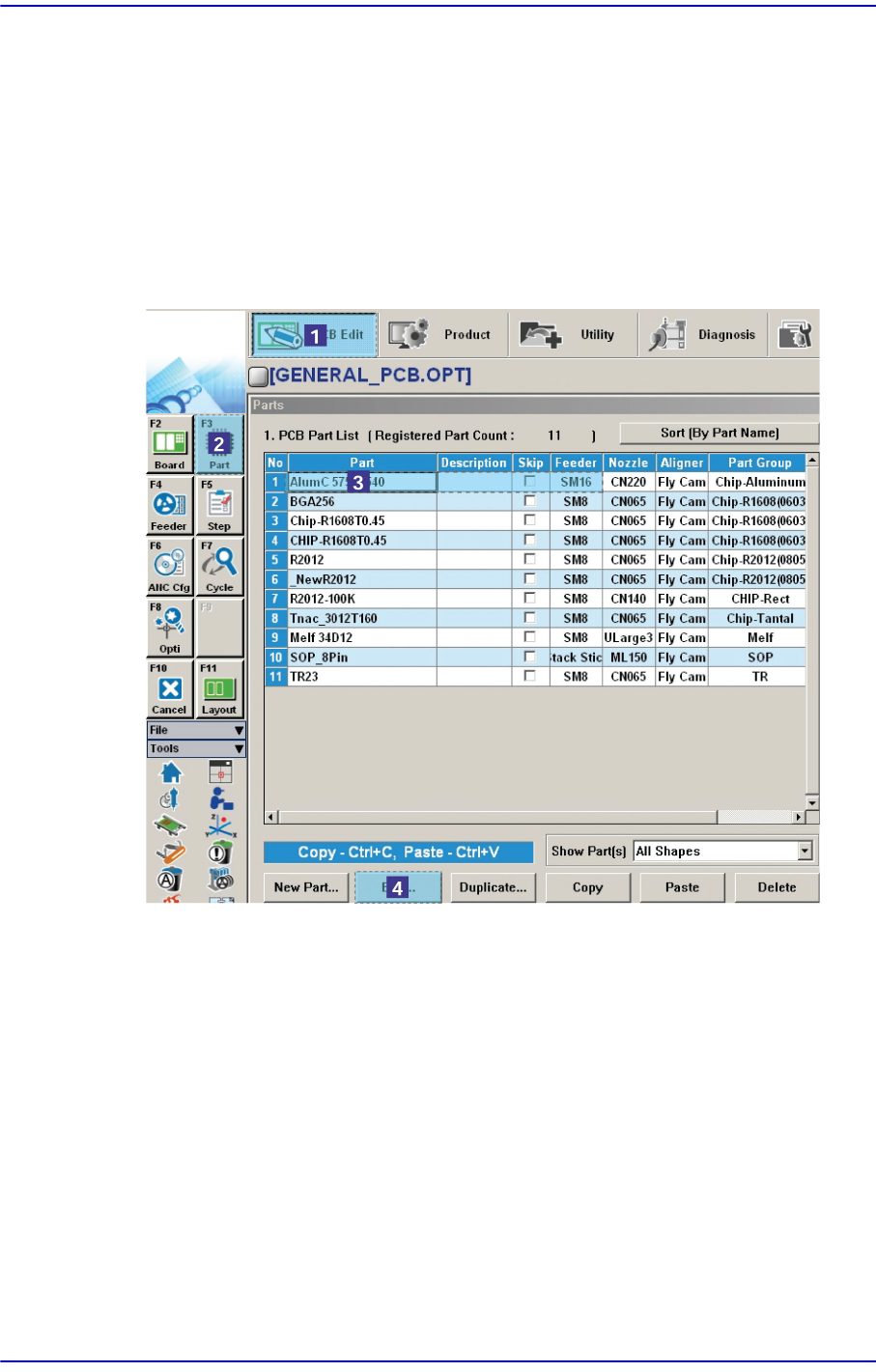
In order to verify if the component data is normal, select the error occurred component
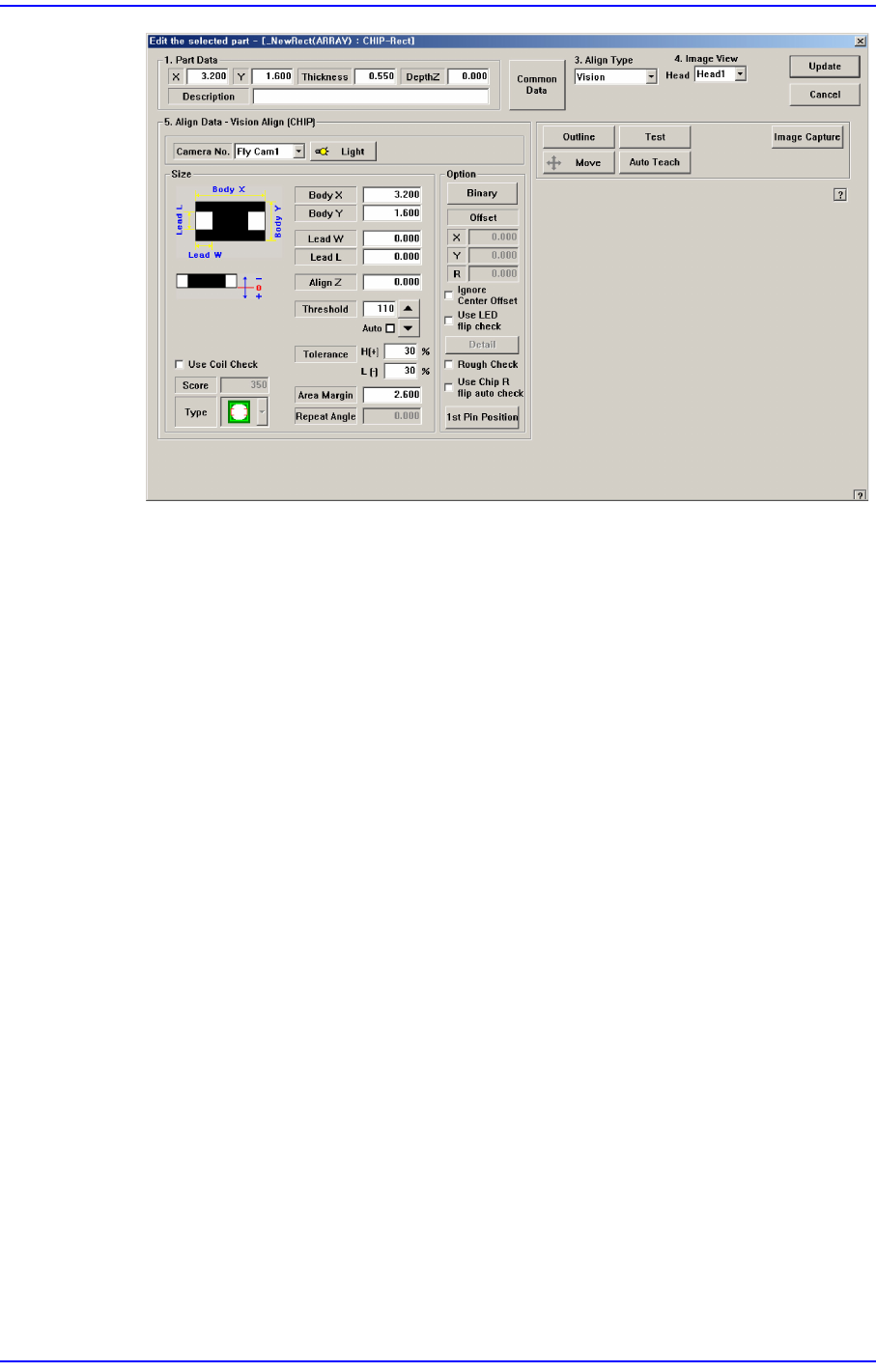
in “Part” of the “PCB Edit” menu and check if the information of the <Align Data>
group is set up in the Profile Editor correctly.
1-121
System Messages of the MMI and Solutions
In addition, if the <Light Control> button is clicked to check and reset the illumination
level for the corresponding component, a dialog box for adjusting the illumination
level is displayed. Here, change the illumination level to make the shape and image of
the SMVision appear clear. For more details, please refer to “7.1 New Components
Registration” in the “Administrator’s Guide”
$a611 Can not find the final (right side) lead of upper lead group.
[Problem]
Failed to recognize the right lead of upper lead group on the SMVision window while
recognizing components.
[Solution]
Perform [Solution] in $a610.
$a612 Can not find the first (upper side) lead of left lead group.
[Problem]
Failed to recognize the right lead of upper lead group on the SMVision window while
recognizing components.
[Solution]
Perform [Solution] in $a610.
$a613 Can not find the last (lower side) lead of left lead group.
[Problem]
Failed to recognize the right lead of upper lead group on the SMVision window while
recognizing components.

1-122
Next Generation, Multi-Functional Placer DECAN S1 Troubleshooting Guide
[Solution]
Perform [Solution] in $a610.
$a614 Can not find the first lead (left side) of lower lead group.
[Problem]
Failed to recognize the right lead of upper lead group on the SMVision window while
recognizing components.
Perform [Solution] in $a610.
$a615 Can not find the last (right side) lead of the lower lead group.
[Problem]
Failed to recognize the right lead of upper lead group on the SMVision window while
recognizing components.
[Solution]
Perform [Solution] in $a610.
$a616 Can not find the first (upper side) lead of right lead group.-+
[Problem]
Failed to recognize the right lead of upper lead group on the SMVision window while
recognizing components.
[Solution]
Perform [Solution] in $a610.
$a617 Can not find the last (lower side) lead of the right lead group.
[Problem]
Failed to recognize the right lead of upper lead group on the SMVision window while
recognizing components.
[Solution]
Perform [Solution] in $a610.
$a620 Recognized pitch(%d) in the lead group(%d) is larger than registered pitch(%d).
[Problem]
The pitch recognized by the vision is larger than the registered pitch.
Lead of component is bent.
Input the pitch of component is incorrect.
Setup of lighting level is inadequate.
[Solution]