SWIA_503.04_EN.pdf - 第46页
L&A I NSTA LLATION M ANUAL L INE C OMPUTER LCL 50 3.04 ONFIGURATION OF PRINTER AND ETWORK C HP 5850 (USB N ) 4. Enter the commands su -c yast2 (and enter the «root» pas sword) to start the «Y aST2 Control Center» con…
INSTALLATION MANUAL LINE COMPUTER LCL 503.04 L&A
ENERAL G
4.3 Configuration of HP 5850 printer (USB and Network)
4.3.1 General
An «HP deskjet 5850» was selected as the printer for the line computer application. This printer can
be installed locally as a USB printer or as a network printer. Installation platforms are available on
SuSE 7.3 (LCL 503.03) and SuSE 9.0 (LCL 503.04). SuSE 9.0 supports both forms of printer installa-
tion, while only local installation on the USB port is possible under SuSE 7.3.
USB printer Network printer
LCL 503.03 (auteq Linux 7.3)
possible not possible
LCL 503.04 (auteq Linux 9.0)
possible possible
The various installation options for the «HP deskjet 5850» are described below.
4.3.2 Configuration on the USB port
4.3.2.1 Local installation on the USB port under SuSE 7.3
4.3.2.1.1 Requirements:
Installed software «SIPLACE auteq-LINUX based on SuSE 7.3».
PC with USB port.
Activate USB support in the BIOS (computer-dependent
1
)
4.3.2.1.2 Installation procedure:
1. Log into the line computer under GNOME as the user «plr».
2. Connect the printer to the USB port of the computer.
3. Open a terminal window by selecting menu «Options» / «Operating system level».
1
E.g. «Primergy Econel 20» system:
«Advanced» page,
«Advanced System Configuration» entry
«USB Host Controller:» entry must have the value ‹Enabled›.
03.03.2005 SUBJECT TO CHANGE WITHOUT PRIOR NOTICE L&A EA
R
UPERT-MAYER-STR. 44
P
AGE 45 / 75 SWIA_503.04_EN.DOC D-81359 MUNICH
L&A INSTALLATION MANUAL LINE COMPUTER LCL 503.04
ONFIGURATION OF PRINTER AND ETWORK
C
HP 5850 (USB N )
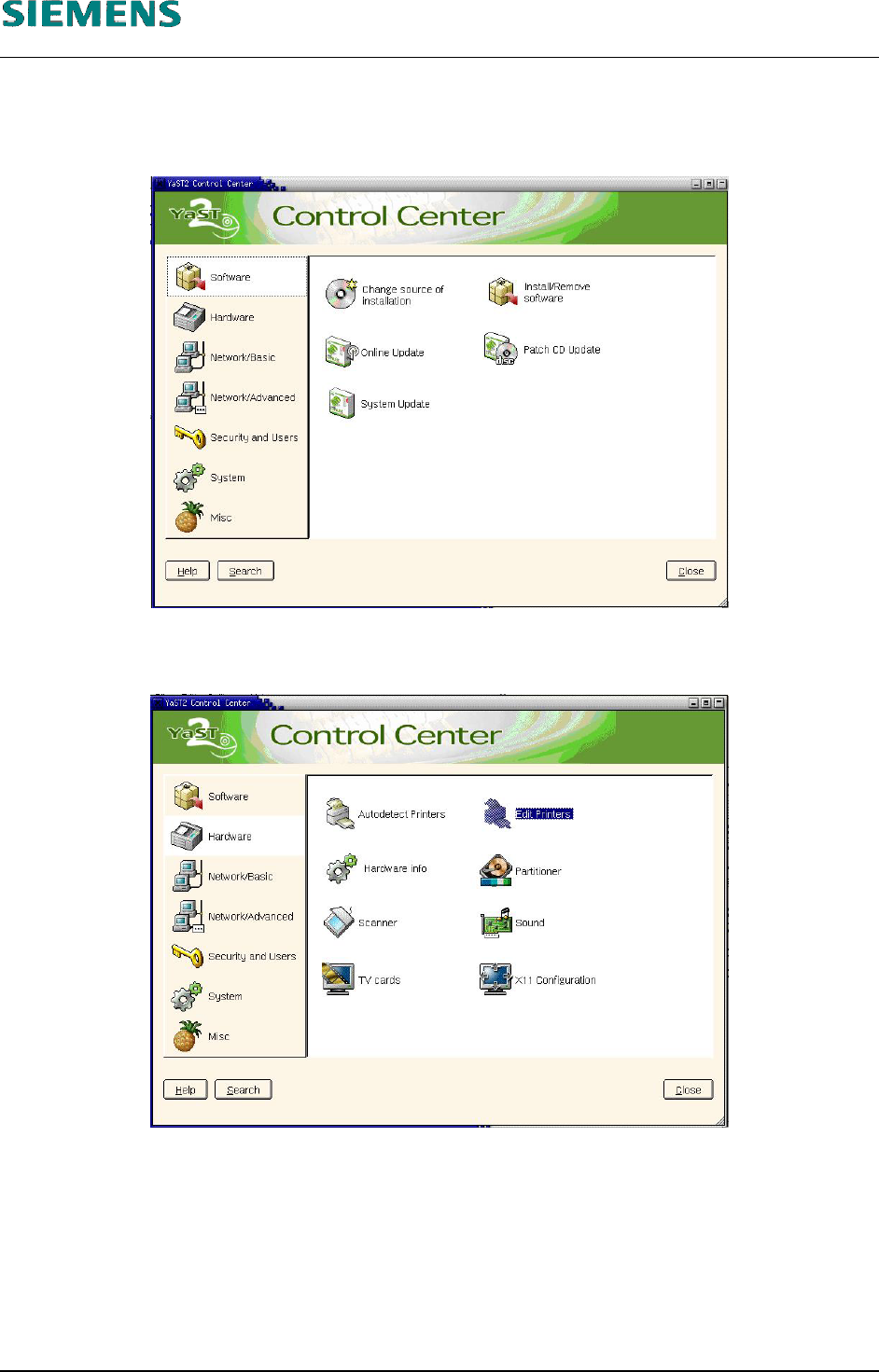
4. Enter the commands
su -c yast2
(and enter the «root» password) to start the «YaST2 Control Center» configuration tool.
5. On the left, select the «Hardware» menu and then select the «Edit Printers» function on the
right.
L&A EA SUBJECT TO CHANGE WITHOUT PRIOR NOTICE 03.03.2005
RUPERT-MAYER-STR. 44
D-81359 M
UNICH SWIA_503.04_EN.DOC PAGE 46 / 75
L&A INSTALLATION MANUAL LINE COMPUTER LCL 503.04
ONFIGURATION OF PRINTER AND ETWORK
C
HP 5850 (USB N )
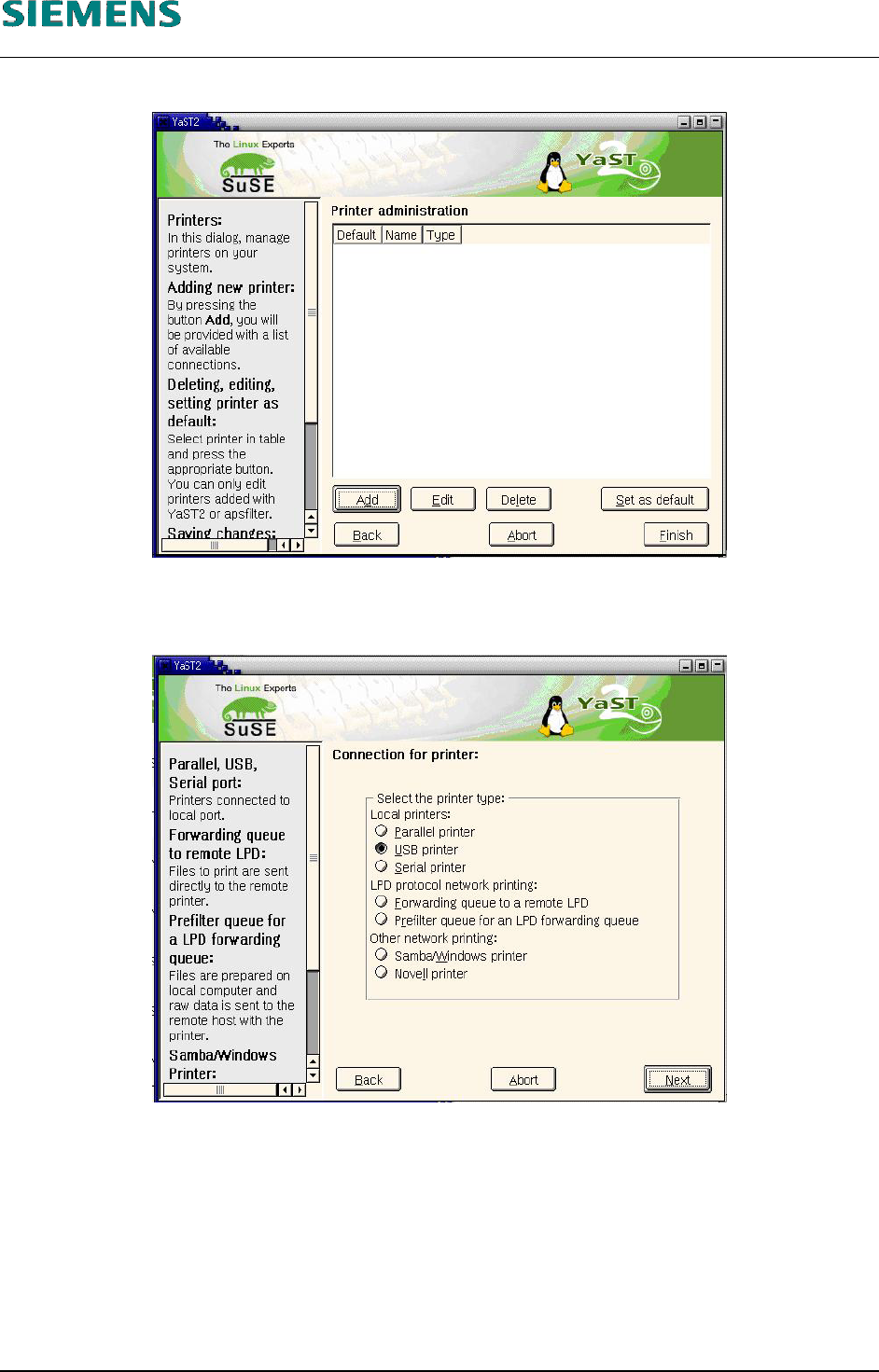
6. Any printers which have already been configured are displayed.
7. Click the «Add» button to add a new printer.
8. Select the printer type «USB printer».
9. Confirm your entry with «Next».
L&A EA SUBJECT TO CHANGE WITHOUT PRIOR NOTICE 03.03.2005
RUPERT-MAYER-STR. 44
D-81359 M
UNICH SWIA_503.04_EN.DOC PAGE 47 / 75