SWIA_503.04_EN.pdf - 第66页
L&A I NSTA LLATION M ANUAL L INE C OMPUTER LCL 50 3.04 ONFIGURATION OF PRINTER AND ETWORK C HP 5850 (USB N ) 23. You can now use the configured prin ter. It is not necessary to restart the line computer. 4.3.4 Config…
L&A INSTALLATION MANUAL LINE COMPUTER LCL 503.04
ONFIGURATION OF PRINTER AND ETWORK
C
HP 5850 (USB N )
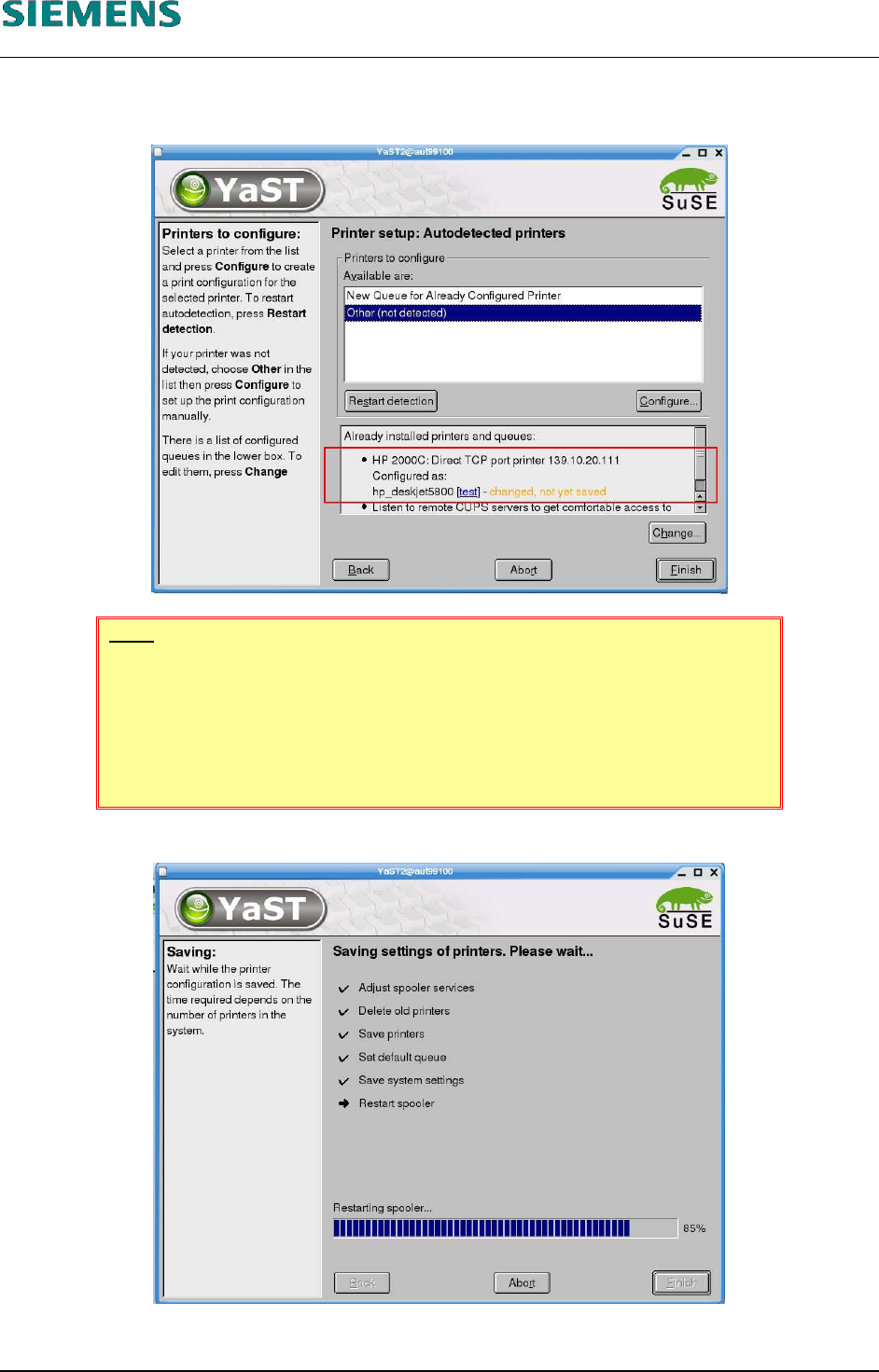
20. The dialog box shown in point 7 above then appears, with the exception that the printer you
have just installed now appears at the bottom.
NOTE
If several printers are installed, you must select the default printer. Click the
«Change» button, select the line containing the required printer and set it as
the default printer by clicking «Set as default».
The default printer is indicated by an arrow in the left column.
21. Click the «Finish» button to save the settings.
22. Close the «YaST Control Center» configuration tool by clicking «Close».
L&A EA SUBJECT TO CHANGE WITHOUT PRIOR NOTICE 03.03.2005
RUPERT-MAYER-STR. 44
D-81359 M
UNICH SWIA_503.04_EN.DOC PAGE 65 / 75

L&A INSTALLATION MANUAL LINE COMPUTER LCL 503.04
ONFIGURATION OF PRINTER AND ETWORK
C
HP 5850 (USB N )
23. You can now use the configured printer. It is not necessary to restart the line computer.
4.3.4 Configuring the network address of the printer
4.3.4.1 General
The «HP Deskjet 5850» printer is supplied with a factory-set address. This is rarely within the ad-
dress range used by the customer.
The easiest way of identifying the address currently set on the printer is to print out the printer con-
figuration.
The address must be changed to allow the line computer to communicate with the printer. To do this,
it is necessary to temporarily change the address of a computer (e.g. a line computer) to the address
range set on the printer in order to allow this computer to access the printer configuration.
The printer is configured using a graphical configuration program which allows the address to be
changed to the new value, for instance.
WARNING
If a productive line computer is used to configure the printer, it is possible
that the temporary change of the line computer's network address causes
communication with the stations to be interrupted.
You should therefore remember to first set the stations to «Stand alone»
mode to avoid any interruptions to production.
4.3.4.2 Requirements
The printer must be connected to the line computer network over a network cable.
A network-capable computer with a working operating system (the following instructions refer
to SuSE Linux 9.0).
L&A EA SUBJECT TO CHANGE WITHOUT PRIOR NOTICE 03.03.2005
RUPERT-MAYER-STR. 44
D-81359 M
UNICH SWIA_503.04_EN.DOC PAGE 66 / 75
L&A INSTALLATION MANUAL LINE COMPUTER LCL 503.04
ONFIGURATION OF PRINTER AND ETWORK
C
HP 5850 (USB N )
4.3.4.3 Configuration procedure
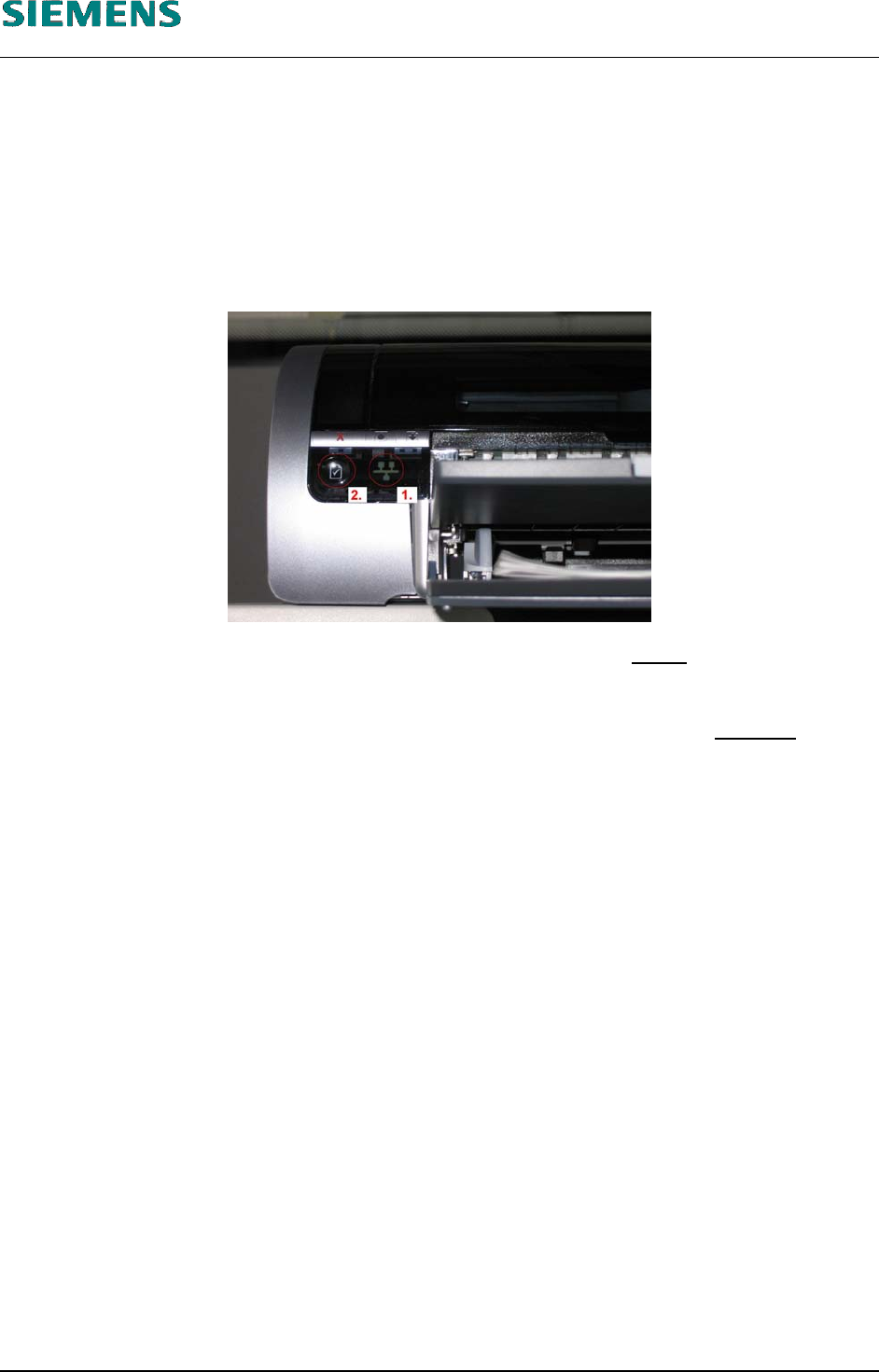
1. Firstly, you need a printout of the network configuration of the printer.
If the printer is connected to the network (and switched on), indicator lamp «1» (see the picture
below) is lit. Now you can press the network button «2» as described in the printer instructions
to print out the configuration page.
An example of such a printout is shown in 4.3.5 Annex.
2. This printout shows the TCP/IP address and the subnet mask of the printer
(in the example:
«172.22.2.250» and «255.255.0.0»).
3. To establish a connection from the computer to the printer, the address of the computer
has to
be changed temporarily to suit that of the printer. In the example, this is, for instance
«172.22.2.240».
4. To do this, log into the line computer under GNOME as the user «plr».
5. Open a terminal window by selecting the menu «Options» / «Operating system level».
6. Use the command
su
to get administrator permissions (and confirm with the «root» password).
7. Temporarily change the address of the computer with the command
ifconfig eth0 <address of computer> netmask <subnet mask>
In the example, this would be:
ifconfig eth0 172.22.2.240 netmask 255.255.0.0
8. The connection to the printer can be tested with the command
ping <address of the printer>
In our example, this would be
ping 172.22.2.250
L&A EA SUBJECT TO CHANGE WITHOUT PRIOR NOTICE 03.03.2005
RUPERT-MAYER-STR. 44
D-81359 M
UNICH SWIA_503.04_EN.DOC PAGE 67 / 75