SWIA_503.04_EN.pdf - 第68页
L&A I NSTA LLATION M ANUAL L INE C OMPUTER LCL 50 3.04 ONFIGURATION OF PRINTER AND ETWORK C HP 5850 (USB N ) 9. Use the command mozilla to start the br owser. 10. Establish a connection to the pr inter by entering th…
L&A INSTALLATION MANUAL LINE COMPUTER LCL 503.04
ONFIGURATION OF PRINTER AND ETWORK
C
HP 5850 (USB N )
4.3.4.3 Configuration procedure
1. Firstly, you need a printout of the network configuration of the printer.
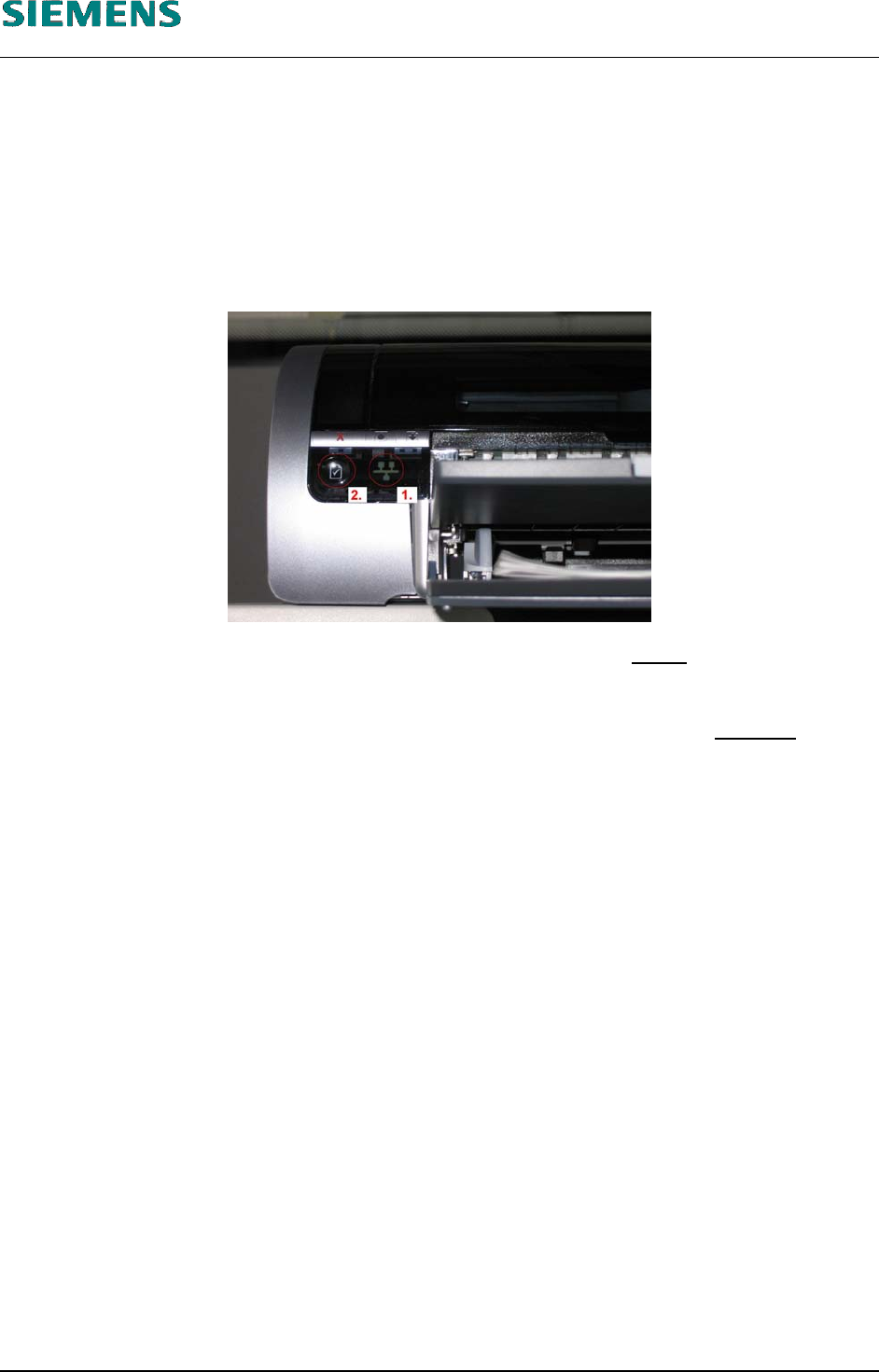
If the printer is connected to the network (and switched on), indicator lamp «1» (see the picture
below) is lit. Now you can press the network button «2» as described in the printer instructions
to print out the configuration page.
An example of such a printout is shown in 4.3.5 Annex.
2. This printout shows the TCP/IP address and the subnet mask of the printer
(in the example:
«172.22.2.250» and «255.255.0.0»).
3. To establish a connection from the computer to the printer, the address of the computer
has to
be changed temporarily to suit that of the printer. In the example, this is, for instance
«172.22.2.240».
4. To do this, log into the line computer under GNOME as the user «plr».
5. Open a terminal window by selecting the menu «Options» / «Operating system level».
6. Use the command
su
to get administrator permissions (and confirm with the «root» password).
7. Temporarily change the address of the computer with the command
ifconfig eth0 <address of computer> netmask <subnet mask>
In the example, this would be:
ifconfig eth0 172.22.2.240 netmask 255.255.0.0
8. The connection to the printer can be tested with the command
ping <address of the printer>
In our example, this would be
ping 172.22.2.250
L&A EA SUBJECT TO CHANGE WITHOUT PRIOR NOTICE 03.03.2005
RUPERT-MAYER-STR. 44
D-81359 M
UNICH SWIA_503.04_EN.DOC PAGE 67 / 75
L&A INSTALLATION MANUAL LINE COMPUTER LCL 503.04
ONFIGURATION OF PRINTER AND ETWORK
C
HP 5850 (USB N )
9. Use the command
mozilla
to start the browser.
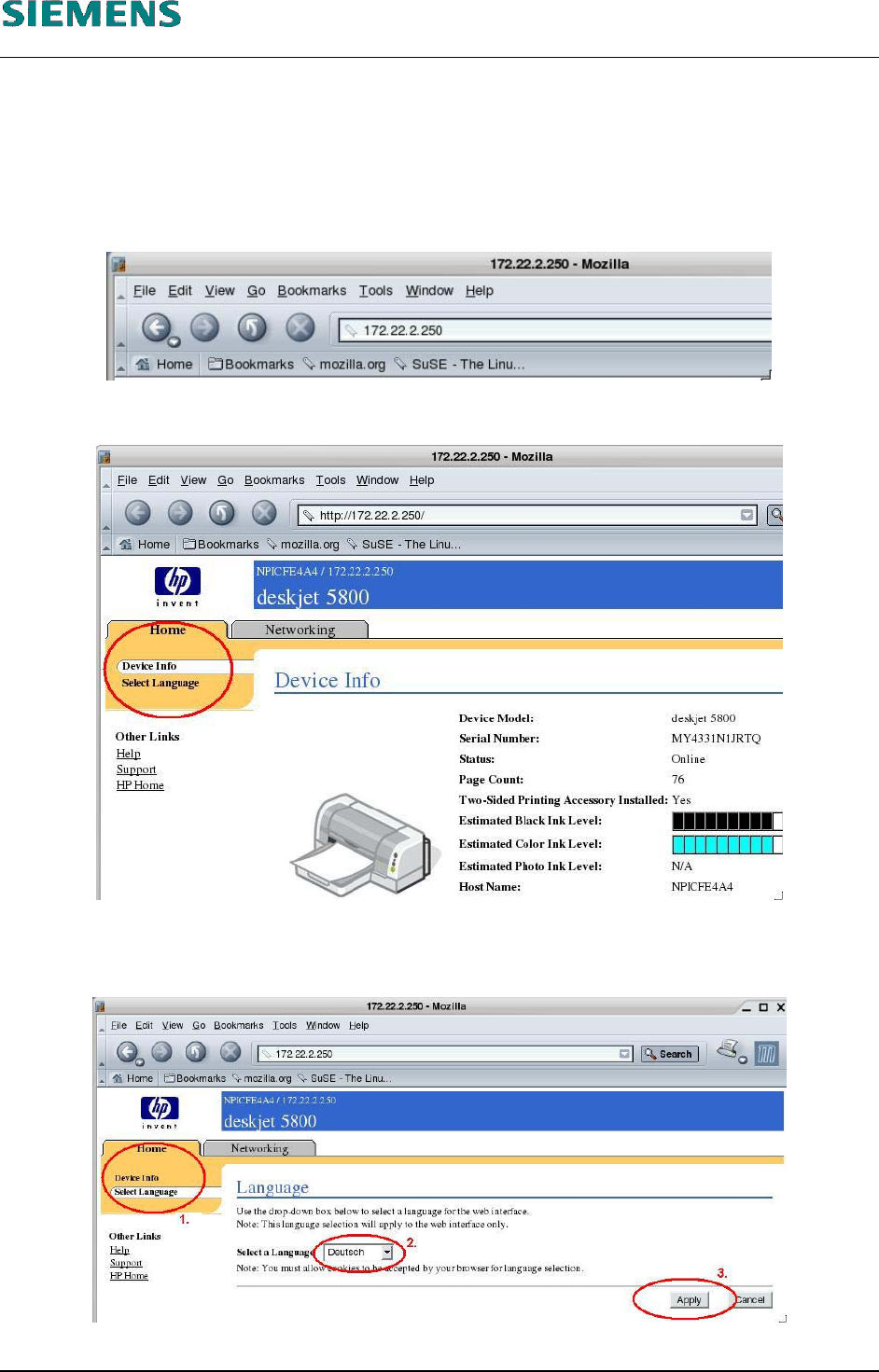
10. Establish a connection to the printer by entering the TCP/IP address of the printer in the address
field of the browser.
11. The device configuration of the printer is displayed.
12. The selection in the top left (indicated by a red circle) allows you to change the language to your
local language.
13. Confirm your selection with the «Apply» button.
L&A EA SUBJECT TO CHANGE WITHOUT PRIOR NOTICE 03.03.2005
RUPERT-MAYER-STR. 44
D-81359 M
UNICH SWIA_503.04_EN.DOC PAGE 68 / 75
L&A INSTALLATION MANUAL LINE COMPUTER LCL 503.04
ONFIGURATION OF PRINTER AND ETWORK
C
HP 5850 (USB N )
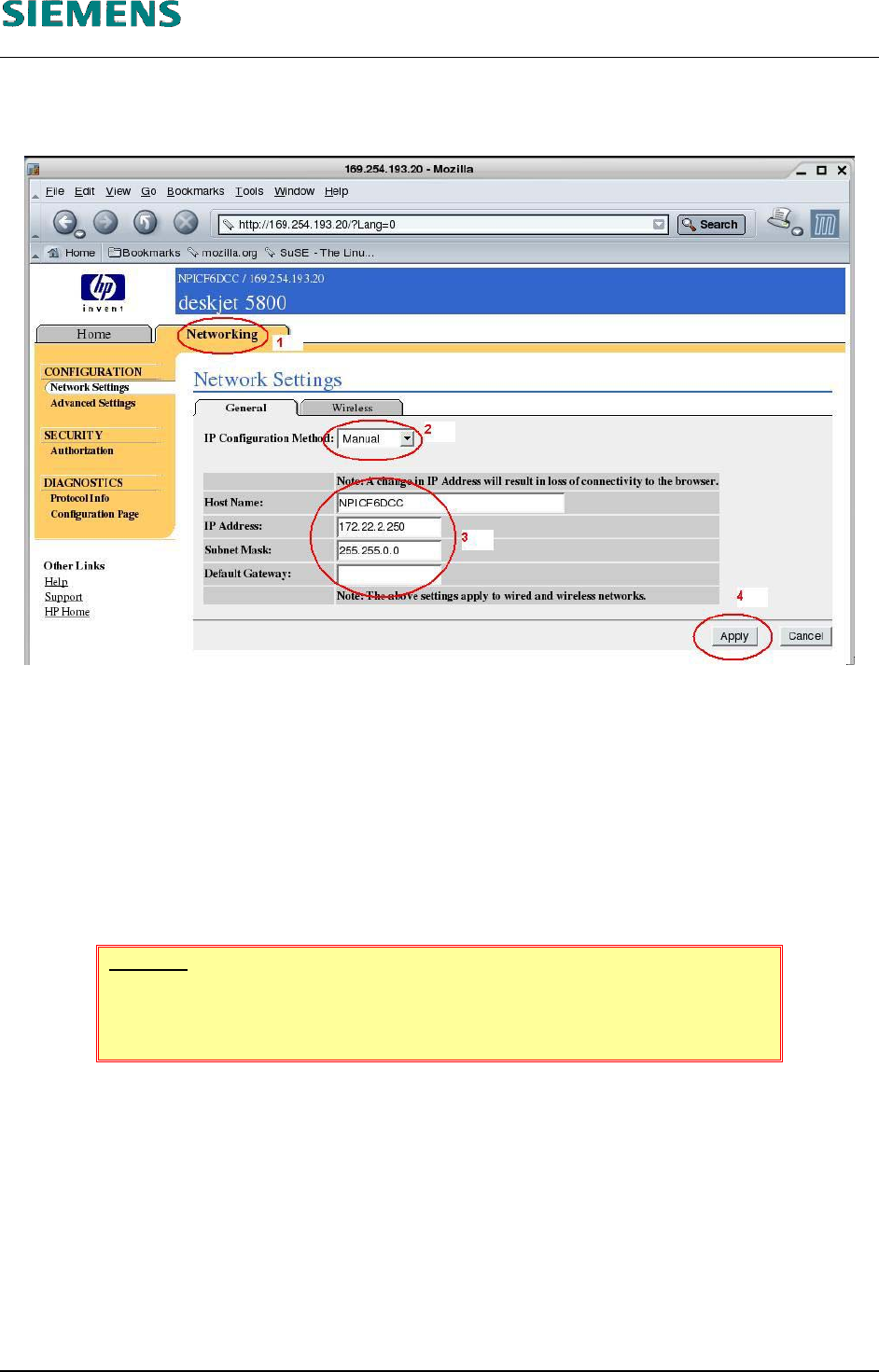
14. The device selection is now shown in the selected language.
15. The network settings are shown by clicking the «Network» tab (1).
16. Select as «IP Configuration Method» the value ‹Manual› (2)
17. (3) Change the settings for
the printer name («Host Name»)
the TCP/IP address of the printer («IP Address»)
the subnet mask of the printer («Subnet Mask»)
the address of the default gateway.
18. Click the «Apply» (4) button to change the settings in the printer.
WARNING
If you change the address of the printer, the connection to the printer is in-
terrupted when you click the «Apply» button.
L&A EA SUBJECT TO CHANGE WITHOUT PRIOR NOTICE 03.03.2005
RUPERT-MAYER-STR. 44
D-81359 M
UNICH SWIA_503.04_EN.DOC PAGE 69 / 75