SWIA_503.04_EN.pdf - 第74页
L&A I NSTA LLATION M ANUAL L INE C OMPUTER LCL 50 3.04 NSTALLING ERVI CE ACK I S P LCL. 503.0 4.SP1 4.4.2 Installing Service Pack 1 under LCL 503.04 1. When the line computer application is running, the service pack …

L&A INSTALLATION MANUAL LINE COMPUTER LCL 503.04
NSTALLING ERVICE ACK
I
S P LCL.503.04.SP1
4.4.1.1 Step 1: Run the Service Pack under SuSE 7.3 as user «root»
1. Reboot the system («Shutdown»)
2. Insert CD «Service Pack 1»
3. Use the keyboard combination «Ctrl» + «Alt» + «F2» to switch to console number 2
4. Log in as user «root» (operating system level).
5. Mount CD with the command:
mount /cdrom
6. Start script with the command:
/cdrom/mkpart.sh
Respond with ‹y› when asked whether to continue.
7. When the following message has been displayed:
Now you have to reboot the system.
Login as root and start the script again
reboot the computer with the command:
init 6
8. Repeat steps 3 to 7 above once again
9. After the second turn, remove the CD
10. Log in as the user «plr».
4.4.1.2 Step 2: Update to the full version LCL.503.04
11. Install SuSE 9.0 and LCL.503.04 according to the instructions in the chapter 4.2.4 Update: In-
stallation via «Install Options».
4.4.1.3 Step 3: Install the Service Pack under SuSE 9.0 as user «plr»
12. After installation of LCL.503.04 is complete, activate Service Pack1 using the menu item «Op-
tions» / «Install options».
L&A EA SUBJECT TO CHANGE WITHOUT PRIOR NOTICE 03.03.2005
RUPERT-MAYER-STR. 44
D-81359 M
UNICH SWIA_503.04_EN.DOC PAGE 73 / 75
L&A INSTALLATION MANUAL LINE COMPUTER LCL 503.04
NSTALLING ERVICE ACK
I
S P LCL.503.04.SP1
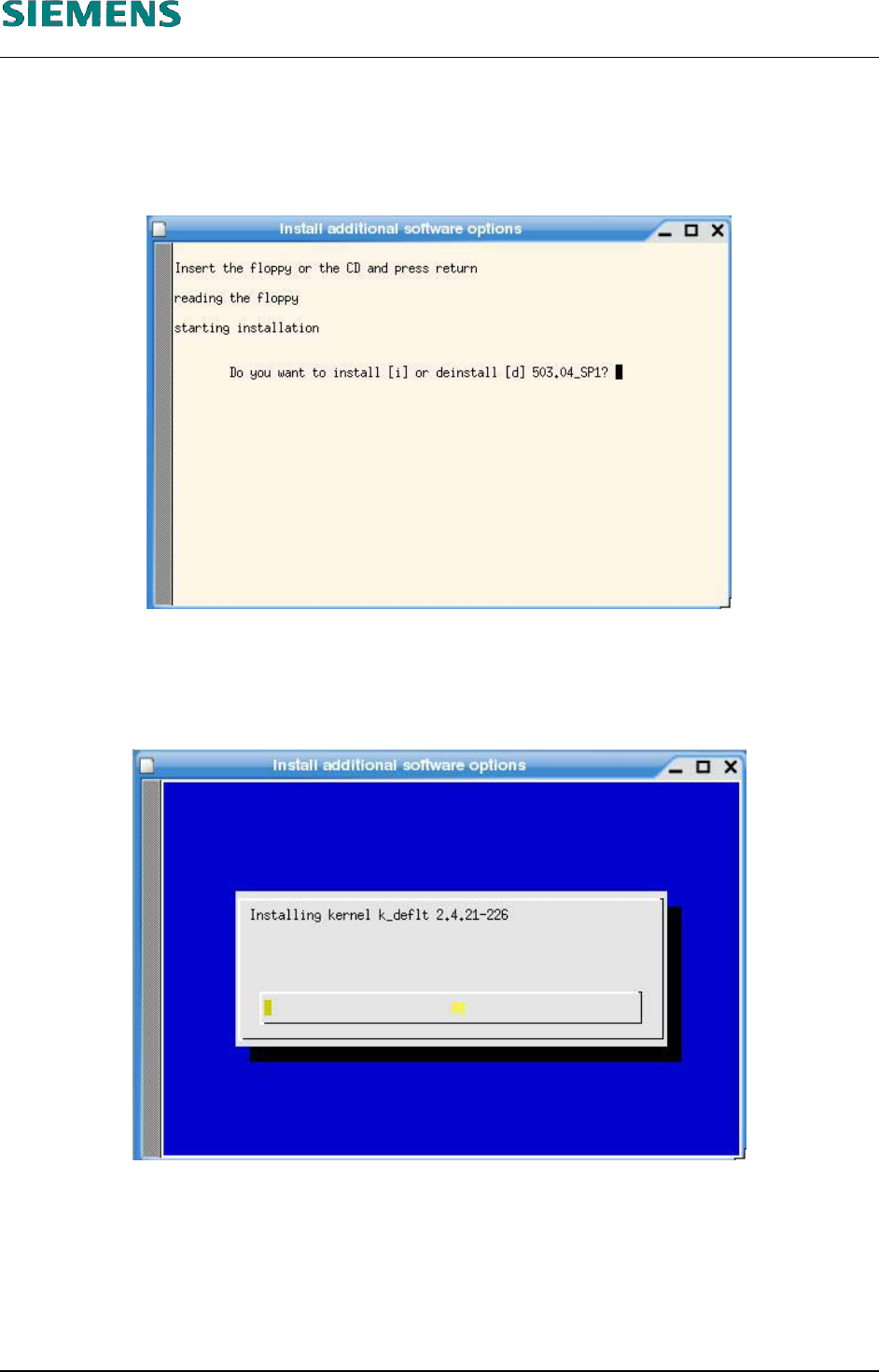
4.4.2 Installing Service Pack 1 under LCL 503.04
1. When the line computer application is running, the service pack can be installed using the menu
item «Options» / «Install options».
2. To start installation, respond with «i».
3. The system asks for the password of user «root».
4. The system then starts to install the new packages.
5. After installation has been completed, the line computer must be rebooted in order to activate
the changes.
L&A EA SUBJECT TO CHANGE WITHOUT PRIOR NOTICE 03.03.2005
RUPERT-MAYER-STR. 44
D-81359 M
UNICH SWIA_503.04_EN.DOC PAGE 74 / 75
L&A INSTALLATION MANUAL LINE COMPUTER LCL 503.04
N
OTES
4.5 Notes
NOTE
For initial installation:
After any initial installation of the LC software has been carried out, it is
mandatory that following startup of the line computer the stations be config-
ured with the aid of the configuration editor (see User’s Manual Line Com-
puter UNIX) before proceeding further.
Passwords to be used for initial login:
The users «Line engineer», «Programmer», «Operator» are not initially as-
signed any passwords.
The user «Supervisor» has the password «Supervisor». Following software
installation, it is the task of an authorized person to change the password.
The «Service» password is known only to Siemens Service staff.
NOTE
The Linux version of the line computer only runs correctly with the SuSE
distribution produced by Siemens Dematic.
The original SuSE installation package as supplied as part of the line
computer SuSE distribution must not be installed. It is only included in the
line computer SuSE distribution in order to fulfill the licensing requirements.
L&A EA SUBJECT TO CHANGE WITHOUT PRIOR NOTICE 03.03.2005
RUPERT-MAYER-STR. 44
D-81359 M
UNICH SWIA_503.04_EN.DOC PAGE 75 / 75