TSR2000-Series-Teaching-Pendant-User-Guide-V1.pdf - 第13页
13 8.4 Shortcut – co mmunicates with external PLC w hen r obot used as a “cell” in an in -line r obot Shortcut refer s to the robot bei ng a inter grated as a modul e in an in-l ine process. The teaching pen dant instr u…
12
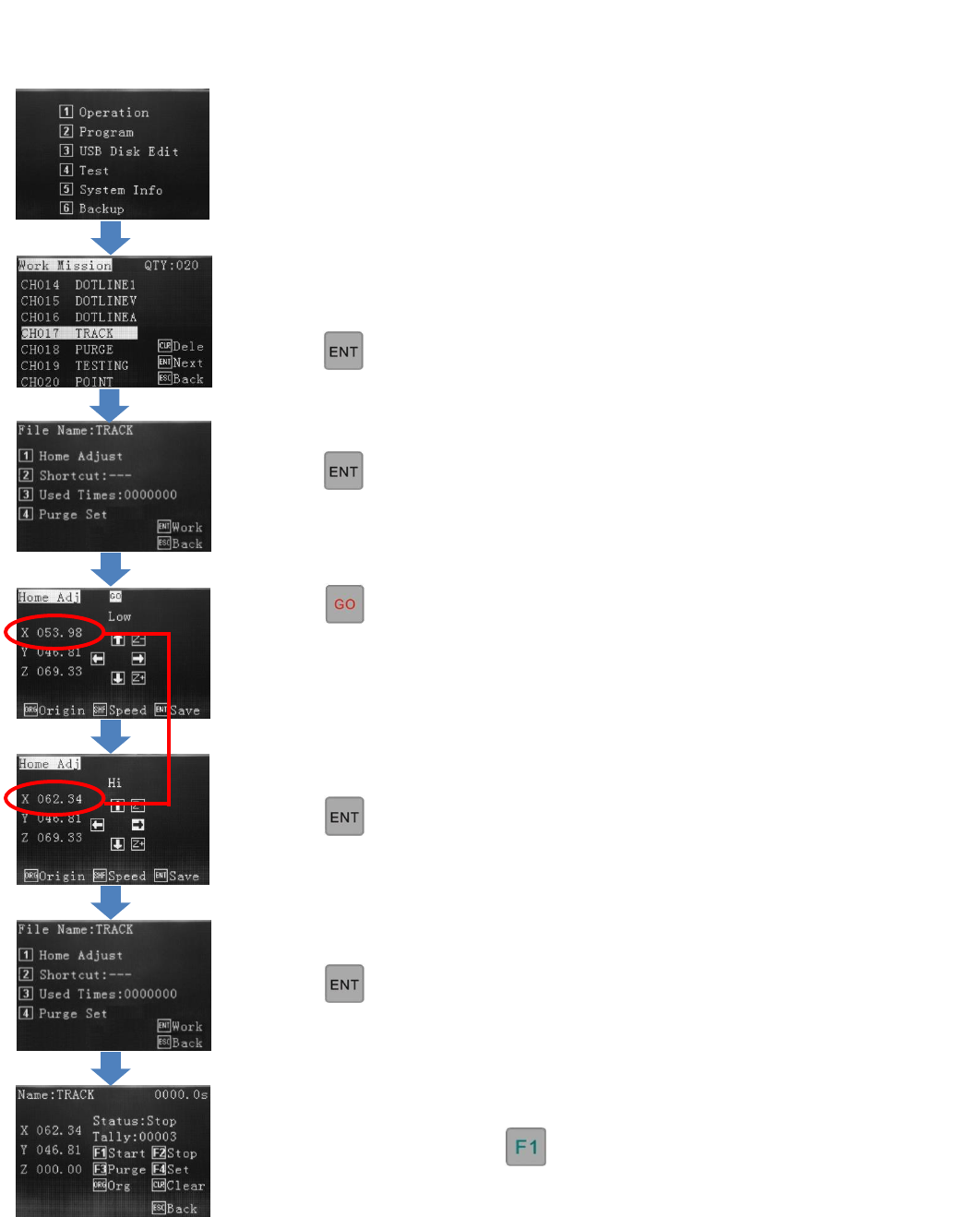
8.3 Veryfying the Calibration Location During Live Use
If no tip calibration is required,
press
If tip calibration is required, press
1 – Home Adjust
Select 1 - Program
Select the program, to run.
Press
Press
The tip will move to the Cal pin if one is
stored or to the first dispensing location if
a Cal point is not stored, in the
programming.
Operation Screen – If a calibration point (REF PT) has been stored in the program the dispense tip will move to this pin
location, when Home Adjust is pressed. If no calibration point has been stored, in the programming, the dispense tip will
move to the first dispensing location, when Home Adjust is pressed.
The program can be run with
Press
Use jog keys to correct tip position.
Press
This change does not affect the original
written program location.
13
8.4 Shortcut – communicates with external PLC when robot used as a “cell” in an in-line robot
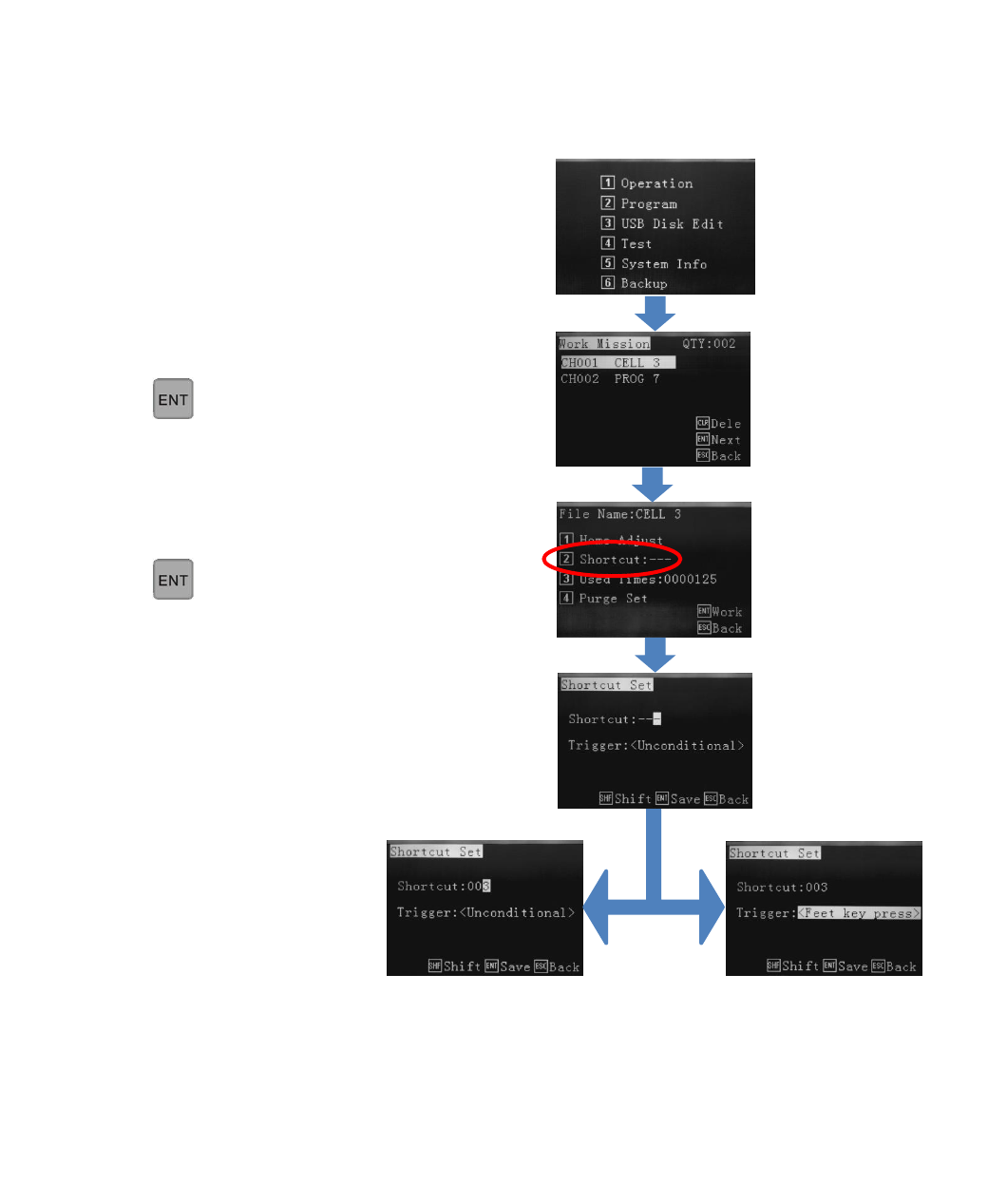
Shortcut refers to the robot being a intergrated as a module in an in-line process. The teaching pendant instructions, below,
are to set the external binary signal up for this process. The pendant would be disconnected when in live use. The signal is
communicated through the rear DB37 connector.
If the robot is on a bench top, being operator controlled, then the Shortcut is not used.
Select 1 - Operation
Select the progam using the arrow.
Press
Select 2 – Shortcut
Press
- - - means no binary Shortcut signal set. Use
numeric keys to set Shortcut binary signal (as per
external PLC). If Shortcut 003 is set, the external
PLC needs to send binary signal 003 to the robot.
Trigger:
Unconditional – the robot
receives the external signal
and completes the dispensing
cycle.
Trigger:
Feet key press – the robot
receives the external signal but
will wait for the line operator to
press the the “Feed key”. When
Feed key is pressed the
dispensing cycle will start.
14
8.5 Used Times - Monitoring and Setting Usage and Visual Alarms
“Used Times” shows on the teaching pendant and robot screen (when teaching pendant is disconnected) the status of how
many dispensing cycles have been dispensed. This is different to the “Tally” as shown on page 48. The tally dispays how
many times the entire program has been completed whereas the Used Times records the the accumulatively dispensed
cycles/positions giving an indication of how much work the dispensing valve has achieved. If another saved program is
selected then the cycle count will not start at zero but continue counting from where it left off. However, the live counter
can be reset to zero on the Teach Pendant and robot screen. This feature is particluary useful if the operator needs to change
the tip or wetted path, of a dispense valve, to maintain dispensing accuracy, after it has been used a certain number of cycles.
The operator is able to set the top limit of dispense activations. When the the robot has reached the target dispense cycles
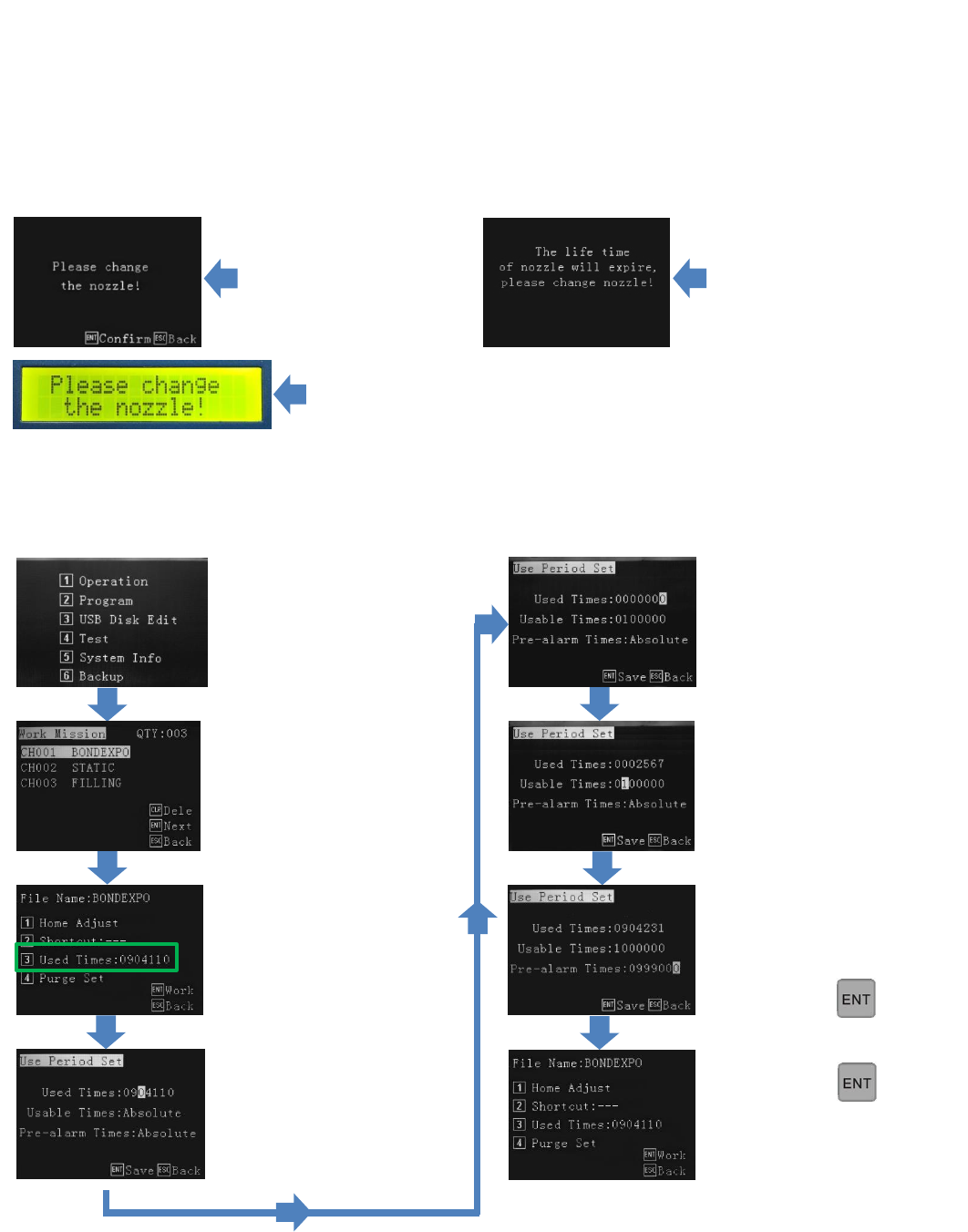
the it will display the following warning on the screen:
This display warns the operator to change the nozzle although the user of the robot can translate this to any internal
maintenance procedure if required. Once the procedure is completed the ENT or ESC key can be pressed to calibrate the tip
(8.1 to 8.3). Possible uses of “Please change the nozzle”: Replace tip, replace disposable path, replace syringe, remove valve
for maintenance, flush valve with cleaning agent, re-calibrate valve position, etc.
On robot
(no teach pendant attached, will alarm everytime until Used Times counter is reset).
On pendant
(will alarm everytime
until Used Times counter
is reset)
Press 1 – Operation.
Select desired program.
Current usuage data is
displayed
Press 3 – Used Times.
Usuage data displayed with
alarm conditions. This screen
shows no alarms are set and
the counter will keep a
running total of shots
completed.
Alarm target (Usable Times)
can be set.
Pre-Alarm
(only if pendant attached,
will pre-alarm once only).
Cycles (Used Times) can be
reset.
Pre-Alarm can be set. This
example has an additional
screen warning 1000 cycles
prior to the actual alarm.
Press
Press
Program is ready to dispanse.