TSR2000-Series-Teaching-Pendant-User-Guide-V1.pdf - 第42页
42 9.24 Line Dispensin g Adjustments 9.24.1 V alve Feed On Delay - Li nes Usually , when a dispensing valve has been stationa ry for a period of ti me , for example at the beginning of a dispensing prog ram, there is a r…
41
9.23 Definition of Additional Programming Features
Dot Point – Feed on Delay
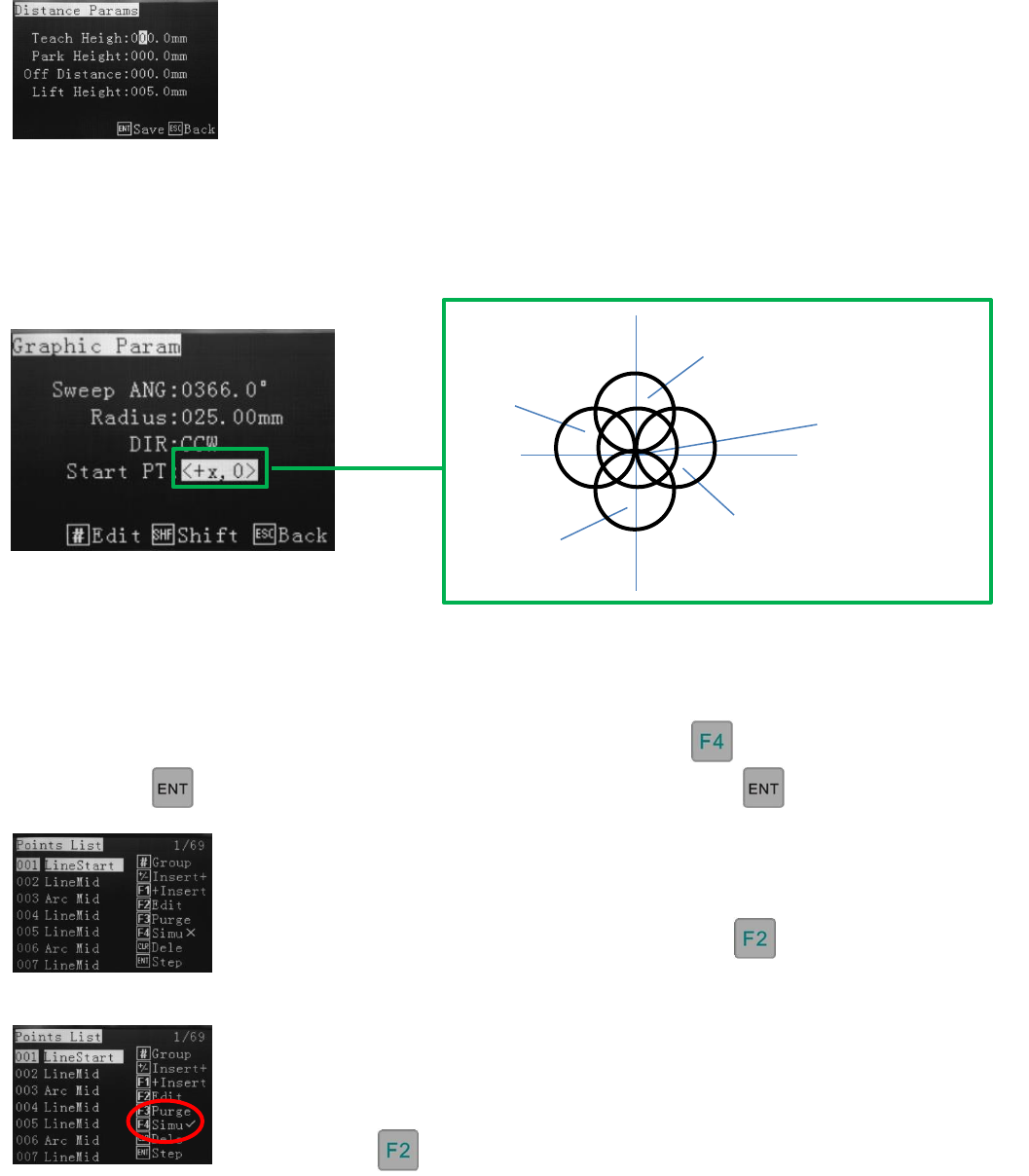
In the distance parameter screen, the Feed on Delay should only be used to set the dispensing time for a dot.
Circular – Start Point Definition
Program Step-Through
A simulated run can be performed within the points list, anytime throughout the program. Use the up/down
jog keys to select where in the program the run is to be started. All co-ordinates will move at their
programed speeds. To switch between Simu X and Simu √ press
By pressing the robot will move to the next location and waiti until is press again.
In the Graphic Parameter screen, whilst inputting circle dimensions, the Start Points are as follows, in relation the
centre of the circle.
Simu √ Mode (wet run)
This mode will move to locations, whilst dispensing, so the operator can verify the
position, speed and dispense quality of the co-ordinates. Editing can be performed by
pressing on a selected line.
0, 0 Inner Circle
+X, 0
0, -Y
-X, 0
0, +Y
Simu X Mode (dry run)
This mode will move to locations so the operator can verify the position and speed of the
co-ordinates. Editing can be performed by pressing on a selected line.
42
9.24 Line Dispensing Adjustments
9.24.1 Valve Feed On Delay - Lines
Usually, when a dispensing valve has been stationary for a period of time, for example at the beginning of a
dispensing program, there is a requirement for the initial dispensing to have a delay applied. This delay is usually
small, such as 50-100ms, which allows the fluid to flow and adhere to the correct position at the start of the pattern.
If no delay is applied, to the first dispensing location, the dispensing will be smaller than the rest or the start of the
line will be without adhesive.
Example of line with and without feed on delay:
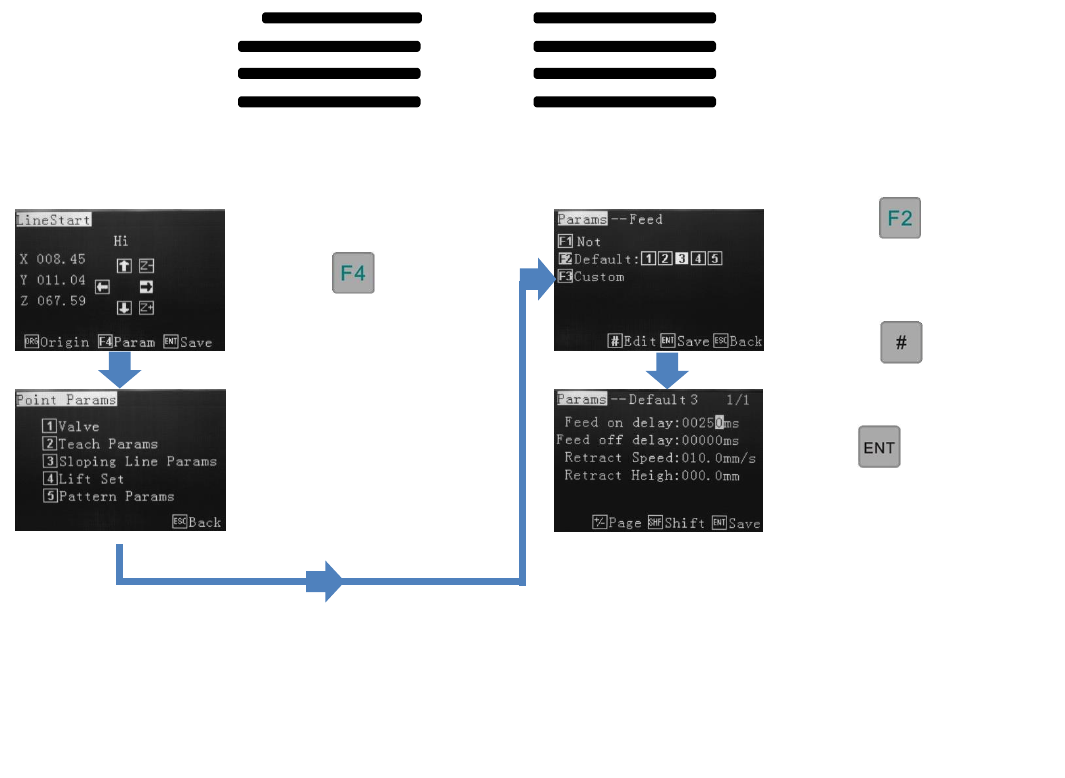
From the Line Start screen:
Press
To go to the Points Parameters
screen.
Press
Select an available Feed
function, 1-5.
Press
Up to 5 Feed On delay or 5 Feed Off delay times can be set per program. Valve Feed Off Delay is the time the robot
will stay at the end of the dispensing location before moving to the next dispensing position. No fluid will be dispensed
during to the Feed Off time period. Note that dots use a feed slot and could conflict will line start delay if the same
slot is chosen for a dot and a line.
Press 2, to go to the Teach
Parameters screen.
Input the Feed On delay
time.
Press until the Line
Start screen is reached.
Continue to program as
normal.
Line 1
Line 2
Line 3
Line 4
Without Feed On
With Feed On
43
9.24.2 Valve Feed On Delay – Dots
Dot 2
Dot 3
Dot 1
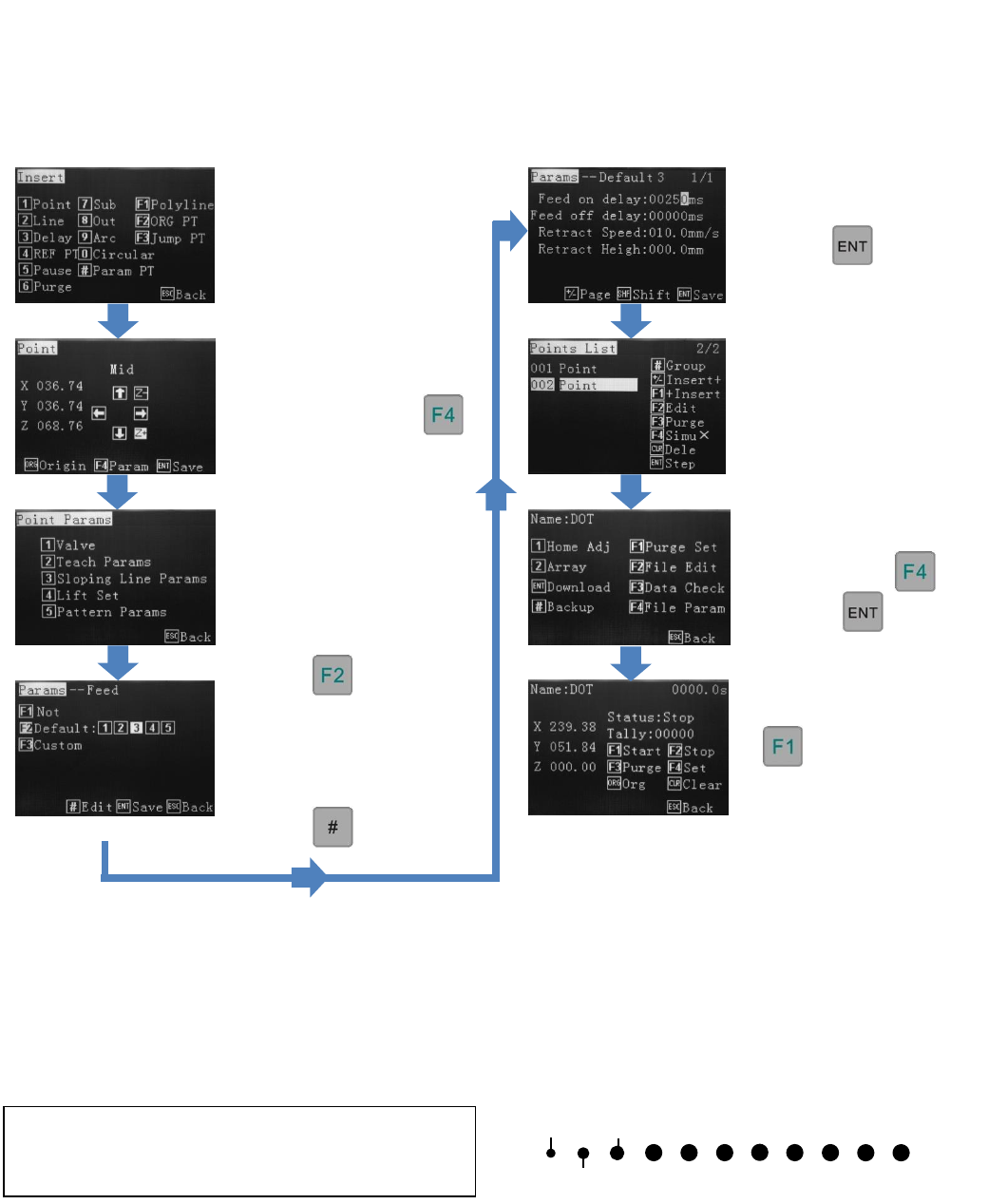
Input the dot dispensing
time.
Press 4 times
to save location and return to
the Points List.
File Parameters can be
changed using
Or press to save.
starts the cycle.
Feed on delay, for a dot, sets the dot dispensing time. Up to 5 dots sizes (set by time) can be inputted per program.
Feed Off delay times can be set also. Valve Feed Off Delay is the time the robot will stay at the end of the dispensing
location before moving to the next dispensing position. No fluid will be dispensed during the Feed Off time period.
Ref: 9.2 and 9.10
From the Insert screen,
select option 1, for a point
Move to the dots first
location and press
Press 2
(Teach Parameters)
Press to select
an available “Feed On”
function: 1-5. For a new
program all 5 functions are
available.
Press
Repeat the process for
additional dots, either
selecting the same Feed On
function or selecting a new
one and inputting a different
time.
It is common, when dispensing dots, to see that the first few dots, of a new program, are smaller than the rest, if all
dots are programmed with the same dispensing time. This is due to the fluid being stationary, within the syringe or
pressure tank, whilst the valve is idle. The above process can be used to program the few dots slightly longer in time
to compensate but it is also common practice to dispense 2-3 test dots somewhere outside of the working area, to get
the fluid moving at a normal pace.
Dots 1 -3 require more dispensing time (Feed ON
Delay) to achieve the same volume as the other dots,
in the program.