00198000-02_VD_709.1_DE_EN.pdf - 第24页
Station Software 709.1 / Version Descript ion Ausgabe 05/2016 E dition 24 4.3.15 Predictive Maintenance – Time - Based Maintenance Cycle During installat ion of statio n software 709.1, the maintenance rating of the plac…
Station Software 709.1 / Version Description Ausgabe 05/2016 Edition
23
The operator has to verify the result. The center of the image (yellow cross hair) marks the pickup
point as seen from the coordinate system of the machine. It is supposed to align with the notch of
the pickup position on the feeder.
The operator can perform Feed forward (current pitch) and – if supported by the feeder – Feed
forward (2 mm) of the tape in the feeder. Thereafter a new image is triggered automatically.
If this adjustment is triggered via the feeder hardware button, the operator has to press the Restart
button to get a new image.
The operator can change back to the Configuration tab and select another feeder for verification
without exiting the function.
4.3.11 Verification Reports
The verification reports are stored as PDF files to the predefined
C:\Sirio\Work\MaintenanceReports directory from where they can be collected by SIPLACE Pro
Line Diagnostics. There is no Save to … file selection box when generating the reports any more.
The station software deletes maintenance reports of the same type that are older than 90 days
automatically.
4.3.12 Preventive Maintenance – Tape Cutter
With the Check tape cutters button in the Maintenance – Preventive Maintenance view, tape
cutter operation times and limits are displayed, evaluated and reported.
Under Tape cutters in the Manual operations, min/max limit values will be displayed in addition to
the measured values.
4.3.13 Preventive Maintenance – Nozzles
A new button Prepare for nozzle maintenance has been added. All actions then apply to the
selected placement heads. After this button has been pressed, the nozzles of the selected heads
will be returned to the nozzle changer, selected heads will be moved to the service position.
The Pickup nozzles button will be extended by a confirmation dialog if the Prepare for nozzle
maintenance button was pressed before. Here, the operator can confirm that all nozzles have
been cleaned or not. In both cases the nozzles will be picked up.
These actions will not lead to an entry in the report list.
Please also refer to section 4.4.
4.3.14 Preventive Maintenance – Improved Usability
If a function cannot be performed, the corresponding button has been disabled, e.g.:
Check tape cutters button
If all locations are deselected, the Start button is disabled.
Pick up nozzle button
Disabled if no nozzles are preset or nozzles are completely on the head.
Station Software 709.1 / Version Description Ausgabe 05/2016 Edition
24
4.3.15 Predictive Maintenance – Time-Based Maintenance Cycle
During installation of station software 709.1, the maintenance rating of the placement heads, tape
cutters and X/Y axes will be changed to be time-based.
Requirements:
– The system time of the station computer has to be set correctly.
– A complete maintenance of the machine and the heads should be performed before the station
software is installed. This is due to the fact that the station software writes a date stamp in the
corresponding EEPROMs that is used for calculating the maintenance due status.
The maintenance rating is calculated by the difference of the current date and the date of the last
maintenance stored on the machine. The passed time is displayed as a progress bar and a
percentage compared to the maintenance cycle timespan. The maintenance rating at the GUI will
be updated once every 24 hours.
The maintenance rating of the vacuum pumps slider and filter is based on operating hours.
The color of the maintenance icon will change to orange when a percentage of 80% is reached.
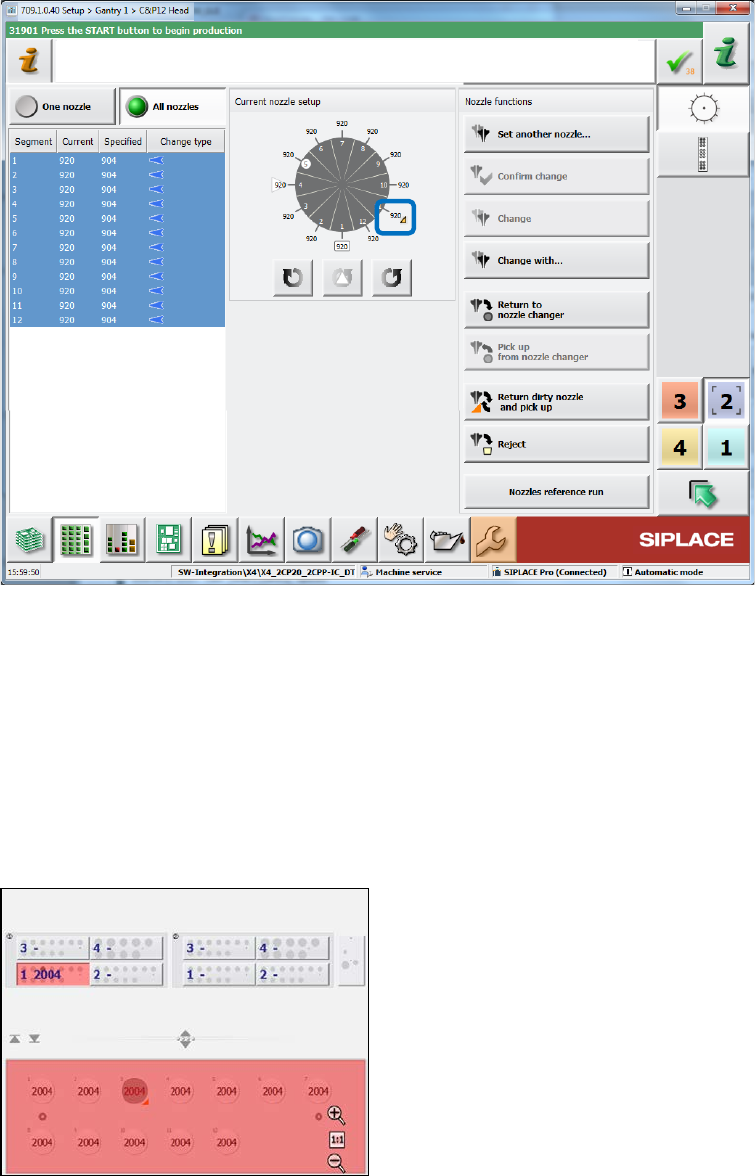
4.4 Returning Dirty Nozzle to Nozzle Changer Magazine
Compatible mode: Complete
If a nozzle is detected as dirty, it must not be rejected into the reject bin anymore. Instead, it will be
returned to the nozzle changer magazine from where it was previously picked up.
If a nozzle was put manually on the head segment, it will be returned to a magazine which has the
same target nozzle types as specified by SIPLACE Pro. If the nozzle type does not fit to any target
nozzle type specified by SIPLACE Pro, it will be returned to the next free garage of a magazine.
If a nozzle cannot be returned to any nozzle magazine, because all magazines are full, or there
was an error during placing the nozzle, the head segment will be disabled as long as the nozzle is
marked as dirty.
However, the operator can still decide to reject a dirty nozzle into the reject bin manually via the
nozzle changer dialog.
A nozzle that is marked as dirty will not be picked up again. Also for the nozzle setup from
SIPLACE Pro, dirty nozzles will be excluded from the current nozzles in the nozzle changer. For
example, if there are twelve nozzles in the nozzle changer and two of them are marked as dirty but
SIPLACE Pro requires twelve nozzles, than the nozzle setup is incorrect.
The dirty state of a nozzle remains after rebooting the station software or the machine. In the
nozzle functions dialogs, a dirty nozzle is marked with an orange triangle.
Station Software 709.1 / Version Description Ausgabe 05/2016 Edition
25
Nozzle setup for the placement head
Figure 4-18: Dirty nozzle – Head view
Nozzle changer
In the Nozzle changer view, there are three new actions to change the nozzle state to "clean":
– Nozzle in garage n is clean (for selected nozzle)
– Nozzles in magazine n are clean (for all nozzles in the selected magazine)
– All nozzles in all magazines are clean (for all nozzles in all magazines at the displayed
location)
Example:
Figure 4-19: Dirty nozzle – Nozzle changer
Although there are twelve 2004 nozzles in the nozzle, the salience is red and the nozzle setup is
incorrect, because one nozzle (in garage 3) is dirty and not allowed to pick up again .The operator
must clean the nozzle and inform the station software that the nozzle is clean. The operator can
also remove the dirty nozzle via the Empty garage action and set in a new, clean nozzle of the
same type. However, the Confirm nozzle in garage action will not set the nozzle to clean, the
nozzle setup remains incorrect!