00198000-02_VD_709.1_DE_EN.pdf - 第25页
Station Software 709.1 / Version Descript ion Ausgabe 05/2016 E dition 25 Nozzle setup for the placement head Figure 4-18: Dirty no zzle – Head view Nozzle changer In the Nozzle changer view, there are three new a ctions…
Station Software 709.1 / Version Description Ausgabe 05/2016 Edition
24
4.3.15 Predictive Maintenance – Time-Based Maintenance Cycle
During installation of station software 709.1, the maintenance rating of the placement heads, tape
cutters and X/Y axes will be changed to be time-based.
Requirements:
– The system time of the station computer has to be set correctly.
– A complete maintenance of the machine and the heads should be performed before the station
software is installed. This is due to the fact that the station software writes a date stamp in the
corresponding EEPROMs that is used for calculating the maintenance due status.
The maintenance rating is calculated by the difference of the current date and the date of the last
maintenance stored on the machine. The passed time is displayed as a progress bar and a
percentage compared to the maintenance cycle timespan. The maintenance rating at the GUI will
be updated once every 24 hours.
The maintenance rating of the vacuum pumps slider and filter is based on operating hours.
The color of the maintenance icon will change to orange when a percentage of 80% is reached.
4.4 Returning Dirty Nozzle to Nozzle Changer Magazine
Compatible mode: Complete
If a nozzle is detected as dirty, it must not be rejected into the reject bin anymore. Instead, it will be
returned to the nozzle changer magazine from where it was previously picked up.
If a nozzle was put manually on the head segment, it will be returned to a magazine which has the
same target nozzle types as specified by SIPLACE Pro. If the nozzle type does not fit to any target
nozzle type specified by SIPLACE Pro, it will be returned to the next free garage of a magazine.
If a nozzle cannot be returned to any nozzle magazine, because all magazines are full, or there
was an error during placing the nozzle, the head segment will be disabled as long as the nozzle is
marked as dirty.
However, the operator can still decide to reject a dirty nozzle into the reject bin manually via the
nozzle changer dialog.
A nozzle that is marked as dirty will not be picked up again. Also for the nozzle setup from
SIPLACE Pro, dirty nozzles will be excluded from the current nozzles in the nozzle changer. For
example, if there are twelve nozzles in the nozzle changer and two of them are marked as dirty but
SIPLACE Pro requires twelve nozzles, than the nozzle setup is incorrect.
The dirty state of a nozzle remains after rebooting the station software or the machine. In the
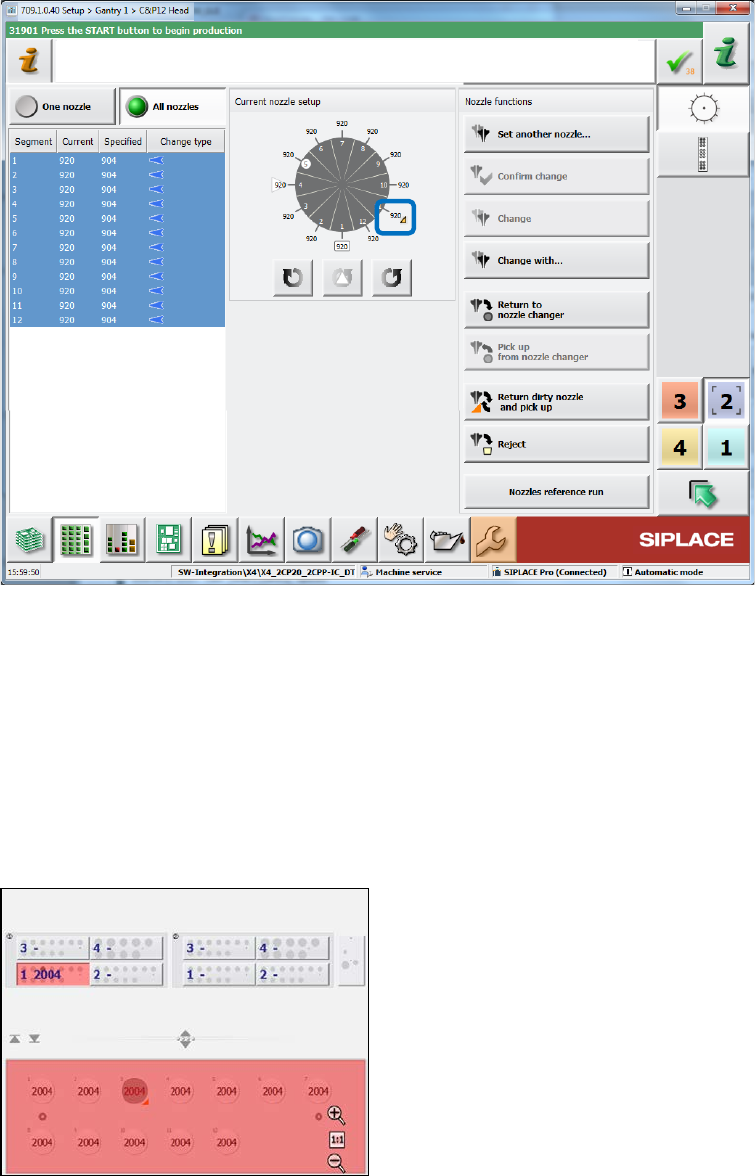
nozzle functions dialogs, a dirty nozzle is marked with an orange triangle.
Station Software 709.1 / Version Description Ausgabe 05/2016 Edition
25
Nozzle setup for the placement head
Figure 4-18: Dirty nozzle – Head view
Nozzle changer
In the Nozzle changer view, there are three new actions to change the nozzle state to "clean":
– Nozzle in garage n is clean (for selected nozzle)
– Nozzles in magazine n are clean (for all nozzles in the selected magazine)
– All nozzles in all magazines are clean (for all nozzles in all magazines at the displayed
location)
Example:
Figure 4-19: Dirty nozzle – Nozzle changer
Although there are twelve 2004 nozzles in the nozzle, the salience is red and the nozzle setup is
incorrect, because one nozzle (in garage 3) is dirty and not allowed to pick up again .The operator
must clean the nozzle and inform the station software that the nozzle is clean. The operator can
also remove the dirty nozzle via the Empty garage action and set in a new, clean nozzle of the
same type. However, the Confirm nozzle in garage action will not set the nozzle to clean, the
nozzle setup remains incorrect!
Station Software 709.1 / Version Description Ausgabe 05/2016 Edition
26
Nozzle scanning
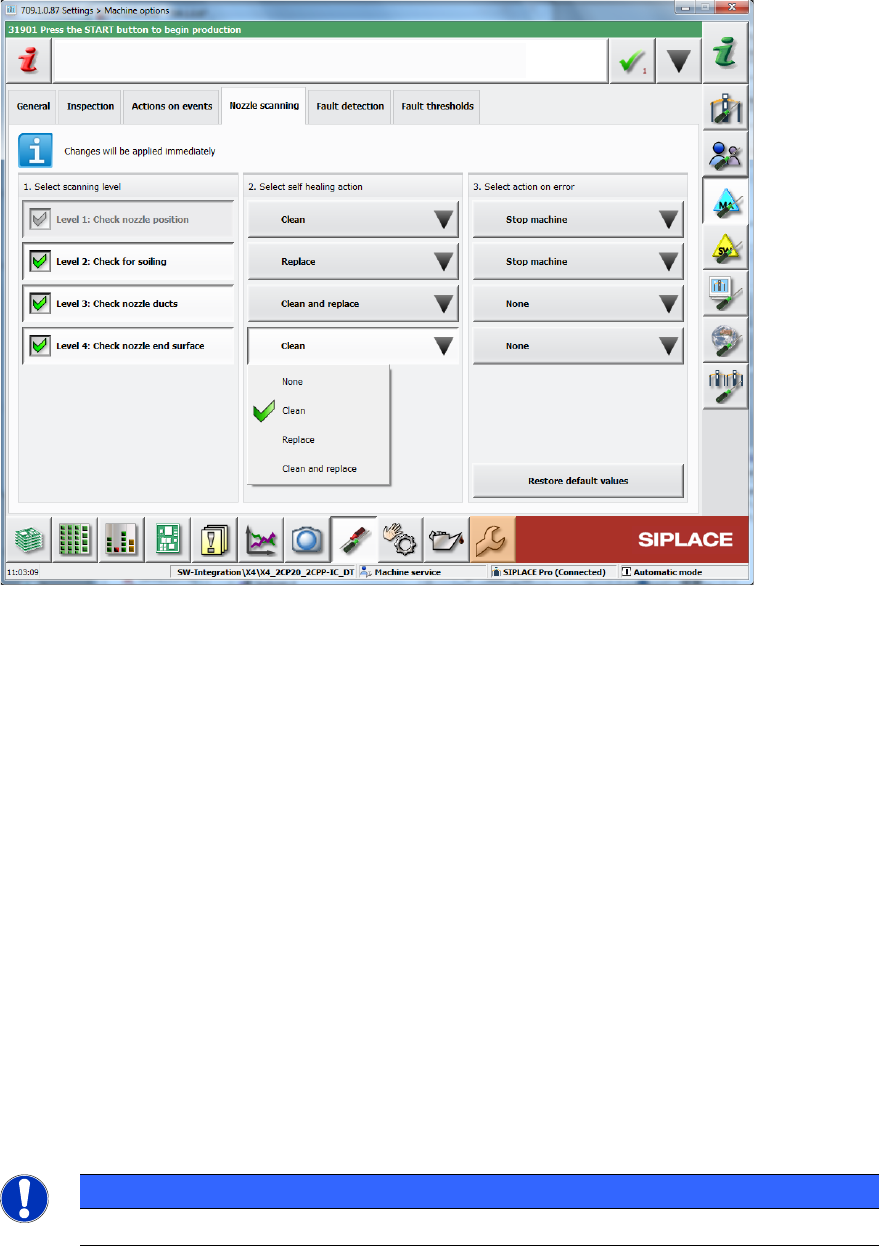
The dialog for configuring the nozzle scanning under Settings – Machine options contains two
new self-healing actions: Replace and Clean and replace.
Figure 4-20: Dirty nozzle – Machine options
State overview of head segments
The State overview dialog for the head segments contains the new state disabled: nozzle dirty.
Preventive maintenance
Additionally to the above changes, the Preventive maintenance view has been extended. Please
refer to section 4.3.13.
4.5 Enhanced Automatic Feeder Pitch Detection
Compatible mode: Complete
The existing Automatic feeder pitch detection function has been enhanced in this station
software version.
The station software can now increase the pitch automatically to the measured value if the
expected pitch is undefined (value 0). The station software performs frequent measurements of the
pitch (every 700 placements) if the expected pitch is undefined, in order to continuously verify
measured pitch values and to minimize the impact of wrong automatic pitch increases.
NOTICE
This function has an impact on the placement performance.