00198000-02_VD_709.1_DE_EN.pdf - 第9页
Station Software 709.1 / Version Descript ion Ausgabe 05/2016 E dition 9 4 Features of the 70 9. 1 Station Softwar e Version All features of t he 701.xx - 70 9.0 stat ion software ver sions are also supported in the 709.…
Station Software 709.1 / Version Description Ausgabe 05/2016 Edition
8
3 Compatible Mode
Some station software versions may be used as lower versions in compatible mode. This means
that the new functions of the current version can be used in the compatible version as far as
possible.
The compatible mode is provided to operate stations with lower line software versions in order to
keep the line software version in case of a station upgrade.
The 709.1 station software version can be operated as Version 708.2© in compatible mode.
The visibility and functionality of the new functions in compatible mode are explained in the
following table.
Compatible Mode Meaning
Complete
Complete function support.
Compatible The function is visible and executable at the station. However, new add-
ons in the station software or in the line products are not supported.
Hidden The function is invisible/inactive, e.g. due to licensing or unsupported
SIPLACE Pro download/upload.
Not supported
The function is not supported, e.g. because of failing hardware.
Table 3-1: Visibility and functionality in compatible mode
The respective visibility/functionality in compatible mode is specified for the new features in
chapter 4.
The compatible mode can be activated under Settings – SIPLACE station interface clients on
the GUI.
Please also refer to chapter 6.
Station Software 709.1 / Version Description Ausgabe 05/2016 Edition
9
4 Features of the 709.1 Station Software Version
All features of the 701.xx - 709.0 station software versions are also supported in the 709.1 station
software version. The main features of the 709.1 station software version are listed below.
NOTICE
Detailed information on the individual functions can be found in the Online help for the
station software.
4.1 SIPLACE TX Series – Enhancements
Compatible mode: Not supported
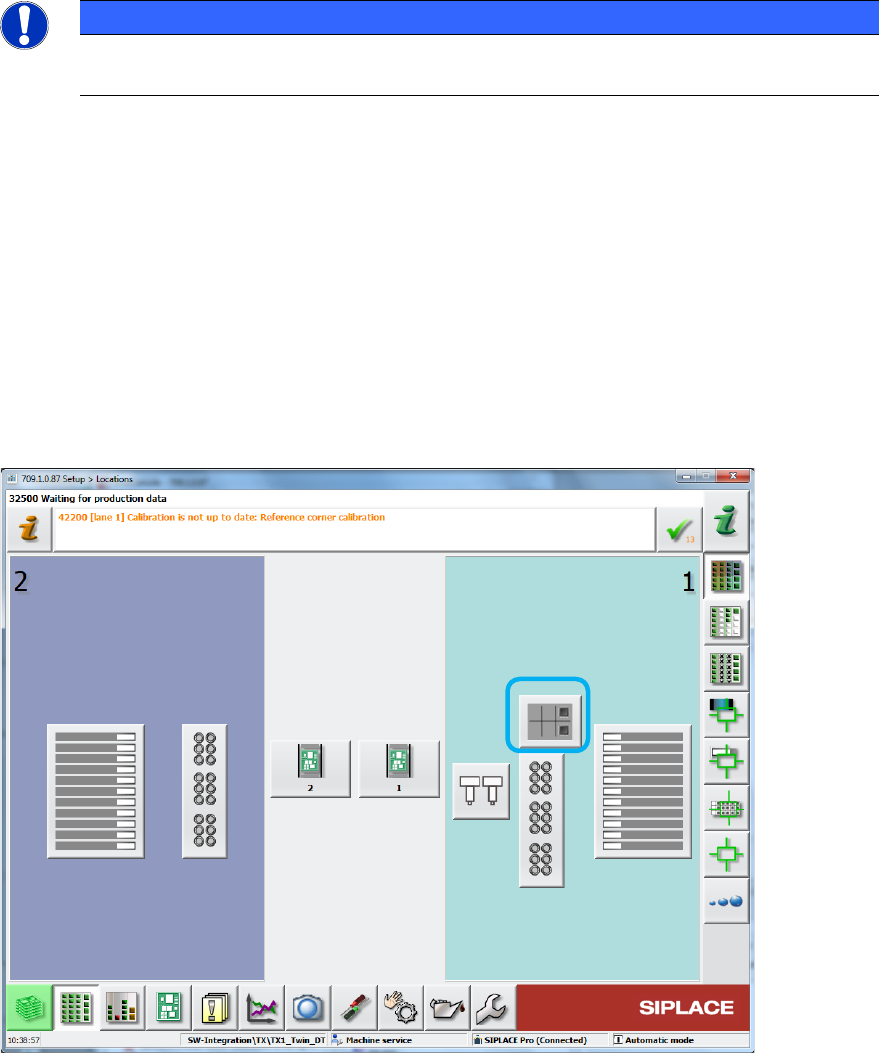
4.1.1 Reject Plate Supported on GUI
The reject plate is a fixed mounted plate on which the station can drop rejected components after
the SIPLACE Vision system detected errors. If a reject plate is installed in a SIPLACE TX
placement machine, a corresponding button will be displayed in the main menu of the station
software. This option has to be enabled in SIPLACE Pro for the respective component / component
shape.
Figure 4-1: Reject plate in main menu
Station Software 709.1 / Version Description Ausgabe 05/2016 Edition
10
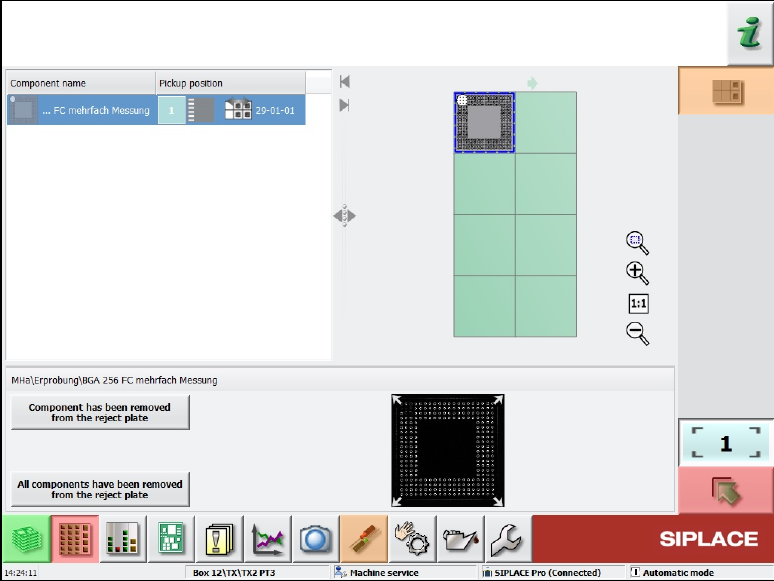
By selecting the reject plate button, the following dialog box opens:
Figure 4-2: Rejected components on the reject plate
This dialog box contains a list of the components put onto the reject plate and a graphical
representation (grid) of the plate with the components on it. A component can be selected from the
list or in the grid, the selection is automatically synchronized.
Additionally, the pickup position from where the component was picked up is displayed. If a
component was picked up from a tray, only the level and magazine number are displayed, not the
pickup position in the magazine!
Once a component has been selected, the attached Vision dump is displayed (if still existing on the
drive).
With this information the operator can check whether the component is ok or not and decide to put
it back in the feeder again. This requires that the feeder from which the component was picked up
is still inserted in the machine at the same location.
The operator can confirm the removal of the component from the reject plate with the Component
has been removed from reject plate button. Confirmation has to be done for each component.
A multiple selection is not available.
4.1.2 Increased Component Range for Twin Head
Until now, the component range for Twin Head on SIPLACE TX series placement machines was
limited to 55 x 45 mm due to the reject bin size. In order to allow larger connectors to be placed,
the component range has been increased to 75 x 10 mm from this station software version. For
this, the nozzle reject bin has to be removed from the side on which the Twin Head is mounted. If
the components are correspondingly marked in SIPLACE Pro, they will be rejected onto the reject
plate.