00193699-01.pdf - 第51页
SIPLACE Instrucciones de software SR.504.xx 4 Encender y apagar la línea SIPLACE Edición 01/03 ES 4.1 Encender línea SIPLACE 51 4 Encender y ap agar la línea SIPLACE En este capítulo se ofrece ayuda p ara encender y ap a…
3 Interfaz gráfica de usuario SIPLACE Instrucciones de software SR.504.xx
3.4 Organigrama de la Visualización básica Edición 01/03 ES
50
3.4 Organigrama de la Visualización básica
3
3
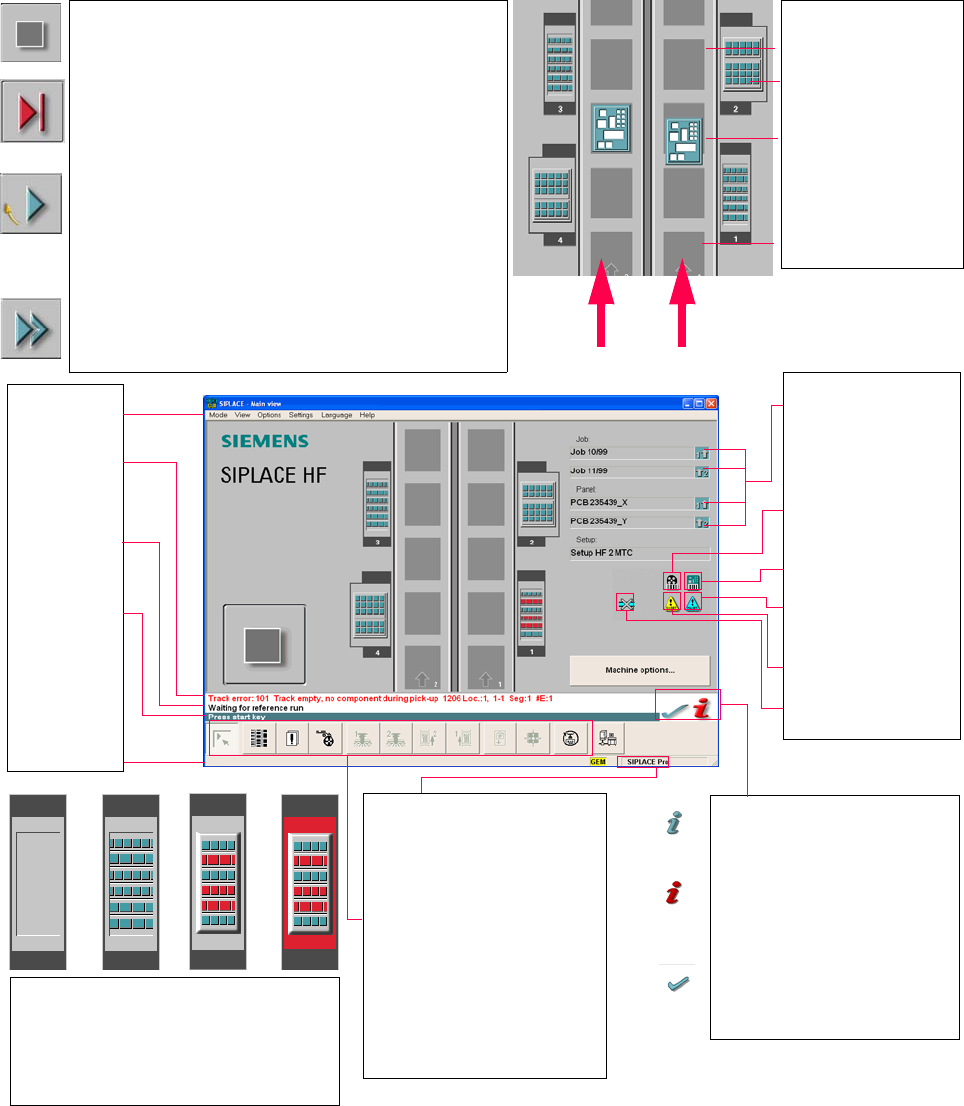
Pull-down menus
3
Error information
bar
3
Status indication
and process status
3
Notification about a
specific action to
carry out
3
Information bar
3
Control modes:
Stand alone
SIPLACE Pro
3
Submenu icons with info box:
Main view
Setup
Error
Feeders
Gantry 1, 2
PCB conveyor 2, 1
Teach fiducial
Test component
SITEST
GEM
3
Output conveyor
The output conveyor is empty.
MTC on location 2
Central conveyor
The PCB is supplied.
Input conveyor
The input conveyor is empty.
3
Context-sensitive help system
This also provides a short description of all
displayed operating elements.
3
Help system for errors
Starts a help system displaying possible
causes of the current error along with correc-
tive actions.
3
Error deletion
After the error has been successfully cor-
rected, the currently active error is deleted.
Conveyor 2
Conveyor 1
3
Identifies the job or panel of the
right conveyor lane, or of the
single conveyor, and of the left
conveyor lane (dual conveyors
only).
3
Barcode-supported component
refilling
3
PCB barcode is activated.
3
Machine options have been
changed
3
Software options configured
3
Compressed air switch-off
mechanism configured
1 234
1 No setup available on the corresponding location
2 Setup available
3 Setup available - at least one empty track error
4 Machine standstill due to track error
3
This display appears during the start-up process of the machine. Only when the
reference run has been completed successfully will the display appear in the form
of a button.
3
Status
The machine is running, or is in its 'ready' state.
Pressing the button:
The machine stops.
3
Status
The machine is placing components; 'stop' is activated. The assembly of the
PCBs located in processing conveyors 1 and 2 or in the central conveyor will be
terminated and the PCBs will be transported to the intermediate or output
conveyor. Subsequently, the machine will stop.
Pressing the button:
The machine continues to run without interruption.
3
Status
Machine is in the stopped state.
Pressing the button:
The machine resumes the placement operation.
SIPLACE Instrucciones de software SR.504.xx 4 Encender y apagar la línea SIPLACE
Edición 01/03 ES 4.1 Encender línea SIPLACE
51
4 Encender y apagar la línea SIPLACE
En este capítulo se ofrece ayuda para encender y apagar la línea SIPLACE. 4
4.1 Encender línea SIPLACE
4.1.1 Iniciar el sistema de programación SIPLACE Pro
Æ Arranque SIPLACE Pro mediante el menú de inicio de Windows NT
Inicio --> Programas --> Registro Siemens SIPLACE
o bien
Æ Arranque SIPLACE Pro mediante el icono del escritorio.
El sistema se conecta ahora con SIPLACE ProServer y abre la interfaz de usuario de
SIPLACE Pro.
Mientras el sistema establece la conexión con SIPLACE ProServer, verá la siguiente indica-
ción en pantalla.
4
Fig. 4.1 - 1 Inicio de SIPLACE Pro

4 Encender y apagar la línea SIPLACE SIPLACE Instrucciones de software SR.504.xx
4.1 Encender línea SIPLACE Edición 01/03 ES
52
4.1.2 Lo que debería tener en cuenta antes de iniciar las estaciones
ATENCION
Antes de iniciar las estaciones, ejecute los pasos de trabajo descritos a continuación. 4
Æ Compruebe si las estaciones están conectadas a la toma de corriente y de aire comprimido.
Æ Lleve a cabo un examen visual de las estaciones. Preste especial atención a que no haya nin-
gún obstáculo en la zona de transporte de los portales.
Æ Asegúrese de que los ejes z de todos los cabezales se encuentran en su posición final supe-
rior.
Æ Cierre las tapas del alimentador y las cubiertas protectoras.
Æ Asegúrese de que no hay ningún disquete en la unidad de disquetes de la computadora de
estación.