TUT-CP842-Oper guide-preliminary.pdf.pdf - 第48页
Nozzle Replacement Nozzles are set in each nozzle holder on all of the placement heads. The nozzle holders are numbered from 1 to 6. Refer to the production program nozzle data to be sure that nozzles are installed corre…
Procedure for Pallet Loading
1. Push the fork of the PCU (containing the replacement pallet) into
the machine. Select the [Main], [Change Pallet], and [Stage1
Clamp] command.
CAUTION
Take care when moving a pallet loaded with feeders. A
loaded pallet can be very heavy, and if dropped, may
cause serious injury or damage to personnel or
equipment.
2. Unlock the pallet and gently push the pallet onto the machine’s
D-axis.
Caution: Wide pallets should be held at both ends and pushed into position.
3. Close the rear door and clamp the pallet at the D-axis.
Caution: • Open and close the cover carefully, as excessive force can damage
the stoppers.
• If the safety door is closed while the pallet is being changed, the
clamp will be activated even though the pallet is not in position.
4. Select the [Stage1 Set] command.
5. Select the [Stage1 Unclamp] command, then slowly retract the
PCU.
Chapter 3: Preparing for Production
Preliminary
3-17CP-842E/842ME Operator’s Guide
Nozzle Replacement
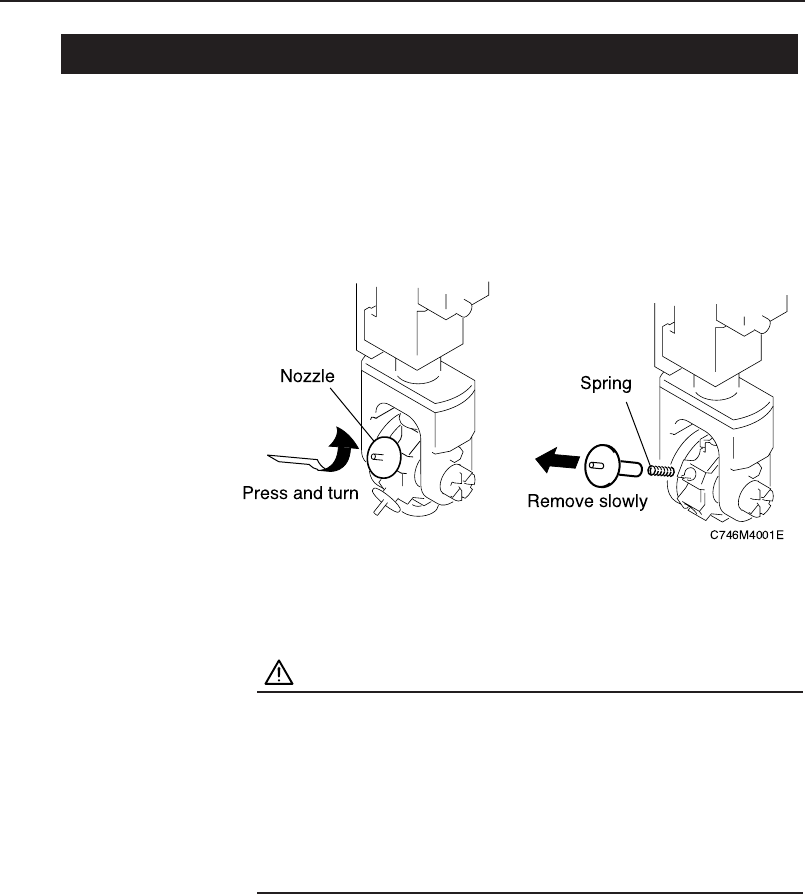
Nozzles are set in each nozzle holder on all of the placement heads. The
nozzle holders are numbered from 1 to 6. Refer to the production program
nozzle data to be sure that nozzles are installed correctly. All 16 placement
heads (A - P) must have the same nozzles attached in the same locations.
CAUTION
• To avoid bending, thin nozzles of 0.4 and 0.7 mm in
diameter should be held by the disk when they are
removed from the head.
• Nozzles should be removed carefully to avoid dislodging
and losing the internal spring. After removing the
nozzle, check that the spring has not been left inside the
holder.
3.5 Machine
Chapter 3: Preparing for Production
Preliminary
3-18 CP-842E/842ME Operator’s Guide
Conveyor Width Adjustment
The XY-table is constructed with no width change mechanism. Use a
command to link the XY-table to the in- and out-conveyors and then carry out
conveyors width adjustment. In addition note that a gap of 1 mm is required
between the panel and the sides of the conveyor rail (0.5 mm on each side).
CAUTION
Before performing conveyor width adjustment, check the
back-up pin positions on the XY-table, verifying that there
will be no interference between the back-up pins and the
adjustable rail.
Procedure
1. Execute the necessary commands to link the XY-table to the in
and out-conveyors. At the touch panel’s main screen, select the
following commands: [Conveyor] - [Conveyor Width] - [Width
Change Preparation], then press the the START button.
Chapter 3: Preparing for Production
Preliminary
3-19CP-842E/842ME Operator’s Guide