00195613-01 IM Uptime LT_EN_DE.pdf - 第47页
General Information About Software Installation Brief Description SIPLACE Uptime LT Installationsanleitung / Installation Manual 47 1 General Information About Sof tware Inst allation 1.1 Brief Description This installat…
Inbetriebnahme der Peripheriegeräte
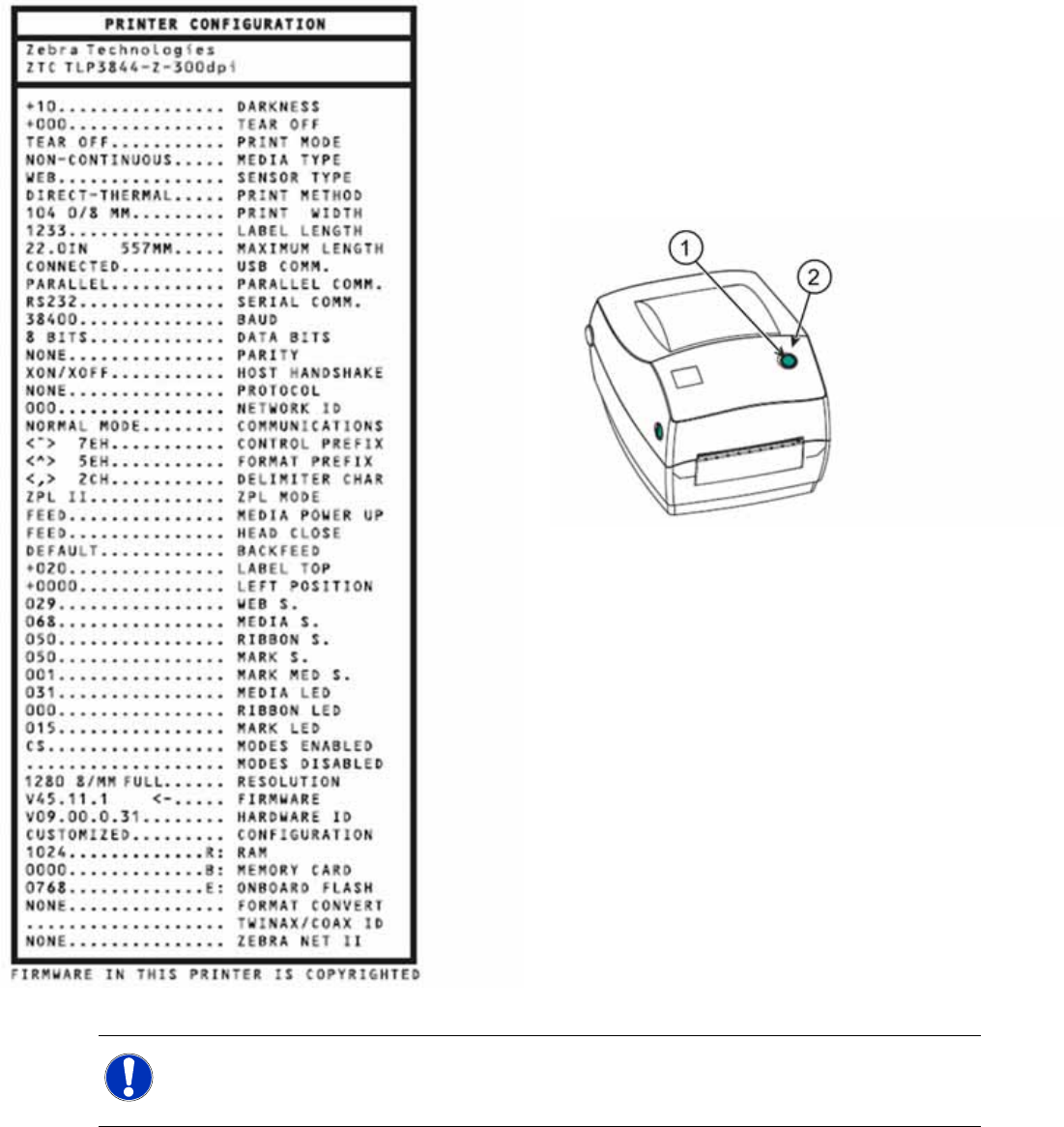
Installation des Druckers Zebra® TLP 3844-Z
46 SIPLACE Uptime LT Installationsanleitung / Installation Manual
X Stellen Sie sicher, dass die Medien im Drucker
richtig geladen sind und dass die obere
Abdeckung des Druckers geschlossen ist.
X Schalten Sie den Drucker ein.
X Wenn die Statusanzeige durchgehend grün
leuchtet, drücken und halten Sie die
Vorschubtaste gedrückt, bis die Statusanzeige
einmal aufblinkt.
1. Vorschubtaste
2. Statusleuchte
X Lassen Sie die Vorschubtaste los.
Der Drucker druckt nun die Konfigurationsdaten
auf den bereitgestellten Medien aus. Wenn die
Statuslampe gelb oder rot bleibt oder Sie diesen
Ausdruck nicht erhalten, lesen Sie im mit dem
Drucker ausgelieferten Benutzerhandbuch den
Abschnitt „Fehlersuche“.
HINWEIS:
Eine detaillierte Beschreibung zum Bedienen des Druckers und zum Installieren des Druckers
als Netzwerkdrucker finden Sie im mit dem Drucker ausgelieferten Benutzerhandbuch.
General Information About Software Installation
Brief Description
SIPLACE Uptime LT Installationsanleitung / Installation Manual
47
1 General Information About Software Installation
1.1 Brief Description
This installation guide provides instructions for installing the software.
Operating system WINDOWS XP
Application SIPLACE UPTIME LT Version 1.0.
Application SIPLACE UPTIME LT Version 1.0 in a network.
Barcode printer
Barcode scanner
This manual contains information about the scope of delivery and the requirements for successful
installation.
1.2 Scope of Delivery
Software UPTIME LT Version 1.0
Article number: 00375295-06
- Software CD-ROM (1)
- License/product certificate/release key (dongle)
- Software installation guide version 1.0 D+E (00193796-06)
- Packaging
- The CD contains the standard applications:
- UPTIME LT
- Various drivers
- Various programs
1.3 Languages
The following languages are available for the UPTIME LT user interface:
Other languages are available on request.
For the installation procedure, you can set the user interface to either German or English.
Other documentation in your specific language can be obtained from the SIPLACE internet site. http://
www.siplace.comwww.siplace.comwww.siplace.com
German
English
Spanish
Czech
Chinese simplified
General Information About Software Installation
Requirements
48 SIPLACE Uptime LT Installationsanleitung / Installation Manual
1.4 Requirements
You must not have any software or hardware products installed on the computer, which are not
compatible with Windows XP SP2 (see manufacturer information and
Microsoft website: http://support.microsoft.com/default.aspx?kbid=884130).
For information about the SIPLACE products, please consult your SIPLACE contact partner.
Operating systems supported
In order to work with SIPLACE Uptime LT, you need one of the following operating systems.
Windows 2000 Service Pack 3
Windows XP Service Pack 2
You must not have any software or hardware products installed on the computer, which are not
compatible with Windows XP SP2 (see manufacturer information and Microsoft website: http://
support.microsoft.com/default.aspx?kbid=884130).
Hardware requirements
In order to work with SIPLACE Uptime LT, your hardware must fulfill the following requirements.
Pentium 4 / Athlon 2 GHz, 512 MB RAM
Graphic card or OnBoard graphic with at least 128 MB graphic memory
1 serial port (COM-Port RS232)
4 USB ports (one each for the dongle, the camera, the label printer and the barcode scanner)
CD drive
Required hard disk memory
SIPLACE Uptime LT requires a total of 1.5 GB hard disk memory for the database, the drivers and
the application.
Microsoft .NET Framework requires 280 MB (x86) hard disk memory.
Software requirements
Microsoft.NET Framework 2.0
As system requirement for Microsoft .NET Framework 2.0, you also need the following software:
Microsoft Windows Installer 3.0
Microsoft Windows Installer 3.1 or higher is recommended
Microsoft Internet Explorer 5.01 or higher
For each installation of Microsoft .NET Framework, you also need the Microsoft Internet
Explorer 5.01 or higher.
Detailed information about the system requirements for .NET Framework 2.0 can be found on the
internet.
Microsoft.NET Framework 2.0 is provided on the installation CD and will be installed where required.