00196284_Install_WinXP_unattended_DVD.pdf - 第57页
Windows XP Unattended Setup DVD V4 .2 11/2015 Edition 57 Fig. 17 W arning m essage → To c ontinue erasing t he firs t harddisk and starti ng the i nstallation, click t he Yes bu tton. → To abort t he proced ure, click th…
Windows XP Unattended Setup DVD V4.2 11/2015 Edition
56
4.2.12 End User License Agreement (EULA)
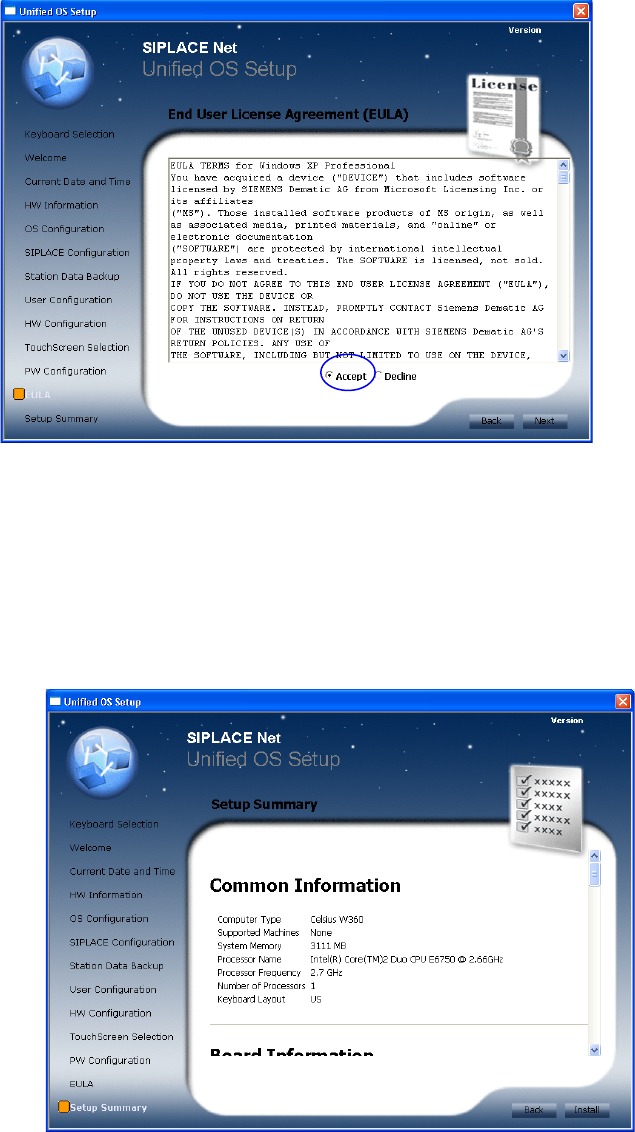
The following dialog is displayed:
Fig. 15 EULA
→ Read the license agreement carefully.
→ Select the Accept radio button to accept the EULA.
→ Click the Next button to continue.
4.2.13 Summary and Installation
The following dialog is displayed:
Fig. 16 Summary and Installation
→ Verify the summarized information about the ongoing installation procedure carefully.
→ To agree with the selected configuration and start the installation, click the Install button.
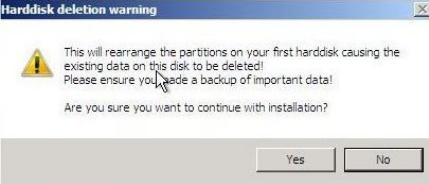
The following warning message is displayed:
Windows XP Unattended Setup DVD V4.2 11/2015 Edition
57
Fig. 17 Warning message
→ To continue erasing the first harddisk and starting the installation, click the Yes button.
→ To abort the procedure, click the No button.

Windows XP Unattended Setup DVD V4.2 11/2015 Edition
58
4.3 Standard Settings and Final Administration
Default settings
Screen resolution: 1024 x 786, 24-bit (16 mill.) Colors, 60 Hz Refresh Frequency
Time Zone: GMT (London, Edinburgh, Lisbon)
Network Protocol: TCP/IP
In addition to the default user groups of Windows XP, the following users and user groups are configured:
Note:
For further information on passwords of created accounts, please refer to technical information
TI2008-04V08 for service technicians.
Station Computer
User: Operator, Siemens-Techniker (Siemens Technician), Einrichter (Engineer)
User groups: _Operator, _Einrichter, _Siemens-Techniker
Vision Computer
User: Operator, Siemens-Techniker, Einrichter, VisionDCOM
User groups: _Operator, _Einrichter, _Siemens-Techniker
Line Computer basic
User: Siemens, plr or Siplace (depending on password complexity setting), SIPLACEServices,
SIPLACEAdmin
Note:
If the computer you have installed is equipped with a CRT (cathode ray tube), please set the
refresh frequency to a higher value. The default value of 60 Hz is preset for TFT displays.